ShortcutPosters

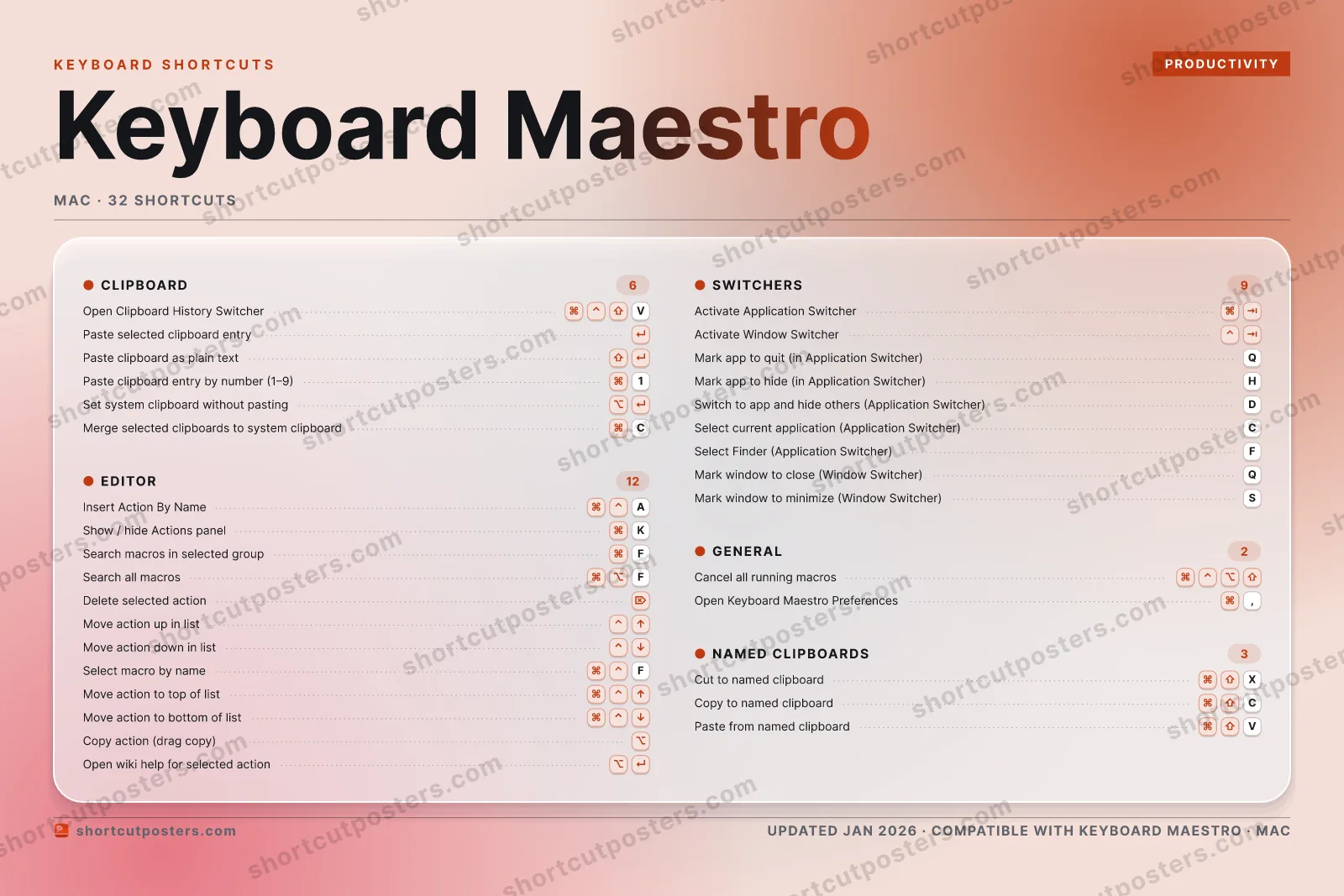
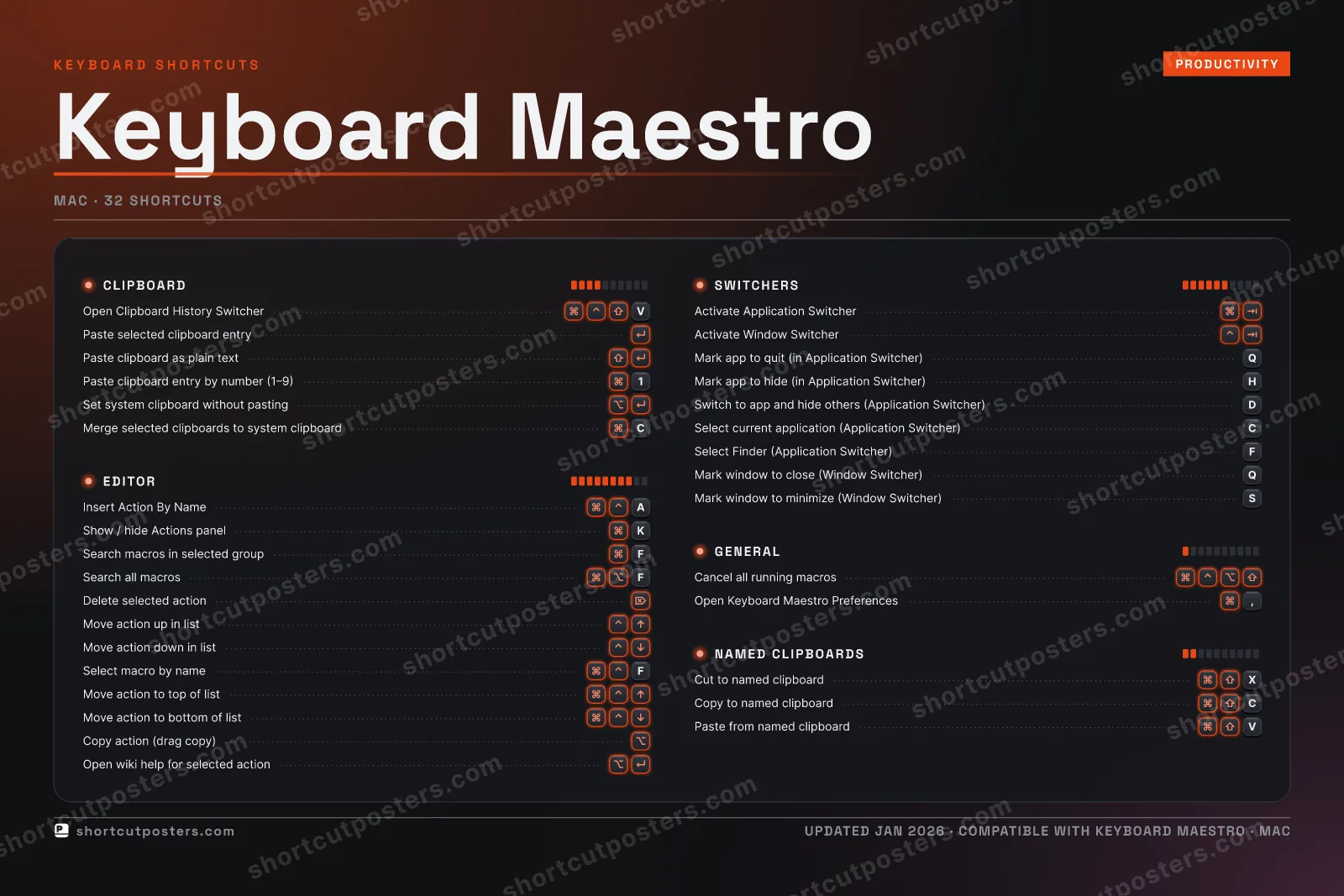
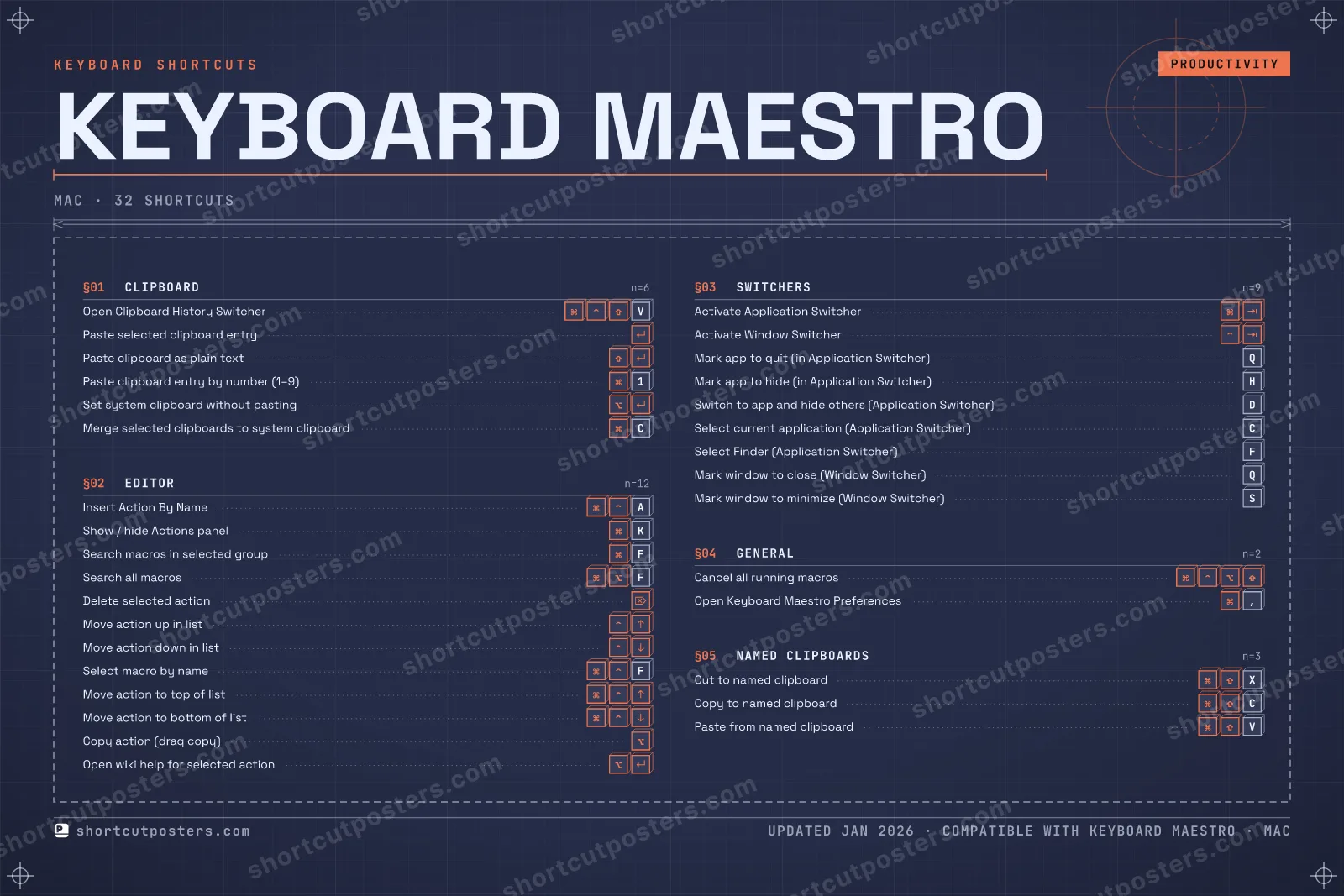
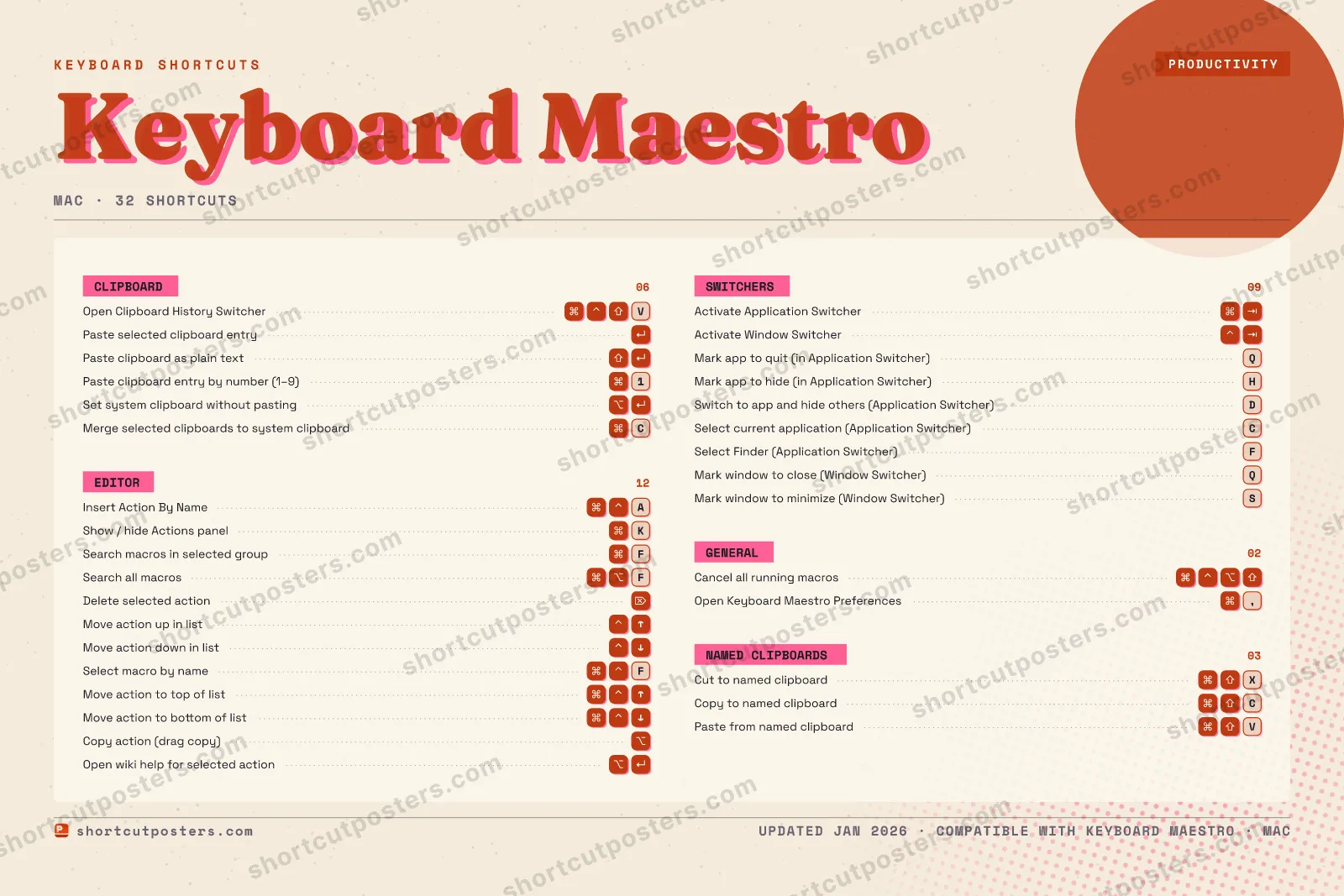
4 art directions — pick one below, click to zoom & compare.
Layout
KEYBOARD MAESTROKEYBOARD SHORTCUTS · MAC · 321Paste cl…234567890QMark app…WERTYUIOPA⌘ ⌃Insert A…SMark win…DSwitch t…FSearch m…GHMark app…JKShow / h…LZX⌘ ⇧Cut to n…C⌘ ⇧Copy to …V⌘ ⌃ ⇧Open Cli…BNMMORE SHORTCUTSPaste selecte…Search all ma…FPaste clipboa…Activate Appl…Delete select…Cancel all ru…Paste from na…VActivate Wind…Move action u…Move action d…Open Keyboard…,Select macro …FSet system cl…Merge selecte…CSelect curren…CMove action t…Move action t…Copy action (…Open wiki hel…Select Finder…FMark window t…Qshortcutposters.comUPDATED JAN 2026 · COMPATIBLE WITH KEYBOARD MAESTRO · MAC
SWITCHERSActivate Application…Activate Window Swit…Mark app to quit (in…QMark app to hide (in…HSwitch to app and hi…DSelect current appli…CSelect Finder (Appli…FMark window to close…QMark window to minim…SNAMED CLIPBOARDSCut to named clipboa…XCopy to named clipbo…CPaste from named cli…VCLIPBOARDOpen Clipboard Histo…VPaste selected clipb…Paste clipboard as p…Paste clipboard entr…1Set system clipboard…Merge selected clipb…CGENERALCancel all running m…Open Keyboard Maestr…,EDITORInsert Action By NameAShow / hide Actions …KSearch macros in sel…FSearch all macrosFDelete selected acti…Move action up in li…Move action down in …Select macro by nameFMove action to top o…Move action to botto…Copy action (drag co…Open wiki help for s…Keyboard MaestroKEYBOARD SHORTCUTS · MAC · 32BOTH LAYOUTSQWERTYQWERTYAZERTYAZERTYshortcutposters.comUPDATED JAN 2026 · COMPATIBLE WITH KEYBOARD MAESTRO · MAC
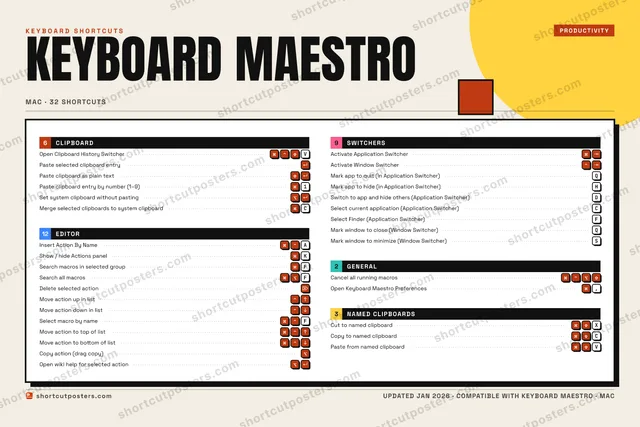
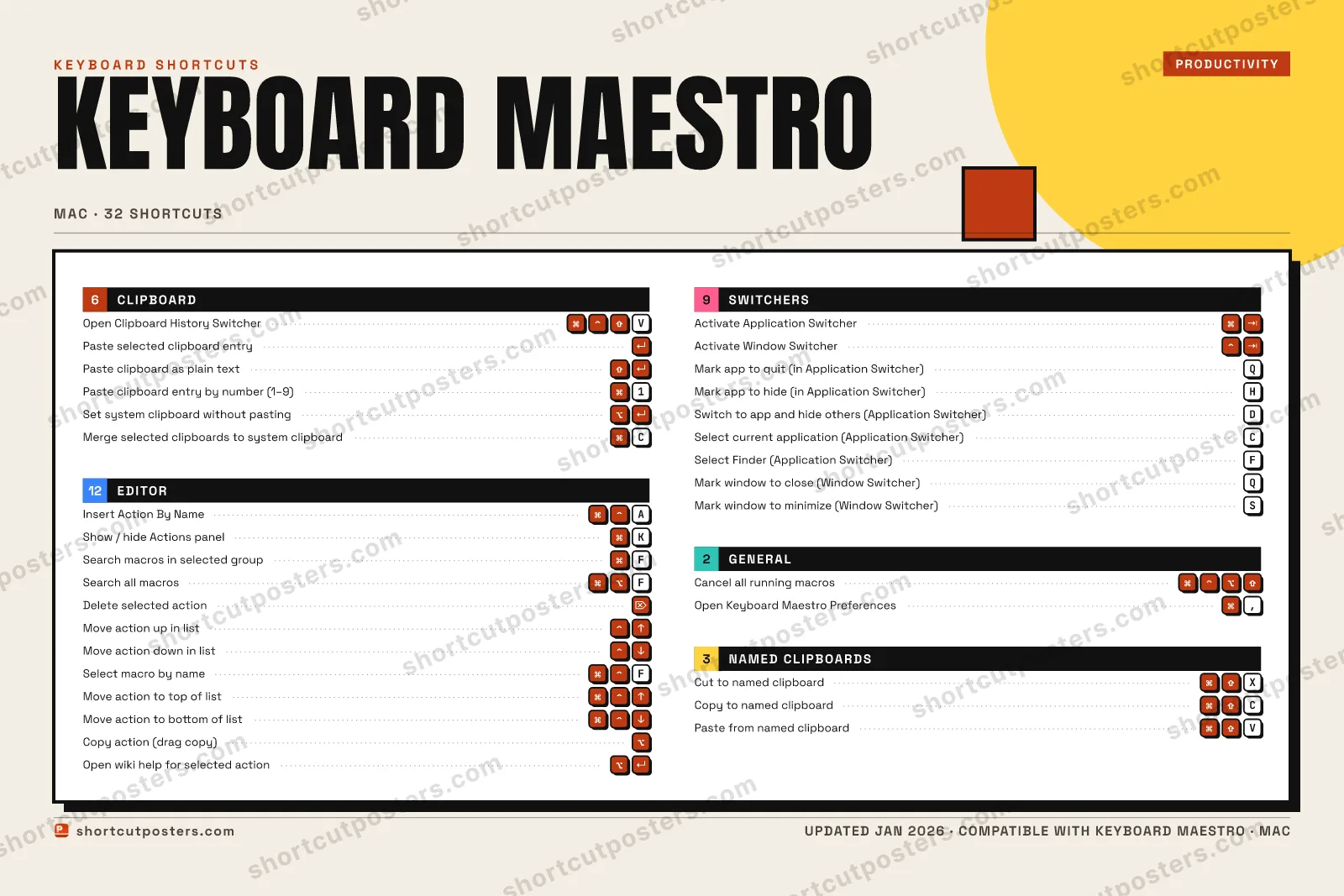
EDITOR12Insert Action By NameAShow / hide Actions panelKSearch macros in selected groupFSearch all macrosFDelete selected actionMove action up in listMove action down in listSelect macro by nameFMove action to top of listMove action to bottom of listCopy action (drag copy)Open wiki help for selected actionGENERAL02Cancel all running macrosOpen Keyboard Maestro Preferences,NAMED CLIPBOARDS03Cut to named clipboardXCopy to named clipboardCPaste from named clipboardVCLIPBOARD06Open Clipboard History SwitcherVPaste selected clipboard entryPaste clipboard as plain textPaste clipboard entry by number (1–9)1Set system clipboard without pastingMerge selected clipboards to system clipb…CSWITCHERS09Activate Application SwitcherActivate Window SwitcherMark app to quit (in Application Switcher)QMark app to hide (in Application Switcher)HSwitch to app and hide others (Applicatio…DSelect current application (Application S…CSelect Finder (Application Switcher)FMark window to close (Window Switcher)QMark window to minimize (Window Switcher)SKeyboard MaestroKEYBOARD SHORTCUTS · MAC · 32BOTH LAYOUTSQWERTYQWERTYAZERTYAZERTYshortcutposters.comUPDATED JAN 2026 · COMPATIBLE WITH KEYBOARD MAESTRO · MAC
KEYBOARD MAESTRO · KEYBOARD SHORTCUTSMac · 5 SETS · No.01KEYBOARD MAESTROTOTAL32SHORTCUTSFOR MAC · SHIPPED COMBOSSETSCLIPBOARD06EDITOR12SWITCHERS09GENERAL02NAMED CLIPBOA03REF. EDITION · JAN 2026shortcutposters.comOpen Clipboard History SwitcherVPaste selected clipboard entryPaste clipboard as plain textPaste clipboard entry by number (1–9)1Set system clipboard without pastingMerge selected clipboards to system clipboardCInsert Action By NameAShow / hide Actions panelKSearch macros in selected groupFSearch all macrosFDelete selected actionMove action up in listMove action down in listSelect macro by nameFMove action to top of listMove action to bottom of listCopy action (drag copy)Open wiki help for selected actionActivate Application SwitcherActivate Window SwitcherMark app to quit (in Application Switcher)QMark app to hide (in Application Switcher)HSwitch to app and hide others (Application Switcher)DSelect current application (Application Switcher)CSelect Finder (Application Switcher)FMark window to close (Window Switcher)QMark window to minimize (Window Switcher)SCancel all running macrosOpen Keyboard Maestro Preferences,Cut to named clipboardXCopy to named clipboardCPaste from named clipboardV

Mac edition · 32 shortcuts

Keyboard Maestro Keyboard Shortcuts Poster

A printable, framed-quality poster of the essential Keyboard Maestro shortcuts for Mac — the keys worth keeping in view, designed to stay readable on a wall.

Free PNG is web-resolution & lightly watermarked.

Customise this poster Pick the shortcuts, restyle the colours — download free. Get the framed-quality print Full 300 DPI, print-ready — at home or shipped to your door.

Keyboard Maestro is a Mac automation powerhouse that lets you build macros triggered by hotkeys, typed strings, time, or application events. Knowing its built-in editor and switcher shortcuts lets you build, test, and manage hundreds of macros without ever reaching for the mouse.

All Keyboard Maestro keyboard shortcuts (Mac)

Layout
`
1
2
3
4
5
6
7
8
9
0
-
=
⌫ Back
Tab
Q
W
E
R
T
Y
U
I
O
P
[
]
\
Caps
A
S
D
F
G
H
J
K
L
;
'
Enter ⏎
Shift
Z
X
C
V
B
N
M
,
.
/
Shift
Ctrl
Win
Alt
Space
Alt
Win
Menu
Ctrl

+ 2 more controls in the table below

Editor 12

Action Shortcut
Insert Action By Name A
Show / hide Actions panel K
Search macros in selected group F
Search all macros F
Delete selected action
Move action up in list
Move action down in list
Select macro by name F
Move action to top of list
Move action to bottom of list
Copy action (drag copy)
Open wiki help for selected action

Switchers 9

Action Shortcut
Activate Application Switcher
Activate Window Switcher
Mark app to quit (in Application Switcher) Q
Mark app to hide (in Application Switcher) H
Switch to app and hide others (Application Switcher) D
Select current application (Application Switcher) C
Select Finder (Application Switcher) F
Mark window to close (Window Switcher) Q
Mark window to minimize (Window Switcher) S

Clipboard 6

Action Shortcut
Open Clipboard History Switcher V
Paste selected clipboard entry
Paste clipboard as plain text
Paste clipboard entry by number (1–9) 1
Set system clipboard without pasting
Merge selected clipboards to system clipboard C

Named Clipboards 3

Action Shortcut
Cut to named clipboard X
Copy to named clipboard C
Paste from named clipboard V

General 2

Action Shortcut
Cancel all running macros
Open Keyboard Maestro Preferences ,

Sourced from wiki.keyboardmaestro.com , wiki.keyboardmaestro.com , wiki.keyboardmaestro.com , wiki.keyboardmaestro.com , wiki.keyboardmaestro.com , wiki.keyboardmaestro.com Last verified

Unofficial reference. ShortcutPosters is not affiliated with, endorsed by, or sponsored by Keyboard Maestro. All product names, logos, and trademarks are property of their respective owners. See our licensing & trademark notice.

Frequently asked questions

Does the poster include every Keyboard Maestro shortcut?
Keyboard Maestro has 32 keyboard shortcuts in total — the complete list is free to read on this page. The poster features the most essential ones, curated to stay readable on a wall.
Can I print it at home?
Yes. The digital download is a high-resolution 300 DPI file you can print at home or at any print shop, in standard frame sizes.
Does it cover both Mac and Windows?
We sell separate Mac and Windows editions so every key matches your keyboard exactly. This page is the macOS edition.
Is this an official Keyboard Maestro product?
No. This is an unofficial reference poster and is not affiliated with or endorsed by Keyboard Maestro. All trademarks belong to their respective owners.
For app makers

Promote your app

Built an app with great keyboard shortcuts? Get it into the database — a free, searchable reference page, and an optional printable poster your power users will pin to the wall.

  • Free shortcut reference page
  • Indexed & searchable
  • Optional framed poster