ShortcutPosters

Poster maker

Make your Keyboard Maestro shortcuts poster

Pick the shortcuts that matter, add your own, tune the colours and style — then download a free personalized PNG, or order the print-ready PDF.

Making a poster for:
Style
Accent
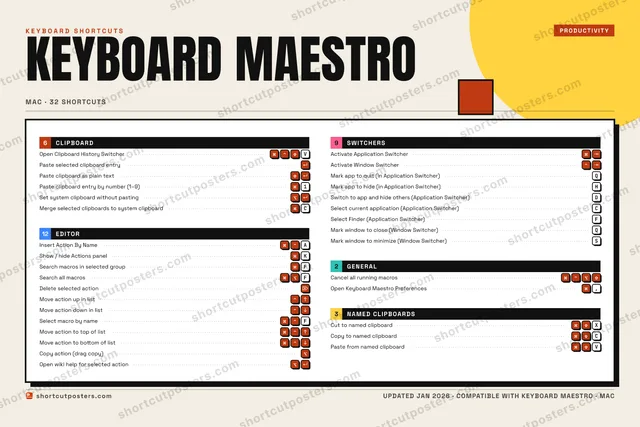
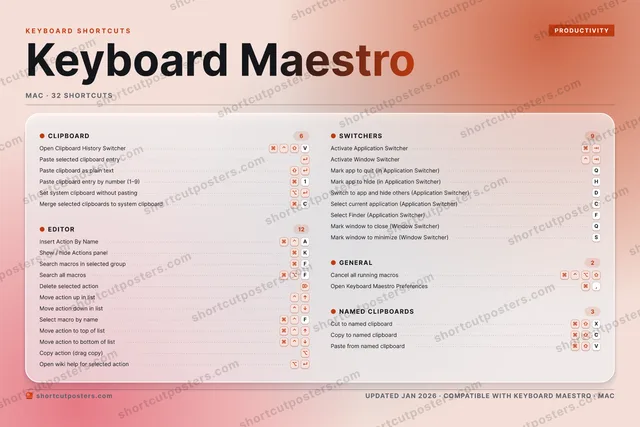
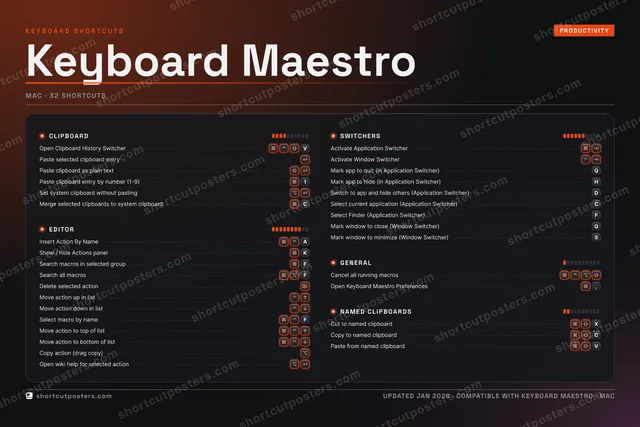
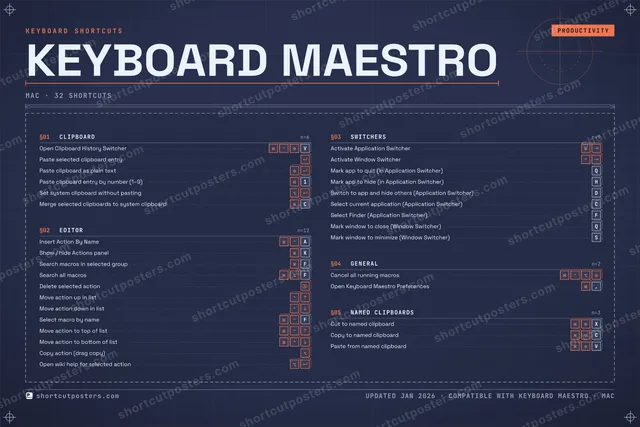
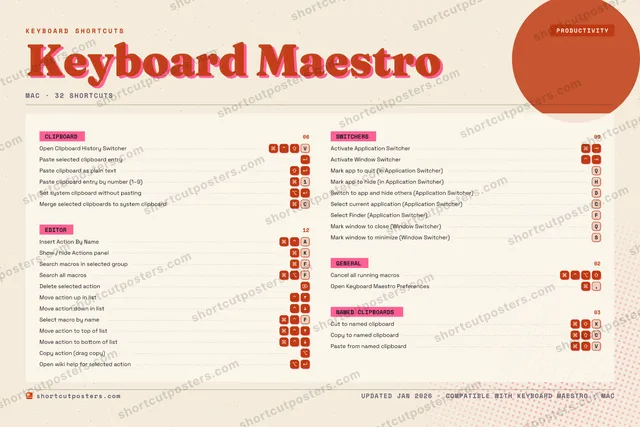
KEYBOARD MAESTROKEYBOARD SHORTCUTS · MAC · 321Paste cl…234567890QMark app…WERTYUIOPA⌘ ⌃Insert A…SMark win…DSwitch t…FSearch m…GHMark app…JKShow / h…LZX⌘ ⇧Cut to n…C⌘ ⇧Copy to …V⌘ ⌃ ⇧Open Cli…BNMMORE SHORTCUTSPaste selecte…Search all ma…FPaste clipboa…Activate Appl…Delete select…Cancel all ru…Paste from na…VActivate Wind…Move action u…Move action d…Open Keyboard…,Select macro …FSet system cl…Merge selecte…CSelect curren…CMove action t…Move action t…Copy action (…Open wiki hel…Select Finder…FMark window t…Qshortcutposters.comUPDATED JAN 2026 · COMPATIBLE WITH KEYBOARD MAESTRO · MAC

Hover to locate · click on the poster to disable · drag to reorder categories & shortcuts · to rename a category

Free PNG $0
  • Web resolution (1600 px)
  • Light watermark
  • Instant download
Made to order
Custom print-ready PDF $2.99
  • 300 DPI, framed-quality — no watermark
  • Every standard print size
  • Built to order from the poster above — checkout link emailed to you

Trouble ordering? Email business@shortcutposters.com.

How it works

  1. 1

    Choose a style

    Pick from four layouts: isometric keys, a typewriter list, a labelled keyboard map, or a bold editorial print.

  2. 2

    Make it yours

    Set the accent colour and palette, rename categories, and reorder anything.

  3. 3

    Pick the shortcuts

    Toggle exactly which shortcuts appear — or add your own custom ones.

  4. 4

    Download or print

    Export a free high-resolution PNG instantly, or order a print-ready PDF.

Four styles to choose from

KEYBOARD MAESTROKEYBOARD SHORTCUTS · MAC · 20 ESSENTIAL1Paste cl…234567890QWERTYUIOPA⌘ ⌃Insert A…SDFSearch m…GHJKShow / h…LZX⌘ ⇧Cut to n…C⌘ ⇧Copy to …V⌘ ⌃ ⇧Open Cli…BNMMORE SHORTCUTSPaste selected cl…Search all macrosFPaste clipboard a…Activate Applicat…Delete selected a…Cancel all runnin…Paste from named …VActivate Window S…Move action up in…Move action down …Open Keyboard Mae…,Select macro by n…FSet system clipbo…shortcutposters.comUPDATED JAN 2026 · COMPATIBLE WITH KEYBOARD MAESTRO · MAC
Keyboard map Every binding labelled on a realistic QWERTY or AZERTY keyboard.
CLIPBOARDOpen Clipboard History SwitcherVPaste selected clipboard entryPaste clipboard as plain textPaste clipboard entry by number (1…1Set system clipboard without pasti…SWITCHERSActivate Application SwitcherActivate Window SwitcherNAMED CLIPBOARDSCut to named clipboardXCopy to named clipboardCPaste from named clipboardVEDITORInsert Action By NameAShow / hide Actions panelKSearch macros in selected groupFSearch all macrosFDelete selected actionMove action up in listMove action down in listSelect macro by nameFGENERALCancel all running macrosOpen Keyboard Maestro Preferences,Keyboard MaestroKEYBOARD SHORTCUTS · MAC · 20 ESSENTIALBOTH LAYOUTSQWERTYQWERTYAZERTYAZERTYshortcutposters.comUPDATED JAN 2026 · COMPATIBLE WITH KEYBOARD MAESTRO · MAC
Isometric Shortcuts on a 3D isometric keyboard — bold and poster-like.
CLIPBOARD05Open Clipboard History SwitcherVPaste selected clipboard entryPaste clipboard as plain textPaste clipboard entry by number (1…1Set system clipboard without pasti…SWITCHERS02Activate Application SwitcherActivate Window SwitcherNAMED CLIPBOARDS03Cut to named clipboardXCopy to named clipboardCPaste from named clipboardVEDITOR08Insert Action By NameAShow / hide Actions panelKSearch macros in selected groupFSearch all macrosFDelete selected actionMove action up in listMove action down in listSelect macro by nameFGENERAL02Cancel all running macrosOpen Keyboard Maestro Preferences,Keyboard MaestroKEYBOARD SHORTCUTS · MAC · 20 ESSENTIALBOTH LAYOUTSQWERTYQWERTYAZERTYAZERTYshortcutposters.comUPDATED JAN 2026 · COMPATIBLE WITH KEYBOARD MAESTRO · MAC
Typewriter A clean printed list, grouped by category — dense and legible.
KEYBOARD MAESTRO · KEYBOARD SHORTCUTSMac · 5 SETS · No.01KEYBOARD MAESTROTOTAL20SHORTCUTSFOR MAC · SHIPPED COMBOSSETSCLIPBOARD05EDITOR08SWITCHERS02GENERAL02NAMED CLIPBOA03REF. EDITION · JAN 2026shortcutposters.comOpen Clipboard History SwitcherVPaste selected clipboard entryPaste clipboard as plain textPaste clipboard entry by number (1–9)1Set system clipboard without pastingInsert Action By NameAShow / hide Actions panelKSearch macros in selected groupFSearch all macrosFDelete selected actionMove action up in listMove action down in listSelect macro by nameFActivate Application SwitcherActivate Window SwitcherCancel all running macrosOpen Keyboard Maestro Preferences,Cut to named clipboardXCopy to named clipboardCPaste from named clipboardV
Editorial A bold Swiss-style print: giant wordmark, dense keycap columns, and a totals rail.

Frequently asked questions

Is the Keyboard Maestro poster maker free?

Yes — you can design and download a high-resolution PNG of your Keyboard Maestro shortcuts poster for free. A print-ready PDF is an optional paid upgrade.

Can I choose which Keyboard Maestro shortcuts appear?

Yes. Toggle any shortcut on or off, reorder them, rename categories, and even add your own custom shortcuts.

Can I change the colours and style?

Yes. Pick an accent colour, choose a palette, and switch between the isometric, typewriter, and keyboard-map styles.

Which keyboard layout and operating system are supported?

Choose QWERTY or AZERTY, and switch the edition between the operating systems Keyboard Maestro supports (macOS, Windows, Linux).

How do I get a printed poster?

Download the free PNG to print yourself, or order the print-ready, framed-quality PDF directly from the maker.