
ShortcutPosters

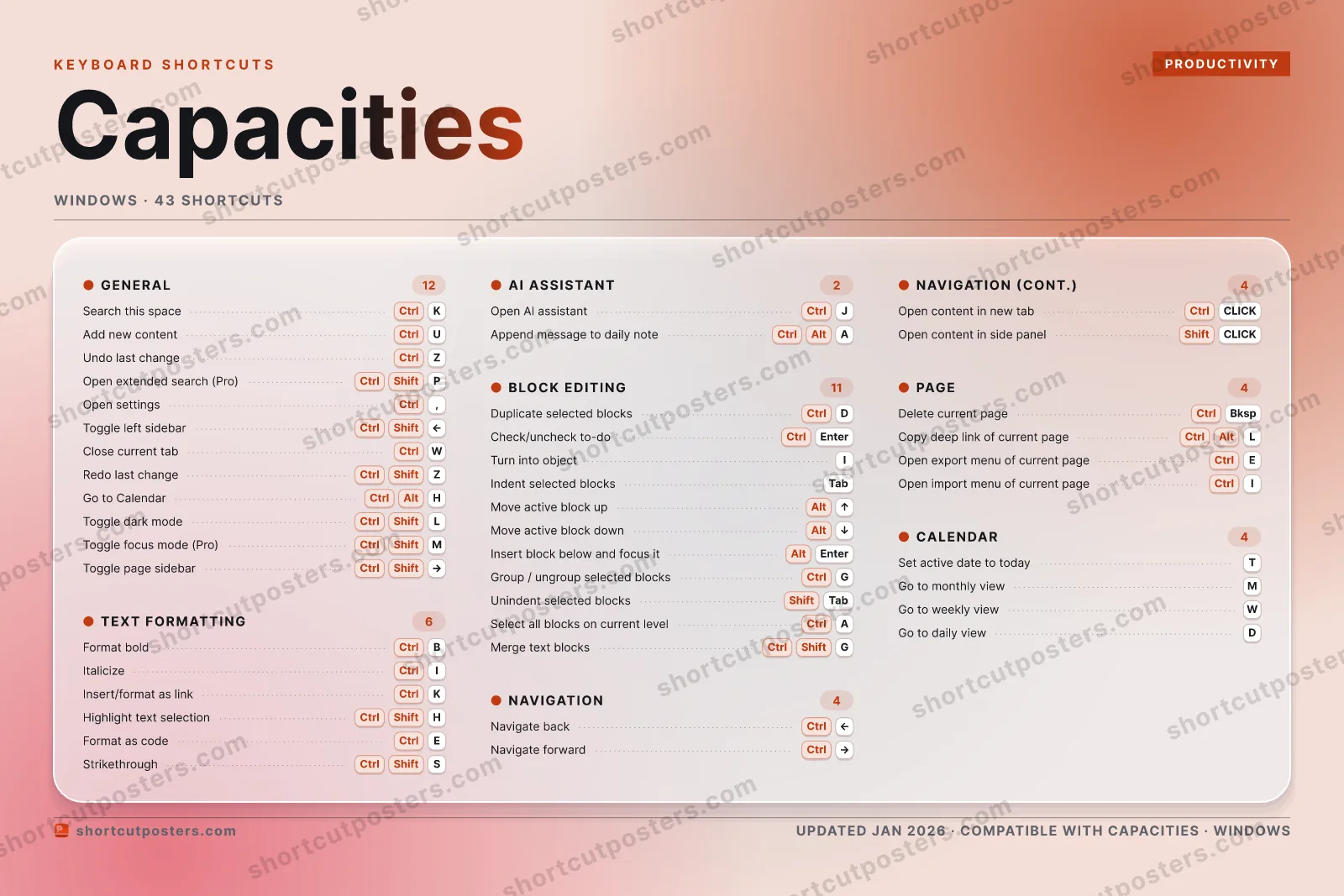
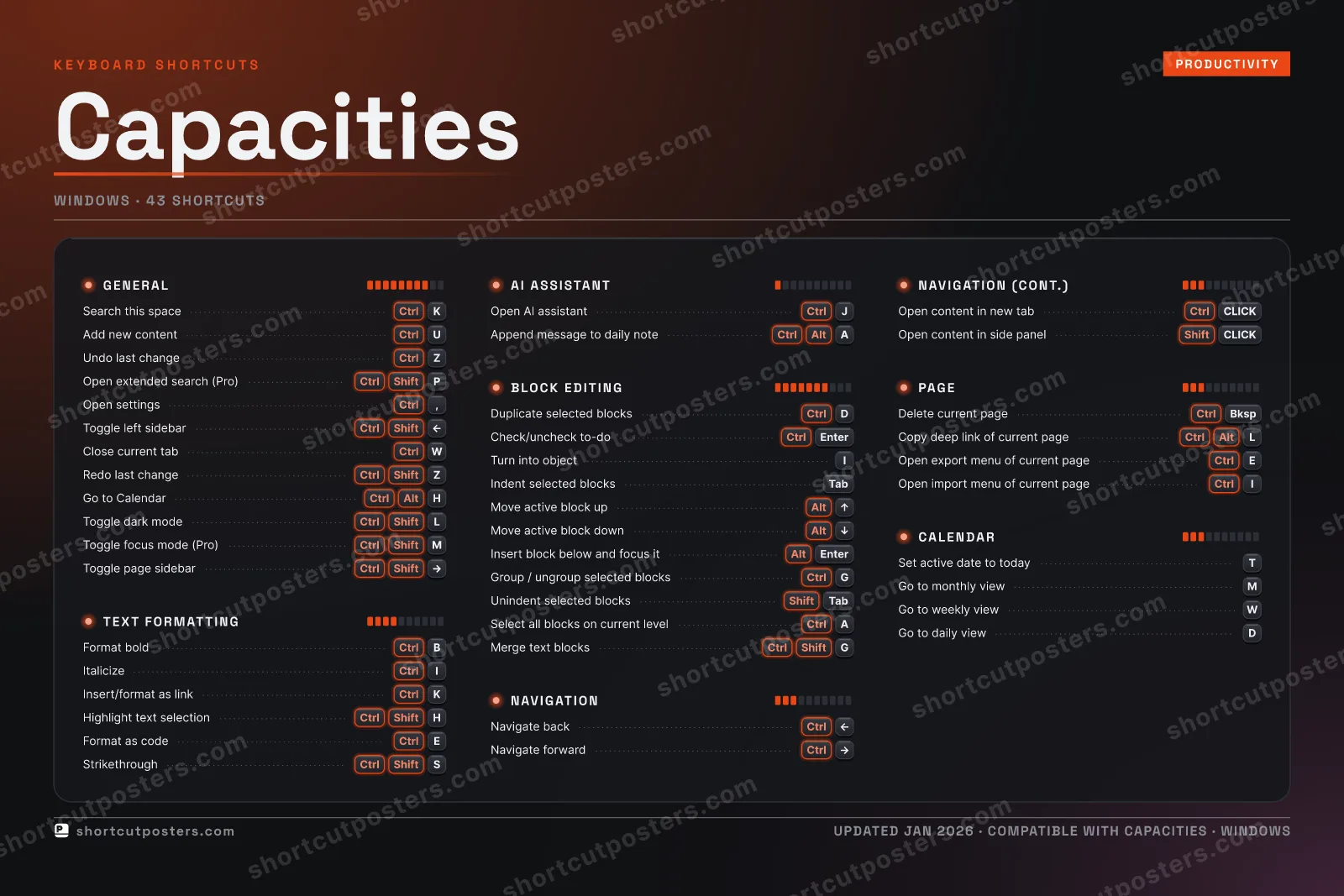
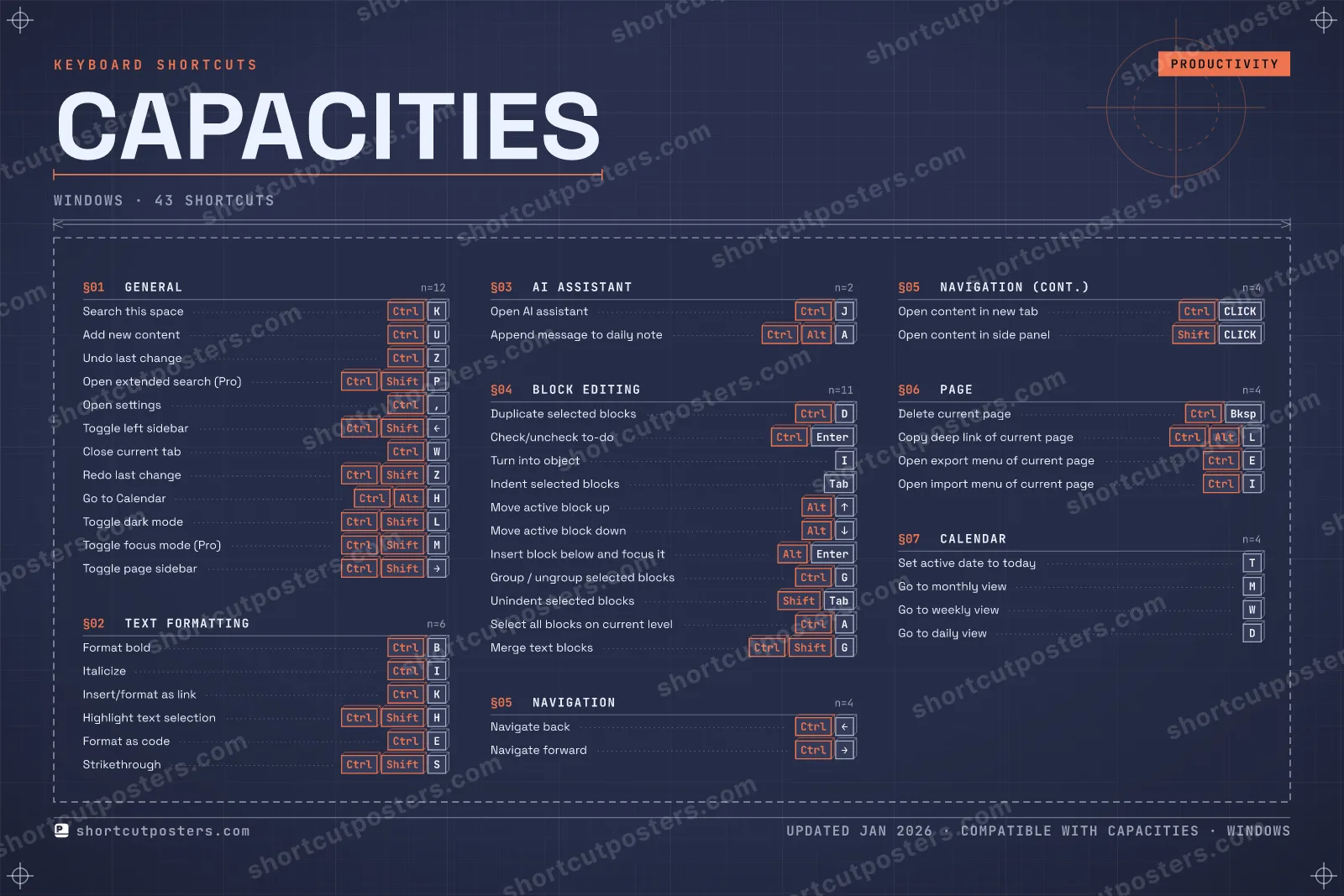
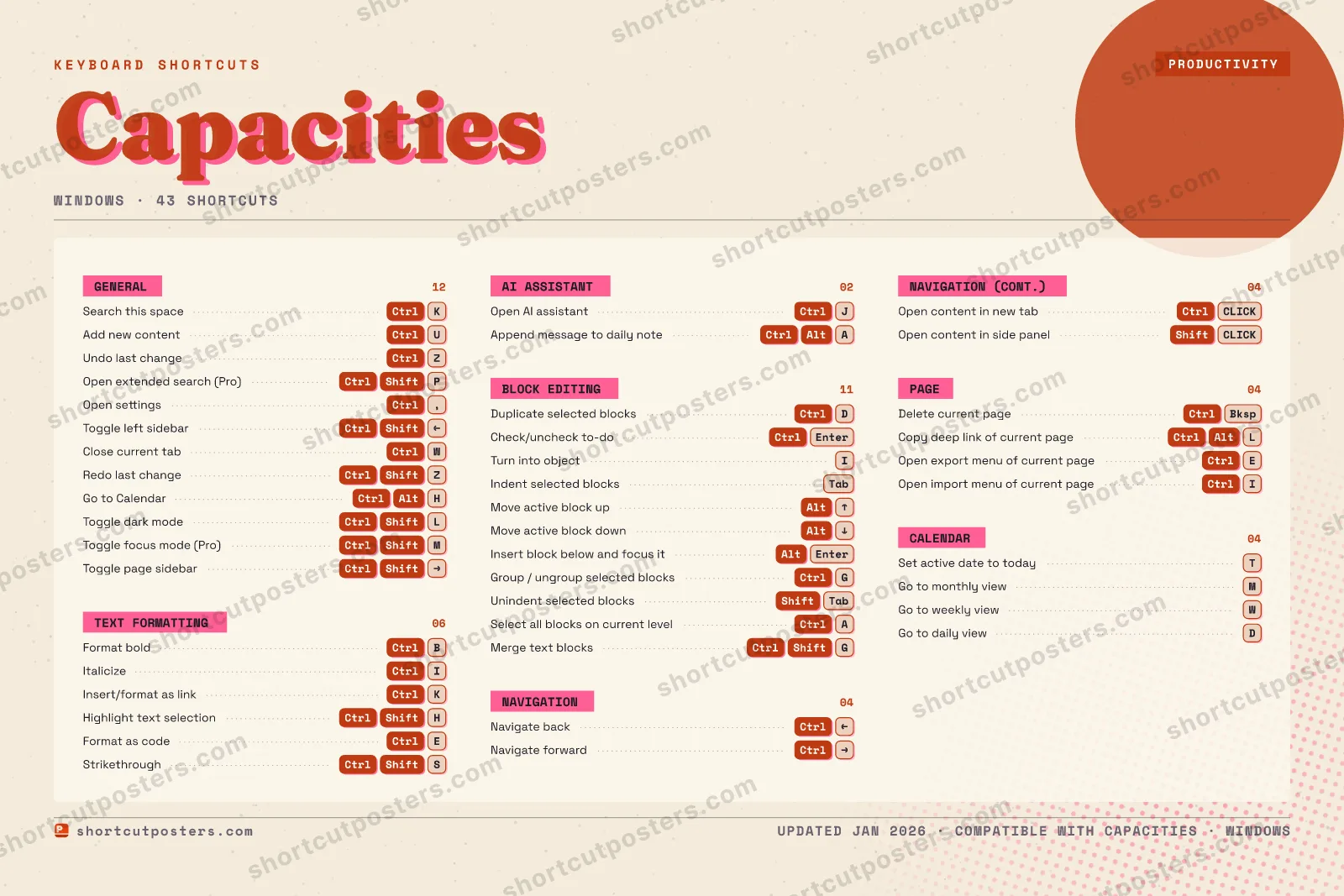
4 art directions — pick one below, click to zoom & compare.
Layout
CAPACITIESKEYBOARD SHORTCUTS · WINDOWS · 42 ESSENTIAL1234567890QWCtrlClose cu…ECtrlFormat a…RTSet acti…YUCtrlAdd new …ICtrlItalicizeOPCtrl ShiftOpen ext…ACtrlSelect a…SCtrl ShiftStriketh…DCtrlDuplicat…FGCtrlGroup / …HCtrl AltGo to Ca…JCtrlOpen AI …KCtrlSearch t…LCtrl ShiftToggle d…ZCtrlUndo las…XCVBCtrlFormat b…NMCtrl ShiftToggle f…MORE SHORTCUTSCheck/uncheck…CtrlEnterNavigate backCtrlLEFTNavigate forw…CtrlRIGHTOpen settingsCtrl,Toggle left s…CtrlShiftLEFTRedo last cha…CtrlShiftZInsert/format…CtrlKTurn into obj…IIndent select…TabMove active b…AltUPMove active b…AltDOWNInsert block …AltEnterDelete curren…CtrlBkspToggle page s…CtrlShiftRIGHTHighlight tex…CtrlShiftHUnindent sele…ShiftTabOpen content …CtrlCLICKOpen content …ShiftCLICKCopy deep lin…CtrlAltLOpen export m…CtrlEOpen import m…CtrlIGo to monthly…MGo to weekly …WGo to daily v…DMerge text bl…CtrlShiftGshortcutposters.comUPDATED JAN 2026 · COMPATIBLE WITH CAPACITIES · WINDOWS
TEXT FORMATTINGFormat boldCtrlBItalicizeCtrlIInsert/format as linkCtrlKHighlight text selectionCtrlShiftHFormat as codeCtrlEStrikethroughCtrlShiftSNAVIGATIONNavigate backCtrlLEFTNavigate forwardCtrlRIGHTOpen content in new tabCtrlCLICKOpen content in side pan…ShiftCLICKCALENDARSet active date to todayTGo to monthly viewMGo to weekly viewWGo to daily viewDAI ASSISTANTOpen AI assistantCtrlJAppend message to daily …CtrlAltABLOCK EDITINGDuplicate selected blocksCtrlDCheck/uncheck to-doCtrlEnterTurn into objectIIndent selected blocksTabMove active block upAltUPMove active block downAltDOWNInsert block below and f…AltEnterGroup / ungroup selected…CtrlGUnindent selected blocksShiftTabSelect all blocks on cur…CtrlAMerge text blocksCtrlShiftGGENERALSearch this spaceCtrlKAdd new contentCtrlUUndo last changeCtrlZOpen extended search (Pr…CtrlShiftPOpen settingsCtrl,Toggle left sidebarCtrlShiftLEFTClose current tabCtrlWRedo last changeCtrlShiftZGo to CalendarCtrlAltHToggle dark modeCtrlShiftLToggle focus mode (Pro)CtrlShiftMToggle page sidebarCtrlShiftRIGHTPAGEDelete current pageCtrlBkspCopy deep link of curren…CtrlAltLOpen export menu of curr…CtrlEOpen import menu of curr…CtrlICapacitiesKEYBOARD SHORTCUTS · WINDOWS · 43BOTH LAYOUTSQWERTYQWERTYAZERTYAZERTYshortcutposters.comUPDATED JAN 2026 · COMPATIBLE WITH CAPACITIES · WINDOWS
TEXT FORMATTING06Format boldCtrlBItalicizeCtrlIInsert/format as linkCtrlKHighlight text selecti…CtrlShiftHFormat as codeCtrlEStrikethroughCtrlShiftSNAVIGATION04Navigate backCtrlLEFTNavigate forwardCtrlRIGHTOpen content in new tabCtrlCLICKOpen content in side p…ShiftCLICKCALENDAR04Set active date to tod…TGo to monthly viewMGo to weekly viewWGo to daily viewDAI ASSISTANT02Open AI assistantCtrlJAppend message to dail…CtrlAltABLOCK EDITING11Duplicate selected blo…CtrlDCheck/uncheck to-doCtrlEnterTurn into objectIIndent selected blocksTabMove active block upAltUPMove active block downAltDOWNInsert block below and…AltEnterGroup / ungroup select…CtrlGUnindent selected bloc…ShiftTabSelect all blocks on c…CtrlAMerge text blocksCtrlShiftGGENERAL12Search this spaceCtrlKAdd new contentCtrlUUndo last changeCtrlZOpen extended search (…CtrlShiftPOpen settingsCtrl,Toggle left sidebarCtrlShiftLEFTClose current tabCtrlWRedo last changeCtrlShiftZGo to CalendarCtrlAltHToggle dark modeCtrlShiftLToggle focus mode (Pro)CtrlShiftMToggle page sidebarCtrlShiftRIGHTPAGE04Delete current pageCtrlBkspCopy deep link of curr…CtrlAltLOpen export menu of cu…CtrlEOpen import menu of cu…CtrlICapacitiesKEYBOARD SHORTCUTS · WINDOWS · 43BOTH LAYOUTSQWERTYQWERTYAZERTYAZERTYshortcutposters.comUPDATED JAN 2026 · COMPATIBLE WITH CAPACITIES · WINDOWS
CAPACITIES · KEYBOARD SHORTCUTSWindows · 7 SETS · No.01CAPACITIESTOTAL43SHORTCUTSFOR WINDOWS · SHIPPED COMBOSSETSGENERAL12TEXT FORMATTI06AI ASSISTANT02BLOCK EDITING11NAVIGATION04PAGE04CALENDAR04REF. EDITION · JAN 2026shortcutposters.comSearch this spaceCtrlKAdd new contentCtrlUUndo last changeCtrlZOpen extended search (Pro)CtrlShiftPOpen settingsCtrl,Toggle left sidebarCtrlShiftLEFTClose current tabCtrlWRedo last changeCtrlShiftZGo to CalendarCtrlAltHToggle dark modeCtrlShiftLToggle focus mode (Pro)CtrlShiftMToggle page sidebarCtrlShiftRIGHTFormat boldCtrlBItalicizeCtrlIInsert/format as linkCtrlKHighlight text selectionCtrlShiftHFormat as codeCtrlEStrikethroughCtrlShiftSOpen AI assistantCtrlJAppend message to daily noteCtrlAltADuplicate selected blocksCtrlDCheck/uncheck to-doCtrlEnterTurn into objectIIndent selected blocksTabMove active block upAltUPMove active block downAltDOWNInsert block below and focus itAltEnterGroup / ungroup selected blocksCtrlGUnindent selected blocksShiftTabSelect all blocks on current levelCtrlAMerge text blocksCtrlShiftGNavigate backCtrlLEFTNavigate forwardCtrlRIGHTOpen content in new tabCtrlCLICKOpen content in side panelShiftCLICKDelete current pageCtrlBkspCopy deep link of current pageCtrlAltLOpen export menu of current pageCtrlEOpen import menu of current pageCtrlISet active date to todayTGo to monthly viewMGo to weekly viewWGo to daily viewD

Windows edition · 43 shortcuts

Capacities Keyboard Shortcuts Poster

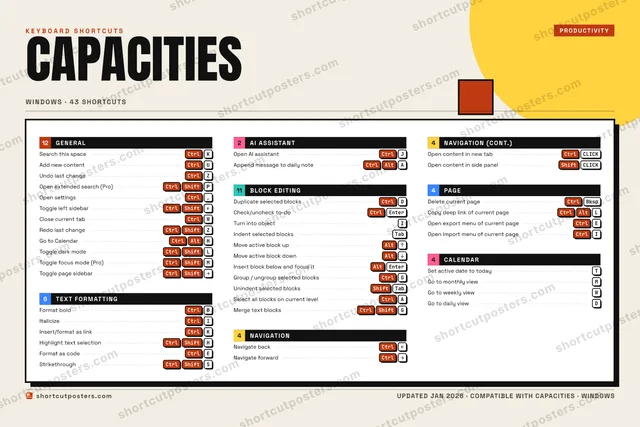
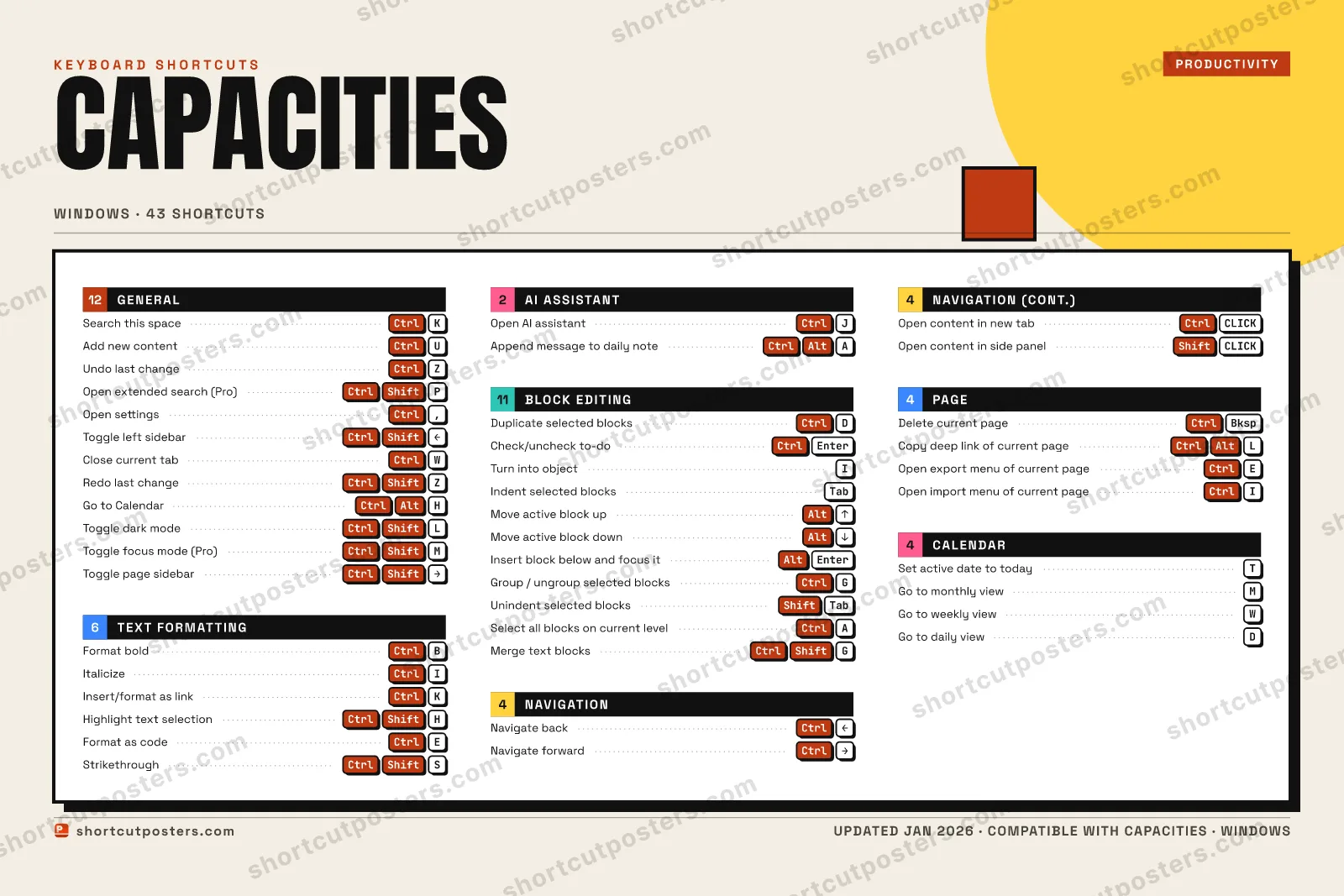
A printable, framed-quality poster of the essential Capacities shortcuts for Windows — the keys worth keeping in view, designed to stay readable on a wall.

Edition

Free PNG is web-resolution & lightly watermarked.

Customise this poster Pick the shortcuts, restyle the colours — download free. Get the framed-quality print Full 300 DPI, print-ready — at home or shipped to your door.

Capacities is an object-based note-taking app built around typed objects (pages, people, tasks) instead of plain files. Its shortcuts drive block editing, the object-linking workflow, and the split search/command palette that ties everything together.

All Capacities keyboard shortcuts (Windows)

Layout
`
1
2
3
4
5
6
7
8
9
0
-
=
⌫ Back
Tab
Q
W
E
R
T
Y
U
I
O
P
[
]
\
Caps
A
S
D
F
G
H
J
K
L
;
'
Enter ⏎
Shift
Z
X
C
V
B
N
M
,
.
/
Shift
Ctrl
Win
Alt
Space
Alt
Win
Menu
Ctrl

+ 2 more controls in the table below

General 12

Action Shortcut
Search this space CtrlK
Add new content CtrlU
Undo last change CtrlZ
Open extended search (Pro) CtrlShiftP
Open settings Ctrl,
Toggle left sidebar CtrlShiftLEFT
Close current tab CtrlW
Redo last change CtrlShiftZ
Go to Calendar CtrlAltH
Toggle dark mode CtrlShiftL
Toggle focus mode (Pro) CtrlShiftM
Toggle page sidebar CtrlShiftRIGHT

Block Editing 11

Action Shortcut
Duplicate selected blocks CtrlD
Check/uncheck to-do CtrlEnter
Turn into object I
Indent selected blocks Tab
Move active block up AltUP
Move active block down AltDOWN
Insert block below and focus it AltEnter
Group / ungroup selected blocks CtrlG
Unindent selected blocks ShiftTab
Select all blocks on current level CtrlA
Merge text blocks CtrlShiftG

Text Formatting 6

Action Shortcut
Format bold CtrlB
Italicize CtrlI
Insert/format as link CtrlK
Highlight text selection CtrlShiftH
Format as code CtrlE
Strikethrough CtrlShiftS

Page 4

Action Shortcut
Delete current page CtrlBksp
Copy deep link of current page CtrlAltL
Open export menu of current page CtrlE
Open import menu of current page CtrlI

Navigation 4

Action Shortcut
Navigate back CtrlLEFT
Navigate forward CtrlRIGHT
Open content in new tab CtrlCLICK
Open content in side panel ShiftCLICK

Calendar 4

Action Shortcut
Set active date to today T
Go to monthly view M
Go to weekly view W
Go to daily view D

AI Assistant 2

Action Shortcut
Open AI assistant CtrlJ
Append message to daily note CtrlAltA

Sourced from docs.capacities.io , docs.capacities.io Last verified

Unofficial reference. ShortcutPosters is not affiliated with, endorsed by, or sponsored by Capacities. All product names, logos, and trademarks are property of their respective owners. See our licensing & trademark notice.

Frequently asked questions

Does the poster include every Capacities shortcut?
Capacities has 43 keyboard shortcuts in total — the complete list is free to read on this page. The poster features the most essential ones, curated to stay readable on a wall.
Can I print it at home?
Yes. The digital download is a high-resolution 300 DPI file you can print at home or at any print shop, in standard frame sizes.
Does it cover both Mac and Windows?
We sell separate Mac and Windows editions so every key matches your keyboard exactly. This page is the Windows edition.
Is this an official Capacities product?
No. This is an unofficial reference poster and is not affiliated with or endorsed by Capacities. All trademarks belong to their respective owners.
For app makers

Promote your app

Built an app with great keyboard shortcuts? Get it into the database — a free, searchable reference page, and an optional printable poster your power users will pin to the wall.

  • Free shortcut reference page
  • Indexed & searchable
  • Optional framed poster