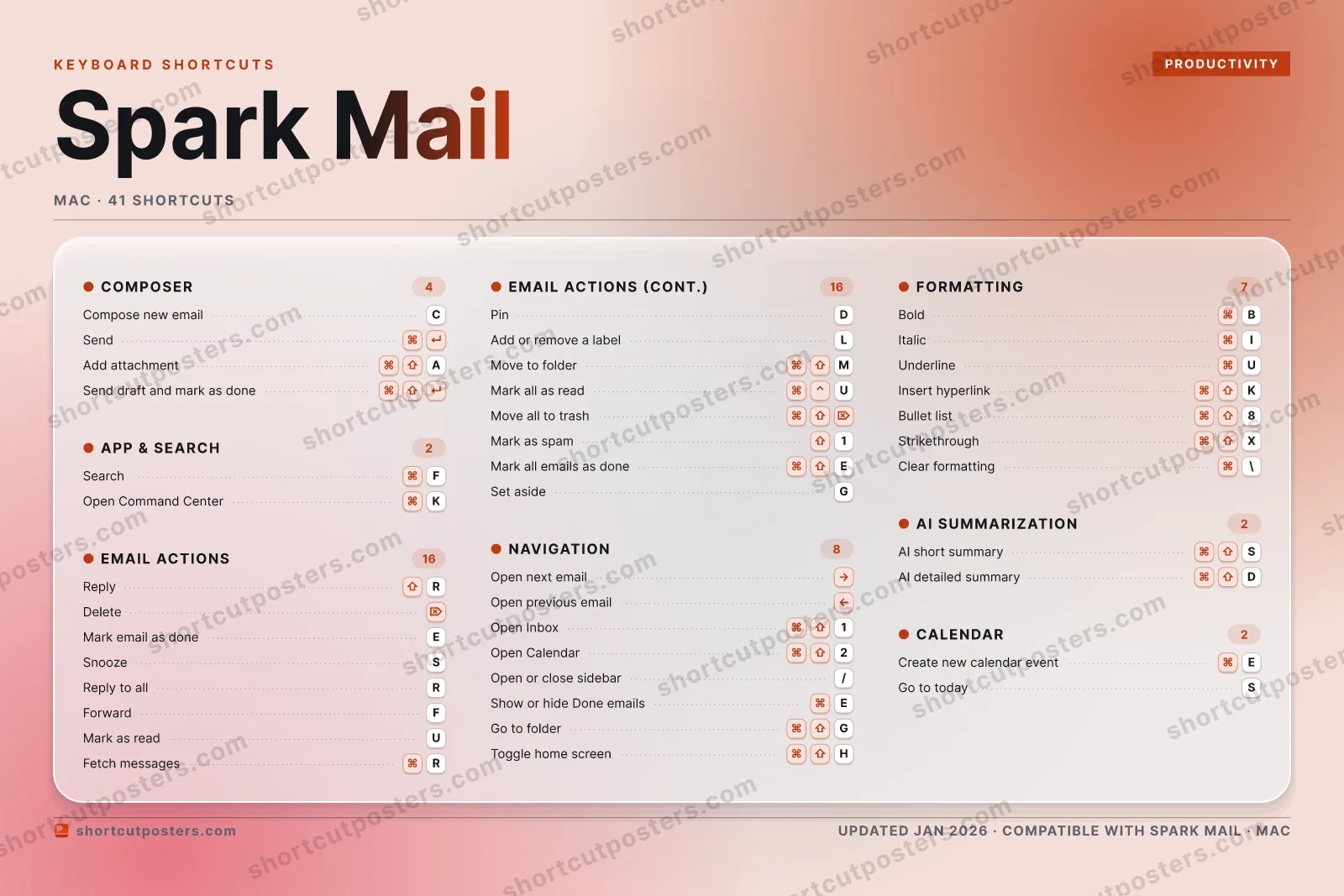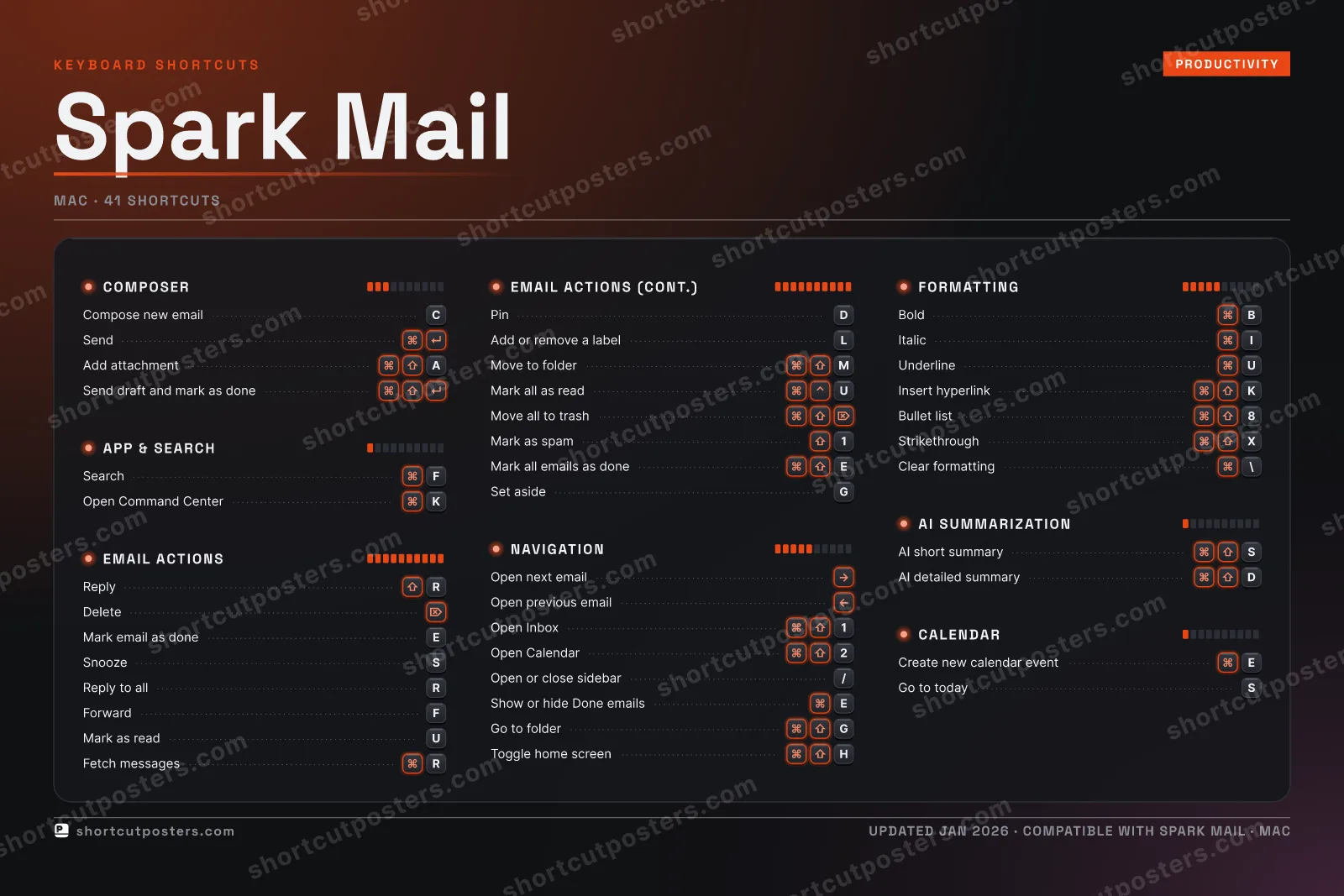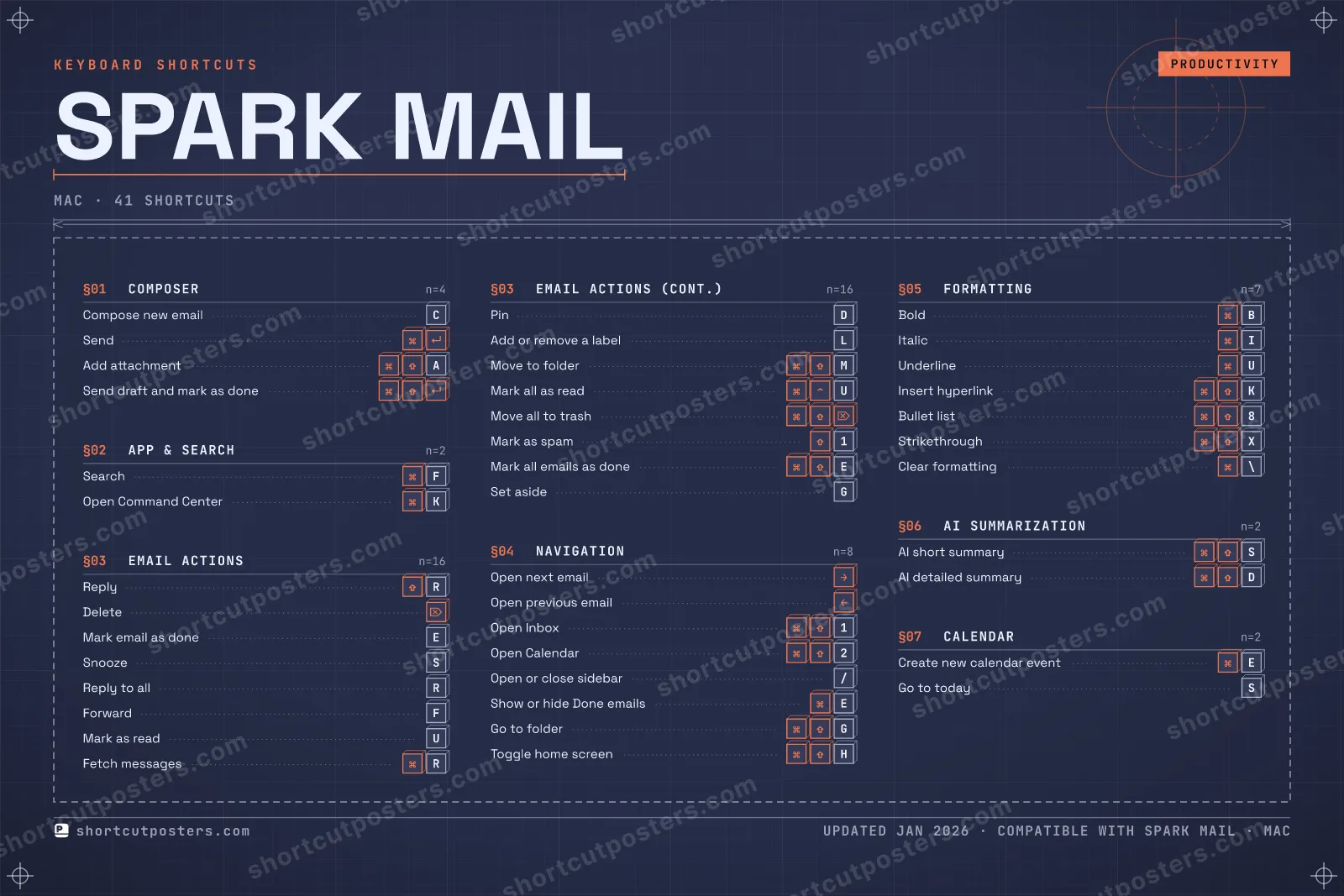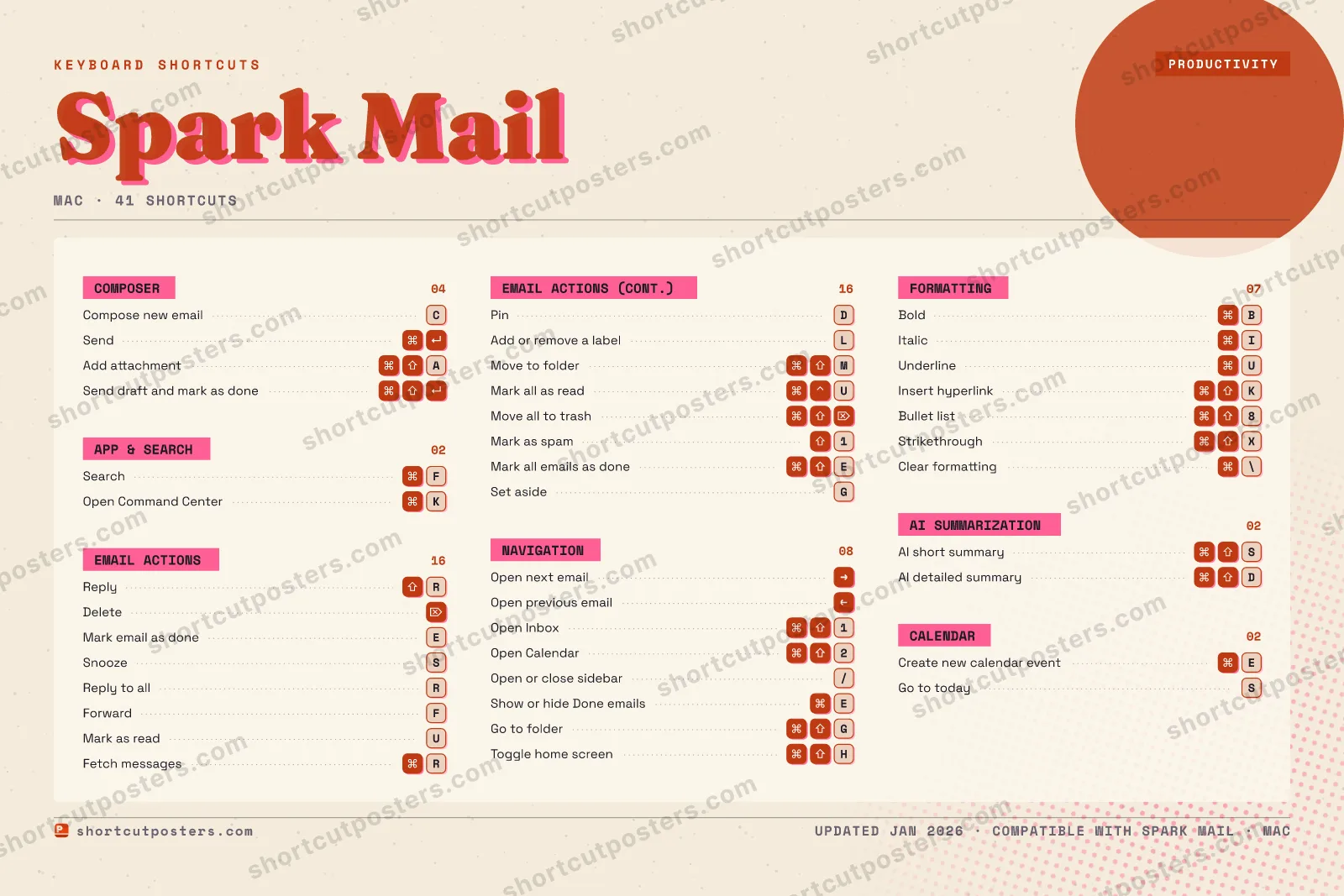

4 art directions — pick one below, click to zoom & compare.
⤢ SPARK MAIL KEYBOARD SHORTCUTS · MAC · 41 1 ⌘ ⇧ Open Inb… 2 ⌘ ⇧ Open Cal… 3 4 5 6 7 8 ⌘ ⇧ Bullet l… 9 0 Q W E Mark ema… R ⇧ Reply T Y U Mark as … I ⌘ Italic O P A ⌘ ⇧ Add atta… S Snooze D Pin F ⌘ Search G Set aside H ⌘ ⇧ Toggle h… J K ⌘ Open Com… L Add or r… Z X ⌘ ⇧ Striketh… C Compose … V B ⌘ Bold N M ⌘ ⇧ Move to … MORE SHORTCUTS Send ⌘ ↵ Delete ⌦ Open next ema… → Open previous… ← Reply to all R Forward F Fetch messages ⌘ R Underline ⌘ U Insert hyperl… ⌘ ⇧ K AI short summ… ⌘ ⇧ S Mark all as r… ⌘ ⌃ U Move all to t… ⌘ ⇧ ⌦ Mark as spam ⇧ 1 Mark all emai… ⌘ ⇧ E Open or close… / Show or hide … ⌘ E Send draft an… ⌘ ⇧ ↵ AI detailed s… ⌘ ⇧ D Create new ca… ⌘ E Go to today S Go to folder ⌘ ⇧ G Clear formatt… ⌘ \ shortcutposters.com UPDATED JAN 2026 · COMPATIBLE WITH SPARK MAIL · MAC
SPARK MAIL KEYBOARD SHORTCUTS · MAC · 41 1 ⌘ ⇧ Open Inb… 2 ⌘ ⇧ Open Cal… 3 4 5 6 7 8 ⌘ ⇧ Bullet l… 9 0 A ⌘ ⇧ Add atta… Z E Mark ema… R ⇧ Reply T Y U Mark as … I ⌘ Italic O P Q S Snooze D Pin F ⌘ Search G Set aside H ⌘ ⇧ Toggle h… J K ⌘ Open Com… L Add or r… M ⌘ ⇧ Move to … W X ⌘ ⇧ Striketh… C Compose … V B ⌘ Bold N MORE SHORTCUTS Send ⌘ ↵ Delete ⌦ Open next ema… → Open previous… ← Reply to all R Forward F Fetch messages ⌘ R Underline ⌘ U Insert hyperl… ⌘ ⇧ K AI short summ… ⌘ ⇧ S Mark all as r… ⌘ ⌃ U Move all to t… ⌘ ⇧ ⌦ Mark as spam ⇧ 1 Mark all emai… ⌘ ⇧ E Open or close… / Show or hide … ⌘ E Send draft an… ⌘ ⇧ ↵ AI detailed s… ⌘ ⇧ D Create new ca… ⌘ E Go to today S Go to folder ⌘ ⇧ G Clear formatt… ⌘ \ shortcutposters.com UPDATED JAN 2026 · COMPATIBLE WITH SPARK MAIL · MAC
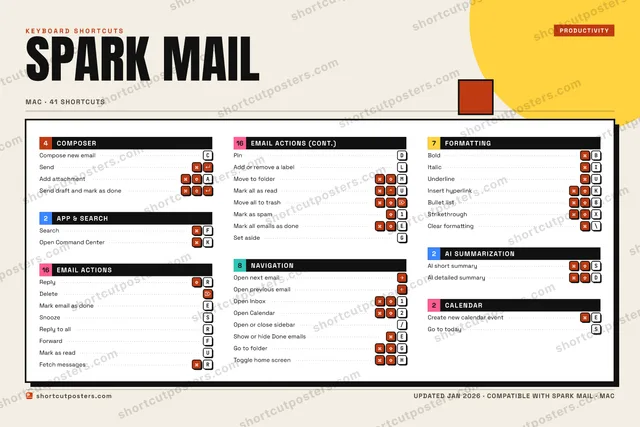
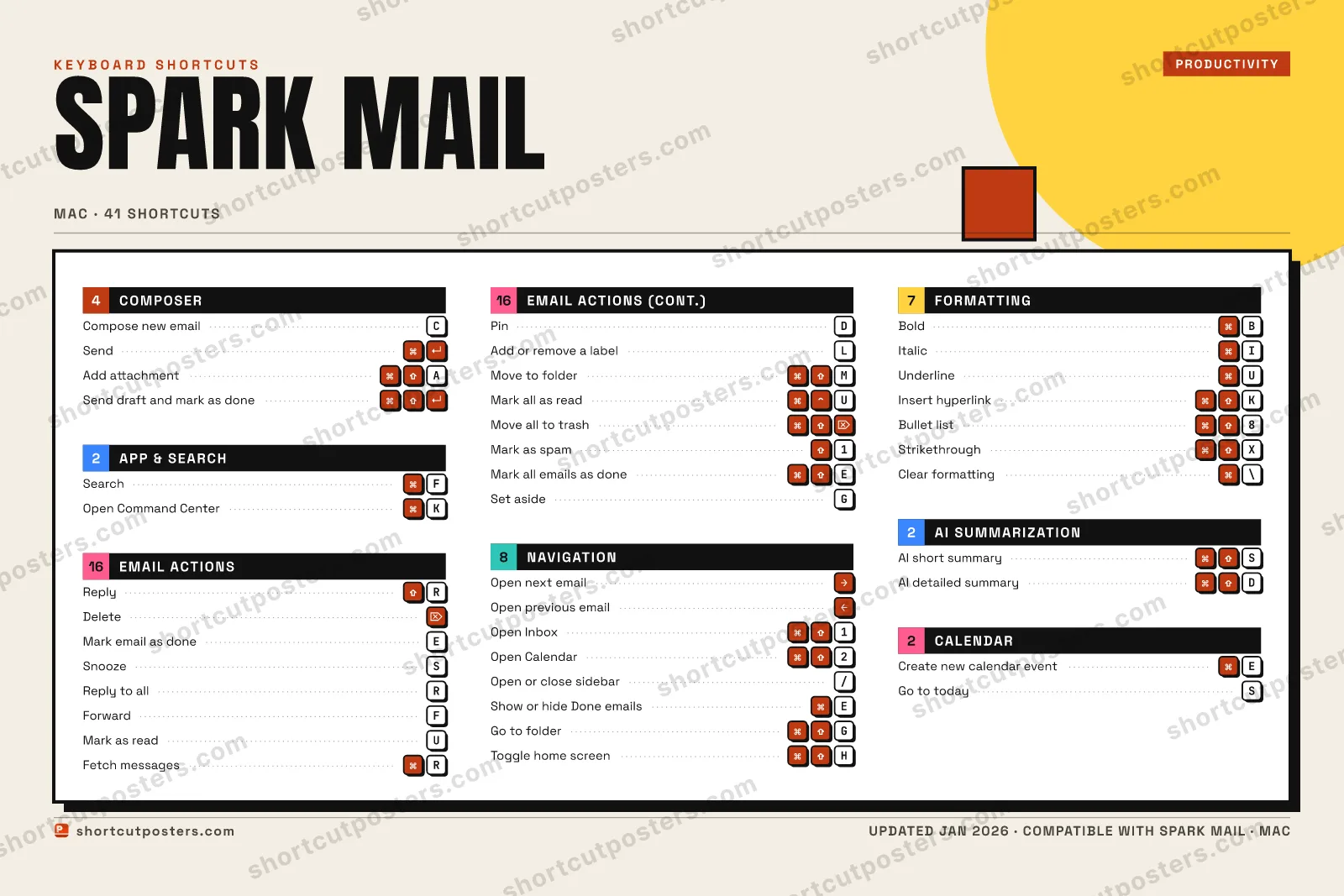
⤢ COMPOSER Compose new email C Send ⌘ ↵ Add attachment ⌘ ⇧ A Send draft and mark as … ⌘ ⇧ ↵ FORMATTING Bold ⌘ B Italic ⌘ I Underline ⌘ U Insert hyperlink ⌘ ⇧ K Bullet list ⌘ ⇧ 8 Strikethrough ⌘ ⇧ X Clear formatting ⌘ \ CALENDAR Create new calendar eve… ⌘ E Go to today S EMAIL ACTIONS Reply ⇧ R Delete ⌦ Mark email as done E Snooze S Reply to all R Forward F Mark as read U Fetch messages ⌘ R Pin D Add or remove a label L Move to folder ⌘ ⇧ M Mark all as read ⌘ ⌃ U Move all to trash ⌘ ⇧ ⌦ Mark as spam ⇧ 1 Mark all emails as done ⌘ ⇧ E Set aside G APP & SEARCH Search ⌘ F Open Command Center ⌘ K NAVIGATION Open next email → Open previous email ← Open Inbox ⌘ ⇧ 1 Open Calendar ⌘ ⇧ 2 Open or close sidebar / Show or hide Done emails ⌘ E Go to folder ⌘ ⇧ G Toggle home screen ⌘ ⇧ H AI SUMMARIZATION AI short summary ⌘ ⇧ S AI detailed summary ⌘ ⇧ D Spark Mail KEYBOARD SHORTCUTS · MAC · 41 BOTH LAYOUTS QWERTY Q W E R T Y AZERTY A Z E R T Y shortcutposters.com UPDATED JAN 2026 · COMPATIBLE WITH SPARK MAIL · MAC ⤢ COMPOSER 04 Compose new email C Send ⌘ ↵ Add attachment ⌘ ⇧ A Send draft and mark a… ⌘ ⇧ ↵ FORMATTING 07 Bold ⌘ B Italic ⌘ I Underline ⌘ U Insert hyperlink ⌘ ⇧ K Bullet list ⌘ ⇧ 8 Strikethrough ⌘ ⇧ X Clear formatting ⌘ \ CALENDAR 02 Create new calendar e… ⌘ E Go to today S EMAIL ACTIONS 16 Reply ⇧ R Delete ⌦ Mark email as done E Snooze S Reply to all R Forward F Mark as read U Fetch messages ⌘ R Pin D Add or remove a label L Move to folder ⌘ ⇧ M Mark all as read ⌘ ⌃ U Move all to trash ⌘ ⇧ ⌦ Mark as spam ⇧ 1 Mark all emails as do… ⌘ ⇧ E Set aside G APP & SEARCH 02 Search ⌘ F Open Command Center ⌘ K NAVIGATION 08 Open next email → Open previous email ← Open Inbox ⌘ ⇧ 1 Open Calendar ⌘ ⇧ 2 Open or close sidebar / Show or hide Done ema… ⌘ E Go to folder ⌘ ⇧ G Toggle home screen ⌘ ⇧ H AI SUMMARIZATION 02 AI short summary ⌘ ⇧ S AI detailed summary ⌘ ⇧ D Spark Mail KEYBOARD SHORTCUTS · MAC · 41 BOTH LAYOUTS QWERTY Q W E R T Y AZERTY A Z E R T Y shortcutposters.com UPDATED JAN 2026 · COMPATIBLE WITH SPARK MAIL · MAC
⤢ SPARK MAIL · KEYBOARD SHORTCUTS Mac · 7 SETS · No.01 SPARK MAIL TOTAL 41 SHORTCUTS FOR MAC · SHIPPED COMBOS SETS COMPOSER 04 APP & SEARCH 02 EMAIL ACTIONS 16 NAVIGATION 08 FORMATTING 07 AI SUMMARIZAT 02 CALENDAR 02 REF. EDITION · JAN 2026 shortcutposters.com Compose new email C Send ⌘ ↵ Add attachment ⌘ ⇧ A Send draft and mark as done ⌘ ⇧ ↵ Search ⌘ F Open Command Center ⌘ K Reply ⇧ R Delete ⌦ Mark email as done E Snooze S Reply to all R Forward F Mark as read U Fetch messages ⌘ R Pin D Add or remove a label L Move to folder ⌘ ⇧ M Mark all as read ⌘ ⌃ U Move all to trash ⌘ ⇧ ⌦ Mark as spam ⇧ 1 Mark all emails as done ⌘ ⇧ E Set aside G Open next email → Open previous email ← Open Inbox ⌘ ⇧ 1 Open Calendar ⌘ ⇧ 2 Open or close sidebar / Show or hide Done emails ⌘ E Go to folder ⌘ ⇧ G Toggle home screen ⌘ ⇧ H Bold ⌘ B Italic ⌘ I Underline ⌘ U Insert hyperlink ⌘ ⇧ K Bullet list ⌘ ⇧ 8 Strikethrough ⌘ ⇧ X Clear formatting ⌘ \ AI short summary ⌘ ⇧ S AI detailed summary ⌘ ⇧ D Create new calendar event ⌘ E Go to today S
SPARK MAIL KEYBOARD SHORTCUTS · MAC · 14 ESSENTIAL 1 2 3 4 5 6 7 8 9 0 Q W E Mark ema… R ⇧ Reply T Y U I ⌘ Italic O P A ⌘ ⇧ Add atta… S Snooze D F ⌘ Search G H J K ⌘ Open Com… L Z X C Compose … V B ⌘ Bold N M MORE SHORTCUTS Send ⌘ ↵ Delete ⌦ Open next email → Open previous ema… ← Reply to all R shortcutposters.com UPDATED JAN 2026 · COMPATIBLE WITH SPARK MAIL · MAC Keyboard map COMPOSER Compose new email C Send ⌘ ↵ Add attachment ⌘ ⇧ A NAVIGATION Open next email → Open previous email ← FORMATTING Bold ⌘ B Italic ⌘ I APP & SEARCH Search ⌘ F Open Command Center ⌘ K EMAIL ACTIONS Reply ⇧ R Delete ⌦ Mark email as done E Snooze S Reply to all R Spark Mail KEYBOARD SHORTCUTS · MAC · 14 ESSENTIAL BOTH LAYOUTS QWERTY Q W E R T Y AZERTY A Z E R T Y shortcutposters.com UPDATED JAN 2026 · COMPATIBLE WITH SPARK MAIL · MAC Isometric COMPOSER 03 Compose new email C Send ⌘ ↵ Add attachment ⌘ ⇧ A NAVIGATION 02 Open next email → Open previous email ← FORMATTING 02 Bold ⌘ B Italic ⌘ I APP & SEARCH 02 Search ⌘ F Open Command Center ⌘ K EMAIL ACTIONS 05 Reply ⇧ R Delete ⌦ Mark email as done E Snooze S Reply to all R Spark Mail KEYBOARD SHORTCUTS · MAC · 14 ESSENTIAL BOTH LAYOUTS QWERTY Q W E R T Y AZERTY A Z E R T Y shortcutposters.com UPDATED JAN 2026 · COMPATIBLE WITH SPARK MAIL · MAC Typewriter SPARK MAIL · KEYBOARD SHORTCUTS Mac · 5 SETS · No.01 SPARK MAIL TOTAL 14 SHORTCUTS FOR MAC · SHIPPED COMBOS SETS COMPOSER 03 APP & SEARCH 02 EMAIL ACTIONS 05 NAVIGATION 02 FORMATTING 02 REF. EDITION · JAN 2026 shortcutposters.com Compose new email C Send ⌘ ↵ Add attachment ⌘ ⇧ A Search ⌘ F Open Command Center ⌘ K Reply ⇧ R Delete ⌦ Mark email as done E Snooze S Reply to all R Open next email → Open previous email ← Bold ⌘ B Italic ⌘ I Editorial Spark Mail is an email client from Readdle built around a smart inbox, AI-assisted summarization, and built-in calendar and team tools. Its default keyboard shortcuts cover message triage, composing, and the Command Center, with bindings that differ in a few places between the Mac and Windows apps.
Official: Official site Mac App Store
All Spark Mail keyboard shortcuts (Mac)
Email Actions Navigation Formatting Composer App & Search
+ 2 more controls in the table below
Email Actions Navigation Formatting Composer App & Search
+ 2 more controls in the table below
Email Actions 16 Action Shortcut Reply ⇧ R Delete ⌦ Mark email as done E Snooze S Reply to all R Forward F Mark as read U Fetch messages ⌘ R Pin D Add or remove a label L Move to folder ⌘ ⇧ M Mark all as read ⌘ ⌃ U Move all to trash ⌘ ⇧ ⌦ Mark as spam ⇧ 1 Mark all emails as done ⌘ ⇧ E Set aside G
Navigation 8 Action Shortcut Open next email → Open previous email ← Open Inbox ⌘ ⇧ 1 Open Calendar ⌘ ⇧ 2 Open or close sidebar / Show or hide Done emails ⌘ E Go to folder ⌘ ⇧ G Toggle home screen ⌘ ⇧ H
Formatting 7 Action Shortcut Bold ⌘ B Italic ⌘ I Underline ⌘ U Insert hyperlink ⌘ ⇧ K Bullet list ⌘ ⇧ 8 Strikethrough ⌘ ⇧ X Clear formatting ⌘ \
Composer 4 Action Shortcut Compose new email C Send ⌘ ↵ Add attachment ⌘ ⇧ A Send draft and mark as done ⌘ ⇧ ↵
App & Search 2 Action Shortcut Search ⌘ F Open Command Center ⌘ K
AI Summarization 2 Action Shortcut AI short summary ⌘ ⇧ S AI detailed summary ⌘ ⇧ D
Calendar 2 Action Shortcut Create new calendar event ⌘ E Go to today S
Sourced from sparkmailapp.com
·
Last verified September 12, 2026
Unofficial reference. ShortcutPosters is not affiliated with, endorsed by, or
sponsored by Spark Mail. All product names, logos, and trademarks are property of
their respective owners. See our licensing & trademark
notice .
Frequently asked questions
Does the poster include every Spark Mail shortcut? Spark Mail has 41 keyboard shortcuts in total — the complete list is free to read on this page. The poster features the most essential ones, curated to stay readable on a wall.
Can I print it at home? Yes. The digital download is a high-resolution 300 DPI file you can print at home or at any print shop, in standard frame sizes.
Does it cover both Mac and Windows? We sell separate Mac and Windows editions so every key matches your keyboard exactly. This page is the macOS edition.
Is this an official Spark Mail product? No. This is an unofficial reference poster and is not affiliated with or endorsed by Spark Mail. All trademarks belong to their respective owners. Was this reference helpful? Thanks — your feedback helps us improve.
▲ Yes
▼ No