ShortcutPosters

4 art directions — pick one below, click to zoom & compare.
Layout
BETTERTOUCHTOOLKEYBOARD SHORTCUTS · MAC · 311⌃ ⌥Resize t…2⌃ ⌥Resize t…3⌃ ⌥Resize t…4567890QQuit Bet…WClose Wi…ERTYUIOPASSave Cur…DDuplicat…FSearch a…GHHide Bet…JKLZUndoXC⌃ ⌘Center W…VPaste Tr…BNNew Trig…MMinimize…MORE SHORTCUTSOpen Preferences,Maximize Window (…Maximize Window t…Maximize Window t…RedoZDelete Selected T…Restore Old Windo…Move Window to Ne…=Copy Selected Tri…CMaximize Window t…Maximize Window t…Move Window to Le…Move Window to Ri…Resize to Top Lef…Resize to Top Rig…Resize to Bottom …Resize to Bottom …shortcutposters.comUPDATED JAN 2026 · COMPATIBLE WITH BETTERTOUCHTOOL · MAC
TRIGGER EDITORNew TriggerNSearch and Filter Tri…FDuplicate Selected Tr…DDelete Selected Trigg…Save Current Configur…SCopy Selected Trigger…CPaste Trigger from Cl…VSPACESMove Window to Left S…Move Window to Right …GENERALOpen Preferences,UndoZRedoZQuit BetterTouchToolQClose WindowWHide BetterTouchToolHMinimize WindowMWINDOW SNAPPINGMaximize Window (Full…Maximize Window to Le…Maximize Window to Ri…Restore Old Window Si…Center Window on Scre…CMove Window to Next M…=WINDOW QUARTERS & THIRDSMaximize Window to To…Maximize Window to Bo…Resize to Top Left Qu…Resize to Top Right Q…Resize to Bottom Left…Resize to Bottom Righ…Resize to Left Third1Resize to Center Third2Resize to Right Third3BetterTouchToolKEYBOARD SHORTCUTS · MAC · 31BOTH LAYOUTSQWERTYQWERTYAZERTYAZERTYshortcutposters.comUPDATED JAN 2026 · COMPATIBLE WITH BETTERTOUCHTOOL · MAC
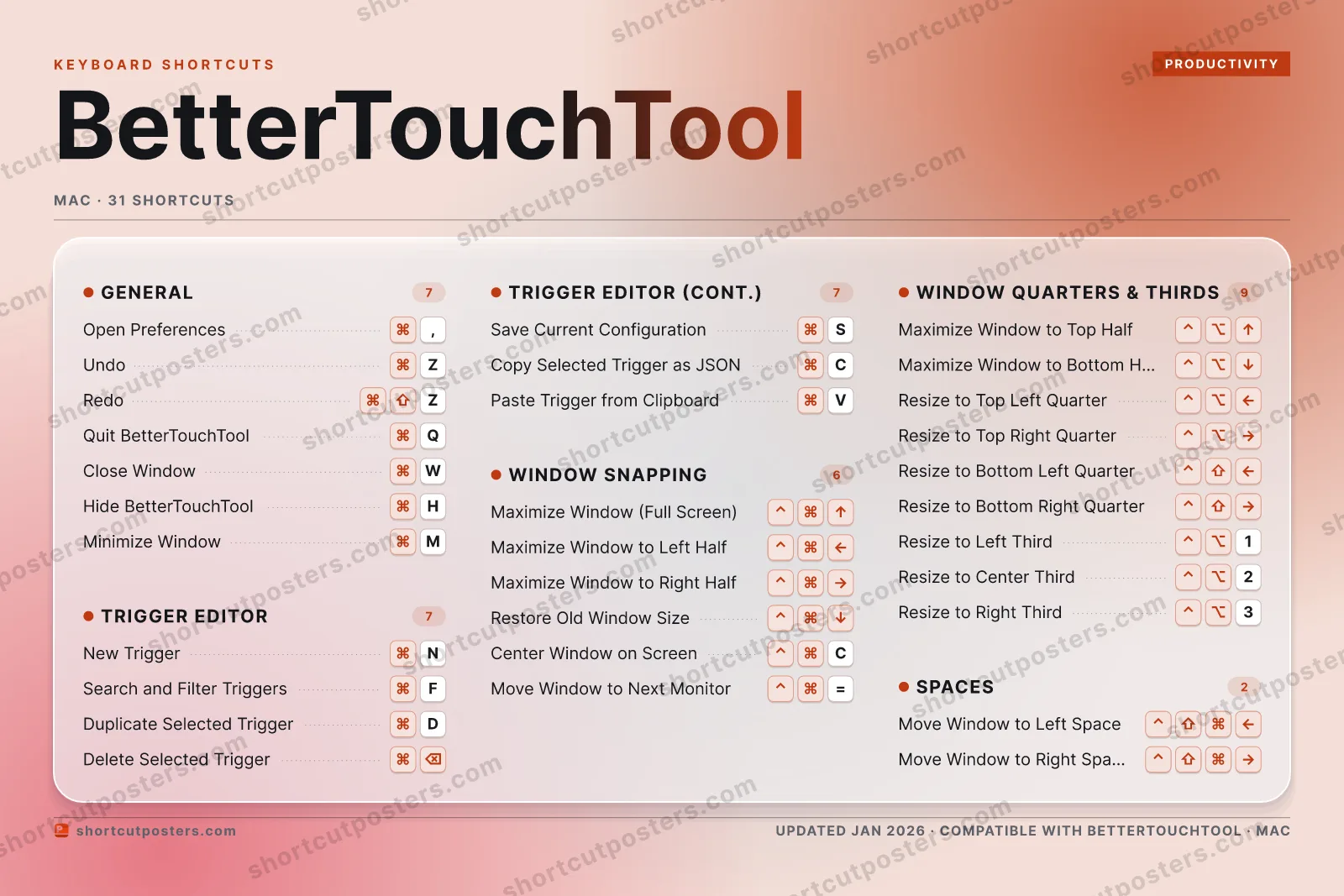
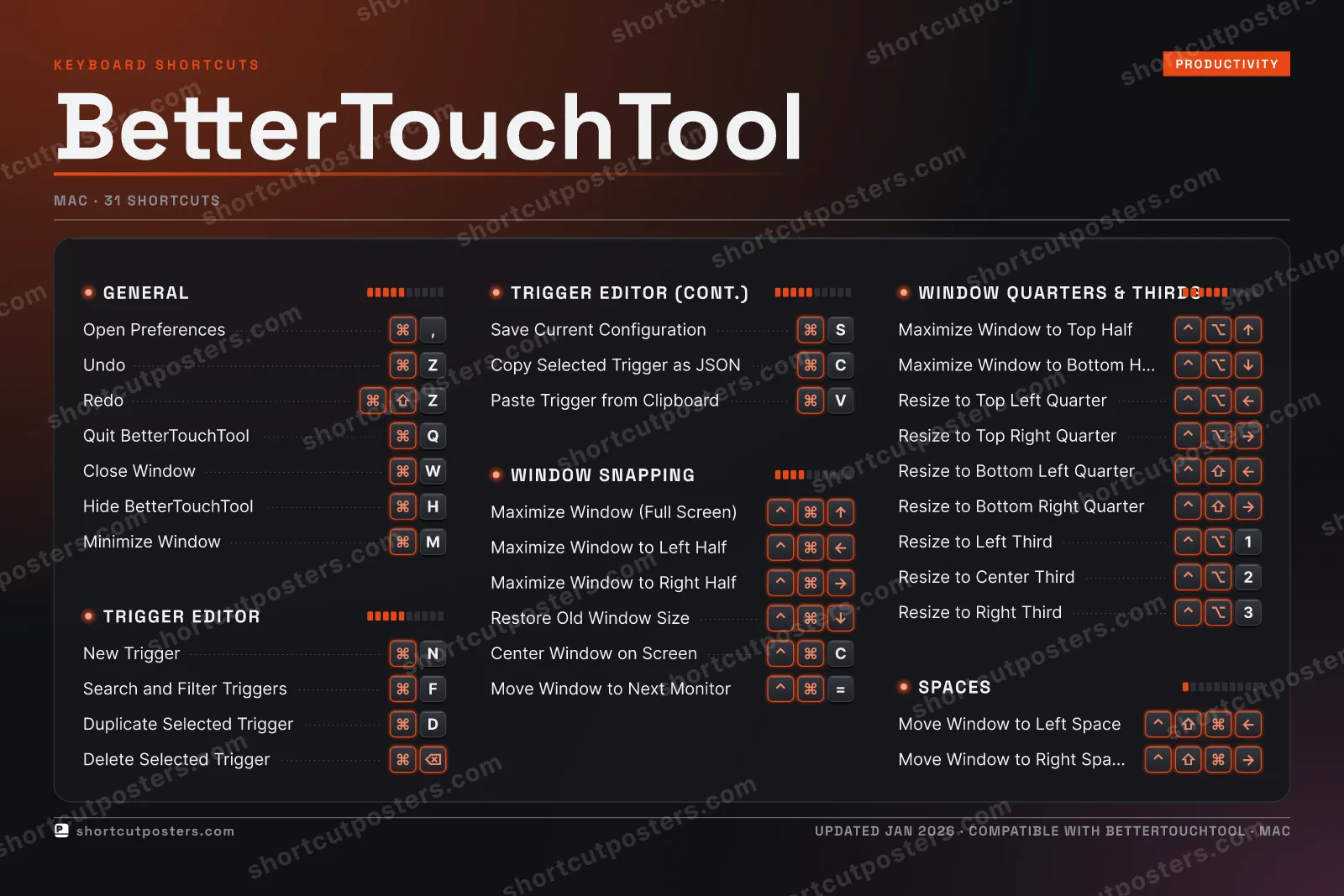
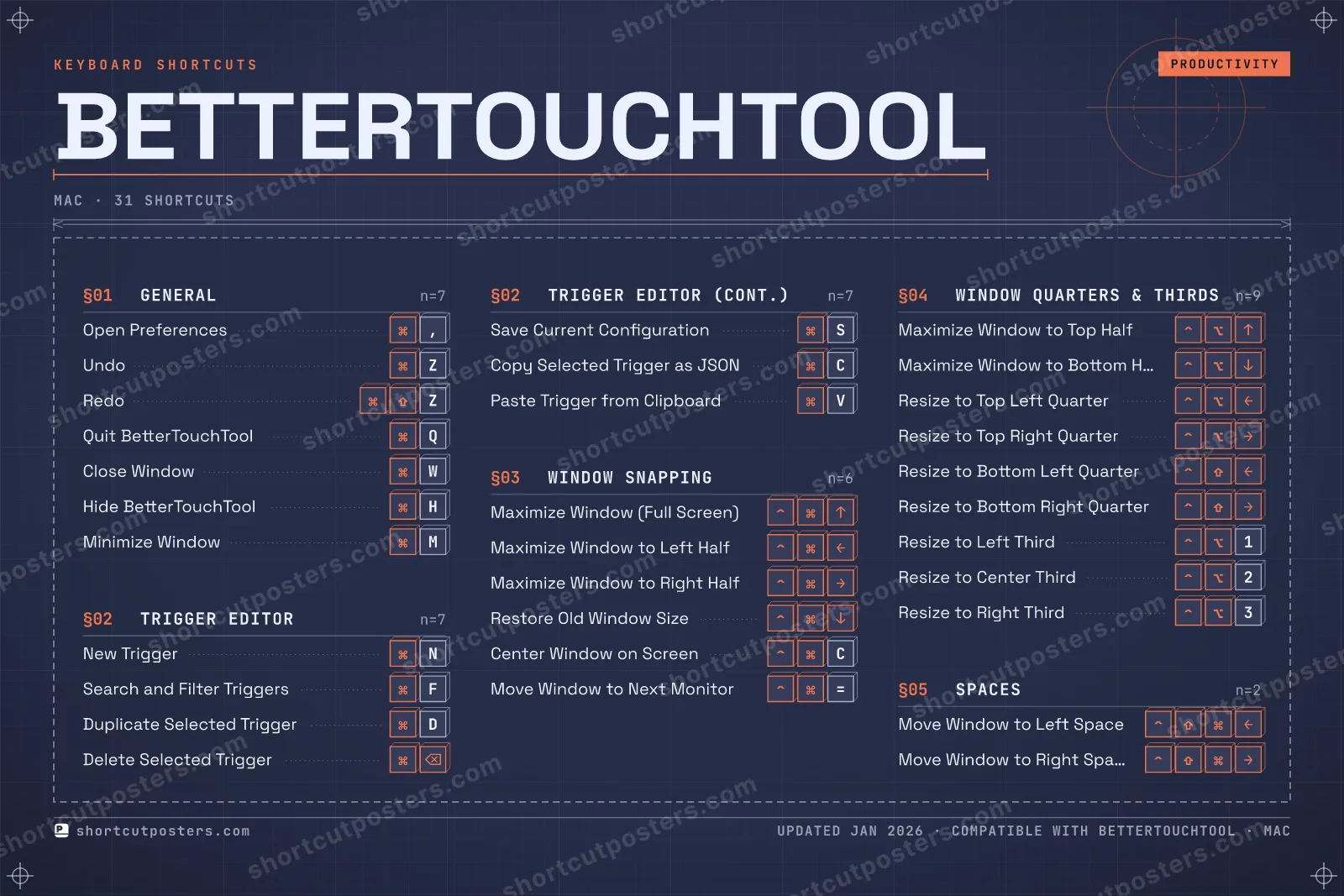
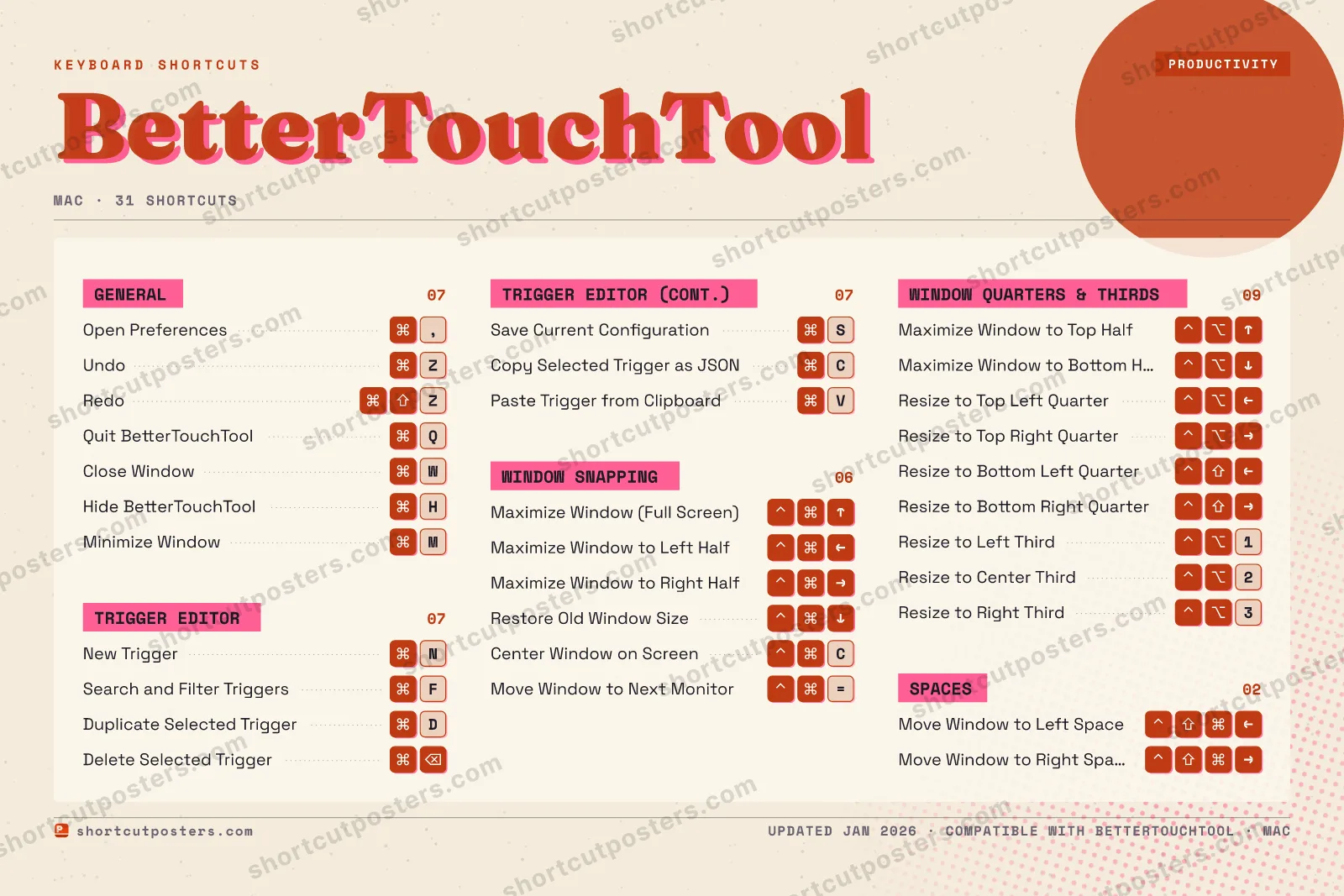
TRIGGER EDITOR07New TriggerNSearch and Filter TriggersFDuplicate Selected TriggerDDelete Selected TriggerSave Current ConfigurationSCopy Selected Trigger as JSONCPaste Trigger from ClipboardVWINDOW SNAPPING06Maximize Window (Full Screen)Maximize Window to Left HalfMaximize Window to Right HalfRestore Old Window SizeCenter Window on ScreenCMove Window to Next Monitor=SPACES02Move Window to Left SpaceMove Window to Right SpaceGENERAL07Open Preferences,UndoZRedoZQuit BetterTouchToolQClose WindowWHide BetterTouchToolHMinimize WindowMWINDOW QUARTERS & THIRDS09Maximize Window to Top HalfMaximize Window to Bottom HalfResize to Top Left QuarterResize to Top Right QuarterResize to Bottom Left QuarterResize to Bottom Right QuarterResize to Left Third1Resize to Center Third2Resize to Right Third3BetterTouchToolKEYBOARD SHORTCUTS · MAC · 31BOTH LAYOUTSQWERTYQWERTYAZERTYAZERTYshortcutposters.comUPDATED JAN 2026 · COMPATIBLE WITH BETTERTOUCHTOOL · MAC
BETTERTOUCHTOOL · KEYBOARD SHORTCUTSMac · 5 SETS · No.01BETTERTOUCHTOOLTOTAL31SHORTCUTSFOR MAC · SHIPPED COMBOSSETSGENERAL07TRIGGER EDITO07WINDOW SNAPPI06WINDOW QUARTE09SPACES02REF. EDITION · JAN 2026shortcutposters.comOpen Preferences,UndoZRedoZQuit BetterTouchToolQClose WindowWHide BetterTouchToolHMinimize WindowMNew TriggerNSearch and Filter TriggersFDuplicate Selected TriggerDDelete Selected TriggerSave Current ConfigurationSCopy Selected Trigger as JSONCPaste Trigger from ClipboardVMaximize Window (Full Screen)Maximize Window to Left HalfMaximize Window to Right HalfRestore Old Window SizeCenter Window on ScreenCMove Window to Next Monitor=Maximize Window to Top HalfMaximize Window to Bottom HalfResize to Top Left QuarterResize to Top Right QuarterResize to Bottom Left QuarterResize to Bottom Right QuarterResize to Left Third1Resize to Center Third2Resize to Right Third3Move Window to Left SpaceMove Window to Right Space

Mac edition · 31 shortcuts

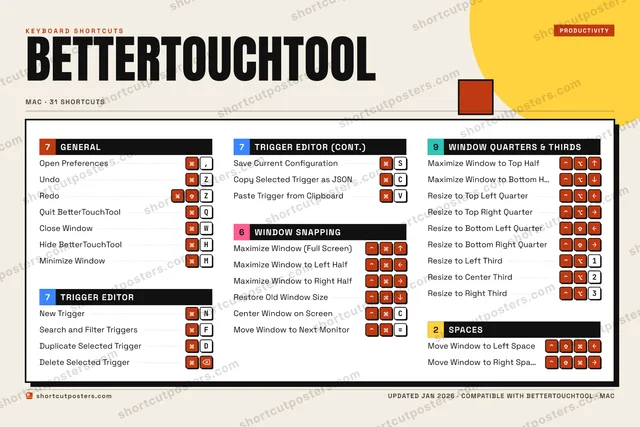
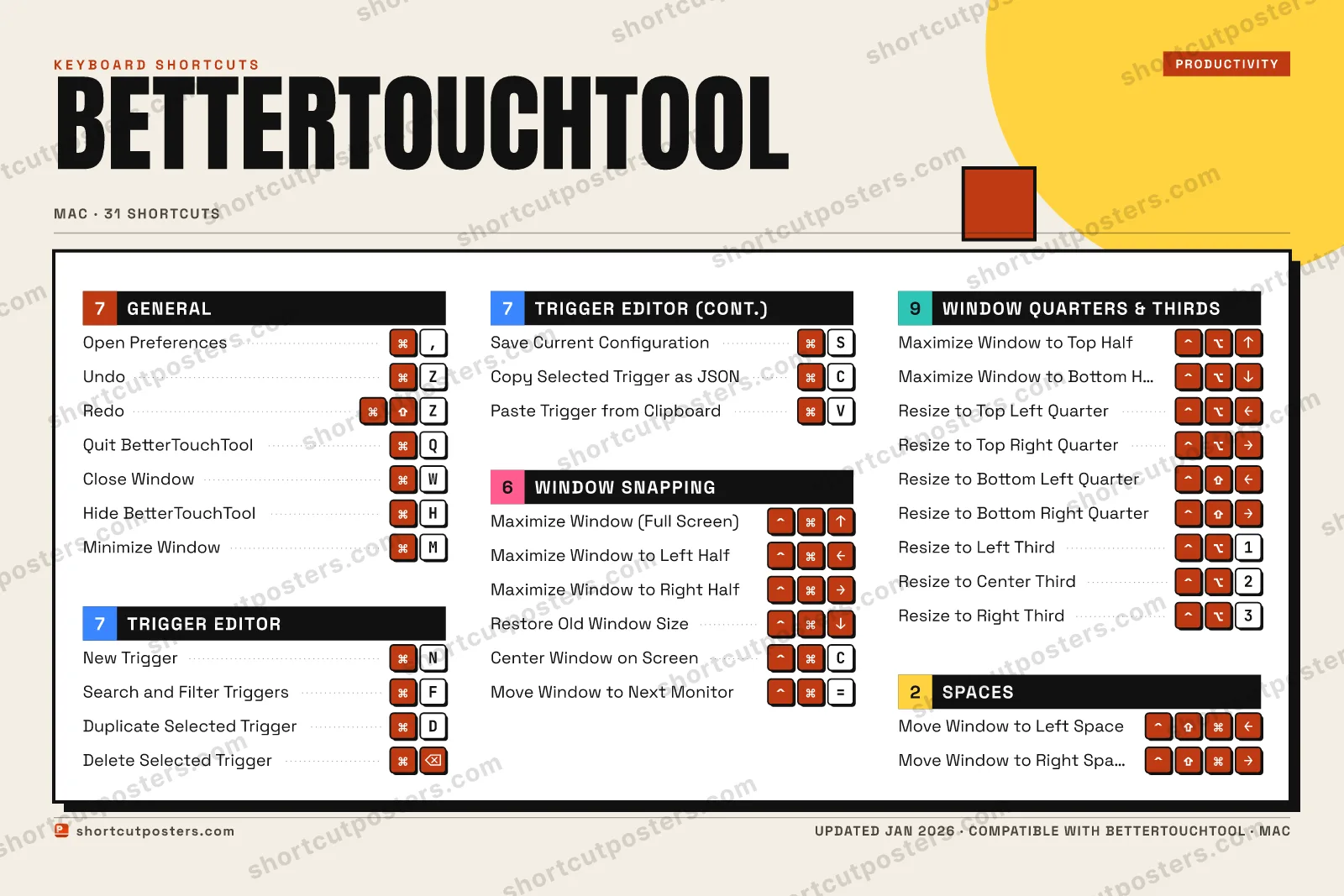
BetterTouchTool Keyboard Shortcuts Poster

A printable, framed-quality poster of the essential BetterTouchTool shortcuts for Mac — the keys worth keeping in view, designed to stay readable on a wall.

Free PNG is web-resolution & lightly watermarked.

Customise this poster Pick the shortcuts, restyle the colours — download free. Get the framed-quality print Full 300 DPI, print-ready — at home or shipped to your door.

BetterTouchTool is a powerful macOS utility that lets you assign custom actions to any input device — keyboard, trackpad, mouse, Touch Bar, Stream Deck, and more. Mastering its built-in shortcuts makes configuring complex automation workflows dramatically faster.

All BetterTouchTool keyboard shortcuts (Mac)

Layout
`
1
2
3
4
5
6
7
8
9
0
-
=
⌫ Back
Tab
Q
W
E
R
T
Y
U
I
O
P
[
]
\
Caps
A
S
D
F
G
H
J
K
L
;
'
Enter ⏎
Shift
Z
X
C
V
B
N
M
,
.
/
Shift
Ctrl
Win
Alt
Space
Alt
Win
Menu
Ctrl

Window Quarters & Thirds 9

Action Shortcut
Maximize Window to Top Half
Maximize Window to Bottom Half
Resize to Top Left Quarter
Resize to Top Right Quarter
Resize to Bottom Left Quarter
Resize to Bottom Right Quarter
Resize to Left Third 1
Resize to Center Third 2
Resize to Right Third 3

General 7

Action Shortcut
Open Preferences ,
Undo Z
Redo Z
Quit BetterTouchTool Q
Close Window W
Hide BetterTouchTool H
Minimize Window M

Trigger Editor 7

Action Shortcut
New Trigger N
Search and Filter Triggers F
Duplicate Selected Trigger D
Delete Selected Trigger
Save Current Configuration S
Copy Selected Trigger as JSON C
Paste Trigger from Clipboard V

Window Snapping 6

Action Shortcut
Maximize Window (Full Screen)
Maximize Window to Left Half
Maximize Window to Right Half
Restore Old Window Size
Center Window on Screen C
Move Window to Next Monitor =

Spaces 2

Action Shortcut
Move Window to Left Space
Move Window to Right Space

Sourced from docs.folivora.ai , docs.folivora.ai , docs.folivora.ai , pie-menu.com , community.folivora.ai Last verified

Unofficial reference. ShortcutPosters is not affiliated with, endorsed by, or sponsored by BetterTouchTool. All product names, logos, and trademarks are property of their respective owners. See our licensing & trademark notice.

Frequently asked questions

Does the poster include every BetterTouchTool shortcut?
BetterTouchTool has 31 keyboard shortcuts in total — the complete list is free to read on this page. The poster features the most essential ones, curated to stay readable on a wall.
Can I print it at home?
Yes. The digital download is a high-resolution 300 DPI file you can print at home or at any print shop, in standard frame sizes.
Does it cover both Mac and Windows?
We sell separate Mac and Windows editions so every key matches your keyboard exactly. This page is the macOS edition.
Is this an official BetterTouchTool product?
No. This is an unofficial reference poster and is not affiliated with or endorsed by BetterTouchTool. All trademarks belong to their respective owners.
For app makers

Promote your app

Built an app with great keyboard shortcuts? Get it into the database — a free, searchable reference page, and an optional printable poster your power users will pin to the wall.

  • Free shortcut reference page
  • Indexed & searchable
  • Optional framed poster