ShortcutPosters

Poster maker

Make your Zellij shortcuts poster

Pick the shortcuts that matter, add your own, tune the colours and style — then download a free personalized PNG, or order the print-ready PDF.

Making a poster for:
Style
Accent
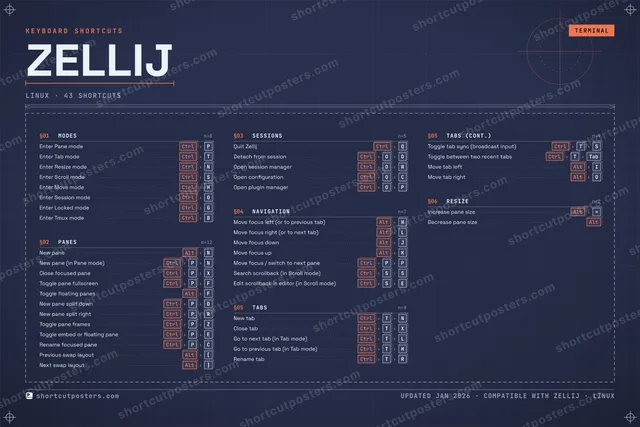
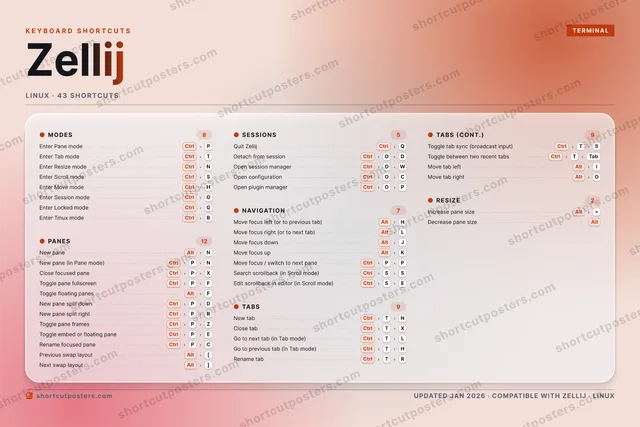
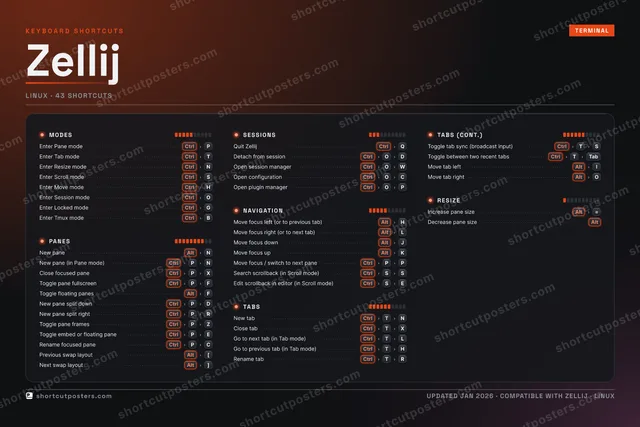
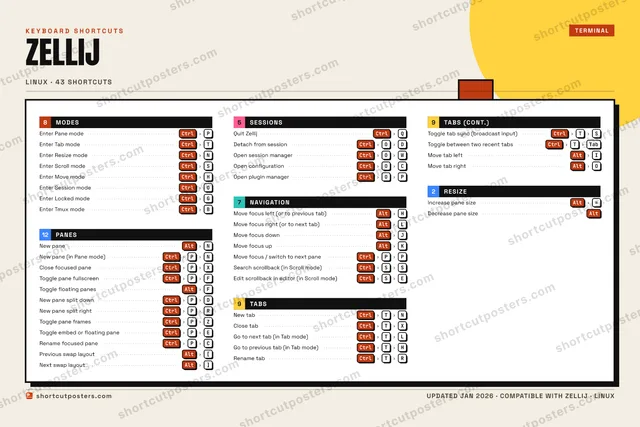
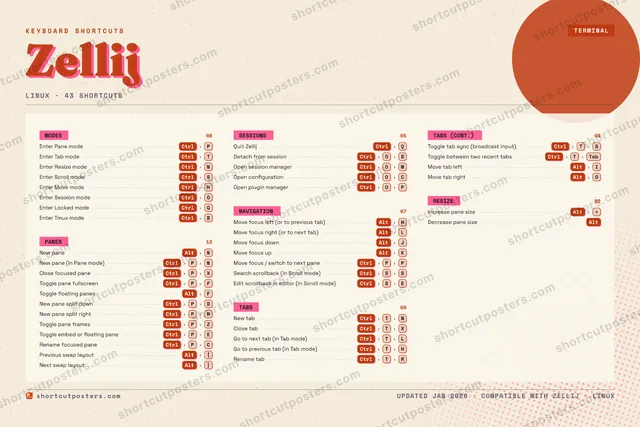
ZELLIJKEYBOARD SHORTCUTS · LINUX · 25 ESSENTIAL1234567890QWERTYUIOPASDFGHJKLZXCVBNMMORE SHORTCUTSEnter Pane mo…CtrlPEnter Tab modeCtrlTNew paneAltNEnter Resize …CtrlNEnter Scroll …CtrlSQuit ZellijCtrlQNew pane (in …CtrlPNClose focused…CtrlPXMove focus le…AltHMove focus ri…AltLMove focus do…AltJMove focus upAltKNew tabCtrlTNDetach from s…CtrlODEnter Move mo…CtrlHEnter Session…CtrlOToggle pane f…CtrlPFToggle floati…AltFClose tabCtrlTXIncrease pane…Alt=Decrease pane…AltEnter Locked …CtrlGNew pane spli…CtrlPDNew pane spli…CtrlPRMove focus / …CtrlPPshortcutposters.comUPDATED JAN 2026 · COMPATIBLE WITH ZELLIJ · LINUX

Hover to locate · click on the poster to disable · drag to reorder categories & shortcuts · to rename a category

Free PNG $0
  • Web resolution (1600 px)
  • Light watermark
  • Instant download
Made to order
Custom print-ready PDF $2.99
  • 300 DPI, framed-quality — no watermark
  • Every standard print size
  • Built to order from the poster above — checkout link emailed to you

Trouble ordering? Email business@shortcutposters.com.

How it works

  1. 1

    Choose a style

    Pick from four layouts: isometric keys, a typewriter list, a labelled keyboard map, or a bold editorial print.

  2. 2

    Make it yours

    Set the accent colour and palette, rename categories, and reorder anything.

  3. 3

    Pick the shortcuts

    Toggle exactly which shortcuts appear — or add your own custom ones.

  4. 4

    Download or print

    Export a free high-resolution PNG instantly, or order a print-ready PDF.

Four styles to choose from

ZELLIJKEYBOARD SHORTCUTS · LINUX · 20 ESSENTIAL1234567890QWERTYUIOPASDFGHJKLZXCVBNMMORE SHORTCUTSEnter Pane modeCtrlPEnter Tab modeCtrlTNew paneAltNEnter Resize modeCtrlNEnter Scroll modeCtrlSQuit ZellijCtrlQNew pane (in Pane…CtrlPNClose focused paneCtrlPXMove focus left (…AltHMove focus right …AltLMove focus downAltJMove focus upAltKNew tabCtrlTNDetach from sessi…CtrlODEnter Move modeCtrlHEnter Session modeCtrlOToggle pane fulls…CtrlPFToggle floating p…AltFClose tabCtrlTXIncrease pane sizeAlt=shortcutposters.comUPDATED JAN 2026 · COMPATIBLE WITH ZELLIJ · LINUX
Keyboard map Every binding labelled on a realistic QWERTY or AZERTY keyboard.
MODESEnter Pane modeCtrlPEnter Tab modeCtrlTEnter Resize modeCtrlNEnter Scroll modeCtrlSEnter Move modeCtrlHEnter Session modeCtrlONAVIGATIONMove focus left (or to previous tab)AltHMove focus right (or to next tab)AltLMove focus downAltJMove focus upAltKRESIZEIncrease pane sizeAlt=PANESNew paneAltNNew pane (in Pane mode)CtrlPNClose focused paneCtrlPXToggle pane fullscreenCtrlPFToggle floating panesAltFSESSIONSQuit ZellijCtrlQDetach from sessionCtrlODTABSNew tabCtrlTNClose tabCtrlTXZellijKEYBOARD SHORTCUTS · LINUX · 20 ESSENTIALBOTH LAYOUTSQWERTYQWERTYAZERTYAZERTYshortcutposters.comUPDATED JAN 2026 · COMPATIBLE WITH ZELLIJ · LINUX
Isometric Shortcuts on a 3D isometric keyboard — bold and poster-like.
MODES06Enter Pane modeCtrlPEnter Tab modeCtrlTEnter Resize modeCtrlNEnter Scroll modeCtrlSEnter Move modeCtrlHEnter Session modeCtrlONAVIGATION04Move focus left (or to previous ta…AltHMove focus right (or to next tab)AltLMove focus downAltJMove focus upAltKRESIZE01Increase pane sizeAlt=PANES05New paneAltNNew pane (in Pane mode)CtrlPNClose focused paneCtrlPXToggle pane fullscreenCtrlPFToggle floating panesAltFSESSIONS02Quit ZellijCtrlQDetach from sessionCtrlODTABS02New tabCtrlTNClose tabCtrlTXZellijKEYBOARD SHORTCUTS · LINUX · 20 ESSENTIALBOTH LAYOUTSQWERTYQWERTYAZERTYAZERTYshortcutposters.comUPDATED JAN 2026 · COMPATIBLE WITH ZELLIJ · LINUX
Typewriter A clean printed list, grouped by category — dense and legible.
ZELLIJ · KEYBOARD SHORTCUTSLinux · 6 SETS · No.01ZELLIJTOTAL20SHORTCUTSFOR LINUX · SHIPPED COMBOSSETSMODES06PANES05SESSIONS02NAVIGATION04TABS02RESIZE01REF. EDITION · JAN 2026shortcutposters.comEnter Pane modeCtrlPEnter Tab modeCtrlTEnter Resize modeCtrlNEnter Scroll modeCtrlSEnter Move modeCtrlHEnter Session modeCtrlONew paneAltNNew pane (in Pane mode)CtrlPNClose focused paneCtrlPXToggle pane fullscreenCtrlPFToggle floating panesAltFQuit ZellijCtrlQDetach from sessionCtrlODMove focus left (or to previous tab)AltHMove focus right (or to next tab)AltLMove focus downAltJMove focus upAltKNew tabCtrlTNClose tabCtrlTXIncrease pane sizeAlt=
Editorial A bold Swiss-style print: giant wordmark, dense keycap columns, and a totals rail.

Frequently asked questions

Is the Zellij poster maker free?

Yes — you can design and download a high-resolution PNG of your Zellij shortcuts poster for free. A print-ready PDF is an optional paid upgrade.

Can I choose which Zellij shortcuts appear?

Yes. Toggle any shortcut on or off, reorder them, rename categories, and even add your own custom shortcuts.

Can I change the colours and style?

Yes. Pick an accent colour, choose a palette, and switch between the isometric, typewriter, and keyboard-map styles.

Which keyboard layout and operating system are supported?

Choose QWERTY or AZERTY, and switch the edition between the operating systems Zellij supports (macOS, Windows, Linux).

How do I get a printed poster?

Download the free PNG to print yourself, or order the print-ready, framed-quality PDF directly from the maker.