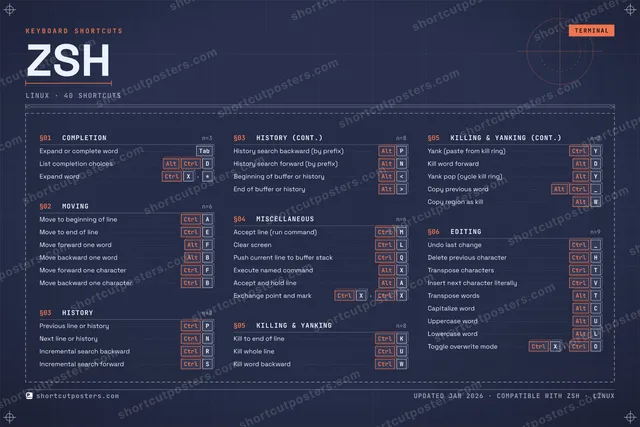
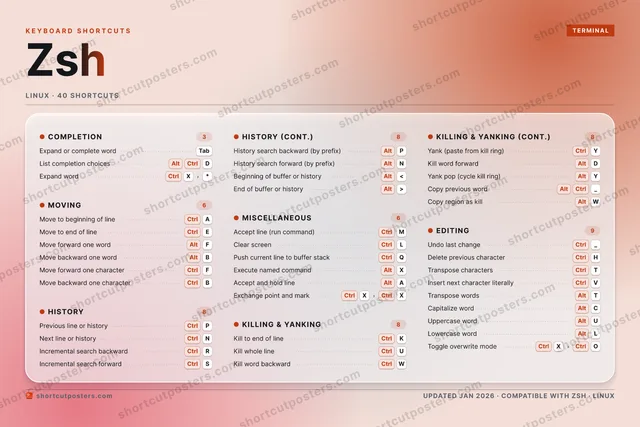
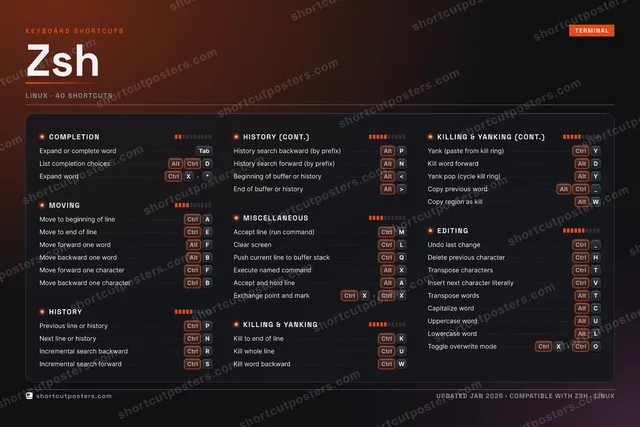
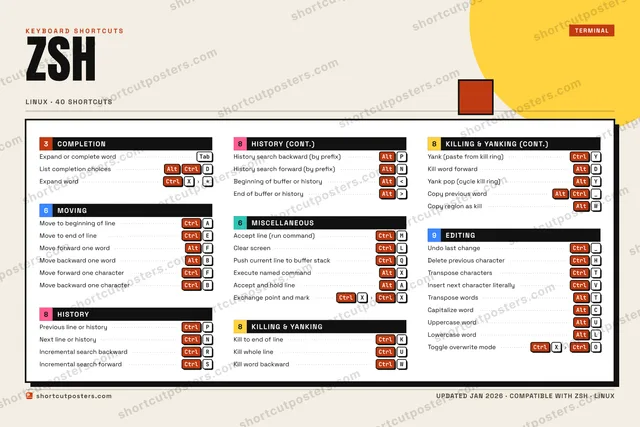
ShortcutPosters

Poster maker

Make your Zsh shortcuts poster

Pick the shortcuts that matter, add your own, tune the colours and style — then download a free personalized PNG, or order the print-ready PDF.

Making a poster for:
Style
Accent
ZSHKEYBOARD SHORTCUTS · LINUX · 401234567890QCtrlPush cur…WCtrlKill wor…ECtrlMove to …RCtrlIncremen…TCtrlTranspos…YCtrlYank (pa…UCtrlKill who…IOPCtrlPrevious…ACtrlMove to …SCtrlIncremen…DAltKill wor…FAltMove for…GHCtrlDelete p…JKCtrlKill to …LCtrlClear sc…ZXAltExecute …CAltCapitali…VCtrlInsert n…BAltMove bac…NCtrlNext lin…MCtrlAccept l…MORE SHORTCUTSExpand or complet…TabUndo last changeCtrl_Move forward one …CtrlFMove backward one…CtrlBYank pop (cycle k…AltYHistory search ba…AltPList completion c…AltCtrlDTranspose wordsAltTUppercase wordAltULowercase wordAltLCopy previous wordAltCtrl_History search fo…AltNBeginning of buff…Alt<End of buffer or …Alt>Copy region as ki…AltWExpand wordCtrlX*Accept and hold l…AltAExchange point an…CtrlXCtrlXToggle overwrite …CtrlXCtrlOshortcutposters.comUPDATED JAN 2026 · COMPATIBLE WITH ZSH · LINUX

Hover to locate · click on the poster to disable · drag to reorder categories & shortcuts · to rename a category

Free PNG $0
  • Web resolution (1600 px)
  • Light watermark
  • Instant download
Made to order
Custom print-ready PDF $2.99
  • 300 DPI, framed-quality — no watermark
  • Every standard print size
  • Built to order from the poster above — checkout link emailed to you

Trouble ordering? Email business@shortcutposters.com.

How it works

  1. 1

    Choose a style

    Pick from four layouts: isometric keys, a typewriter list, a labelled keyboard map, or a bold editorial print.

  2. 2

    Make it yours

    Set the accent colour and palette, rename categories, and reorder anything.

  3. 3

    Pick the shortcuts

    Toggle exactly which shortcuts appear — or add your own custom ones.

  4. 4

    Download or print

    Export a free high-resolution PNG instantly, or order a print-ready PDF.

Four styles to choose from

ZSHKEYBOARD SHORTCUTS · LINUX · 20 ESSENTIAL1234567890QWCtrlKill wor…ECtrlMove to …RCtrlIncremen…TCtrlTranspos…YCtrlYank (pa…UCtrlKill who…IOPCtrlPrevious…ACtrlMove to …SDAltKill wor…FAltMove for…GHCtrlDelete p…JKCtrlKill to …LCtrlClear sc…ZXCVBAltMove bac…NCtrlNext lin…MCtrlAccept l…MORE SHORTCUTSExpand or complet…TabUndo last changeCtrl_Move forward one …CtrlFMove backward one…CtrlBshortcutposters.comUPDATED JAN 2026 · COMPATIBLE WITH ZSH · LINUX
Keyboard map Every binding labelled on a realistic QWERTY or AZERTY keyboard.
MOVINGMove to beginning of lineCtrlAMove to end of lineCtrlEMove forward one wordAltFMove backward one wordAltBMove forward one characterCtrlFMove backward one characterCtrlBMISCELLANEOUSAccept line (run command)CtrlMClear screenCtrlLEDITINGUndo last changeCtrl_Delete previous characterCtrlHTranspose charactersCtrlTCOMPLETIONExpand or complete wordTabHISTORYPrevious line or historyCtrlPNext line or historyCtrlNIncremental search backwardCtrlRKILLING & YANKINGKill to end of lineCtrlKKill whole lineCtrlUKill word backwardCtrlWYank (paste from kill ring)CtrlYKill word forwardAltDZshKEYBOARD SHORTCUTS · LINUX · 20 ESSENTIALBOTH LAYOUTSQWERTYQWERTYAZERTYAZERTYshortcutposters.comUPDATED JAN 2026 · COMPATIBLE WITH ZSH · LINUX
Isometric Shortcuts on a 3D isometric keyboard — bold and poster-like.
MOVING06Move to beginning of lineCtrlAMove to end of lineCtrlEMove forward one wordAltFMove backward one wordAltBMove forward one characterCtrlFMove backward one characterCtrlBMISCELLANEOUS02Accept line (run command)CtrlMClear screenCtrlLEDITING03Undo last changeCtrl_Delete previous characterCtrlHTranspose charactersCtrlTCOMPLETION01Expand or complete wordTabHISTORY03Previous line or historyCtrlPNext line or historyCtrlNIncremental search backwardCtrlRKILLING & YANKING05Kill to end of lineCtrlKKill whole lineCtrlUKill word backwardCtrlWYank (paste from kill ring)CtrlYKill word forwardAltDZshKEYBOARD SHORTCUTS · LINUX · 20 ESSENTIALBOTH LAYOUTSQWERTYQWERTYAZERTYAZERTYshortcutposters.comUPDATED JAN 2026 · COMPATIBLE WITH ZSH · LINUX
Typewriter A clean printed list, grouped by category — dense and legible.
ZSH · KEYBOARD SHORTCUTSLinux · 6 SETS · No.01ZSHTOTAL20SHORTCUTSFOR LINUX · SHIPPED COMBOSSETSCOMPLETION01MOVING06HISTORY03MISCELLANEOUS02KILLING & YAN05EDITING03REF. EDITION · JAN 2026shortcutposters.comExpand or complete wordTabMove to beginning of lineCtrlAMove to end of lineCtrlEMove forward one wordAltFMove backward one wordAltBMove forward one characterCtrlFMove backward one characterCtrlBPrevious line or historyCtrlPNext line or historyCtrlNIncremental search backwardCtrlRAccept line (run command)CtrlMClear screenCtrlLKill to end of lineCtrlKKill whole lineCtrlUKill word backwardCtrlWYank (paste from kill ring)CtrlYKill word forwardAltDUndo last changeCtrl_Delete previous characterCtrlHTranspose charactersCtrlT
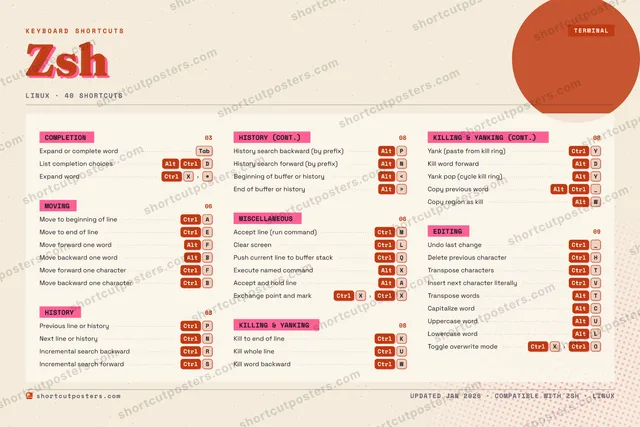
Editorial A bold Swiss-style print: giant wordmark, dense keycap columns, and a totals rail.

Frequently asked questions

Is the Zsh poster maker free?

Yes — you can design and download a high-resolution PNG of your Zsh shortcuts poster for free. A print-ready PDF is an optional paid upgrade.

Can I choose which Zsh shortcuts appear?

Yes. Toggle any shortcut on or off, reorder them, rename categories, and even add your own custom shortcuts.

Can I change the colours and style?

Yes. Pick an accent colour, choose a palette, and switch between the isometric, typewriter, and keyboard-map styles.

Which keyboard layout and operating system are supported?

Choose QWERTY or AZERTY, and switch the edition between the operating systems Zsh supports (macOS, Windows, Linux).

How do I get a printed poster?

Download the free PNG to print yourself, or order the print-ready, framed-quality PDF directly from the maker.