ShortcutPosters

Poster maker

Make your Docker shortcuts poster

Pick the shortcuts that matter, add your own, tune the colours and style — then download a free personalized PNG, or order the print-ready PDF.

Making a poster for:
Style
Accent
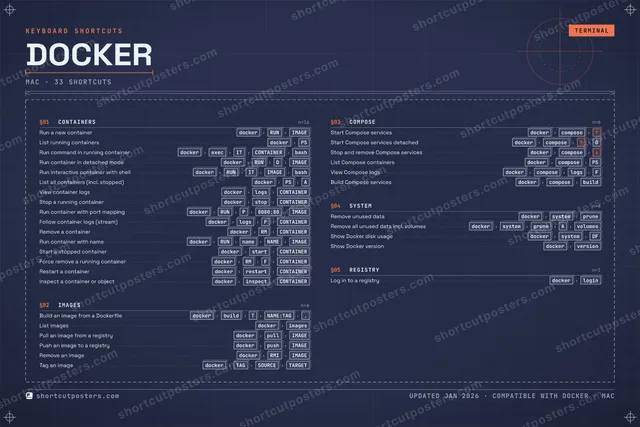
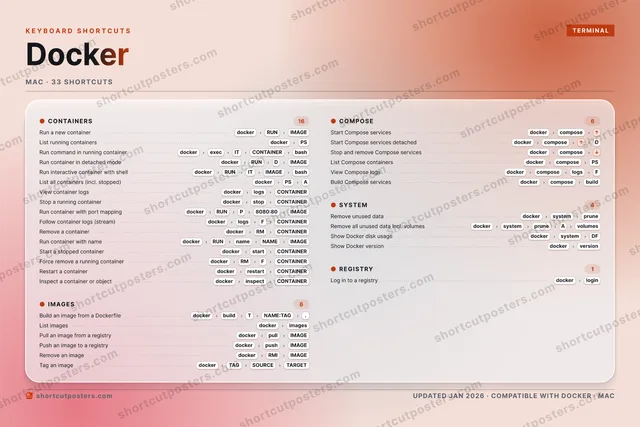
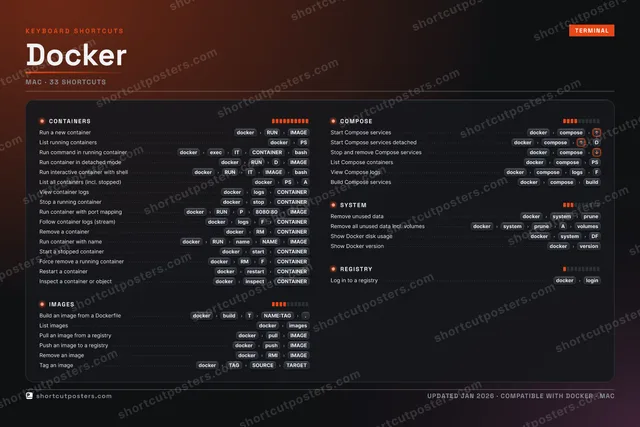
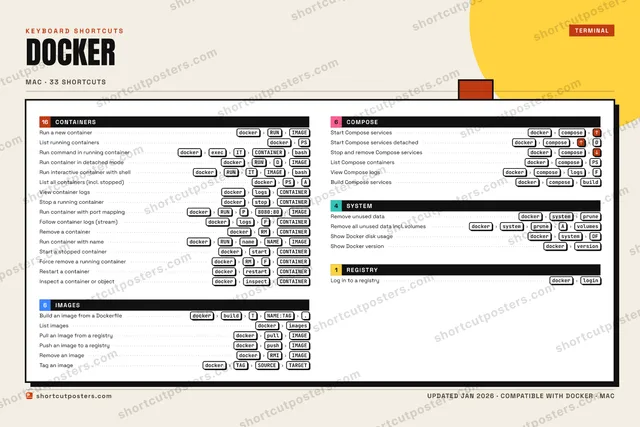
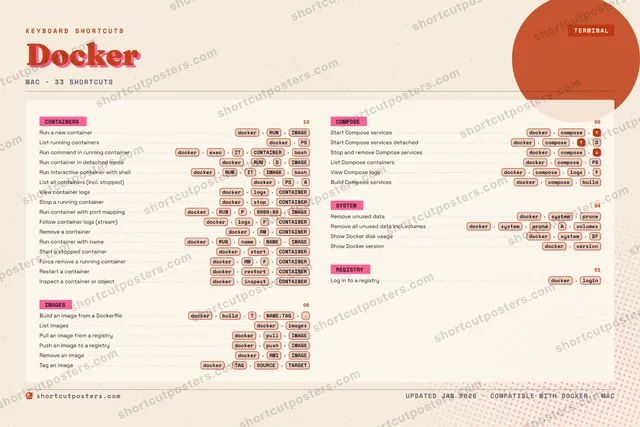
DOCKERKEYBOARD SHORTCUTS · MAC · 25 ESSENTIAL1234567890QWERTYUIOPASDFGHJKLZXCVBNMMORE SHORTCUTSRun a new con…dockerRUNIMAGEList running …dockerPSRun command i…dockerexecITCONTAINERbashBuild an imag…dockerbuildTNAME:TAG.Start Compose…dockercomposeStart Compose…dockercomposeDStop and remo…dockercomposeRun container…dockerRUNDIMAGERun interacti…dockerRUNITIMAGEbashList all cont…dockerPSAView containe…dockerlogsCONTAINERStop a runnin…dockerstopCONTAINERList imagesdockerimagesPull an image…dockerpullIMAGERemove unused…dockersystempruneRun container…dockerRUNP8080:80IMAGEFollow contai…dockerlogsFCONTAINERRemove a cont…dockerRMCONTAINERPush an image…dockerpushIMAGERun container…dockerRUNnameNAMEIMAGEStart a stopp…dockerstartCONTAINERForce remove …dockerRMFCONTAINERRemove an ima…dockerRMIIMAGEList Compose …dockercomposePSView Compose …dockercomposelogsFshortcutposters.comUPDATED JAN 2026 · COMPATIBLE WITH DOCKER · MAC

Hover to locate · click on the poster to disable · drag to reorder categories & shortcuts · to rename a category

Free PNG $0
  • Web resolution (1600 px)
  • Light watermark
  • Instant download
Made to order
Custom print-ready PDF $2.99
  • 300 DPI, framed-quality — no watermark
  • Every standard print size
  • Built to order from the poster above — checkout link emailed to you

Trouble ordering? Email business@shortcutposters.com.

How it works

  1. 1

    Choose a style

    Pick from four layouts: isometric keys, a typewriter list, a labelled keyboard map, or a bold editorial print.

  2. 2

    Make it yours

    Set the accent colour and palette, rename categories, and reorder anything.

  3. 3

    Pick the shortcuts

    Toggle exactly which shortcuts appear — or add your own custom ones.

  4. 4

    Download or print

    Export a free high-resolution PNG instantly, or order a print-ready PDF.

Four styles to choose from

DOCKERKEYBOARD SHORTCUTS · MAC · 20 ESSENTIAL1234567890QWERTYUIOPASDFGHJKLZXCVBNMMORE SHORTCUTSRun a new contain…dockerRUNIMAGEList running cont…dockerPSRun command in ru…dockerexecITCONTAINERbashBuild an image fr…dockerbuildTNAME:TAG.Start Compose ser…dockercomposeStart Compose ser…dockercomposeDStop and remove C…dockercomposeRun container in …dockerRUNDIMAGERun interactive c…dockerRUNITIMAGEbashList all containe…dockerPSAView container lo…dockerlogsCONTAINERStop a running co…dockerstopCONTAINERList imagesdockerimagesPull an image fro…dockerpullIMAGERemove unused datadockersystempruneRun container wit…dockerRUNP8080:80IMAGEFollow container …dockerlogsFCONTAINERRemove a containerdockerRMCONTAINERPush an image to …dockerpushIMAGERun container wit…dockerRUNnameNAMEIMAGEshortcutposters.comUPDATED JAN 2026 · COMPATIBLE WITH DOCKER · MAC
Keyboard map Every binding labelled on a realistic QWERTY or AZERTY keyboard.
IMAGESBuild an image from a DockerfiledockerbuildTNAME:TAG.List imagesdockerimagesPull an image from a registrydockerpullIMAGEPush an image to a registrydockerpushIMAGECOMPOSEStart Compose servicesdockercomposeStart Compose services detacheddockercomposeDStop and remove Compose servicesdockercomposeSYSTEMRemove unused datadockersystempruneCONTAINERSRun a new containerdockerRUNIMAGEList running containersdockerPSRun command in running containerdockerexecITCONTAINERbashRun container in detached modedockerRUNDIMAGERun interactive container with she…dockerRUNITIMAGEbashList all containers (incl. stopped)dockerPSAView container logsdockerlogsCONTAINERStop a running containerdockerstopCONTAINERRun container with port mappingdockerRUNP8080:80IMAGEFollow container logs (stream)dockerlogsFCONTAINERRemove a containerdockerRMCONTAINERRun container with namedockerRUNnameNAMEIMAGEDockerKEYBOARD SHORTCUTS · MAC · 20 ESSENTIALBOTH LAYOUTSQWERTYQWERTYAZERTYAZERTYshortcutposters.comUPDATED JAN 2026 · COMPATIBLE WITH DOCKER · MAC
Isometric Shortcuts on a 3D isometric keyboard — bold and poster-like.
IMAGES04Build an image from a DockerfiledockerbuildTNAME:TAG.List imagesdockerimagesPull an image from a registrydockerpullIMAGEPush an image to a registrydockerpushIMAGECOMPOSE03Start Compose servicesdockercomposeStart Compose services detacheddockercomposeDStop and remove Compose servicesdockercomposeSYSTEM01Remove unused datadockersystempruneCONTAINERS12Run a new containerdockerRUNIMAGEList running containersdockerPSRun command in running containerdockerexecITCONTAINERbashRun container in detached modedockerRUNDIMAGERun interactive container with she…dockerRUNITIMAGEbashList all containers (incl. stopped)dockerPSAView container logsdockerlogsCONTAINERStop a running containerdockerstopCONTAINERRun container with port mappingdockerRUNP8080:80IMAGEFollow container logs (stream)dockerlogsFCONTAINERRemove a containerdockerRMCONTAINERRun container with namedockerRUNnameNAMEIMAGEDockerKEYBOARD SHORTCUTS · MAC · 20 ESSENTIALBOTH LAYOUTSQWERTYQWERTYAZERTYAZERTYshortcutposters.comUPDATED JAN 2026 · COMPATIBLE WITH DOCKER · MAC
Typewriter A clean printed list, grouped by category — dense and legible.
DOCKER · KEYBOARD SHORTCUTSMac · 4 SETS · No.01DOCKERTOTAL20SHORTCUTSFOR MAC · SHIPPED COMBOSSETSCONTAINERS12IMAGES04COMPOSE03SYSTEM01REF. EDITION · JAN 2026shortcutposters.comRun a new containerdockerRUNIMAGEList running containersdockerPSRun command in running containerdockerexecITCONTAINERbashRun container in detached modedockerRUNDIMAGERun interactive container with shelldockerRUNITIMAGEbashList all containers (incl. stopped)dockerPSAView container logsdockerlogsCONTAINERStop a running containerdockerstopCONTAINERRun container with port mappingdockerRUNP8080:80IMAGEFollow container logs (stream)dockerlogsFCONTAINERRemove a containerdockerRMCONTAINERRun container with namedockerRUNnameNAMEIMAGEBuild an image from a DockerfiledockerbuildTNAME:TAG.List imagesdockerimagesPull an image from a registrydockerpullIMAGEPush an image to a registrydockerpushIMAGEStart Compose servicesdockercomposeStart Compose services detacheddockercomposeDStop and remove Compose servicesdockercomposeRemove unused datadockersystemprune
Editorial A bold Swiss-style print: giant wordmark, dense keycap columns, and a totals rail.

Frequently asked questions

Is the Docker poster maker free?

Yes — you can design and download a high-resolution PNG of your Docker shortcuts poster for free. A print-ready PDF is an optional paid upgrade.

Can I choose which Docker shortcuts appear?

Yes. Toggle any shortcut on or off, reorder them, rename categories, and even add your own custom shortcuts.

Can I change the colours and style?

Yes. Pick an accent colour, choose a palette, and switch between the isometric, typewriter, and keyboard-map styles.

Which keyboard layout and operating system are supported?

Choose QWERTY or AZERTY, and switch the edition between the operating systems Docker supports (macOS, Windows, Linux).

How do I get a printed poster?

Download the free PNG to print yourself, or order the print-ready, framed-quality PDF directly from the maker.