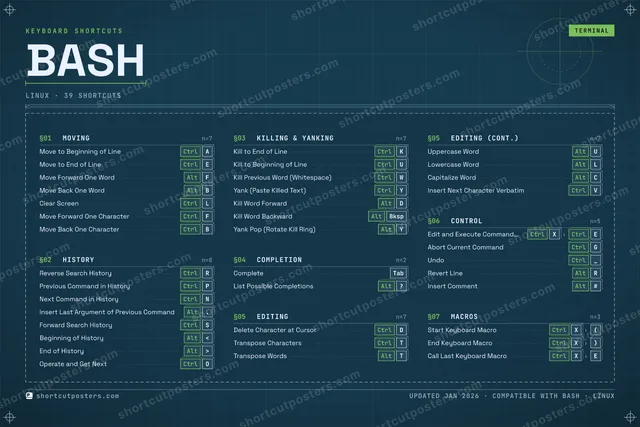
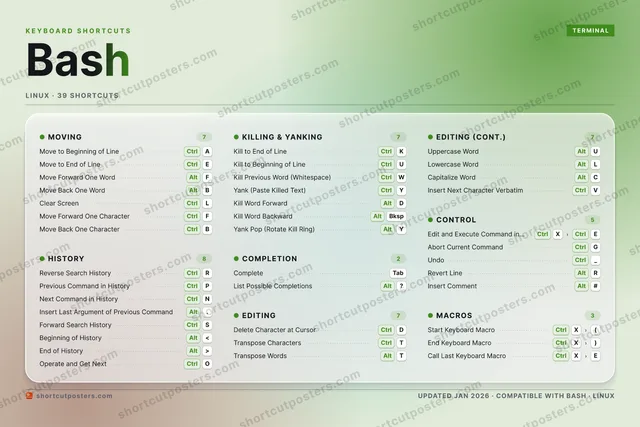
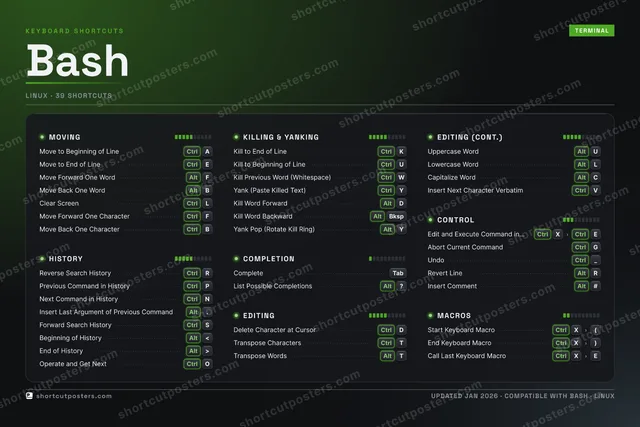
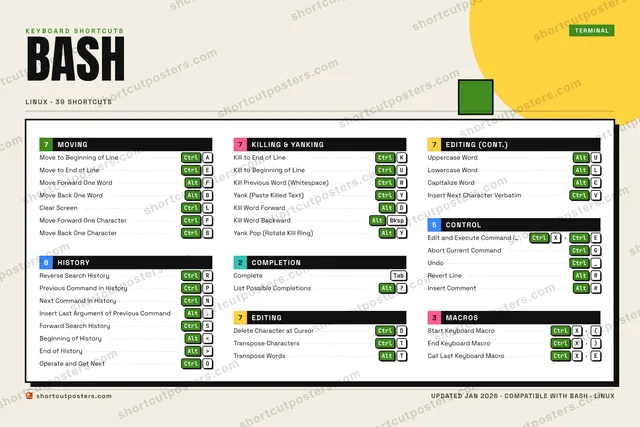
ShortcutPosters

Poster maker

Make your Bash shortcuts poster

Pick the shortcuts that matter, add your own, tune the colours and style — then download a free personalized PNG, or order the print-ready PDF.

Making a poster for:
Style
Accent
BASHKEYBOARD SHORTCUTS · LINUX · 391234567890QWCtrlKill Pre…ECtrlMove to …RCtrlReverse …TCtrlTranspos…YCtrlYank (Pa…UCtrlKill to …IOCtrlOperate …PCtrlPrevious…ACtrlMove to …SCtrlForward …DCtrlDelete C…FAltMove For…GCtrlAbort Cu…HJKCtrlKill to …LCtrlClear Sc…ZXCtrlEdit and…CAltCapitali…VCtrlInsert N…BAltMove Bac…NCtrlNext Com…MMORE SHORTCUTSCompleteTabInsert Last Argum…Alt.Kill Word ForwardAltDKill Word BackwardAltBkspMove Forward One …CtrlFMove Back One Cha…CtrlBUndoCtrl_Transpose WordsAltTUppercase WordAltULowercase WordAltLYank Pop (Rotate …AltYList Possible Com…Alt?Beginning of Hist…Alt<End of HistoryAlt>Revert LineAltRInsert CommentAlt#Start Keyboard Ma…CtrlX(End Keyboard MacroCtrlX)Call Last Keyboar…CtrlXEshortcutposters.comUPDATED JAN 2026 · COMPATIBLE WITH BASH · LINUX

Hover to locate · click on the poster to disable · drag to reorder categories & shortcuts · to rename a category

Free PNG $0
  • Web resolution (1600 px)
  • Light watermark
  • Instant download
Made to order
Custom print-ready PDF $2.99
  • 300 DPI, framed-quality — no watermark
  • Every standard print size
  • Built to order from the poster above — checkout link emailed to you

Trouble ordering? Email business@shortcutposters.com.

How it works

  1. 1

    Choose a style

    Pick from four layouts: isometric keys, a typewriter list, a labelled keyboard map, or a bold editorial print.

  2. 2

    Make it yours

    Set the accent colour and palette, rename categories, and reorder anything.

  3. 3

    Pick the shortcuts

    Toggle exactly which shortcuts appear — or add your own custom ones.

  4. 4

    Download or print

    Export a free high-resolution PNG instantly, or order a print-ready PDF.

Four styles to choose from

BASHKEYBOARD SHORTCUTS · LINUX · 20 ESSENTIAL1234567890QWCtrlKill Pre…ECtrlMove to …RCtrlReverse …TYCtrlYank (Pa…UCtrlKill to …IOPCtrlPrevious…ACtrlMove to …SDCtrlDelete C…FAltMove For…GHJKCtrlKill to …LCtrlClear Sc…ZXCtrlEdit and…CVBAltMove Bac…NCtrlNext Com…MMORE SHORTCUTSCompleteTabInsert Last Argum…Alt.Kill Word ForwardAltDKill Word BackwardAltBkspMove Forward One …CtrlFMove Back One Cha…CtrlBshortcutposters.comUPDATED JAN 2026 · COMPATIBLE WITH BASH · LINUX
Keyboard map Every binding labelled on a realistic QWERTY or AZERTY keyboard.
HISTORYReverse Search HistoryCtrlRPrevious Command in HistoryCtrlPNext Command in HistoryCtrlNInsert Last Argument of Previous Co…Alt.KILLING & YANKINGKill to End of LineCtrlKKill to Beginning of LineCtrlUKill Previous Word (Whitespace)CtrlWYank (Paste Killed Text)CtrlYKill Word ForwardAltDKill Word BackwardAltBkspCONTROLEdit and Execute Command in EditorCtrlXCtrlEMOVINGMove to Beginning of LineCtrlAMove to End of LineCtrlEMove Forward One WordAltFMove Back One WordAltBClear ScreenCtrlLMove Forward One CharacterCtrlFMove Back One CharacterCtrlBCOMPLETIONCompleteTabEDITINGDelete Character at CursorCtrlDBashKEYBOARD SHORTCUTS · LINUX · 20 ESSENTIALBOTH LAYOUTSQWERTYQWERTYAZERTYAZERTYshortcutposters.comUPDATED JAN 2026 · COMPATIBLE WITH BASH · LINUX
Isometric Shortcuts on a 3D isometric keyboard — bold and poster-like.
HISTORY04Reverse Search HistoryCtrlRPrevious Command in HistoryCtrlPNext Command in HistoryCtrlNInsert Last Argument of Previous C…Alt.KILLING & YANKING06Kill to End of LineCtrlKKill to Beginning of LineCtrlUKill Previous Word (Whitespace)CtrlWYank (Paste Killed Text)CtrlYKill Word ForwardAltDKill Word BackwardAltBkspCONTROL01Edit and Execute Command in EditorCtrlXCtrlEMOVING07Move to Beginning of LineCtrlAMove to End of LineCtrlEMove Forward One WordAltFMove Back One WordAltBClear ScreenCtrlLMove Forward One CharacterCtrlFMove Back One CharacterCtrlBCOMPLETION01CompleteTabEDITING01Delete Character at CursorCtrlDBashKEYBOARD SHORTCUTS · LINUX · 20 ESSENTIALBOTH LAYOUTSQWERTYQWERTYAZERTYAZERTYshortcutposters.comUPDATED JAN 2026 · COMPATIBLE WITH BASH · LINUX
Typewriter A clean printed list, grouped by category — dense and legible.
BASH · KEYBOARD SHORTCUTSLinux · 6 SETS · No.01BASHTOTAL20SHORTCUTSFOR LINUX · SHIPPED COMBOSSETSMOVING07HISTORY04KILLING & YAN06COMPLETION01EDITING01CONTROL01REF. EDITION · JAN 2026shortcutposters.comMove to Beginning of LineCtrlAMove to End of LineCtrlEMove Forward One WordAltFMove Back One WordAltBClear ScreenCtrlLMove Forward One CharacterCtrlFMove Back One CharacterCtrlBReverse Search HistoryCtrlRPrevious Command in HistoryCtrlPNext Command in HistoryCtrlNInsert Last Argument of Previous CommandAlt.Kill to End of LineCtrlKKill to Beginning of LineCtrlUKill Previous Word (Whitespace)CtrlWYank (Paste Killed Text)CtrlYKill Word ForwardAltDKill Word BackwardAltBkspCompleteTabDelete Character at CursorCtrlDEdit and Execute Command in EditorCtrlXCtrlE
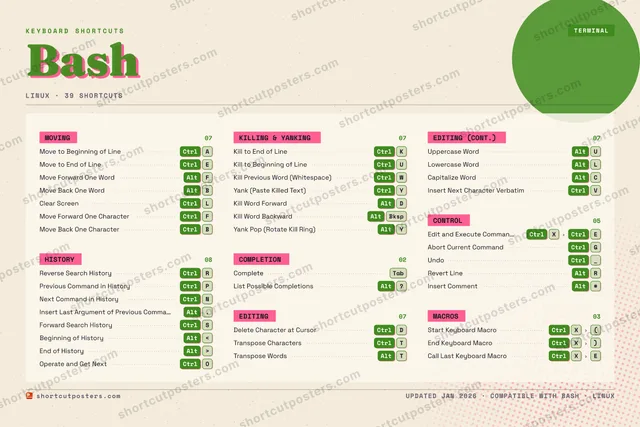
Editorial A bold Swiss-style print: giant wordmark, dense keycap columns, and a totals rail.

Frequently asked questions

Is the Bash poster maker free?

Yes — you can design and download a high-resolution PNG of your Bash shortcuts poster for free. A print-ready PDF is an optional paid upgrade.

Can I choose which Bash shortcuts appear?

Yes. Toggle any shortcut on or off, reorder them, rename categories, and even add your own custom shortcuts.

Can I change the colours and style?

Yes. Pick an accent colour, choose a palette, and switch between the isometric, typewriter, and keyboard-map styles.

Which keyboard layout and operating system are supported?

Choose QWERTY or AZERTY, and switch the edition between the operating systems Bash supports (macOS, Windows, Linux).

How do I get a printed poster?

Download the free PNG to print yourself, or order the print-ready, framed-quality PDF directly from the maker.