ShortcutPosters

Poster maker

Make your fzf shortcuts poster

Pick the shortcuts that matter, add your own, tune the colours and style — then download a free personalized PNG, or order the print-ready PDF.

Making a poster for:
Style
Accent
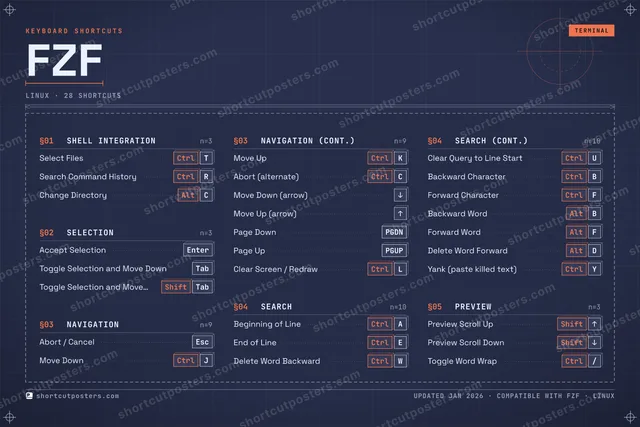
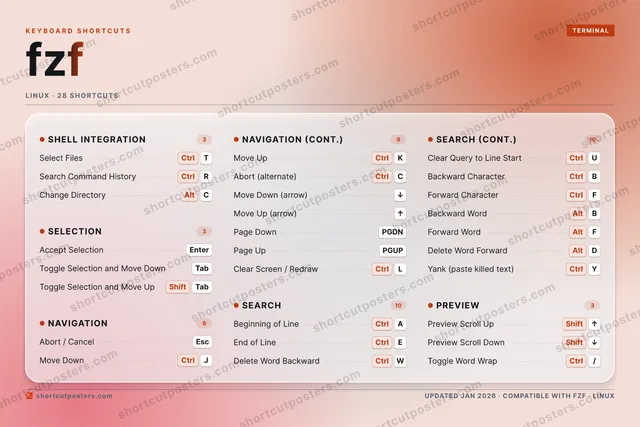
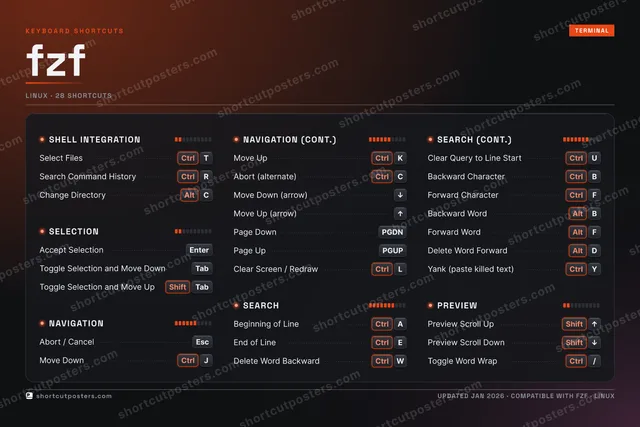
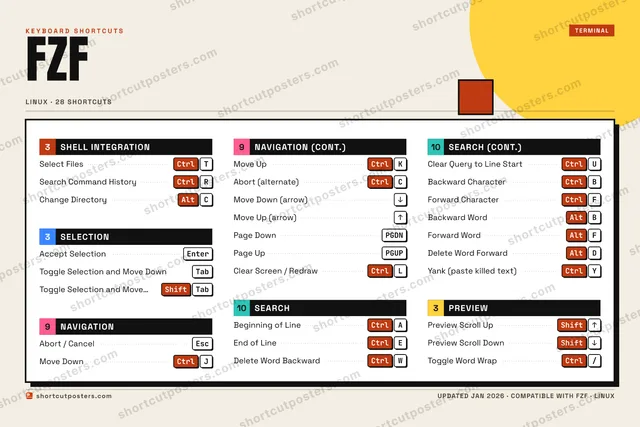
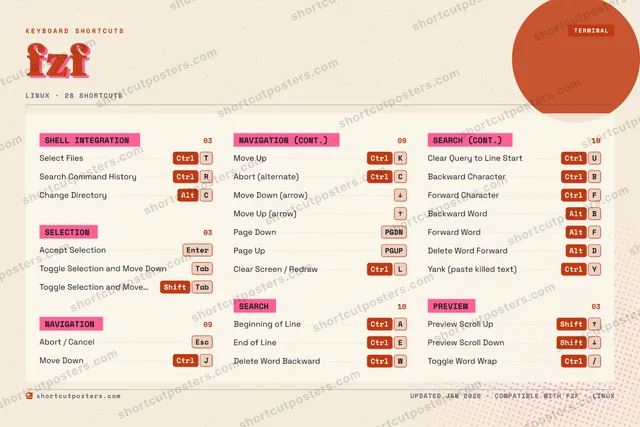
FZFKEYBOARD SHORTCUTS · LINUX · 281234567890QWCtrlDelete W…ECtrlEnd of L…RCtrlSearch C…TCtrlSelect F…YCtrlYank (pa…UCtrlClear Qu…IOPACtrlBeginnin…SDAltDelete W…FCtrlForward …GHJCtrlMove DownKCtrlMove UpLCtrlClear Sc…ZXCAltChange D…VBCtrlBackward…NMMORE SHORTCUTSAccept SelectionEnterAbort / CancelEscToggle Selection …TabToggle Selection …ShiftTabAbort (alternate)CtrlCMove Down (arrow)DOWNMove Up (arrow)UPPage DownPGDNPage UpPGUPPreview Scroll UpShiftUPPreview Scroll Do…ShiftDOWNBackward WordAltBForward WordAltFToggle Word WrapCtrl/shortcutposters.comUPDATED JAN 2026 · COMPATIBLE WITH FZF · LINUX

Hover to locate · click on the poster to disable · drag to reorder categories & shortcuts · to rename a category

Free PNG $0
  • Web resolution (1600 px)
  • Light watermark
  • Instant download
Made to order
Custom print-ready PDF $2.99
  • 300 DPI, framed-quality — no watermark
  • Every standard print size
  • Built to order from the poster above — checkout link emailed to you

Trouble ordering? Email business@shortcutposters.com.

How it works

  1. 1

    Choose a style

    Pick from four layouts: isometric keys, a typewriter list, a labelled keyboard map, or a bold editorial print.

  2. 2

    Make it yours

    Set the accent colour and palette, rename categories, and reorder anything.

  3. 3

    Pick the shortcuts

    Toggle exactly which shortcuts appear — or add your own custom ones.

  4. 4

    Download or print

    Export a free high-resolution PNG instantly, or order a print-ready PDF.

Four styles to choose from

FZFKEYBOARD SHORTCUTS · LINUX · 20 ESSENTIAL1234567890QWCtrlDelete W…ECtrlEnd of L…RCtrlSearch C…TCtrlSelect F…YUCtrlClear Qu…IOPACtrlBeginnin…SDFGHJCtrlMove DownKCtrlMove UpLZXCAltChange D…VBNMMORE SHORTCUTSAccept SelectionEnterAbort / CancelEscToggle Selection …TabToggle Selection …ShiftTabAbort (alternate)CtrlCMove Down (arrow)DOWNMove Up (arrow)UPPage DownPGDNPage UpPGUPPreview Scroll UpShiftUPPreview Scroll Do…ShiftDOWNshortcutposters.comUPDATED JAN 2026 · COMPATIBLE WITH FZF · LINUX
Keyboard map Every binding labelled on a realistic QWERTY or AZERTY keyboard.
SHELL INTEGRATIONSelect Files (paste into command l…CtrlTSearch Command HistoryCtrlRChange Directory (cd into selectio…AltCSEARCHBeginning of LineCtrlAEnd of LineCtrlEDelete Word BackwardCtrlWClear Query to Line StartCtrlUPREVIEWPreview Scroll UpShiftUPPreview Scroll DownShiftDOWNSELECTIONAccept SelectionEnterToggle Selection and Move DownTabToggle Selection and Move UpShiftTabNAVIGATIONAbort / CancelEscMove DownCtrlJMove UpCtrlKAbort (alternate)CtrlCMove Down (arrow)DOWNMove Up (arrow)UPPage DownPGDNPage UpPGUPfzfKEYBOARD SHORTCUTS · LINUX · 20 ESSENTIALBOTH LAYOUTSQWERTYQWERTYAZERTYAZERTYshortcutposters.comUPDATED JAN 2026 · COMPATIBLE WITH FZF · LINUX
Isometric Shortcuts on a 3D isometric keyboard — bold and poster-like.
SHELL INTEGRATION03Select Files (paste into command l…CtrlTSearch Command HistoryCtrlRChange Directory (cd into selectio…AltCSEARCH04Beginning of LineCtrlAEnd of LineCtrlEDelete Word BackwardCtrlWClear Query to Line StartCtrlUPREVIEW02Preview Scroll UpShiftUPPreview Scroll DownShiftDOWNSELECTION03Accept SelectionEnterToggle Selection and Move DownTabToggle Selection and Move UpShiftTabNAVIGATION08Abort / CancelEscMove DownCtrlJMove UpCtrlKAbort (alternate)CtrlCMove Down (arrow)DOWNMove Up (arrow)UPPage DownPGDNPage UpPGUPfzfKEYBOARD SHORTCUTS · LINUX · 20 ESSENTIALBOTH LAYOUTSQWERTYQWERTYAZERTYAZERTYshortcutposters.comUPDATED JAN 2026 · COMPATIBLE WITH FZF · LINUX
Typewriter A clean printed list, grouped by category — dense and legible.
FZF · KEYBOARD SHORTCUTSLinux · 5 SETS · No.01FZFTOTAL20SHORTCUTSFOR LINUX · SHIPPED COMBOSSETSSHELL INTEGRA03SELECTION03NAVIGATION08SEARCH04PREVIEW02REF. EDITION · JAN 2026shortcutposters.comSelect Files (paste into command line)CtrlTSearch Command HistoryCtrlRChange Directory (cd into selection)AltCAccept SelectionEnterToggle Selection and Move DownTabToggle Selection and Move UpShiftTabAbort / CancelEscMove DownCtrlJMove UpCtrlKAbort (alternate)CtrlCMove Down (arrow)DOWNMove Up (arrow)UPPage DownPGDNPage UpPGUPBeginning of LineCtrlAEnd of LineCtrlEDelete Word BackwardCtrlWClear Query to Line StartCtrlUPreview Scroll UpShiftUPPreview Scroll DownShiftDOWN
Editorial A bold Swiss-style print: giant wordmark, dense keycap columns, and a totals rail.

Frequently asked questions

Is the fzf poster maker free?

Yes — you can design and download a high-resolution PNG of your fzf shortcuts poster for free. A print-ready PDF is an optional paid upgrade.

Can I choose which fzf shortcuts appear?

Yes. Toggle any shortcut on or off, reorder them, rename categories, and even add your own custom shortcuts.

Can I change the colours and style?

Yes. Pick an accent colour, choose a palette, and switch between the isometric, typewriter, and keyboard-map styles.

Which keyboard layout and operating system are supported?

Choose QWERTY or AZERTY, and switch the edition between the operating systems fzf supports (macOS, Windows, Linux).

How do I get a printed poster?

Download the free PNG to print yourself, or order the print-ready, framed-quality PDF directly from the maker.