ShortcutPosters

Poster maker

Make your Ollama shortcuts poster

Pick the shortcuts that matter, add your own, tune the colours and style — then download a free personalized PNG, or order the print-ready PDF.

Making a poster for:
Style
Accent
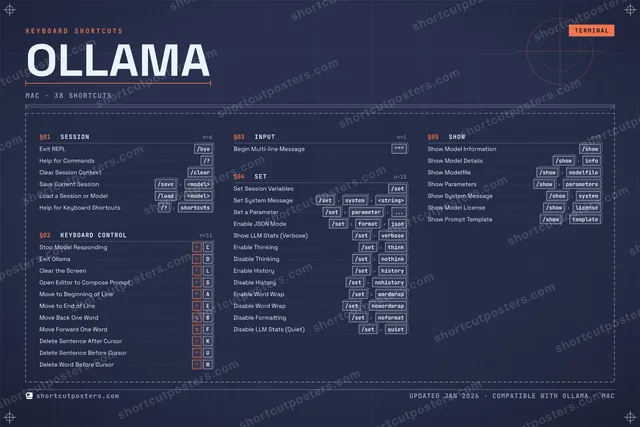
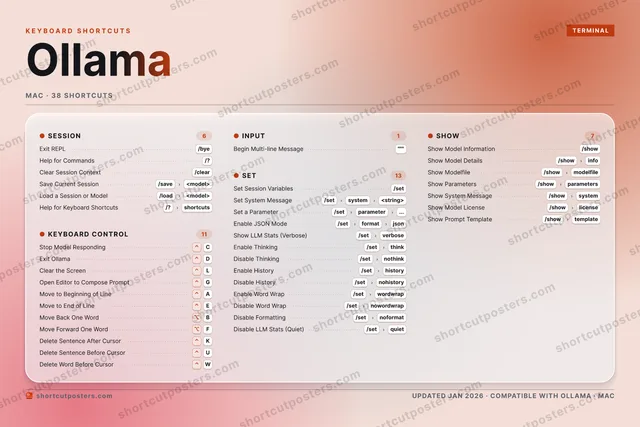
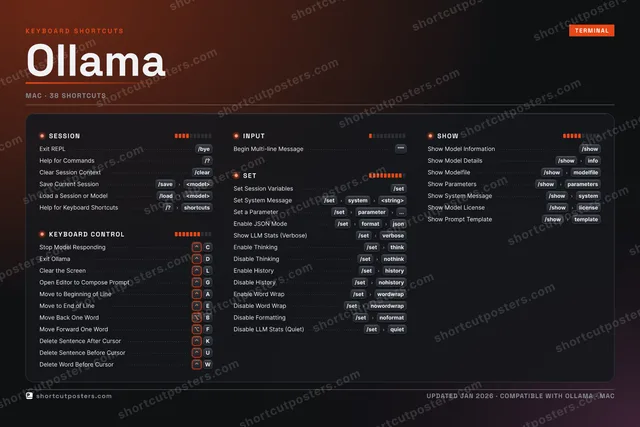
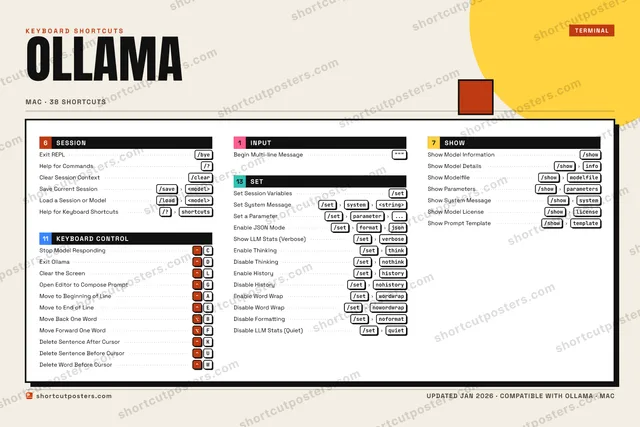
OLLAMAKEYBOARD SHORTCUTS · MAC · 36 ESSENTIAL1234567890QWDelete W…EMove to …RTYUDelete S…IOPAMove to …SDExit Oll…FMove For…GOpen Edi…HJKDelete S…LClear th…ZXCStop Mod…VBMove Bac…NMMORE SHORTCUTSExit REPL/byeHelp for Comm…/?Clear Session…/clearBegin Multi-l…"""Set Session V…/setSave Current …/save<model>Load a Sessio…/load<model>Set System Me…/setsystem<string>Set a Paramet…/setparameter...Show Model In…/showShow Model De…/showinfoHelp for Keyb…/?shortcutsEnable JSON M…/setformatjsonShow LLM Stat…/setverboseEnable Thinki…/setthinkDisable Think…/setnothinkShow Modelfile/showmodelfileShow Paramete…/showparametersShow System M…/showsystemEnable History/sethistoryDisable Histo…/setnohistoryEnable Word W…/setwordwrapDisable Word …/setnowordwrapDisable Forma…/setnoformatDisable LLM S…/setquietshortcutposters.comUPDATED JAN 2026 · COMPATIBLE WITH OLLAMA · MAC

Hover to locate · click on the poster to disable · drag to reorder categories & shortcuts · to rename a category

Free PNG $0
  • Web resolution (1600 px)
  • Light watermark
  • Instant download
Made to order
Custom print-ready PDF $2.99
  • 300 DPI, framed-quality — no watermark
  • Every standard print size
  • Built to order from the poster above — checkout link emailed to you

Trouble ordering? Email business@shortcutposters.com.

How it works

  1. 1

    Choose a style

    Pick from four layouts: isometric keys, a typewriter list, a labelled keyboard map, or a bold editorial print.

  2. 2

    Make it yours

    Set the accent colour and palette, rename categories, and reorder anything.

  3. 3

    Pick the shortcuts

    Toggle exactly which shortcuts appear — or add your own custom ones.

  4. 4

    Download or print

    Export a free high-resolution PNG instantly, or order a print-ready PDF.

Four styles to choose from

OLLAMAKEYBOARD SHORTCUTS · MAC · 20 ESSENTIAL1234567890QWERTYUIOPASDExit Oll…FGHJKLClear th…ZXCStop Mod…VBNMMORE SHORTCUTSExit REPL/byeHelp for Commands/?Clear Session Con…/clearBegin Multi-line …"""Set Session Varia…/setSave Current Sess…/save<model>Load a Session or…/load<model>Set System Message/setsystem<string>Set a Parameter/setparameter...Show Model Inform…/showShow Model Details/showinfoHelp for Keyboard…/?shortcutsEnable JSON Mode/setformatjsonShow LLM Stats (V…/setverboseEnable Thinking/setthinkDisable Thinking/setnothinkShow Modelfile/showmodelfileshortcutposters.comUPDATED JAN 2026 · COMPATIBLE WITH OLLAMA · MAC
Keyboard map Every binding labelled on a realistic QWERTY or AZERTY keyboard.
KEYBOARD CONTROLStop Model RespondingCExit OllamaDClear the ScreenLINPUTBegin Multi-line Message"""SHOWShow Model Information/showShow Model Details/showinfoShow Modelfile/showmodelfileSESSIONExit REPL/byeHelp for Commands/?Clear Session Context/clearSave Current Session/save<model>Load a Session or Model/load<model>Help for Keyboard Shortcuts/?shortcutsSETSet Session Variables/setSet System Message/setsystem<string>Set a Parameter/setparameter...Enable JSON Mode/setformatjsonShow LLM Stats (Verbose)/setverboseEnable Thinking/setthinkDisable Thinking/setnothinkOllamaKEYBOARD SHORTCUTS · MAC · 20 ESSENTIALBOTH LAYOUTSQWERTYQWERTYAZERTYAZERTYshortcutposters.comUPDATED JAN 2026 · COMPATIBLE WITH OLLAMA · MAC
Isometric Shortcuts on a 3D isometric keyboard — bold and poster-like.
KEYBOARD CONTROL03Stop Model RespondingCExit OllamaDClear the ScreenLINPUT01Begin Multi-line Message"""SHOW03Show Model Information/showShow Model Details/showinfoShow Modelfile/showmodelfileSESSION06Exit REPL/byeHelp for Commands/?Clear Session Context/clearSave Current Session/save<model>Load a Session or Model/load<model>Help for Keyboard Shortcuts/?shortcutsSET07Set Session Variables/setSet System Message/setsystem<string>Set a Parameter/setparameter...Enable JSON Mode/setformatjsonShow LLM Stats (Verbose)/setverboseEnable Thinking/setthinkDisable Thinking/setnothinkOllamaKEYBOARD SHORTCUTS · MAC · 20 ESSENTIALBOTH LAYOUTSQWERTYQWERTYAZERTYAZERTYshortcutposters.comUPDATED JAN 2026 · COMPATIBLE WITH OLLAMA · MAC
Typewriter A clean printed list, grouped by category — dense and legible.
OLLAMA · KEYBOARD SHORTCUTSMac · 5 SETS · No.01OLLAMATOTAL20SHORTCUTSFOR MAC · SHIPPED COMBOSSETSSESSION06KEYBOARD CONT03INPUT01SET07SHOW03REF. EDITION · JAN 2026shortcutposters.comExit REPL/byeHelp for Commands/?Clear Session Context/clearSave Current Session/save<model>Load a Session or Model/load<model>Help for Keyboard Shortcuts/?shortcutsStop Model RespondingCExit OllamaDClear the ScreenLBegin Multi-line Message"""Set Session Variables/setSet System Message/setsystem<string>Set a Parameter/setparameter...Enable JSON Mode/setformatjsonShow LLM Stats (Verbose)/setverboseEnable Thinking/setthinkDisable Thinking/setnothinkShow Model Information/showShow Model Details/showinfoShow Modelfile/showmodelfile
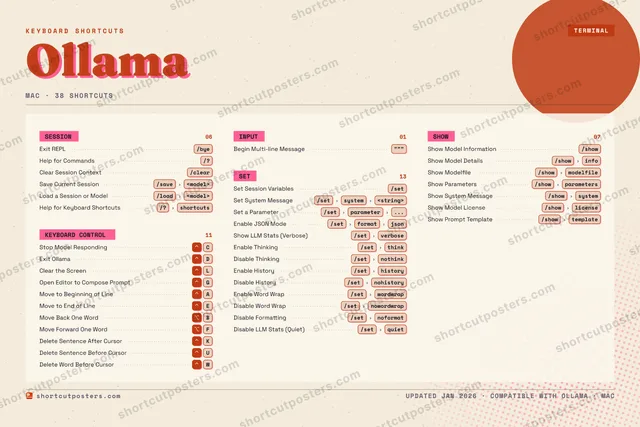
Editorial A bold Swiss-style print: giant wordmark, dense keycap columns, and a totals rail.

Frequently asked questions

Is the Ollama poster maker free?

Yes — you can design and download a high-resolution PNG of your Ollama shortcuts poster for free. A print-ready PDF is an optional paid upgrade.

Can I choose which Ollama shortcuts appear?

Yes. Toggle any shortcut on or off, reorder them, rename categories, and even add your own custom shortcuts.

Can I change the colours and style?

Yes. Pick an accent colour, choose a palette, and switch between the isometric, typewriter, and keyboard-map styles.

Which keyboard layout and operating system are supported?

Choose QWERTY or AZERTY, and switch the edition between the operating systems Ollama supports (macOS, Windows, Linux).

How do I get a printed poster?

Download the free PNG to print yourself, or order the print-ready, framed-quality PDF directly from the maker.