ShortcutPosters

Poster maker

Make your lazygit shortcuts poster

Pick the shortcuts that matter, add your own, tune the colours and style — then download a free personalized PNG, or order the print-ready PDF.

Making a poster for:
Style
Accent
LAZYGITKEYBOARD SHORTCUTS · MAC · 43 ESSENTIAL1234567890QQuitWEEdit fil…RReword c…TYCopy to …UIIgnore o…OPPushAStage al…SStash al…DView dis…FFixup co…GPop stas…HJNext itemKPrevious…LZUndoXCCommit s…VPaste ch…BNCreate n…MMerge in…MORE SHORTCUTSPullPStage / unsta…Confirm / Sel…Return / Canc…Checkout sele…Open keybindi…?Next panelSquash commit…SRefresh git s…RView merge/re…MRebase onto s…RDrop commitDAmend commit …AApply stash e…RedoZSwitch to rec…RNext tab]Previous tab[Search curren…/Fast-forward …FCherry-pick (…CDrop stash en…DNext screen m…+Previous scre…_FilteringSshortcutposters.comUPDATED JAN 2026 · COMPATIBLE WITH LAZYGIT · MAC

Hover to locate · click on the poster to disable · drag to reorder categories & shortcuts · to rename a category

Free PNG $0
  • Web resolution (1600 px)
  • Light watermark
  • Instant download
Made to order
Custom print-ready PDF $2.99
  • 300 DPI, framed-quality — no watermark
  • Every standard print size
  • Built to order from the poster above — checkout link emailed to you

Trouble ordering? Email business@shortcutposters.com.

How it works

  1. 1

    Choose a style

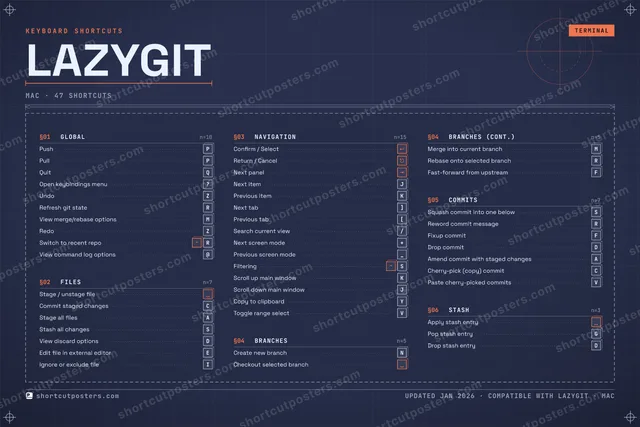
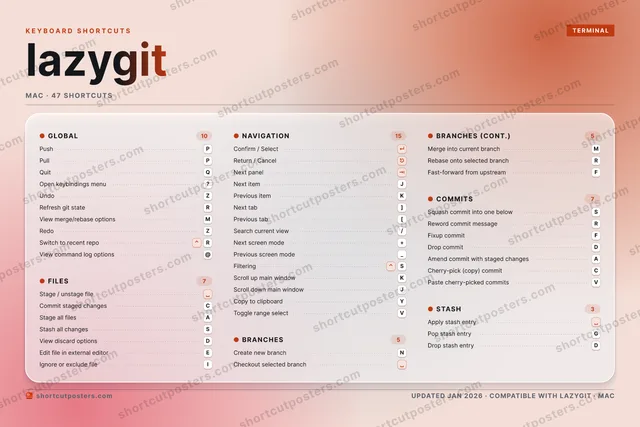
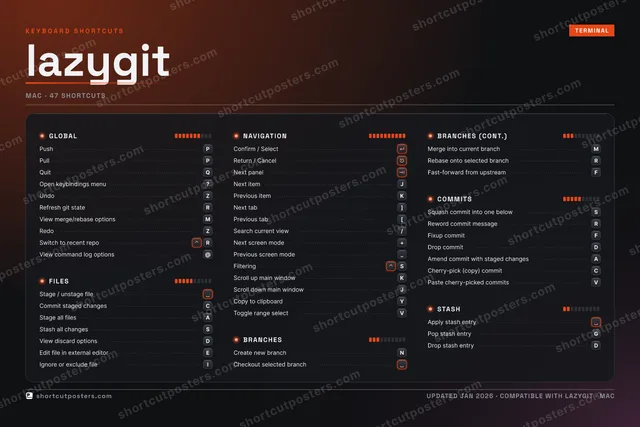
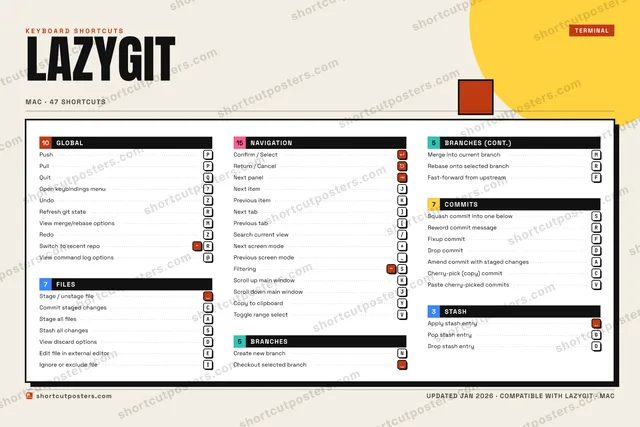
    Pick from four layouts: isometric keys, a typewriter list, a labelled keyboard map, or a bold editorial print.

  2. 2

    Make it yours

    Set the accent colour and palette, rename categories, and reorder anything.

  3. 3

    Pick the shortcuts

    Toggle exactly which shortcuts appear — or add your own custom ones.

  4. 4

    Download or print

    Export a free high-resolution PNG instantly, or order a print-ready PDF.

Four styles to choose from

LAZYGITKEYBOARD SHORTCUTS · MAC · 20 ESSENTIAL1234567890QQuitWERReword c…TYUIOPPushAStage al…SStash al…DFGHJNext itemKLZUndoXCCommit s…VBNCreate n…MMerge in…MORE SHORTCUTSPullPStage / unstage f…Confirm / SelectReturn / CancelCheckout selected…Open keybindings …?Next panelSquash commit int…SRefresh git stateRView merge/rebase…Mshortcutposters.comUPDATED JAN 2026 · COMPATIBLE WITH LAZYGIT · MAC
Keyboard map Every binding labelled on a realistic QWERTY or AZERTY keyboard.
FILESStage / unstage fileCommit staged changesCStage all filesAStash all changesSNAVIGATIONConfirm / SelectReturn / CancelNext panelNext itemJCOMMITSSquash commit into one belowSReword commit messageRGLOBALPushPPullPQuitQOpen keybindings menu?UndoZRefresh git stateRView merge/rebase optionsMBRANCHESCreate new branchNCheckout selected branchMerge into current branchMlazygitKEYBOARD SHORTCUTS · MAC · 20 ESSENTIALBOTH LAYOUTSQWERTYQWERTYAZERTYAZERTYshortcutposters.comUPDATED JAN 2026 · COMPATIBLE WITH LAZYGIT · MAC
Isometric Shortcuts on a 3D isometric keyboard — bold and poster-like.
FILES04Stage / unstage fileCommit staged changesCStage all filesAStash all changesSNAVIGATION04Confirm / SelectReturn / CancelNext panelNext itemJCOMMITS02Squash commit into one belowSReword commit messageRGLOBAL07PushPPullPQuitQOpen keybindings menu?UndoZRefresh git stateRView merge/rebase optionsMBRANCHES03Create new branchNCheckout selected branchMerge into current branchMlazygitKEYBOARD SHORTCUTS · MAC · 20 ESSENTIALBOTH LAYOUTSQWERTYQWERTYAZERTYAZERTYshortcutposters.comUPDATED JAN 2026 · COMPATIBLE WITH LAZYGIT · MAC
Typewriter A clean printed list, grouped by category — dense and legible.
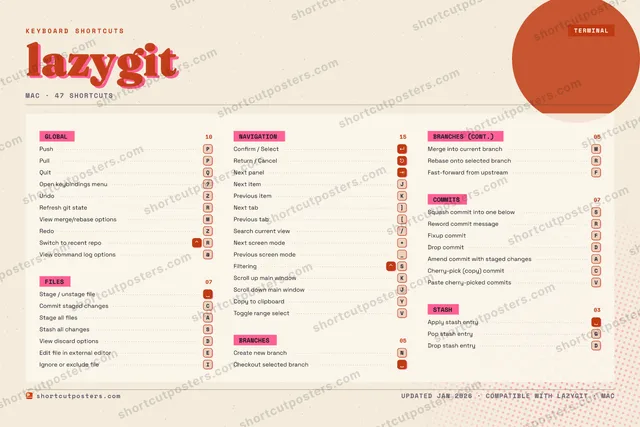
LAZYGIT · KEYBOARD SHORTCUTSMac · 5 SETS · No.01LAZYGITTOTAL20SHORTCUTSFOR MAC · SHIPPED COMBOSSETSGLOBAL07FILES04NAVIGATION04BRANCHES03COMMITS02REF. EDITION · JAN 2026shortcutposters.comPushPPullPQuitQOpen keybindings menu?UndoZRefresh git stateRView merge/rebase optionsMStage / unstage fileCommit staged changesCStage all filesAStash all changesSConfirm / SelectReturn / CancelNext panelNext itemJCreate new branchNCheckout selected branchMerge into current branchMSquash commit into one belowSReword commit messageR
Editorial A bold Swiss-style print: giant wordmark, dense keycap columns, and a totals rail.

Frequently asked questions

Is the lazygit poster maker free?

Yes — you can design and download a high-resolution PNG of your lazygit shortcuts poster for free. A print-ready PDF is an optional paid upgrade.

Can I choose which lazygit shortcuts appear?

Yes. Toggle any shortcut on or off, reorder them, rename categories, and even add your own custom shortcuts.

Can I change the colours and style?

Yes. Pick an accent colour, choose a palette, and switch between the isometric, typewriter, and keyboard-map styles.

Which keyboard layout and operating system are supported?

Choose QWERTY or AZERTY, and switch the edition between the operating systems lazygit supports (macOS, Windows, Linux).

How do I get a printed poster?

Download the free PNG to print yourself, or order the print-ready, framed-quality PDF directly from the maker.