ShortcutPosters

Poster maker

Make your Konsole shortcuts poster

Pick the shortcuts that matter, add your own, tune the colours and style — then download a free personalized PNG, or order the print-ready PDF.

Making a poster for:
Style
Accent
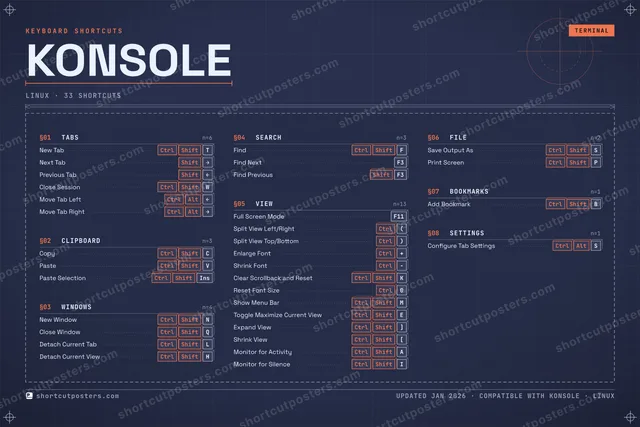
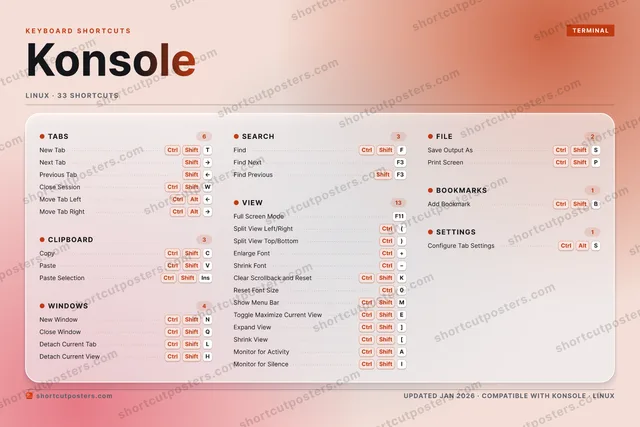
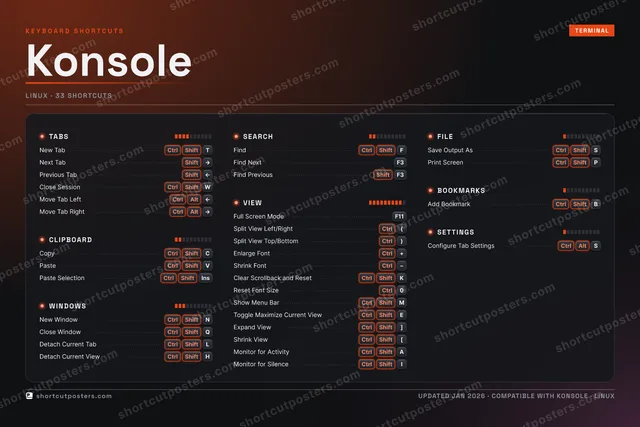
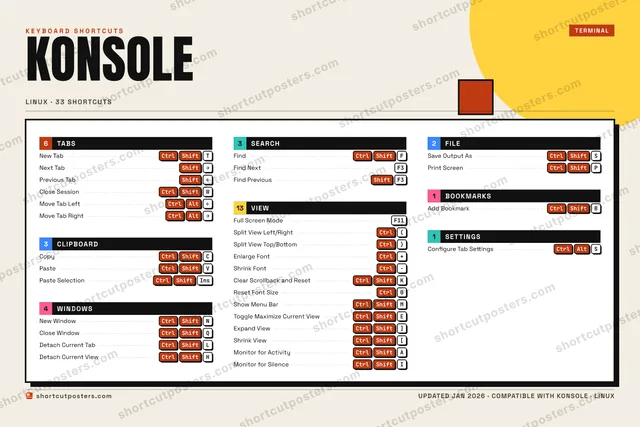
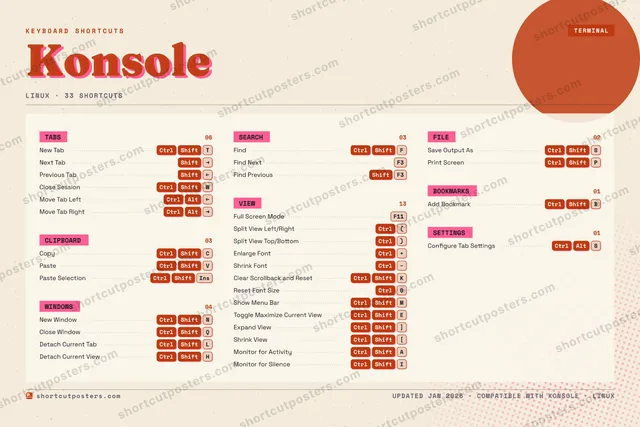
KONSOLEKEYBOARD SHORTCUTS · LINUX · 331234567890CtrlReset Fo…QCtrl ShiftClose Wi…WCtrl ShiftClose Se…ECtrl ShiftToggle M…RTCtrl ShiftNew TabYUICtrl ShiftMonitor …OPCtrl ShiftPrint Sc…ACtrl ShiftMonitor …SCtrl ShiftSave Out…DFCtrl ShiftFindGHCtrl ShiftDetach C…JKCtrl ShiftClear Sc…LCtrl ShiftDetach C…ZXCCtrl ShiftCopyVCtrl ShiftPasteBCtrl ShiftAdd Book…NCtrl ShiftNew Wind…MCtrl ShiftShow Men…MORE SHORTCUTSNext TabShiftRIGHTPrevious TabShiftLEFTFind NextF3Find PreviousShiftF3Full Screen ModeF11Split View Left/R…Ctrl(Split View Top/Bo…Ctrl)Paste SelectionCtrlShiftINSERTEnlarge FontCtrl+Shrink FontCtrlMove Tab LeftCtrlAltLEFTMove Tab RightCtrlAltRIGHTExpand ViewCtrlShift]Shrink ViewCtrlShift[Configure Tab Set…CtrlAltSshortcutposters.comUPDATED JAN 2026 · COMPATIBLE WITH KONSOLE · LINUX

Hover to locate · click on the poster to disable · drag to reorder categories & shortcuts · to rename a category

Free PNG $0
  • Web resolution (1600 px)
  • Light watermark
  • Instant download
Made to order
Custom print-ready PDF $2.99
  • 300 DPI, framed-quality — no watermark
  • Every standard print size
  • Built to order from the poster above — checkout link emailed to you

Trouble ordering? Email business@shortcutposters.com.

How it works

  1. 1

    Choose a style

    Pick from four layouts: isometric keys, a typewriter list, a labelled keyboard map, or a bold editorial print.

  2. 2

    Make it yours

    Set the accent colour and palette, rename categories, and reorder anything.

  3. 3

    Pick the shortcuts

    Toggle exactly which shortcuts appear — or add your own custom ones.

  4. 4

    Download or print

    Export a free high-resolution PNG instantly, or order a print-ready PDF.

Four styles to choose from

KONSOLEKEYBOARD SHORTCUTS · LINUX · 20 ESSENTIAL1234567890QCtrl ShiftClose Wi…WCtrl ShiftClose Se…ERTCtrl ShiftNew TabYUIOPASDFCtrl ShiftFindGHJKCtrl ShiftClear Sc…LZXCCtrl ShiftCopyVCtrl ShiftPasteBNCtrl ShiftNew Wind…MMORE SHORTCUTSNext TabShiftRIGHTPrevious TabShiftLEFTFind NextF3Find PreviousShiftF3Full Screen ModeF11Split View Left/R…Ctrl(Split View Top/Bo…Ctrl)Paste SelectionCtrlShiftINSERTEnlarge FontCtrl+Shrink FontCtrlMove Tab LeftCtrlAltLEFTMove Tab RightCtrlAltRIGHTshortcutposters.comUPDATED JAN 2026 · COMPATIBLE WITH KONSOLE · LINUX
Keyboard map Every binding labelled on a realistic QWERTY or AZERTY keyboard.
CLIPBOARDCopyCtrlShiftCPasteCtrlShiftVPaste SelectionCtrlShiftINSERTWINDOWSNew WindowCtrlShiftNClose WindowCtrlShiftQVIEWFull Screen ModeF11Split View Left/RightCtrl(Split View Top/BottomCtrl)Enlarge FontCtrl+Shrink FontCtrlClear Scrollback and ResetCtrlShiftKTABSNew TabCtrlShiftTNext TabShiftRIGHTPrevious TabShiftLEFTClose SessionCtrlShiftWMove Tab LeftCtrlAltLEFTMove Tab RightCtrlAltRIGHTSEARCHFindCtrlShiftFFind NextF3Find PreviousShiftF3KonsoleKEYBOARD SHORTCUTS · LINUX · 20 ESSENTIALBOTH LAYOUTSQWERTYQWERTYAZERTYAZERTYshortcutposters.comUPDATED JAN 2026 · COMPATIBLE WITH KONSOLE · LINUX
Isometric Shortcuts on a 3D isometric keyboard — bold and poster-like.
CLIPBOARD03CopyCtrlShiftCPasteCtrlShiftVPaste SelectionCtrlShiftINSERTWINDOWS02New WindowCtrlShiftNClose WindowCtrlShiftQVIEW06Full Screen ModeF11Split View Left/RightCtrl(Split View Top/BottomCtrl)Enlarge FontCtrl+Shrink FontCtrlClear Scrollback and ResetCtrlShiftKTABS06New TabCtrlShiftTNext TabShiftRIGHTPrevious TabShiftLEFTClose SessionCtrlShiftWMove Tab LeftCtrlAltLEFTMove Tab RightCtrlAltRIGHTSEARCH03FindCtrlShiftFFind NextF3Find PreviousShiftF3KonsoleKEYBOARD SHORTCUTS · LINUX · 20 ESSENTIALBOTH LAYOUTSQWERTYQWERTYAZERTYAZERTYshortcutposters.comUPDATED JAN 2026 · COMPATIBLE WITH KONSOLE · LINUX
Typewriter A clean printed list, grouped by category — dense and legible.
KONSOLE · KEYBOARD SHORTCUTSLinux · 5 SETS · No.01KONSOLETOTAL20SHORTCUTSFOR LINUX · SHIPPED COMBOSSETSTABS06CLIPBOARD03WINDOWS02SEARCH03VIEW06REF. EDITION · JAN 2026shortcutposters.comNew TabCtrlShiftTNext TabShiftRIGHTPrevious TabShiftLEFTClose SessionCtrlShiftWMove Tab LeftCtrlAltLEFTMove Tab RightCtrlAltRIGHTCopyCtrlShiftCPasteCtrlShiftVPaste SelectionCtrlShiftINSERTNew WindowCtrlShiftNClose WindowCtrlShiftQFindCtrlShiftFFind NextF3Find PreviousShiftF3Full Screen ModeF11Split View Left/RightCtrl(Split View Top/BottomCtrl)Enlarge FontCtrl+Shrink FontCtrlClear Scrollback and ResetCtrlShiftK
Editorial A bold Swiss-style print: giant wordmark, dense keycap columns, and a totals rail.

Frequently asked questions

Is the Konsole poster maker free?

Yes — you can design and download a high-resolution PNG of your Konsole shortcuts poster for free. A print-ready PDF is an optional paid upgrade.

Can I choose which Konsole shortcuts appear?

Yes. Toggle any shortcut on or off, reorder them, rename categories, and even add your own custom shortcuts.

Can I change the colours and style?

Yes. Pick an accent colour, choose a palette, and switch between the isometric, typewriter, and keyboard-map styles.

Which keyboard layout and operating system are supported?

Choose QWERTY or AZERTY, and switch the edition between the operating systems Konsole supports (macOS, Windows, Linux).

How do I get a printed poster?

Download the free PNG to print yourself, or order the print-ready, framed-quality PDF directly from the maker.