ShortcutPosters

Poster maker

Make your Alacritty shortcuts poster

Pick the shortcuts that matter, add your own, tune the colours and style — then download a free personalized PNG, or order the print-ready PDF.

Making a poster for:
Style
Accent
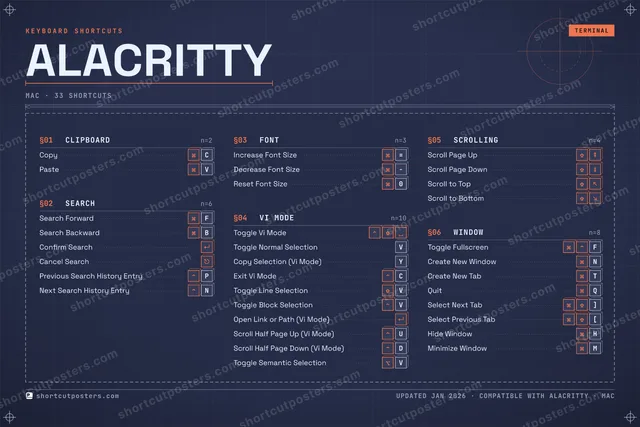
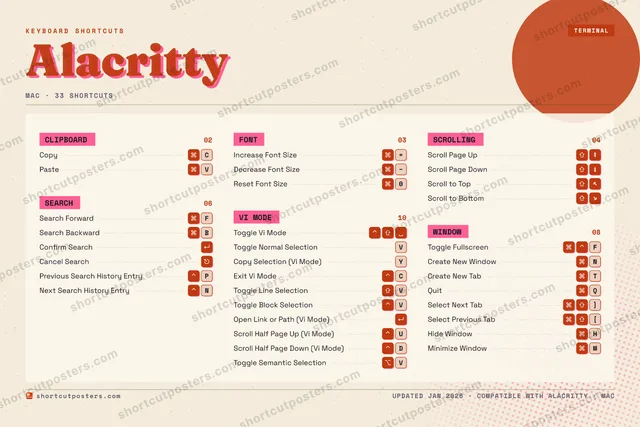
ALACRITTYKEYBOARD SHORTCUTS · MAC · 341234567890Reset Fo…QQuitWERTCreate N…YCopy Sel…UScroll H…IOPPrevious…ASDScroll H…FSearch F…GHHide Win…JKLZXCCopyVPasteBSearch B…NCreate N…MMinimize…MORE SHORTCUTSIncrease Font Size=Decrease Font SizeToggle Vi ModeScroll Page UpScroll Page DownToggle FullscreenFConfirm SearchCancel SearchScroll to TopScroll to BottomToggle Normal Sel…VPaste SelectionINSERTNext Search MatchNExit Vi ModeCToggle Line Selec…VToggle Block Sele…VOpen Link or Path…Select Next Tab]Select Previous T…[Toggle Semantic S…Vshortcutposters.comUPDATED JAN 2026 · COMPATIBLE WITH ALACRITTY · MAC

Hover to locate · click on the poster to disable · drag to reorder categories & shortcuts · to rename a category

Free PNG $0
  • Web resolution (1600 px)
  • Light watermark
  • Instant download
Made to order
Custom print-ready PDF $2.99
  • 300 DPI, framed-quality — no watermark
  • Every standard print size
  • Built to order from the poster above — checkout link emailed to you

Trouble ordering? Email business@shortcutposters.com.

How it works

  1. 1

    Choose a style

    Pick from four layouts: isometric keys, a typewriter list, a labelled keyboard map, or a bold editorial print.

  2. 2

    Make it yours

    Set the accent colour and palette, rename categories, and reorder anything.

  3. 3

    Pick the shortcuts

    Toggle exactly which shortcuts appear — or add your own custom ones.

  4. 4

    Download or print

    Export a free high-resolution PNG instantly, or order a print-ready PDF.

Four styles to choose from

ALACRITTYKEYBOARD SHORTCUTS · MAC · 20 ESSENTIAL1234567890Reset Fo…QQuitWERTCreate N…YCopy Sel…UIOPASDFSearch F…GHJKLZXCCopyVPasteBSearch B…NCreate N…MMORE SHORTCUTSIncrease Font Size=Decrease Font SizeToggle Vi ModeScroll Page UpScroll Page DownToggle FullscreenFConfirm SearchCancel SearchScroll to TopScroll to BottomToggle Normal Sel…Vshortcutposters.comUPDATED JAN 2026 · COMPATIBLE WITH ALACRITTY · MAC
Keyboard map Every binding labelled on a realistic QWERTY or AZERTY keyboard.
SEARCHSearch ForwardFSearch BackwardBConfirm SearchCancel SearchVI MODEToggle Vi ModeToggle Normal SelectionVCopy Selection (Vi Mode)YWINDOWToggle FullscreenFCreate New WindowNCreate New TabTQuitQCLIPBOARDCopyCPasteVFONTIncrease Font Size=Decrease Font SizeReset Font Size0SCROLLINGScroll Page UpScroll Page DownScroll to TopScroll to BottomAlacrittyKEYBOARD SHORTCUTS · MAC · 20 ESSENTIALBOTH LAYOUTSQWERTYQWERTYAZERTYAZERTYshortcutposters.comUPDATED JAN 2026 · COMPATIBLE WITH ALACRITTY · MAC
Isometric Shortcuts on a 3D isometric keyboard — bold and poster-like.
SEARCH04Search ForwardFSearch BackwardBConfirm SearchCancel SearchVI MODE03Toggle Vi ModeToggle Normal SelectionVCopy Selection (Vi Mode)YWINDOW04Toggle FullscreenFCreate New WindowNCreate New TabTQuitQCLIPBOARD02CopyCPasteVFONT03Increase Font Size=Decrease Font SizeReset Font Size0SCROLLING04Scroll Page UpScroll Page DownScroll to TopScroll to BottomAlacrittyKEYBOARD SHORTCUTS · MAC · 20 ESSENTIALBOTH LAYOUTSQWERTYQWERTYAZERTYAZERTYshortcutposters.comUPDATED JAN 2026 · COMPATIBLE WITH ALACRITTY · MAC
Typewriter A clean printed list, grouped by category — dense and legible.
ALACRITTY · KEYBOARD SHORTCUTSMac · 6 SETS · No.01ALACRITTYTOTAL20SHORTCUTSFOR MAC · SHIPPED COMBOSSETSCLIPBOARD02SEARCH04FONT03VI MODE03SCROLLING04WINDOW04REF. EDITION · JAN 2026shortcutposters.comCopyCPasteVSearch ForwardFSearch BackwardBConfirm SearchCancel SearchIncrease Font Size=Decrease Font SizeReset Font Size0Toggle Vi ModeToggle Normal SelectionVCopy Selection (Vi Mode)YScroll Page UpScroll Page DownScroll to TopScroll to BottomToggle FullscreenFCreate New WindowNCreate New TabTQuitQ
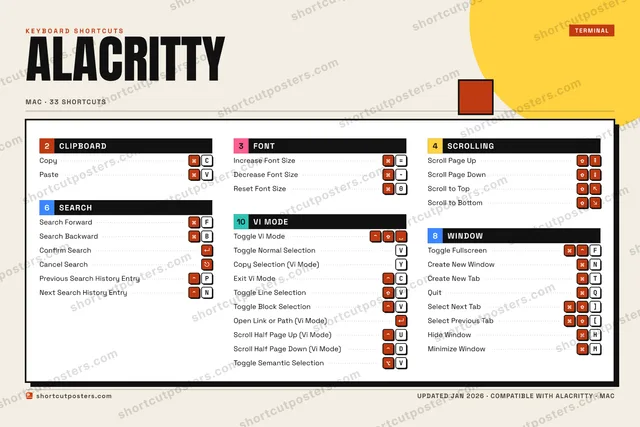
Editorial A bold Swiss-style print: giant wordmark, dense keycap columns, and a totals rail.

Frequently asked questions

Is the Alacritty poster maker free?

Yes — you can design and download a high-resolution PNG of your Alacritty shortcuts poster for free. A print-ready PDF is an optional paid upgrade.

Can I choose which Alacritty shortcuts appear?

Yes. Toggle any shortcut on or off, reorder them, rename categories, and even add your own custom shortcuts.

Can I change the colours and style?

Yes. Pick an accent colour, choose a palette, and switch between the isometric, typewriter, and keyboard-map styles.

Which keyboard layout and operating system are supported?

Choose QWERTY or AZERTY, and switch the edition between the operating systems Alacritty supports (macOS, Windows, Linux).

How do I get a printed poster?

Download the free PNG to print yourself, or order the print-ready, framed-quality PDF directly from the maker.