
ShortcutPosters

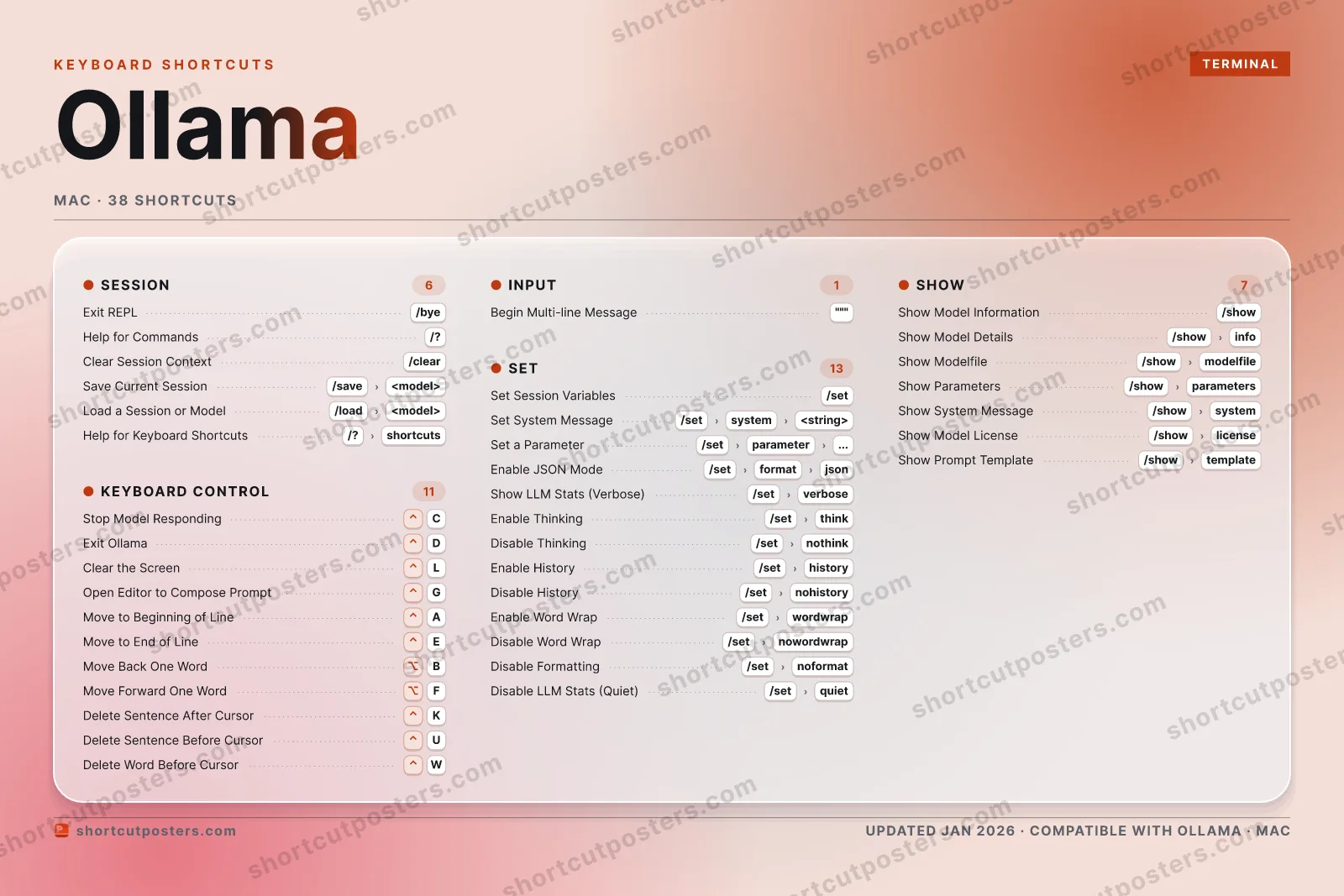
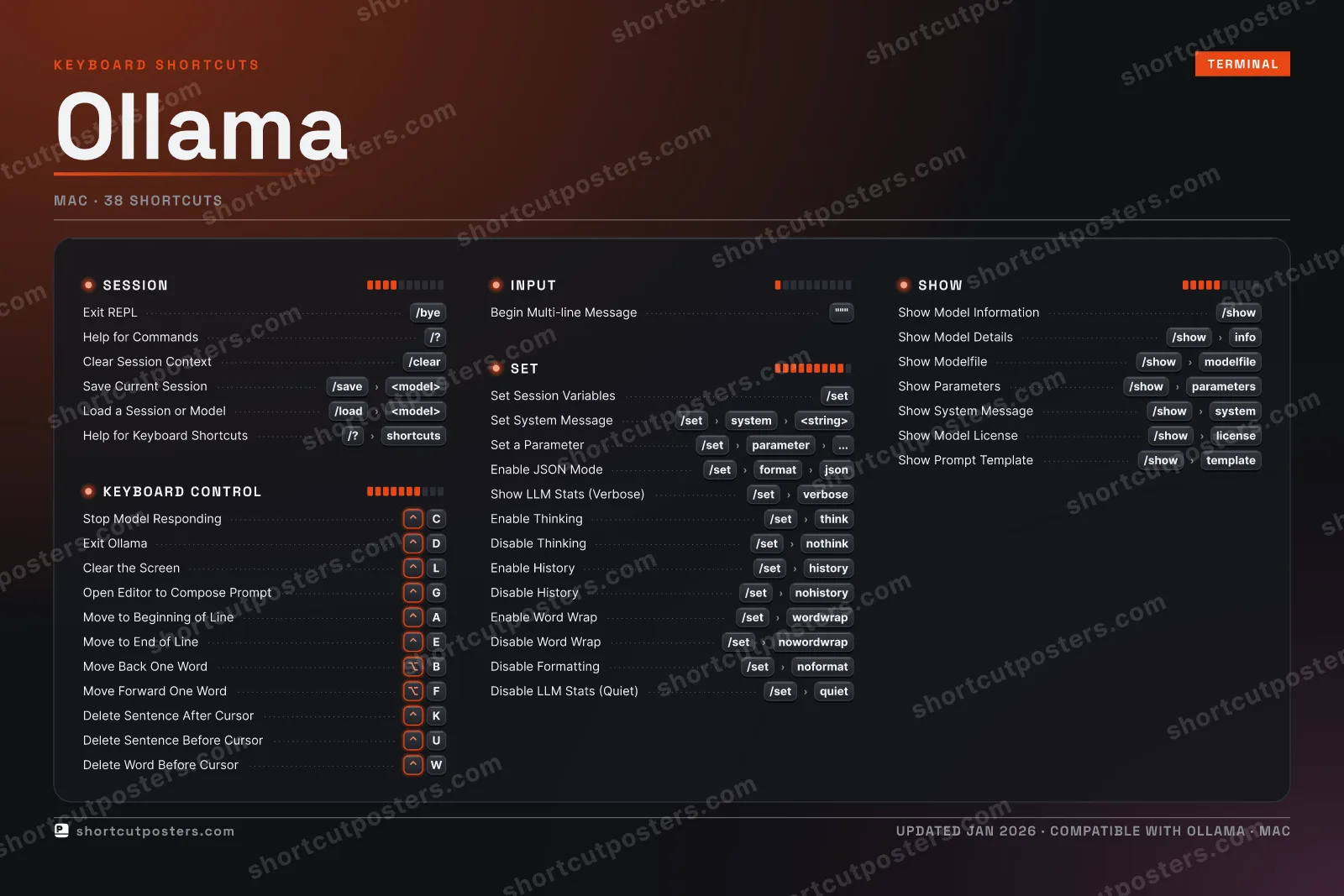
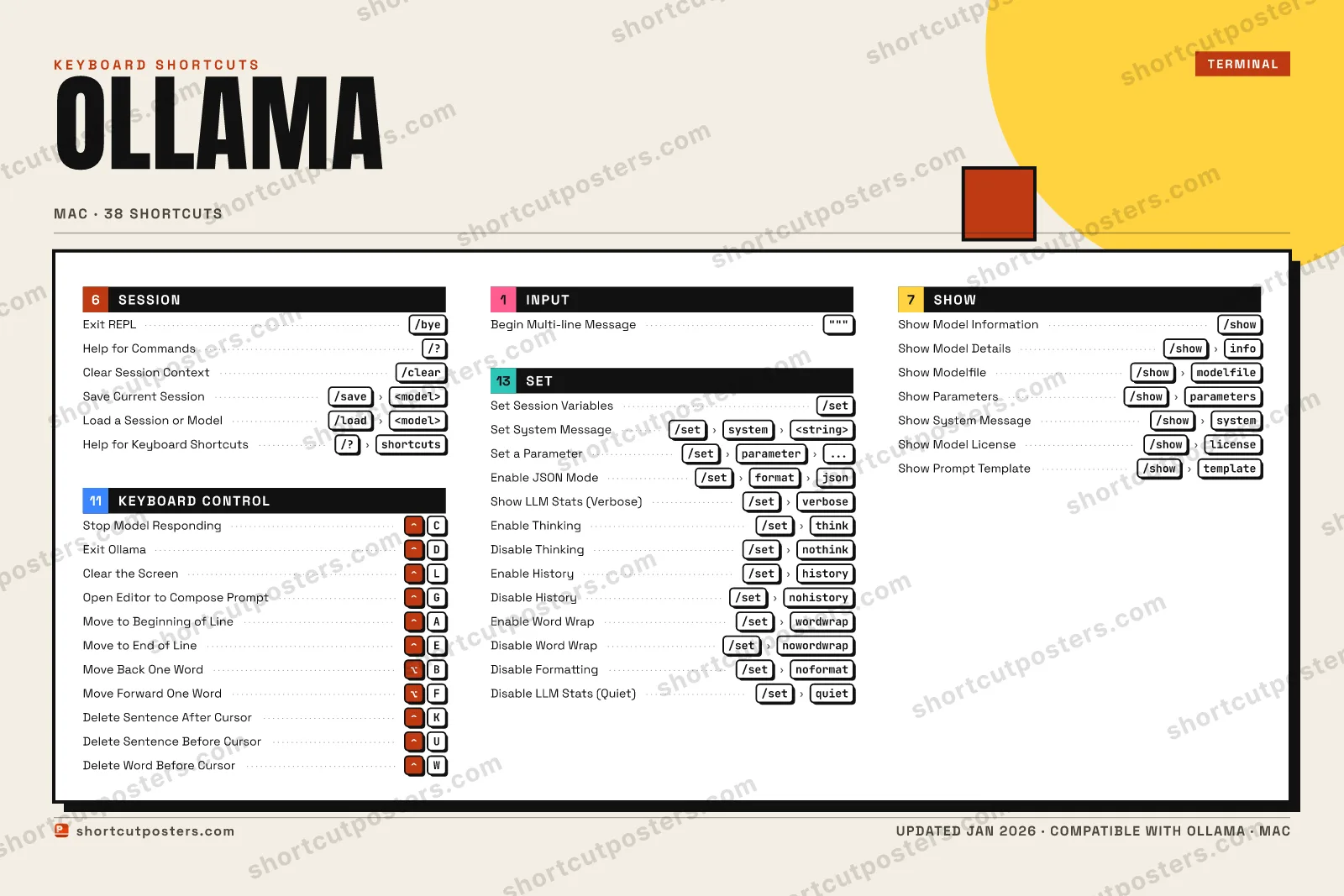
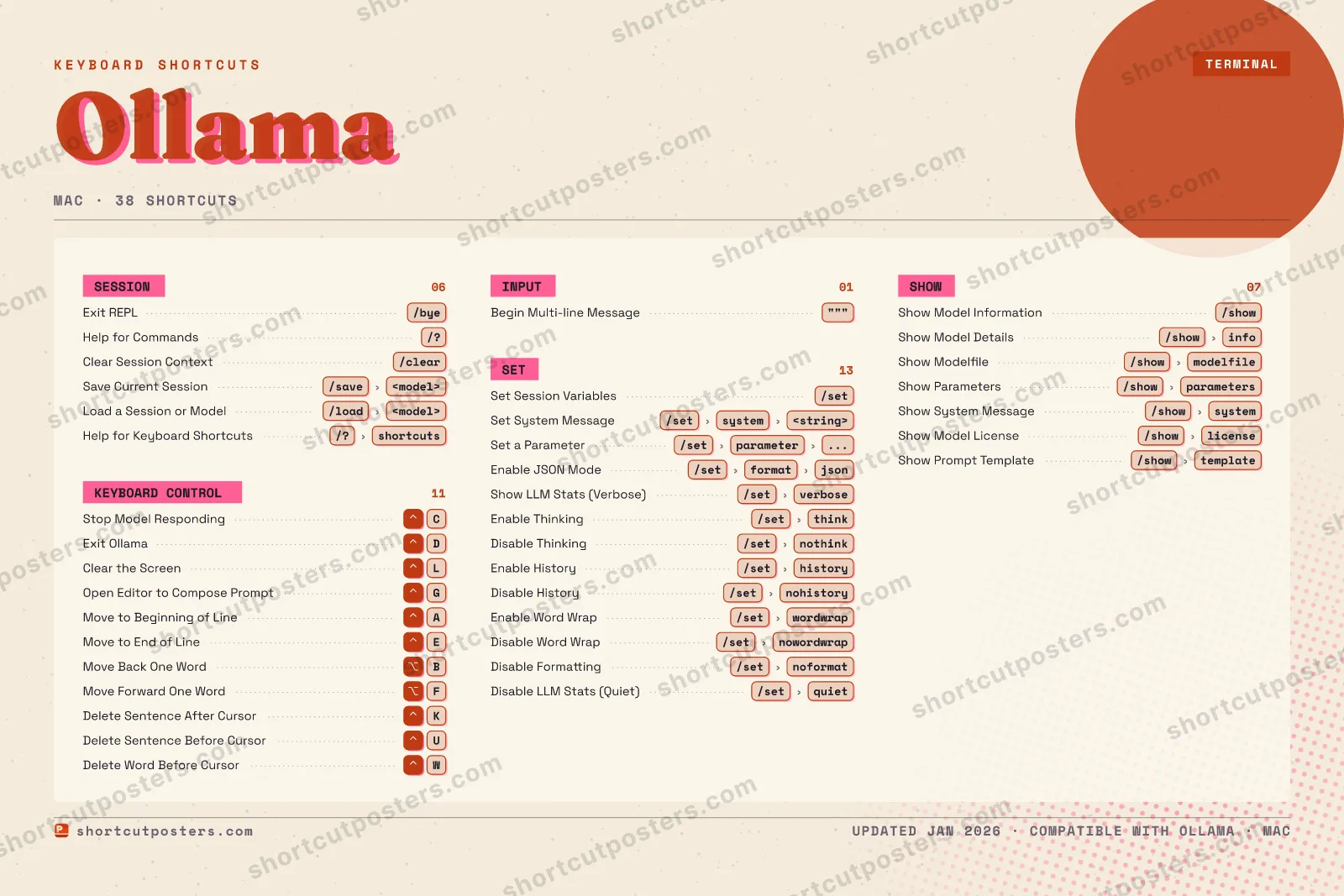
4 art directions — pick one below, click to zoom & compare.
Layout
OLLAMAKEYBOARD SHORTCUTS · MAC · 36 ESSENTIAL1234567890QWDelete W…EMove to …RTYUDelete S…IOPAMove to …SDExit Oll…FMove For…GOpen Edi…HJKDelete S…LClear th…ZXCStop Mod…VBMove Bac…NMMORE SHORTCUTSExit REPL/byeHelp for Comm…/?Clear Session…/clearBegin Multi-l…"""Set Session V…/setSave Current …/save<model>Load a Sessio…/load<model>Set System Me…/setsystem<string>Set a Paramet…/setparameter...Show Model In…/showShow Model De…/showinfoHelp for Keyb…/?shortcutsEnable JSON M…/setformatjsonShow LLM Stat…/setverboseEnable Thinki…/setthinkDisable Think…/setnothinkShow Modelfile/showmodelfileShow Paramete…/showparametersShow System M…/showsystemEnable History/sethistoryDisable Histo…/setnohistoryEnable Word W…/setwordwrapDisable Word …/setnowordwrapDisable Forma…/setnoformatDisable LLM S…/setquietshortcutposters.comUPDATED JAN 2026 · COMPATIBLE WITH OLLAMA · MAC
SESSIONExit REPL/byeHelp for Commands/?Clear Session Context/clearSave Current Session/save<model>Load a Session or Mo…/load<model>Help for Keyboard Sh…/?shortcutsSHOWShow Model Informati…/showShow Model Details/showinfoShow Modelfile/showmodelfileShow Parameters/showparametersShow System Message/showsystemShow Model License/showlicenseShow Prompt Template/showtemplateKEYBOARD CONTROLStop Model RespondingCExit OllamaDClear the ScreenLOpen Editor to Compo…GMove to Beginning of…AMove to End of LineEMove Back One WordBMove Forward One WordFDelete Sentence Afte…KDelete Sentence Befo…UDelete Word Before C…WINPUTBegin Multi-line Mes…"""SETSet Session Variables/setSet System Message/setsystem<string>Set a Parameter/setparameter...Enable JSON Mode/setformatjsonShow LLM Stats (Verb…/setverboseEnable Thinking/setthinkDisable Thinking/setnothinkEnable History/sethistoryDisable History/setnohistoryEnable Word Wrap/setwordwrapDisable Word Wrap/setnowordwrapDisable Formatting/setnoformatDisable LLM Stats (Q…/setquietOllamaKEYBOARD SHORTCUTS · MAC · 38BOTH LAYOUTSQWERTYQWERTYAZERTYAZERTYshortcutposters.comUPDATED JAN 2026 · COMPATIBLE WITH OLLAMA · MAC
SESSION06Exit REPL/byeHelp for Commands/?Clear Session Context/clearSave Current Session/save<model>Load a Session or Mod…/load<model>Help for Keyboard Sho…/?shortcutsSHOW07Show Model Information/showShow Model Details/showinfoShow Modelfile/showmodelfileShow Parameters/showparametersShow System Message/showsystemShow Model License/showlicenseShow Prompt Template/showtemplateKEYBOARD CONTROL11Stop Model RespondingCExit OllamaDClear the ScreenLOpen Editor to Compos…GMove to Beginning of …AMove to End of LineEMove Back One WordBMove Forward One WordFDelete Sentence After…KDelete Sentence Befor…UDelete Word Before Cu…WINPUT01Begin Multi-line Mess…"""SET13Set Session Variables/setSet System Message/setsystem<string>Set a Parameter/setparameter...Enable JSON Mode/setformatjsonShow LLM Stats (Verbo…/setverboseEnable Thinking/setthinkDisable Thinking/setnothinkEnable History/sethistoryDisable History/setnohistoryEnable Word Wrap/setwordwrapDisable Word Wrap/setnowordwrapDisable Formatting/setnoformatDisable LLM Stats (Qu…/setquietOllamaKEYBOARD SHORTCUTS · MAC · 38BOTH LAYOUTSQWERTYQWERTYAZERTYAZERTYshortcutposters.comUPDATED JAN 2026 · COMPATIBLE WITH OLLAMA · MAC
OLLAMA · KEYBOARD SHORTCUTSMac · 5 SETS · No.01OLLAMATOTAL38SHORTCUTSFOR MAC · SHIPPED COMBOSSETSSESSION06KEYBOARD CONT11INPUT01SET13SHOW07REF. EDITION · JAN 2026shortcutposters.comExit REPL/byeHelp for Commands/?Clear Session Context/clearSave Current Session/save<model>Load a Session or Model/load<model>Help for Keyboard Shortcuts/?shortcutsStop Model RespondingCExit OllamaDClear the ScreenLOpen Editor to Compose PromptGMove to Beginning of LineAMove to End of LineEMove Back One WordBMove Forward One WordFDelete Sentence After CursorKDelete Sentence Before CursorUDelete Word Before CursorWBegin Multi-line Message"""Set Session Variables/setSet System Message/setsystem<string>Set a Parameter/setparameter...Enable JSON Mode/setformatjsonShow LLM Stats (Verbose)/setverboseEnable Thinking/setthinkDisable Thinking/setnothinkEnable History/sethistoryDisable History/setnohistoryEnable Word Wrap/setwordwrapDisable Word Wrap/setnowordwrapDisable Formatting/setnoformatDisable LLM Stats (Quiet)/setquietShow Model Information/showShow Model Details/showinfoShow Modelfile/showmodelfileShow Parameters/showparametersShow System Message/showsystemShow Model License/showlicenseShow Prompt Template/showtemplate

Mac edition · 38 shortcuts

Ollama Keyboard Shortcuts Poster

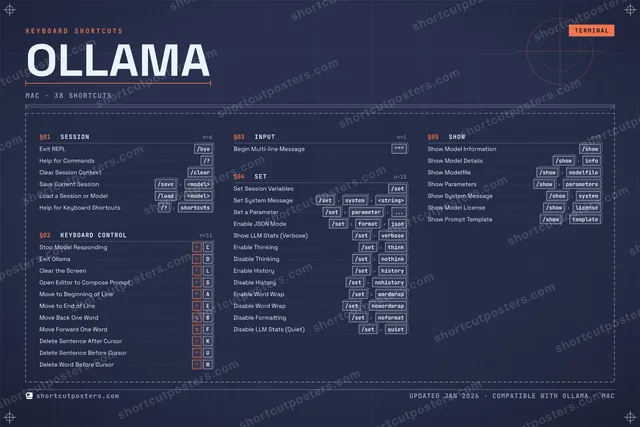
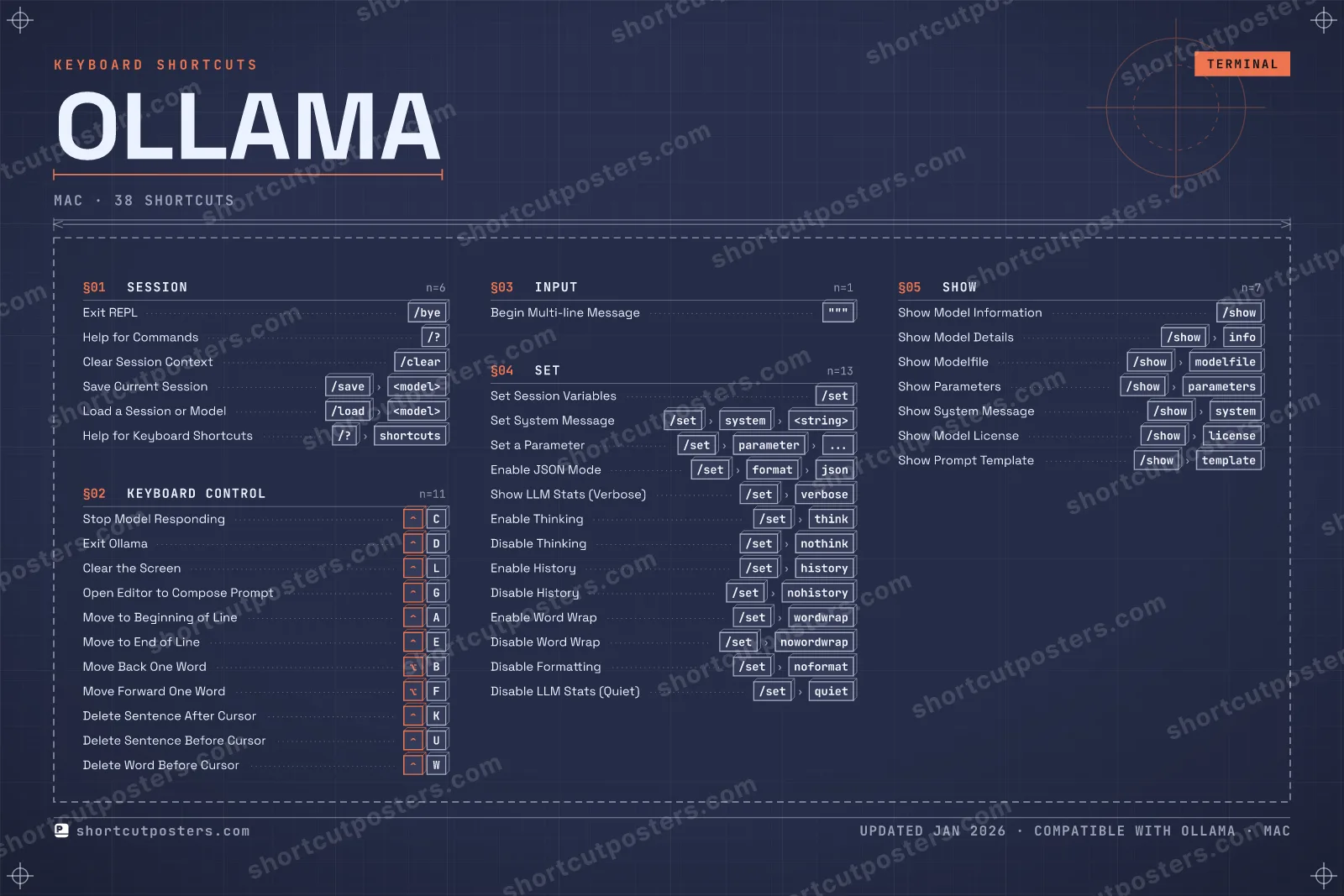
A printable, framed-quality poster of the essential Ollama shortcuts for Mac — the keys worth keeping in view, designed to stay readable on a wall.

Edition

Free PNG is web-resolution & lightly watermarked.

Customise this poster Pick the shortcuts, restyle the colours — download free. Get the framed-quality print Full 300 DPI, print-ready — at home or shipped to your door.

Ollama is a tool for running large language models locally from the command line. Inside its interactive REPL, slash-commands and readline-style control keys let you switch models, tweak parameters, inspect a model, and manage sessions without leaving the terminal.

All Ollama keyboard shortcuts (Mac)

Layout
`
1
2
3
4
5
6
7
8
9
0
-
=
⌫ Back
Tab
Q
W
E
R
T
Y
U
I
O
P
[
]
\
Caps
A
S
D
F
G
H
J
K
L
;
'
Enter ⏎
Shift
Z
X
C
V
B
N
M
,
.
/
Shift
Ctrl
Win
Alt
Space
Alt
Win
Menu
Ctrl

+ 27 more controls in the table below

Set 13

Action Shortcut
Set Session Variables /set
Set System Message /setthensystemthen<string>
Set a Parameter /setthenparameterthen...
Enable JSON Mode /setthenformatthenjson
Show LLM Stats (Verbose) /setthenverbose
Enable Thinking /setthenthink
Disable Thinking /setthennothink
Enable History /setthenhistory
Disable History /setthennohistory
Enable Word Wrap /setthenwordwrap
Disable Word Wrap /setthennowordwrap
Disable Formatting /setthennoformat
Disable LLM Stats (Quiet) /setthenquiet

Keyboard Control 11

Action Shortcut
Stop Model Responding C
Exit Ollama D
Clear the Screen L
Open Editor to Compose Prompt G
Move to Beginning of Line A
Move to End of Line E
Move Back One Word B
Move Forward One Word F
Delete Sentence After Cursor K
Delete Sentence Before Cursor U
Delete Word Before Cursor W

Show 7

Action Shortcut
Show Model Information /show
Show Model Details /showtheninfo
Show Modelfile /showthenmodelfile
Show Parameters /showthenparameters
Show System Message /showthensystem
Show Model License /showthenlicense
Show Prompt Template /showthentemplate

Session 6

Action Shortcut
Exit REPL /bye
Help for Commands /?
Clear Session Context /clear
Save Current Session /savethen<model>
Load a Session or Model /loadthen<model>
Help for Keyboard Shortcuts /?thenshortcuts

Input 1

Action Shortcut
Begin Multi-line Message """

Sourced from docs.ollama.com , github.com , github.com Last verified

Unofficial reference. ShortcutPosters is not affiliated with, endorsed by, or sponsored by Ollama. All product names, logos, and trademarks are property of their respective owners. See our licensing & trademark notice.

Frequently asked questions

Does the poster include every Ollama shortcut?
Ollama has 38 keyboard shortcuts in total — the complete list is free to read on this page. The poster features the most essential ones, curated to stay readable on a wall.
Can I print it at home?
Yes. The digital download is a high-resolution 300 DPI file you can print at home or at any print shop, in standard frame sizes.
Does it cover both Mac and Windows?
We sell separate Mac and Windows editions so every key matches your keyboard exactly. This page is the macOS edition.
Is this an official Ollama product?
No. This is an unofficial reference poster and is not affiliated with or endorsed by Ollama. All trademarks belong to their respective owners.
For app makers

Promote your app

Built an app with great keyboard shortcuts? Get it into the database — a free, searchable reference page, and an optional printable poster your power users will pin to the wall.

  • Free shortcut reference page
  • Indexed & searchable
  • Optional framed poster