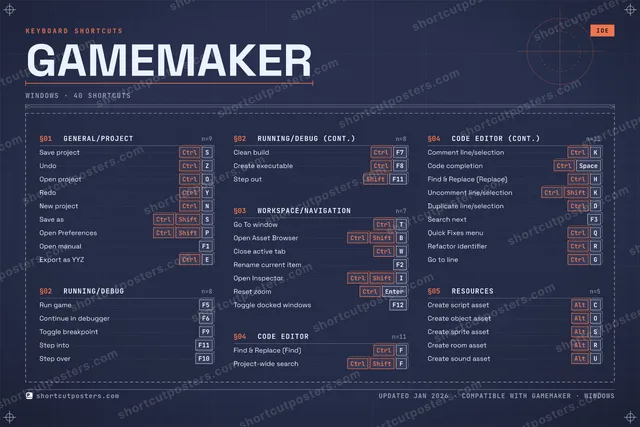

4 art directions — pick one below, click to zoom & compare.
⤢ GAMEMAKER KEYBOARD SHORTCUTS · WINDOWS · 40 1 2 3 4 5 6 7 8 9 0 Q Ctrl Quick Fi… W Ctrl Close ac… E Ctrl Export a… R Ctrl Refactor… T Ctrl Go To wi… Y Ctrl Redo U Alt Create s… I Ctrl Shift Open Ins… O Ctrl Open pro… P Ctrl Shift Open Pre… A S Ctrl Save pro… D Ctrl Duplicat… F Ctrl Find & R… G Ctrl Go to li… H Ctrl Find & R… J K Ctrl Comment … L Z Ctrl Undo X C Alt Create s… V B Ctrl Shift Open Ass… N Ctrl New proj… M MORE SHORTCUTS Run game F5 Continue in debug… F6 Toggle breakpoint F9 Project-wide sear… Ctrl Shift F Code completion Ctrl Space Step into F11 Step over F10 Rename current it… F2 Uncomment line/se… Ctrl Shift K Save as Ctrl Shift S Open manual F1 Clean build Ctrl F7 Create executable Ctrl F8 Step out Shift F11 Reset zoom Ctrl Enter Search next F3 Create object ass… Alt O Create sprite ass… Alt S Create room asset Alt R Toggle docked win… F12 shortcutposters.com UPDATED JAN 2026 · COMPATIBLE WITH GAMEMAKER · WINDOWS
GAMEMAKER KEYBOARD SHORTCUTS · WINDOWS · 40 1 2 3 4 5 6 7 8 9 0 A Z Ctrl Undo E Ctrl Export a… R Ctrl Refactor… T Ctrl Go To wi… Y Ctrl Redo U Alt Create s… I Ctrl Shift Open Ins… O Ctrl Open pro… P Ctrl Shift Open Pre… Q Ctrl Quick Fi… S Ctrl Save pro… D Ctrl Duplicat… F Ctrl Find & R… G Ctrl Go to li… H Ctrl Find & R… J K Ctrl Comment … L M W Ctrl Close ac… X C Alt Create s… V B Ctrl Shift Open Ass… N Ctrl New proj… MORE SHORTCUTS Run game F5 Continue in debug… F6 Toggle breakpoint F9 Project-wide sear… Ctrl Shift F Code completion Ctrl Space Step into F11 Step over F10 Rename current it… F2 Uncomment line/se… Ctrl Shift K Save as Ctrl Shift S Open manual F1 Clean build Ctrl F7 Create executable Ctrl F8 Step out Shift F11 Reset zoom Ctrl Enter Search next F3 Create object ass… Alt O Create sprite ass… Alt S Create room asset Alt R Toggle docked win… F12 shortcutposters.com UPDATED JAN 2026 · COMPATIBLE WITH GAMEMAKER · WINDOWS
⤢ RUNNING/DEBUG Run game F5 Continue in debugger F6 Toggle breakpoint F9 Step into F11 Step over F10 Clean build Ctrl F7 Create executable Ctrl F8 Step out Shift F11 RESOURCES Create script asset Alt C Create object asset Alt O Create sprite asset Alt S Create room asset Alt R Create sound asset Alt U GENERAL/PROJECT Save project Ctrl S Undo Ctrl Z Open project Ctrl O Redo Ctrl Y New project Ctrl N Save as Ctrl Shift S Open Preferences Ctrl Shift P Open manual F1 Export as YYZ Ctrl E WORKSPACE/NAVIGATION Go To window Ctrl T Open Asset Browser Ctrl Shift B Close active tab Ctrl W Rename current item F2 Open Inspector Ctrl Shift I Reset zoom Ctrl Enter Toggle docked windows F12 CODE EDITOR Find & Replace (Find) Ctrl F Project-wide search Ctrl Shift F Comment line/selection Ctrl K Code completion Ctrl Space Find & Replace (Replace) Ctrl H Uncomment line/selection Ctrl Shift K Duplicate line/selection Ctrl D Search next F3 Quick Fixes menu Ctrl Q Refactor identifier Ctrl R Go to line Ctrl G GameMaker KEYBOARD SHORTCUTS · WINDOWS · 40 BOTH LAYOUTS QWERTY Q W E R T Y AZERTY A Z E R T Y shortcutposters.com UPDATED JAN 2026 · COMPATIBLE WITH GAMEMAKER · WINDOWS ⤢ RUNNING/DEBUG 08 Run game F5 Continue in debugger F6 Toggle breakpoint F9 Step into F11 Step over F10 Clean build Ctrl F7 Create executable Ctrl F8 Step out Shift F11 RESOURCES 05 Create script asset Alt C Create object asset Alt O Create sprite asset Alt S Create room asset Alt R Create sound asset Alt U GENERAL/PROJECT 09 Save project Ctrl S Undo Ctrl Z Open project Ctrl O Redo Ctrl Y New project Ctrl N Save as Ctrl Shift S Open Preferences Ctrl Shift P Open manual F1 Export as YYZ Ctrl E WORKSPACE/NAVIGATION 07 Go To window Ctrl T Open Asset Browser Ctrl Shift B Close active tab Ctrl W Rename current item F2 Open Inspector Ctrl Shift I Reset zoom Ctrl Enter Toggle docked windows F12 CODE EDITOR 11 Find & Replace (Find) Ctrl F Project-wide search Ctrl Shift F Comment line/selection Ctrl K Code completion Ctrl Space Find & Replace (Replace) Ctrl H Uncomment line/selection Ctrl Shift K Duplicate line/selection Ctrl D Search next F3 Quick Fixes menu Ctrl Q Refactor identifier Ctrl R Go to line Ctrl G GameMaker KEYBOARD SHORTCUTS · WINDOWS · 40 BOTH LAYOUTS QWERTY Q W E R T Y AZERTY A Z E R T Y shortcutposters.com UPDATED JAN 2026 · COMPATIBLE WITH GAMEMAKER · WINDOWS
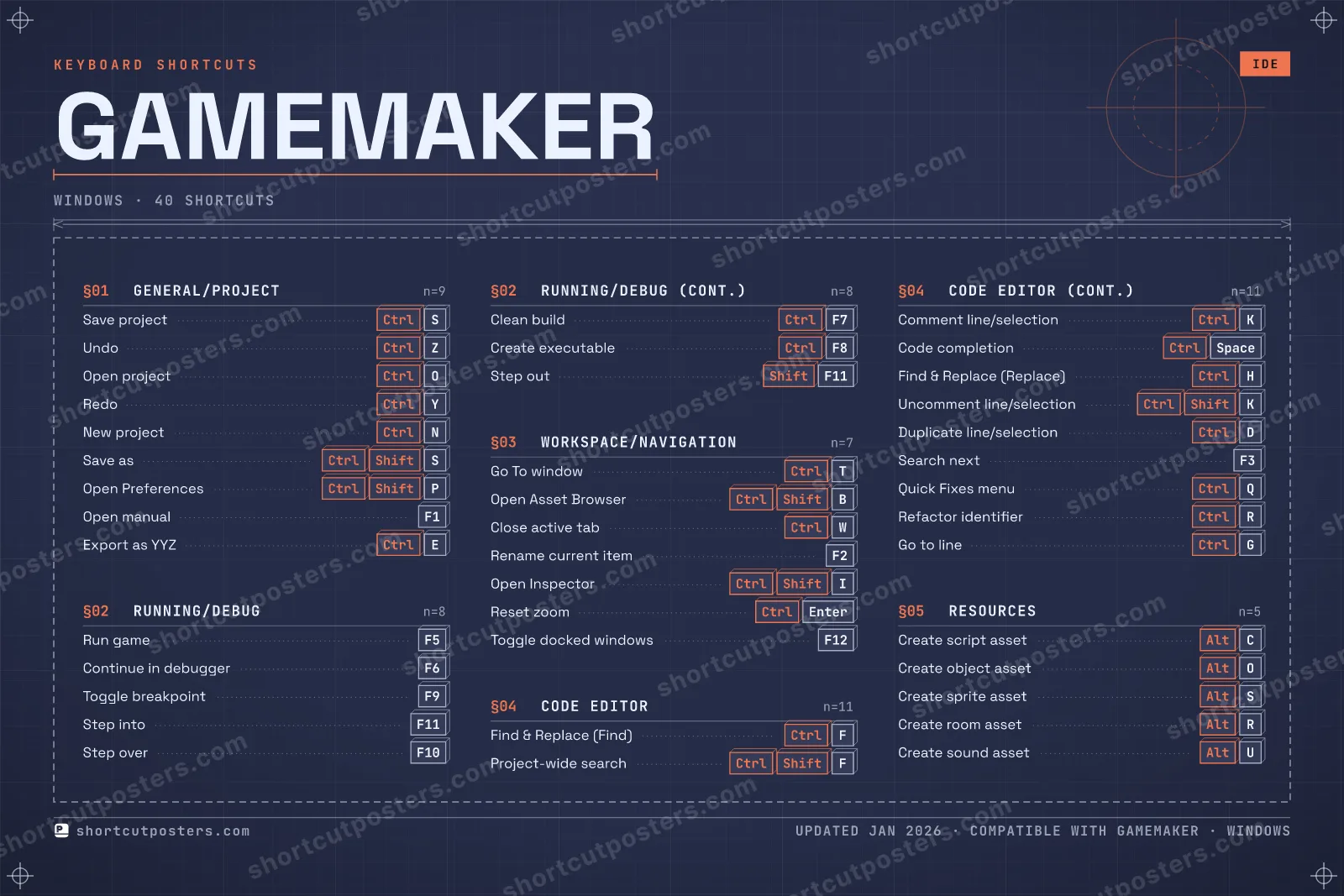
⤢ GAMEMAKER · KEYBOARD SHORTCUTS Windows · 5 SETS · No.01 GAMEMAKER TOTAL 40 SHORTCUTS FOR WINDOWS · SHIPPED COMBOS SETS GENERAL/PROJE 09 RUNNING/DEBUG 08 WORKSPACE/NAV 07 CODE EDITOR 11 RESOURCES 05 REF. EDITION · JAN 2026 shortcutposters.com Save project Ctrl S Undo Ctrl Z Open project Ctrl O Redo Ctrl Y New project Ctrl N Save as Ctrl Shift S Open Preferences Ctrl Shift P Open manual F1 Export as YYZ Ctrl E Run game F5 Continue in debugger F6 Toggle breakpoint F9 Step into F11 Step over F10 Clean build Ctrl F7 Create executable Ctrl F8 Step out Shift F11 Go To window Ctrl T Open Asset Browser Ctrl Shift B Close active tab Ctrl W Rename current item F2 Open Inspector Ctrl Shift I Reset zoom Ctrl Enter Toggle docked windows F12 Find & Replace (Find) Ctrl F Project-wide search Ctrl Shift F Comment line/selection Ctrl K Code completion Ctrl Space Find & Replace (Replace) Ctrl H Uncomment line/selection Ctrl Shift K Duplicate line/selection Ctrl D Search next F3 Quick Fixes menu Ctrl Q Refactor identifier Ctrl R Go to line Ctrl G Create script asset Alt C Create object asset Alt O Create sprite asset Alt S Create room asset Alt R Create sound asset Alt U
GAMEMAKER KEYBOARD SHORTCUTS · WINDOWS · 14 ESSENTIAL 1 2 3 4 5 6 7 8 9 0 Q W E R T Ctrl Go To wi… Y Ctrl Redo U I O Ctrl Open pro… P A S Ctrl Save pro… D F Ctrl Find & R… G H J K Ctrl Comment … L Z Ctrl Undo X C V B N Ctrl New proj… M MORE SHORTCUTS Run game F5 Continue in debug… F6 Toggle breakpoint F9 Project-wide sear… Ctrl Shift F Code completion Ctrl Space Step into F11 shortcutposters.com UPDATED JAN 2026 · COMPATIBLE WITH GAMEMAKER · WINDOWS Keyboard map GENERAL/PROJECT Save project Ctrl S Undo Ctrl Z Open project Ctrl O Redo Ctrl Y New project Ctrl N CODE EDITOR Find & Replace (Find) Ctrl F Project-wide search Ctrl Shift F Comment line/selection Ctrl K Code completion Ctrl Space RUNNING/DEBUG Run game F5 Continue in debugger F6 Toggle breakpoint F9 Step into F11 WORKSPACE/NAVIGATION Go To window Ctrl T GameMaker KEYBOARD SHORTCUTS · WINDOWS · 14 ESSENTIAL BOTH LAYOUTS QWERTY Q W E R T Y AZERTY A Z E R T Y shortcutposters.com UPDATED JAN 2026 · COMPATIBLE WITH GAMEMAKER · WINDOWS Isometric GENERAL/PROJECT 05 Save project Ctrl S Undo Ctrl Z Open project Ctrl O Redo Ctrl Y New project Ctrl N CODE EDITOR 04 Find & Replace (Find) Ctrl F Project-wide search Ctrl Shift F Comment line/selection Ctrl K Code completion Ctrl Space RUNNING/DEBUG 04 Run game F5 Continue in debugger F6 Toggle breakpoint F9 Step into F11 WORKSPACE/NAVIGATION 01 Go To window Ctrl T GameMaker KEYBOARD SHORTCUTS · WINDOWS · 14 ESSENTIAL BOTH LAYOUTS QWERTY Q W E R T Y AZERTY A Z E R T Y shortcutposters.com UPDATED JAN 2026 · COMPATIBLE WITH GAMEMAKER · WINDOWS Typewriter GAMEMAKER · KEYBOARD SHORTCUTS Windows · 4 SETS · No.01 GAMEMAKER TOTAL 14 SHORTCUTS FOR WINDOWS · SHIPPED COMBOS SETS GENERAL/PROJE 05 RUNNING/DEBUG 04 WORKSPACE/NAV 01 CODE EDITOR 04 REF. EDITION · JAN 2026 shortcutposters.com Save project Ctrl S Undo Ctrl Z Open project Ctrl O Redo Ctrl Y New project Ctrl N Run game F5 Continue in debugger F6 Toggle breakpoint F9 Step into F11 Go To window Ctrl T Find & Replace (Find) Ctrl F Project-wide search Ctrl Shift F Comment line/selection Ctrl K Code completion Ctrl Space Editorial GameMaker is YoYo Games' 2D-focused game engine and IDE. These keyboard shortcuts cover the core IDE workflow, taken straight from the official manual, and speed up everyday tasks like running and debugging games, navigating workspaces, editing code, and creating resources.
Official: Official site
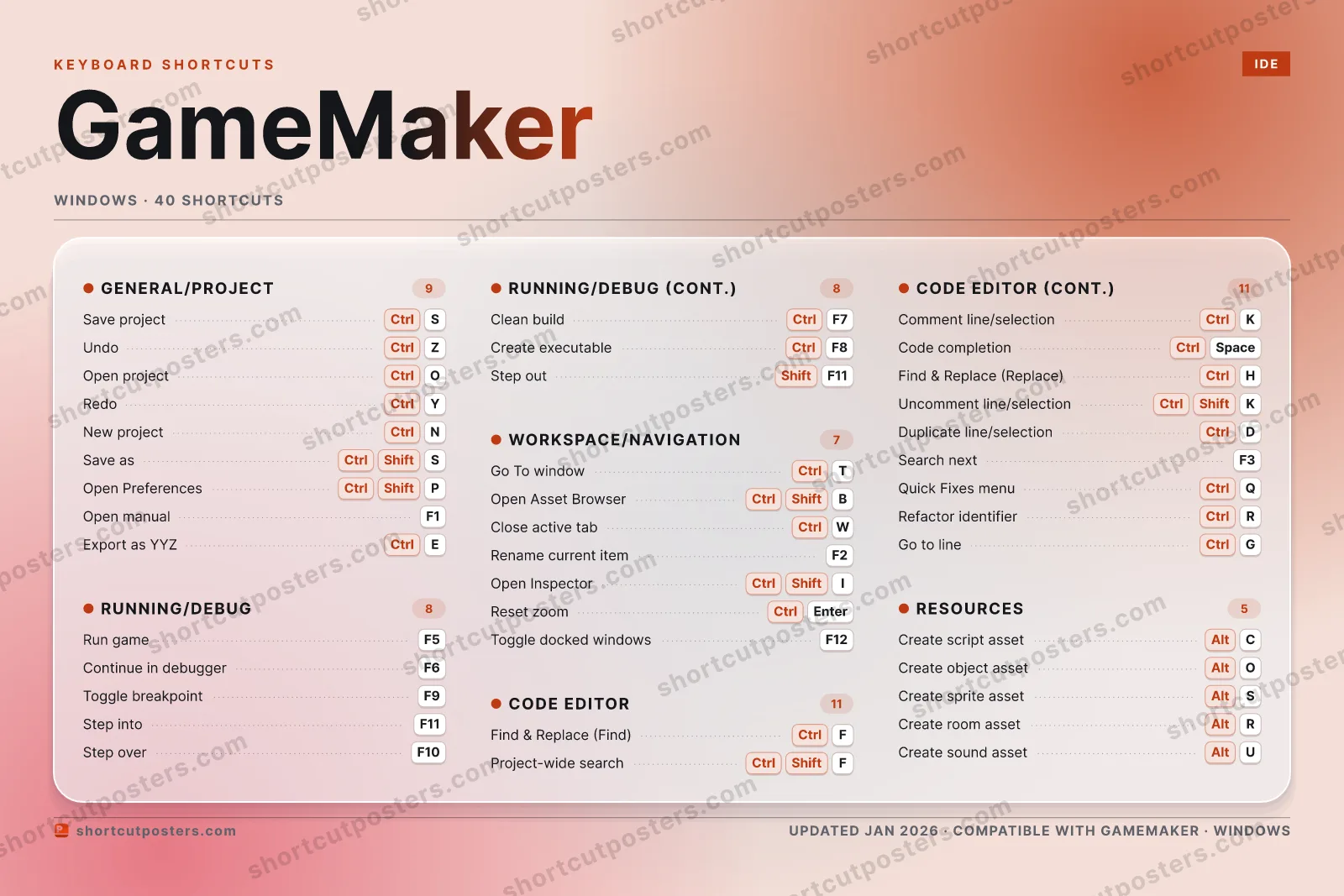
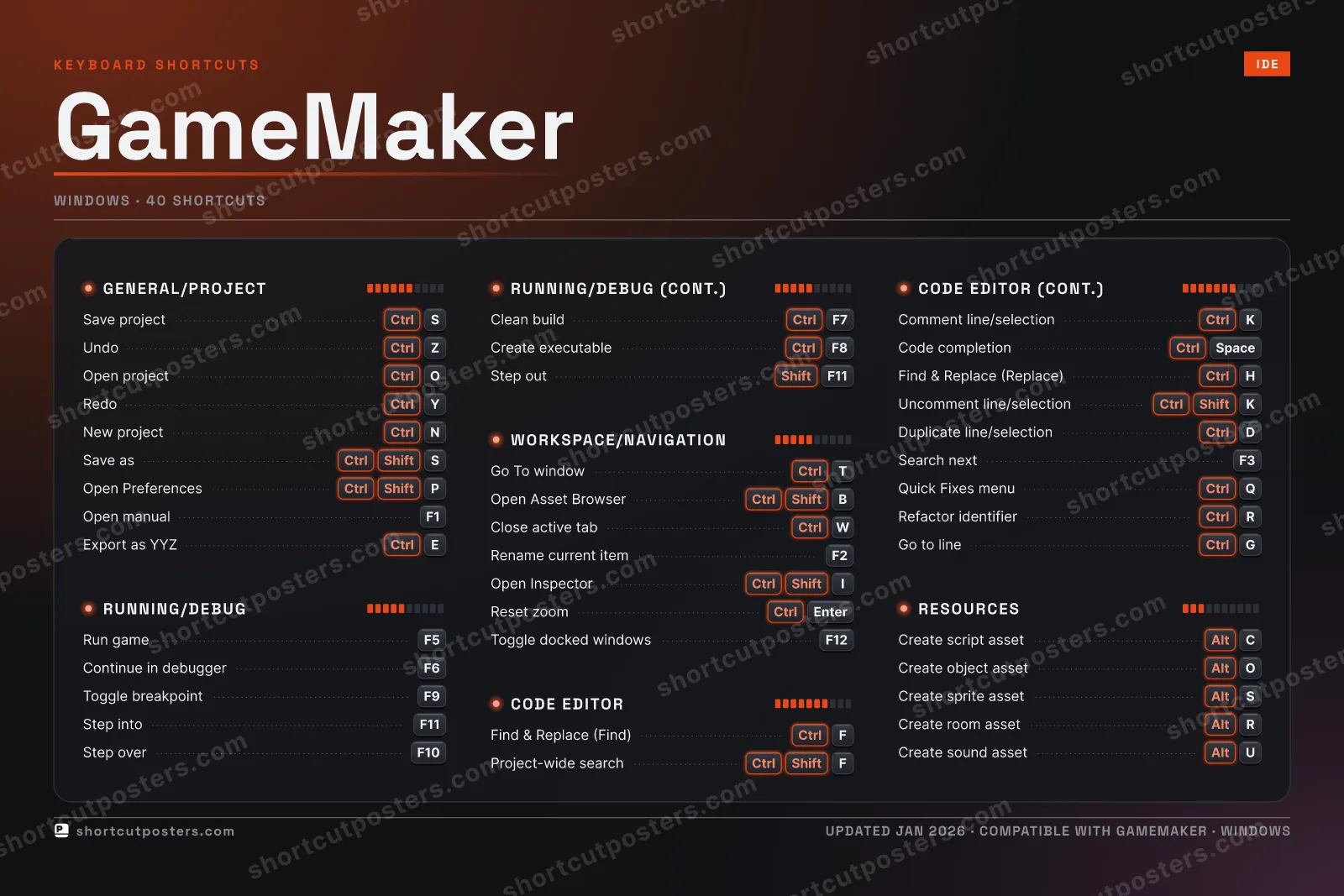
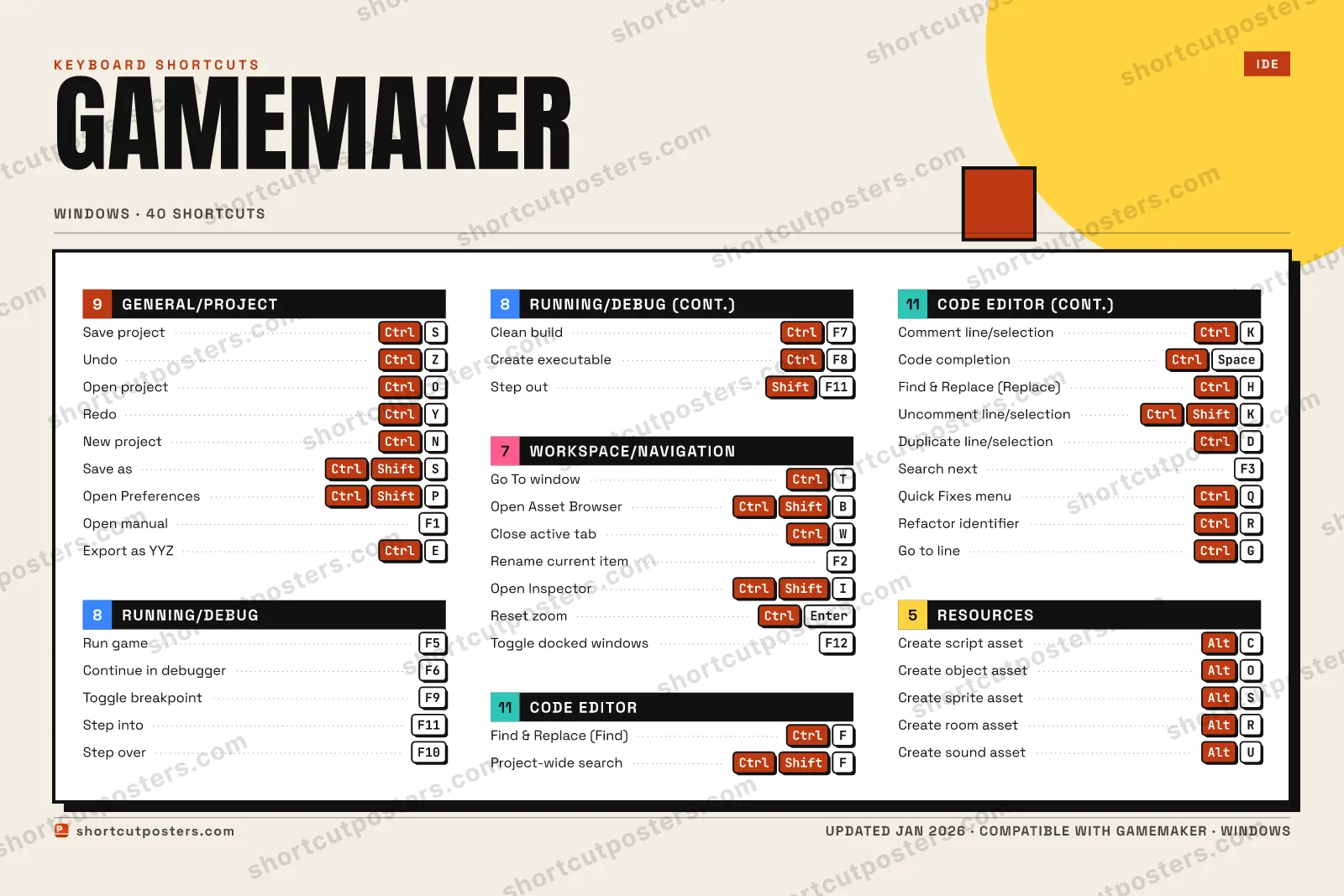
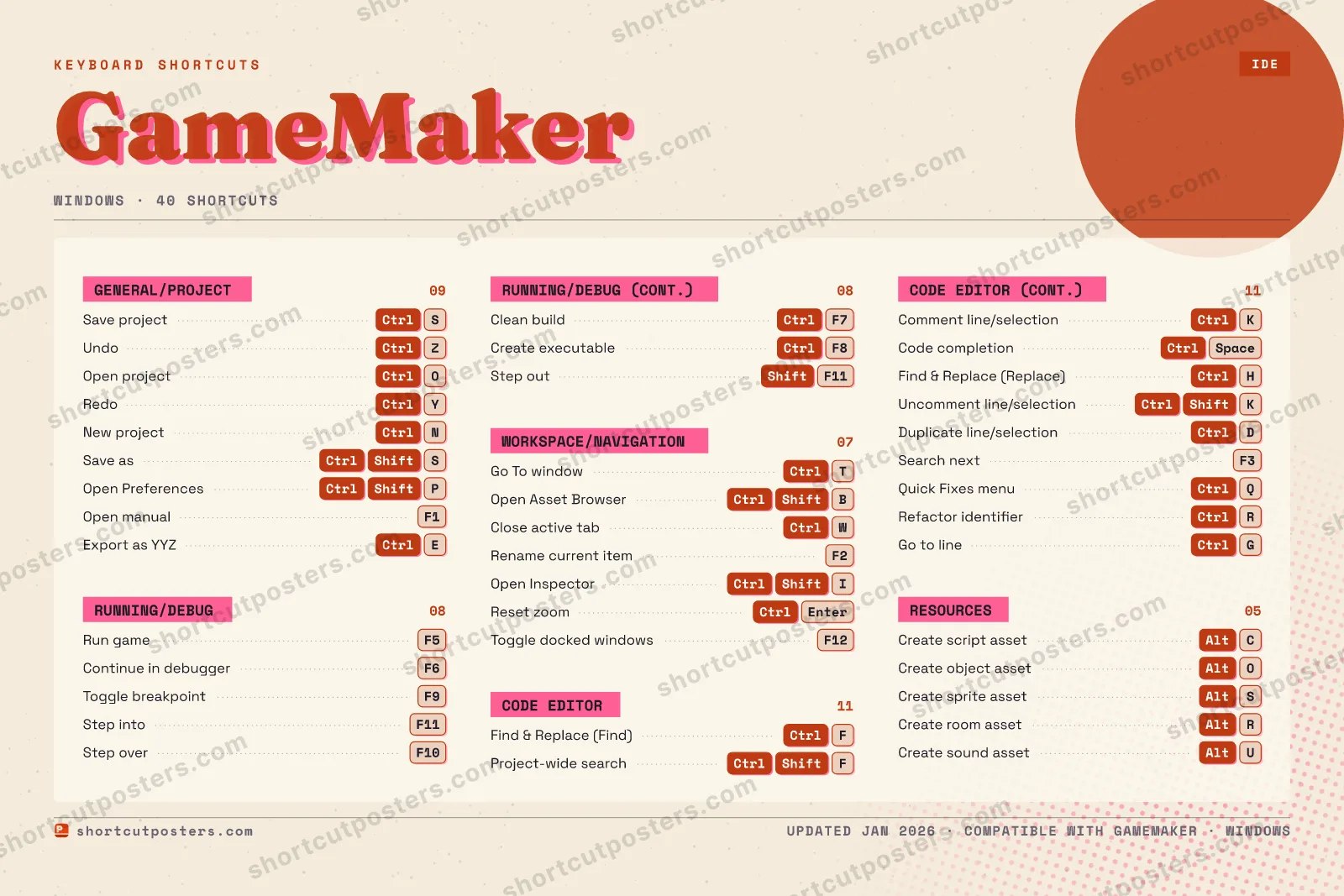
All GameMaker keyboard shortcuts (Windows)
Code Editor General/Project Running/Debug Workspace/Navigation Resources
Code Editor 11 Action Shortcut Find & Replace (Find) Ctrl F Project-wide search Ctrl Shift F Comment line/selection Ctrl K Code completion Ctrl Space Find & Replace (Replace) Ctrl H Uncomment line/selection Ctrl Shift K Duplicate line/selection Ctrl D Search next F3 Quick Fixes menu Ctrl Q Refactor identifier Ctrl R Go to line Ctrl G
General/Project 9 Action Shortcut Save project Ctrl S Undo Ctrl Z Open project Ctrl O Redo Ctrl Y New project Ctrl N Save as Ctrl Shift S Open Preferences Ctrl Shift P Open manual F1 Export as YYZ Ctrl E
Running/Debug 8 Action Shortcut Run game F5 Continue in debugger F6 Toggle breakpoint F9 Step into F11 Step over F10 Clean build Ctrl F7 Create executable Ctrl F8 Step out Shift F11
Workspace/Navigation 7 Action Shortcut Go To window Ctrl T Open Asset Browser Ctrl Shift B Close active tab Ctrl W Rename current item F2 Open Inspector Ctrl Shift I Reset zoom Ctrl Enter Toggle docked windows F12
Resources 5 Action Shortcut Create script asset Alt C Create object asset Alt O Create sprite asset Alt S Create room asset Alt R Create sound asset Alt U
Sourced from manual.gamemaker.io
·
Last verified June 18, 2026
Unofficial reference. ShortcutPosters is not affiliated with, endorsed by, or
sponsored by GameMaker. All product names, logos, and trademarks are property of
their respective owners. See our licensing & trademark
notice .
Frequently asked questions
Does the poster include every GameMaker shortcut? GameMaker has 40 keyboard shortcuts in total — the complete list is free to read on this page. The poster features the most essential ones, curated to stay readable on a wall.
Can I print it at home? Yes. The digital download is a high-resolution 300 DPI file you can print at home or at any print shop, in standard frame sizes.
Does it cover both Mac and Windows? We sell separate Mac and Windows editions so every key matches your keyboard exactly. This page is the Windows edition.
Is this an official GameMaker product? No. This is an unofficial reference poster and is not affiliated with or endorsed by GameMaker. All trademarks belong to their respective owners. Was this reference helpful? Thanks — your feedback helps us improve.
▲ Yes
▼ No