ShortcutPosters

Poster maker

Make your GameMaker shortcuts poster

Pick the shortcuts that matter, add your own, tune the colours and style — then download a free personalized PNG, or order the print-ready PDF.

Making a poster for:
Style
Accent
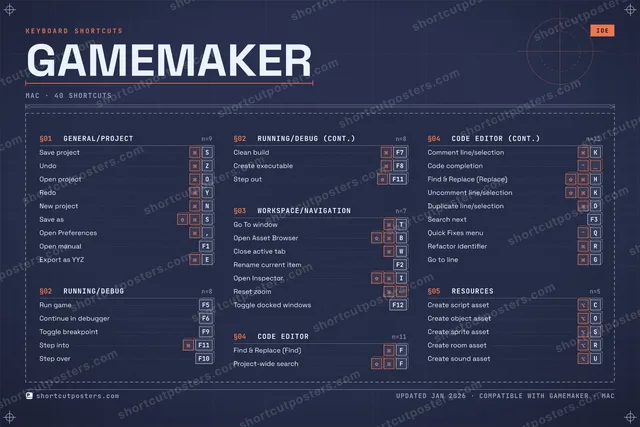
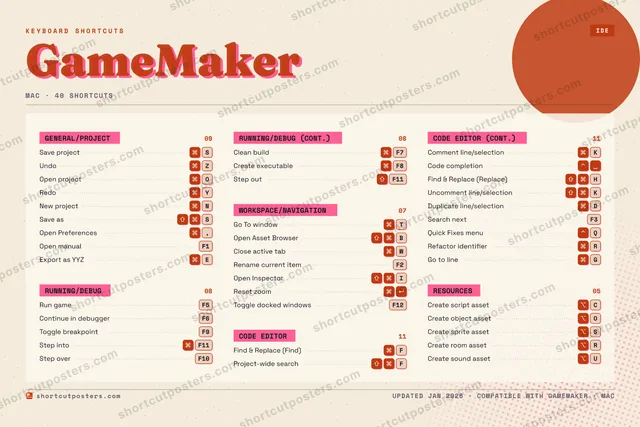
GAMEMAKERKEYBOARD SHORTCUTS · MAC · 401234567890QQuick Fi…WClose ac…EExport a…RRefactor…TGo To wi…YRedoUCreate s…I⇧ ⌘Open Ins…OOpen pro…PASSave pro…DDuplicat…FFind & R…GGo to li…H⇧ ⌘Find & R…JKComment …LZUndoXCCreate s…VB⇧ ⌘Open Ass…NNew proj…MMORE SHORTCUTSRun gameF5Continue in d…F6Toggle breakp…F9Project-wide …FCode completi…Step intoF11Step overF10Rename curren…F2Uncomment lin…KSave asSOpen Preferen…,Open manualF1Clean buildF7Create execut…F8Step outF11Reset zoomSearch nextF3Create object…OCreate sprite…SCreate room a…RToggle docked…F12shortcutposters.comUPDATED JAN 2026 · COMPATIBLE WITH GAMEMAKER · MAC

Hover to locate · click on the poster to disable · drag to reorder categories & shortcuts · to rename a category

Free PNG $0
  • Web resolution (1600 px)
  • Light watermark
  • Instant download
Made to order
Custom print-ready PDF $2.99
  • 300 DPI, framed-quality — no watermark
  • Every standard print size
  • Built to order from the poster above — checkout link emailed to you

Trouble ordering? Email business@shortcutposters.com.

How it works

  1. 1

    Choose a style

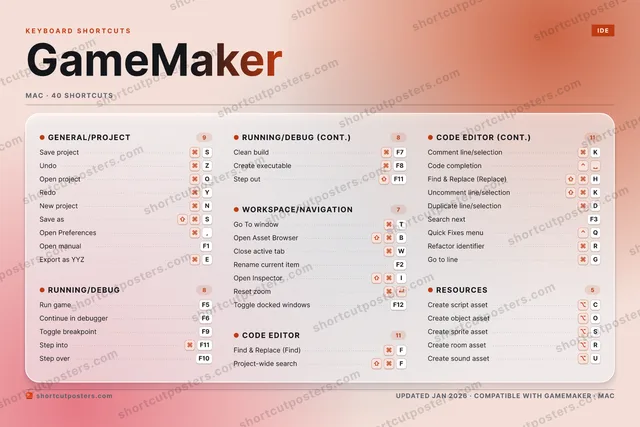
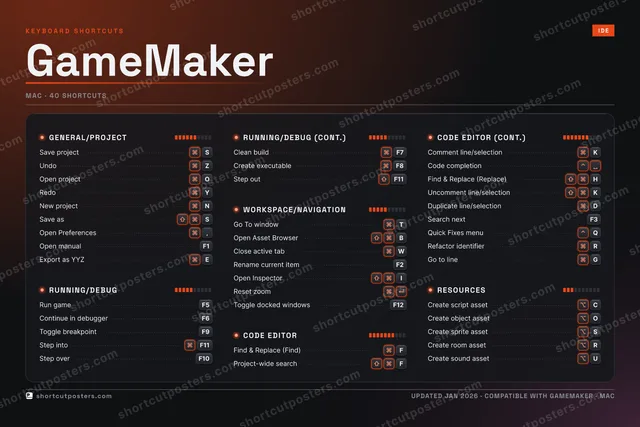
    Pick from four layouts: isometric keys, a typewriter list, a labelled keyboard map, or a bold editorial print.

  2. 2

    Make it yours

    Set the accent colour and palette, rename categories, and reorder anything.

  3. 3

    Pick the shortcuts

    Toggle exactly which shortcuts appear — or add your own custom ones.

  4. 4

    Download or print

    Export a free high-resolution PNG instantly, or order a print-ready PDF.

Four styles to choose from

GAMEMAKERKEYBOARD SHORTCUTS · MAC · 20 ESSENTIAL1234567890QWClose ac…ERTGo To wi…YRedoUIOOpen pro…PASSave pro…DFFind & R…GH⇧ ⌘Find & R…JKComment …LZUndoXCVB⇧ ⌘Open Ass…NNew proj…MMORE SHORTCUTSRun gameF5Continue in debug…F6Toggle breakpointF9Project-wide sear…FCode completionStep intoF11Step overF10Rename current it…F2Uncomment line/se…Kshortcutposters.comUPDATED JAN 2026 · COMPATIBLE WITH GAMEMAKER · MAC
Keyboard map Every binding labelled on a realistic QWERTY or AZERTY keyboard.
GENERAL/PROJECTSave projectSUndoZOpen projectORedoYNew projectNCODE EDITORFind & Replace (Find)FProject-wide searchFComment line/selectionKCode completionFind & Replace (Replace)HUncomment line/selectionKRUNNING/DEBUGRun gameF5Continue in debuggerF6Toggle breakpointF9Step intoF11Step overF10WORKSPACE/NAVIGATIONGo To windowTOpen Asset BrowserBClose active tabWRename current itemF2GameMakerKEYBOARD SHORTCUTS · MAC · 20 ESSENTIALBOTH LAYOUTSQWERTYQWERTYAZERTYAZERTYshortcutposters.comUPDATED JAN 2026 · COMPATIBLE WITH GAMEMAKER · MAC
Isometric Shortcuts on a 3D isometric keyboard — bold and poster-like.
GENERAL/PROJECT05Save projectSUndoZOpen projectORedoYNew projectNCODE EDITOR06Find & Replace (Find)FProject-wide searchFComment line/selectionKCode completionFind & Replace (Replace)HUncomment line/selectionKRUNNING/DEBUG05Run gameF5Continue in debuggerF6Toggle breakpointF9Step intoF11Step overF10WORKSPACE/NAVIGATION04Go To windowTOpen Asset BrowserBClose active tabWRename current itemF2GameMakerKEYBOARD SHORTCUTS · MAC · 20 ESSENTIALBOTH LAYOUTSQWERTYQWERTYAZERTYAZERTYshortcutposters.comUPDATED JAN 2026 · COMPATIBLE WITH GAMEMAKER · MAC
Typewriter A clean printed list, grouped by category — dense and legible.
GAMEMAKER · KEYBOARD SHORTCUTSMac · 4 SETS · No.01GAMEMAKERTOTAL20SHORTCUTSFOR MAC · SHIPPED COMBOSSETSGENERAL/PROJE05RUNNING/DEBUG05WORKSPACE/NAV04CODE EDITOR06REF. EDITION · JAN 2026shortcutposters.comSave projectSUndoZOpen projectORedoYNew projectNRun gameF5Continue in debuggerF6Toggle breakpointF9Step intoF11Step overF10Go To windowTOpen Asset BrowserBClose active tabWRename current itemF2Find & Replace (Find)FProject-wide searchFComment line/selectionKCode completionFind & Replace (Replace)HUncomment line/selectionK
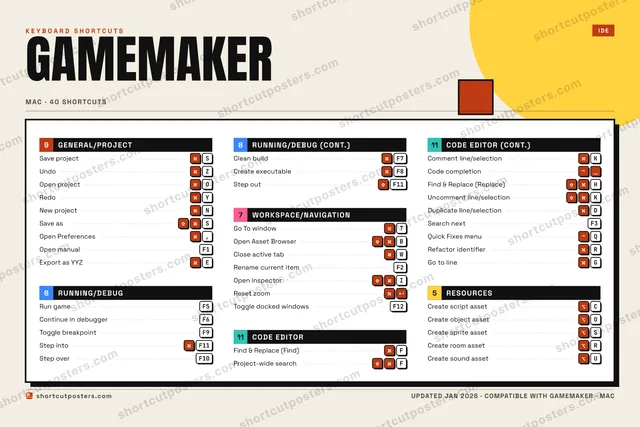
Editorial A bold Swiss-style print: giant wordmark, dense keycap columns, and a totals rail.

Frequently asked questions

Is the GameMaker poster maker free?

Yes — you can design and download a high-resolution PNG of your GameMaker shortcuts poster for free. A print-ready PDF is an optional paid upgrade.

Can I choose which GameMaker shortcuts appear?

Yes. Toggle any shortcut on or off, reorder them, rename categories, and even add your own custom shortcuts.

Can I change the colours and style?

Yes. Pick an accent colour, choose a palette, and switch between the isometric, typewriter, and keyboard-map styles.

Which keyboard layout and operating system are supported?

Choose QWERTY or AZERTY, and switch the edition between the operating systems GameMaker supports (macOS, Windows, Linux).

How do I get a printed poster?

Download the free PNG to print yourself, or order the print-ready, framed-quality PDF directly from the maker.