ShortcutPosters

Poster maker

Make your Visual Studio Code shortcuts poster

Pick the shortcuts that matter, add your own, tune the colours and style — then download a free personalized PNG, or order the print-ready PDF.

Making a poster for:
Style
Accent
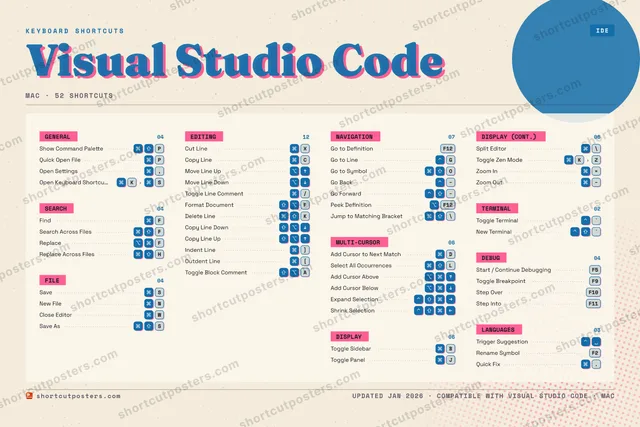
VISUAL STUDIO CODEKEYBOARD SHORTCUTS · MAC · 41 ESSENTIAL1234567890QWClose Ed…ERTYUIO⌘ ⇧Go to Sy…P⌘ ⇧Show Com…A⇧ ⌥Toggle B…SSaveDAdd Curs…FFindGGo to Li…H⌘ ⇧Replace …JToggle P…K⌘ ⇧Delete L…L⌘ ⇧Select A…ZXCut LineCCopy LineVBToggle S…NNew FileMMORE SHORTCUTSQuick Open Fi…PMove Line UpMove Line DownToggle Line C…/Format Docume…FGo to Definit…F12Search Across…FToggle Termin…`Start / Conti…F5Open Settings,Copy Line DownReplaceFTrigger Sugge…Rename SymbolF2Quick Fix.Toggle Breakp…F9Copy Line UpGo BackGo ForwardAdd Cursor Ab…Add Cursor Be…Expand Select…Split Editor\Save AsSNew Terminal`shortcutposters.comUPDATED JAN 2026 · COMPATIBLE WITH VISUAL STUDIO CODE · MAC

Hover to locate · click on the poster to disable · drag to reorder categories & shortcuts · to rename a category

Free PNG $0
  • Web resolution (1600 px)
  • Light watermark
  • Instant download
Made to order
Custom print-ready PDF $2.99
  • 300 DPI, framed-quality — no watermark
  • Every standard print size
  • Built to order from the poster above — checkout link emailed to you

Trouble ordering? Email business@shortcutposters.com.

How it works

  1. 1

    Choose a style

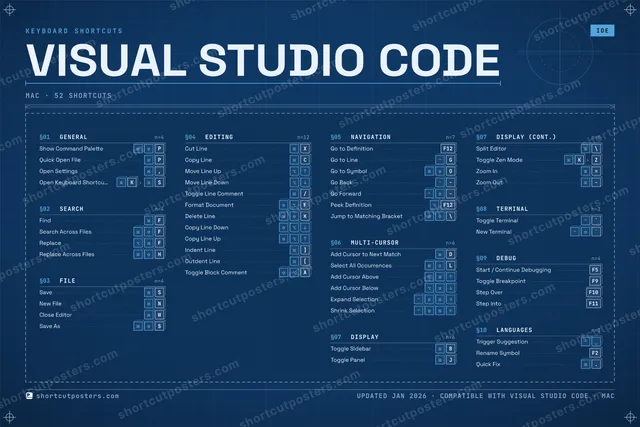
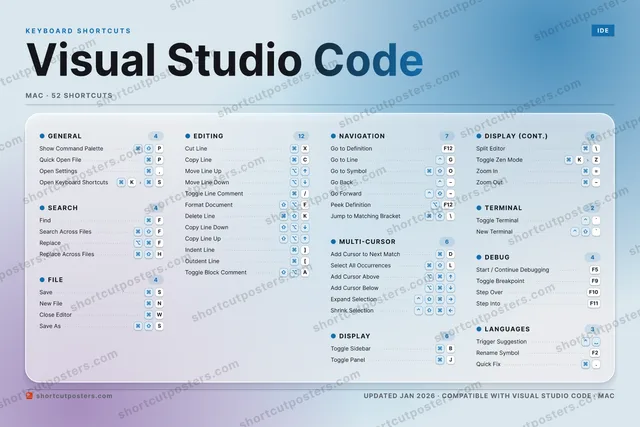
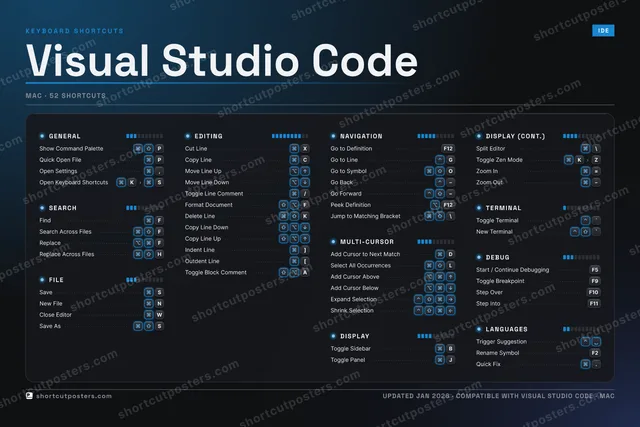
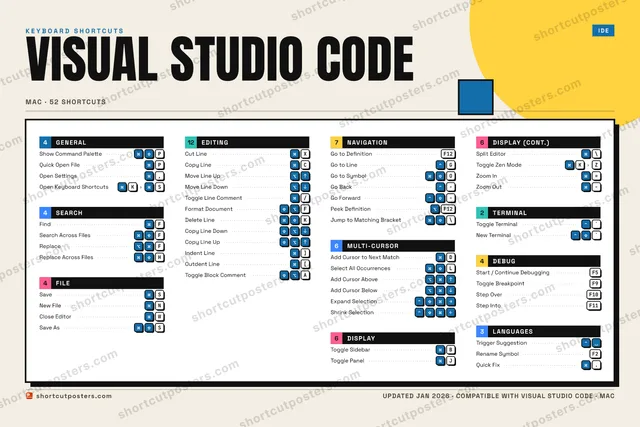
    Pick from four layouts: isometric keys, a typewriter list, a labelled keyboard map, or a bold editorial print.

  2. 2

    Make it yours

    Set the accent colour and palette, rename categories, and reorder anything.

  3. 3

    Pick the shortcuts

    Toggle exactly which shortcuts appear — or add your own custom ones.

  4. 4

    Download or print

    Export a free high-resolution PNG instantly, or order a print-ready PDF.

Four styles to choose from

VISUAL STUDIO CODEKEYBOARD SHORTCUTS · MAC · 20 ESSENTIAL1234567890QWERTYUIOP⌘ ⇧Show Com…ASSaveDAdd Curs…FFindGHJK⌘ ⇧Delete L…LZXCut LineCCopy LineVBToggle S…NMMORE SHORTCUTSQuick Open FilePMove Line UpMove Line DownToggle Line Comme…/Format DocumentFGo to DefinitionF12Search Across Fil…FToggle Terminal`Start / Continue …F5Open Settings,Copy Line DownReplaceFshortcutposters.comUPDATED JAN 2026 · COMPATIBLE WITH VISUAL STUDIO CODE · MAC
Keyboard map Every binding labelled on a realistic QWERTY or AZERTY keyboard.
GENERALShow Command PalettePQuick Open FilePOpen Settings,EDITINGCut LineXCopy LineCMove Line UpMove Line DownToggle Line Comment/Format DocumentFDelete LineKCopy Line DownDISPLAYToggle SidebarBDEBUGStart / Continue DebuggingF5SEARCHFindFSearch Across FilesFReplaceFFILESaveSNAVIGATIONGo to DefinitionF12MULTI-CURSORAdd Cursor to Next MatchDTERMINALToggle Terminal`Visual Studio CodeKEYBOARD SHORTCUTS · MAC · 20 ESSENTIALBOTH LAYOUTSQWERTYQWERTYAZERTYAZERTYshortcutposters.comUPDATED JAN 2026 · COMPATIBLE WITH VISUAL STUDIO CODE · MAC
Isometric Shortcuts on a 3D isometric keyboard — bold and poster-like.
GENERAL03Show Command PalettePQuick Open FilePOpen Settings,EDITING08Cut LineXCopy LineCMove Line UpMove Line DownToggle Line Comment/Format DocumentFDelete LineKCopy Line DownDISPLAY01Toggle SidebarBDEBUG01Start / Continue DebuggingF5SEARCH03FindFSearch Across FilesFReplaceFFILE01SaveSNAVIGATION01Go to DefinitionF12MULTI-CURSOR01Add Cursor to Next MatchDTERMINAL01Toggle Terminal`Visual Studio CodeKEYBOARD SHORTCUTS · MAC · 20 ESSENTIALBOTH LAYOUTSQWERTYQWERTYAZERTYAZERTYshortcutposters.comUPDATED JAN 2026 · COMPATIBLE WITH VISUAL STUDIO CODE · MAC
Typewriter A clean printed list, grouped by category — dense and legible.
VISUAL STUDIO CODE · KEYBOARD SHORTCUTSMac · 9 SETS · No.01VISUAL STUDIO CODETOTAL20SHORTCUTSFOR MAC · SHIPPED COMBOSSETSGENERAL03SEARCH03FILE01EDITING08NAVIGATION01MULTI-CURSOR01DISPLAY01TERMINAL01DEBUG01REF. EDITION · JAN 2026shortcutposters.comShow Command PalettePQuick Open FilePOpen Settings,FindFSearch Across FilesFReplaceFSaveSCut LineXCopy LineCMove Line UpMove Line DownToggle Line Comment/Format DocumentFDelete LineKCopy Line DownGo to DefinitionF12Add Cursor to Next MatchDToggle SidebarBToggle Terminal`Start / Continue DebuggingF5
Editorial A bold Swiss-style print: giant wordmark, dense keycap columns, and a totals rail.

Frequently asked questions

Is the Visual Studio Code poster maker free?

Yes — you can design and download a high-resolution PNG of your Visual Studio Code shortcuts poster for free. A print-ready PDF is an optional paid upgrade.

Can I choose which Visual Studio Code shortcuts appear?

Yes. Toggle any shortcut on or off, reorder them, rename categories, and even add your own custom shortcuts.

Can I change the colours and style?

Yes. Pick an accent colour, choose a palette, and switch between the isometric, typewriter, and keyboard-map styles.

Which keyboard layout and operating system are supported?

Choose QWERTY or AZERTY, and switch the edition between the operating systems Visual Studio Code supports (macOS, Windows, Linux).

How do I get a printed poster?

Download the free PNG to print yourself, or order the print-ready, framed-quality PDF directly from the maker.