ShortcutPosters

Poster maker

Make your Vim shortcuts poster

Pick the shortcuts that matter, add your own, tune the colours and style — then download a free personalized PNG, or order the print-ready PDF.

Making a poster for:
Style
Accent
VIMKEYBOARD SHORTCUTS · MAC · 43 ESSENTIAL1234End of L…5678Search W…90Start of…QWWord For…EEnd of W…RRedoTYUUndoIInsert B…OOpen Lin…PPut Afte…AAppend A…SDFGGo to La…HMove Lef…JJoin Lin…KLZXDelete C…CVVisual C…BWord Bac…NNext Mat…MMORE SHORTCUTSBack to Norma…Delete LineDDSearch Forward/Write File:WWrite and Quit:WQGo to First L…GGYank LineYYVisual LineVQuit:QQuit Without …:Q!Delete WordDWChange WordCWRepeat Last C….Previous MatchNSubstitute Al…:%S/OLD/NEW/GVisual BlockVOpen Line Abo…OPut Before Cu…PSearch Backwa…/Edit File:EFILESplit Window …WSSplit Window …WVMove to Next …WWChange LineCCNext Buffer:BNshortcutposters.comUPDATED JAN 2026 · COMPATIBLE WITH VIM · MAC

Hover to locate · click on the poster to disable · drag to reorder categories & shortcuts · to rename a category

Free PNG $0
  • Web resolution (1600 px)
  • Light watermark
  • Instant download
Made to order
Custom print-ready PDF $2.99
  • 300 DPI, framed-quality — no watermark
  • Every standard print size
  • Built to order from the poster above — checkout link emailed to you

Trouble ordering? Email business@shortcutposters.com.

How it works

  1. 1

    Choose a style

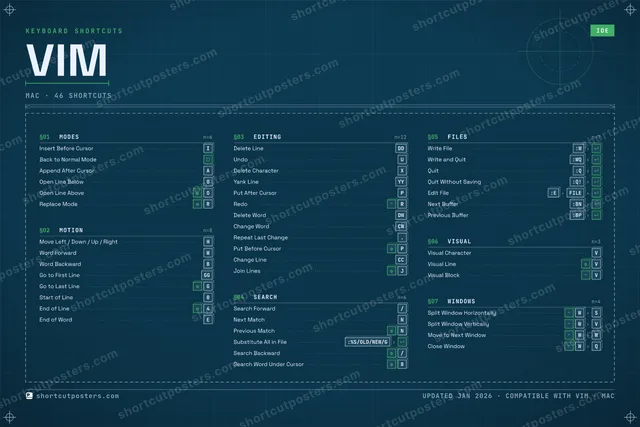
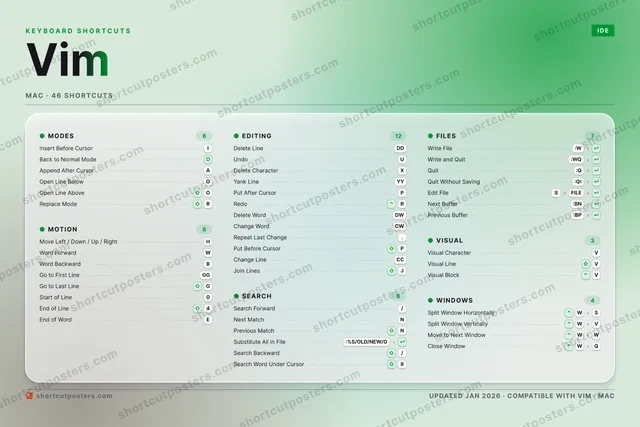
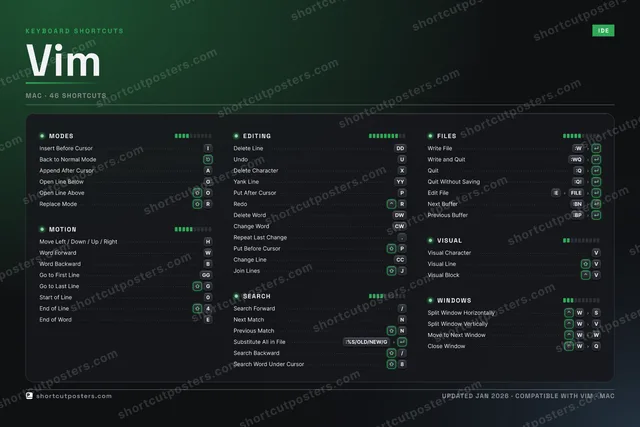
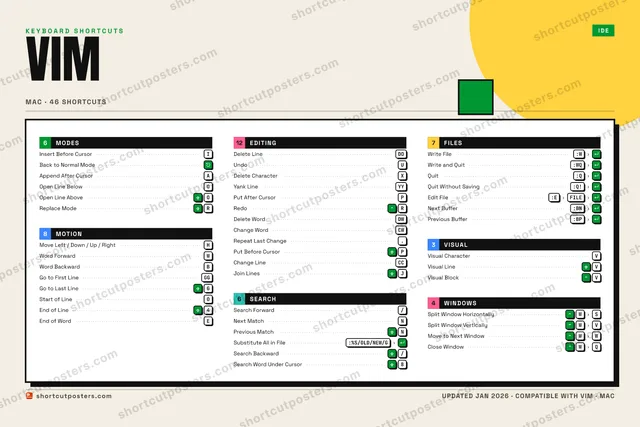
    Pick from four layouts: isometric keys, a typewriter list, a labelled keyboard map, or a bold editorial print.

  2. 2

    Make it yours

    Set the accent colour and palette, rename categories, and reorder anything.

  3. 3

    Pick the shortcuts

    Toggle exactly which shortcuts appear — or add your own custom ones.

  4. 4

    Download or print

    Export a free high-resolution PNG instantly, or order a print-ready PDF.

Four styles to choose from

VIMKEYBOARD SHORTCUTS · MAC · 20 ESSENTIAL1234567890QWWord For…ERRedoTYUUndoIInsert B…OPPut Afte…AAppend A…SDFGGo to La…HMove Lef…JKLZXDelete C…CVVisual C…BWord Bac…NNext Mat…MMORE SHORTCUTSBack to Normal Mo…Delete LineDDSearch Forward/Write File:WWrite and Quit:WQGo to First LineGGYank LineYYVisual LineVshortcutposters.comUPDATED JAN 2026 · COMPATIBLE WITH VIM · MAC
Keyboard map Every binding labelled on a realistic QWERTY or AZERTY keyboard.
MODESInsert Before CursorIBack to Normal ModeAppend After CursorAEDITINGDelete LineDDUndoUDelete CharacterXYank LineYYPut After CursorPRedoRVISUALVisual CharacterVVisual LineVMOTIONMove Left / Down / Up / RightHWord ForwardWWord BackwardBGo to First LineGGGo to Last LineGSEARCHSearch Forward/Next MatchNFILESWrite File:WWrite and Quit:WQVimKEYBOARD SHORTCUTS · MAC · 20 ESSENTIALBOTH LAYOUTSQWERTYQWERTYAZERTYAZERTYshortcutposters.comUPDATED JAN 2026 · COMPATIBLE WITH VIM · MAC
Isometric Shortcuts on a 3D isometric keyboard — bold and poster-like.
MODES03Insert Before CursorIBack to Normal ModeAppend After CursorAEDITING06Delete LineDDUndoUDelete CharacterXYank LineYYPut After CursorPRedoRVISUAL02Visual CharacterVVisual LineVMOTION05Move Left / Down / Up / RightHWord ForwardWWord BackwardBGo to First LineGGGo to Last LineGSEARCH02Search Forward/Next MatchNFILES02Write File:WWrite and Quit:WQVimKEYBOARD SHORTCUTS · MAC · 20 ESSENTIALBOTH LAYOUTSQWERTYQWERTYAZERTYAZERTYshortcutposters.comUPDATED JAN 2026 · COMPATIBLE WITH VIM · MAC
Typewriter A clean printed list, grouped by category — dense and legible.
VIM · KEYBOARD SHORTCUTSMac · 6 SETS · No.01VIMTOTAL20SHORTCUTSFOR MAC · SHIPPED COMBOSSETSMODES03MOTION05EDITING06SEARCH02FILES02VISUAL02REF. EDITION · JAN 2026shortcutposters.comInsert Before CursorIBack to Normal ModeAppend After CursorAMove Left / Down / Up / RightHWord ForwardWWord BackwardBGo to First LineGGGo to Last LineGDelete LineDDUndoUDelete CharacterXYank LineYYPut After CursorPRedoRSearch Forward/Next MatchNWrite File:WWrite and Quit:WQVisual CharacterVVisual LineV
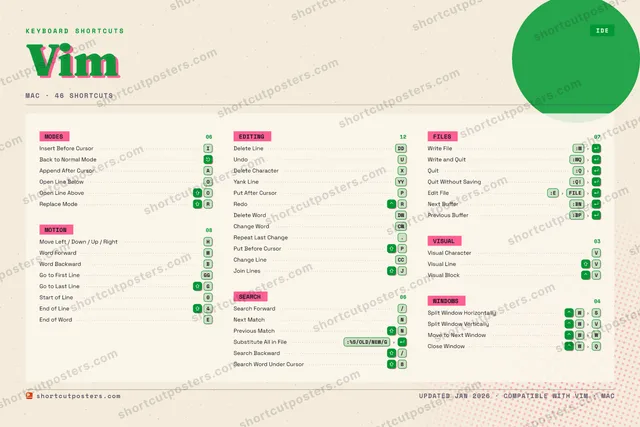
Editorial A bold Swiss-style print: giant wordmark, dense keycap columns, and a totals rail.

Frequently asked questions

Is the Vim poster maker free?

Yes — you can design and download a high-resolution PNG of your Vim shortcuts poster for free. A print-ready PDF is an optional paid upgrade.

Can I choose which Vim shortcuts appear?

Yes. Toggle any shortcut on or off, reorder them, rename categories, and even add your own custom shortcuts.

Can I change the colours and style?

Yes. Pick an accent colour, choose a palette, and switch between the isometric, typewriter, and keyboard-map styles.

Which keyboard layout and operating system are supported?

Choose QWERTY or AZERTY, and switch the edition between the operating systems Vim supports (macOS, Windows, Linux).

How do I get a printed poster?

Download the free PNG to print yourself, or order the print-ready, framed-quality PDF directly from the maker.