ShortcutPosters

4 art directions — pick one below, click to zoom & compare.
Layout
DOCKERKEYBOARD SHORTCUTS · WINDOWS · 25 ESSENTIAL1234567890QWERTYUIOPASDFGHJKLZXCVBNMMORE SHORTCUTSRun a new con…dockerRUNIMAGEList running …dockerPSRun command i…dockerexecITCONTAINERbashBuild an imag…dockerbuildTNAME:TAG.Start Compose…dockercomposeUPStart Compose…dockercomposeUPDStop and remo…dockercomposedownRun container…dockerRUNDIMAGERun interacti…dockerRUNITIMAGEbashList all cont…dockerPSAView containe…dockerlogsCONTAINERStop a runnin…dockerstopCONTAINERList imagesdockerimagesPull an image…dockerpullIMAGERemove unused…dockersystempruneRun container…dockerRUNP8080:80IMAGEFollow contai…dockerlogsFCONTAINERRemove a cont…dockerRMCONTAINERPush an image…dockerpushIMAGERun container…dockerRUNnameNAMEIMAGEStart a stopp…dockerstartCONTAINERForce remove …dockerRMFCONTAINERRemove an ima…dockerRMIIMAGEList Compose …dockercomposePSView Compose …dockercomposelogsFshortcutposters.comUPDATED JAN 2026 · COMPATIBLE WITH DOCKER · WINDOWS
IMAGESBuild an image from …dockerbuildTNAME:TAG.List imagesdockerimagesPull an image from a…dockerpullIMAGEPush an image to a r…dockerpushIMAGERemove an imagedockerRMIIMAGETag an imagedockerTAGSOURCETARGETREGISTRYLog in to a registrydockerloginCOMPOSEStart Compose servic…dockercomposeUPStart Compose servic…dockercomposeUPDStop and remove Comp…dockercomposedownList Compose contain…dockercomposePSView Compose logsdockercomposelogsFBuild Compose servic…dockercomposebuildSYSTEMRemove unused datadockersystempruneRemove all unused da…dockersystempruneAvolumesShow Docker disk usa…dockersystemDFShow Docker versiondockerversionCONTAINERSRun a new containerdockerRUNIMAGEList running contain…dockerPSRun command in runni…dockerexecITCONTAINERbashRun container in det…dockerRUNDIMAGERun interactive cont…dockerRUNITIMAGEbashList all containers …dockerPSAView container logsdockerlogsCONTAINERStop a running conta…dockerstopCONTAINERRun container with p…dockerRUNP8080:80IMAGEFollow container log…dockerlogsFCONTAINERRemove a containerdockerRMCONTAINERRun container with n…dockerRUNnameNAMEIMAGEStart a stopped cont…dockerstartCONTAINERForce remove a runni…dockerRMFCONTAINERRestart a containerdockerrestartCONTAINERInspect a container …dockerinspectCONTAINERDockerKEYBOARD SHORTCUTS · WINDOWS · 33BOTH LAYOUTSQWERTYQWERTYAZERTYAZERTYshortcutposters.comUPDATED JAN 2026 · COMPATIBLE WITH DOCKER · WINDOWS
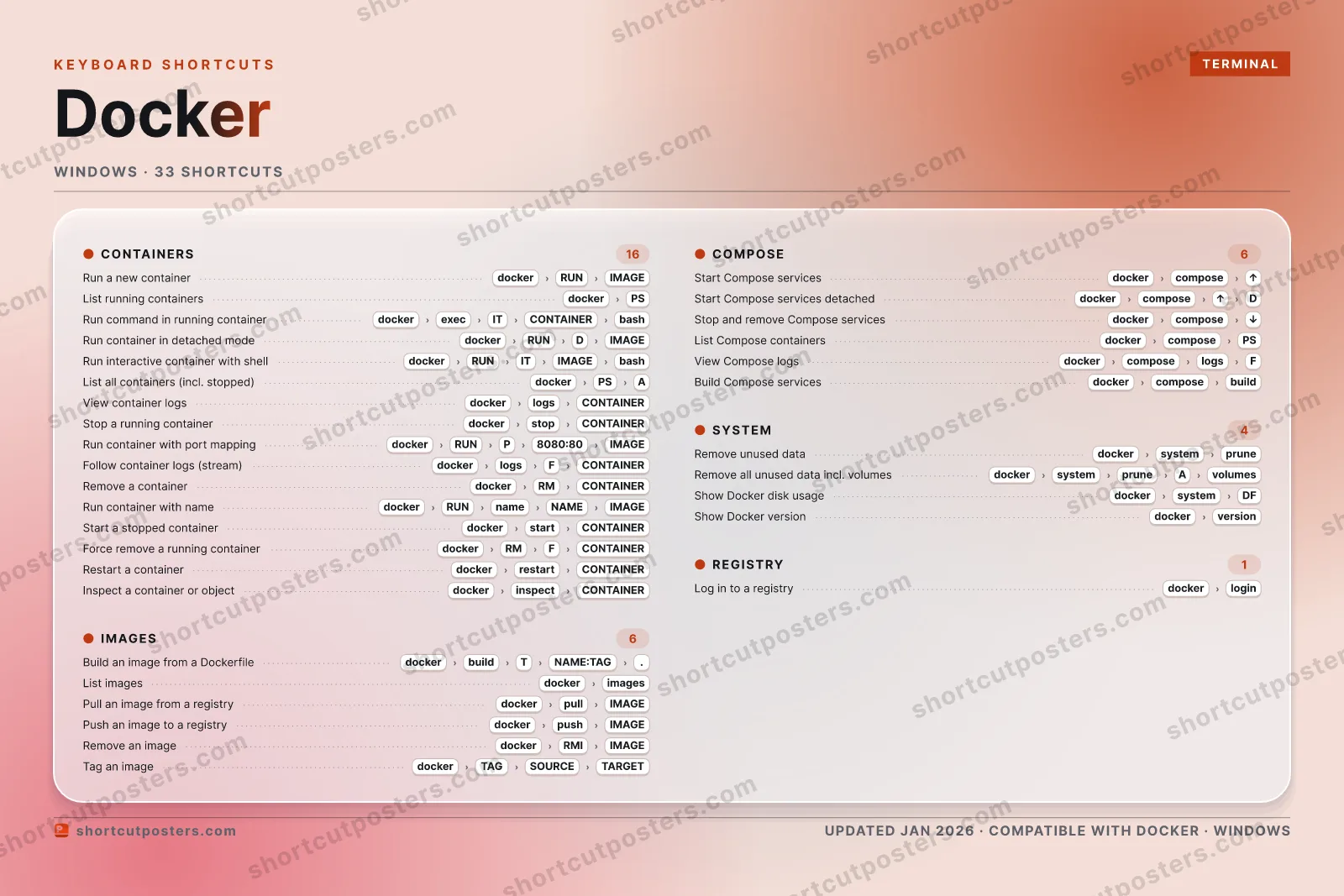
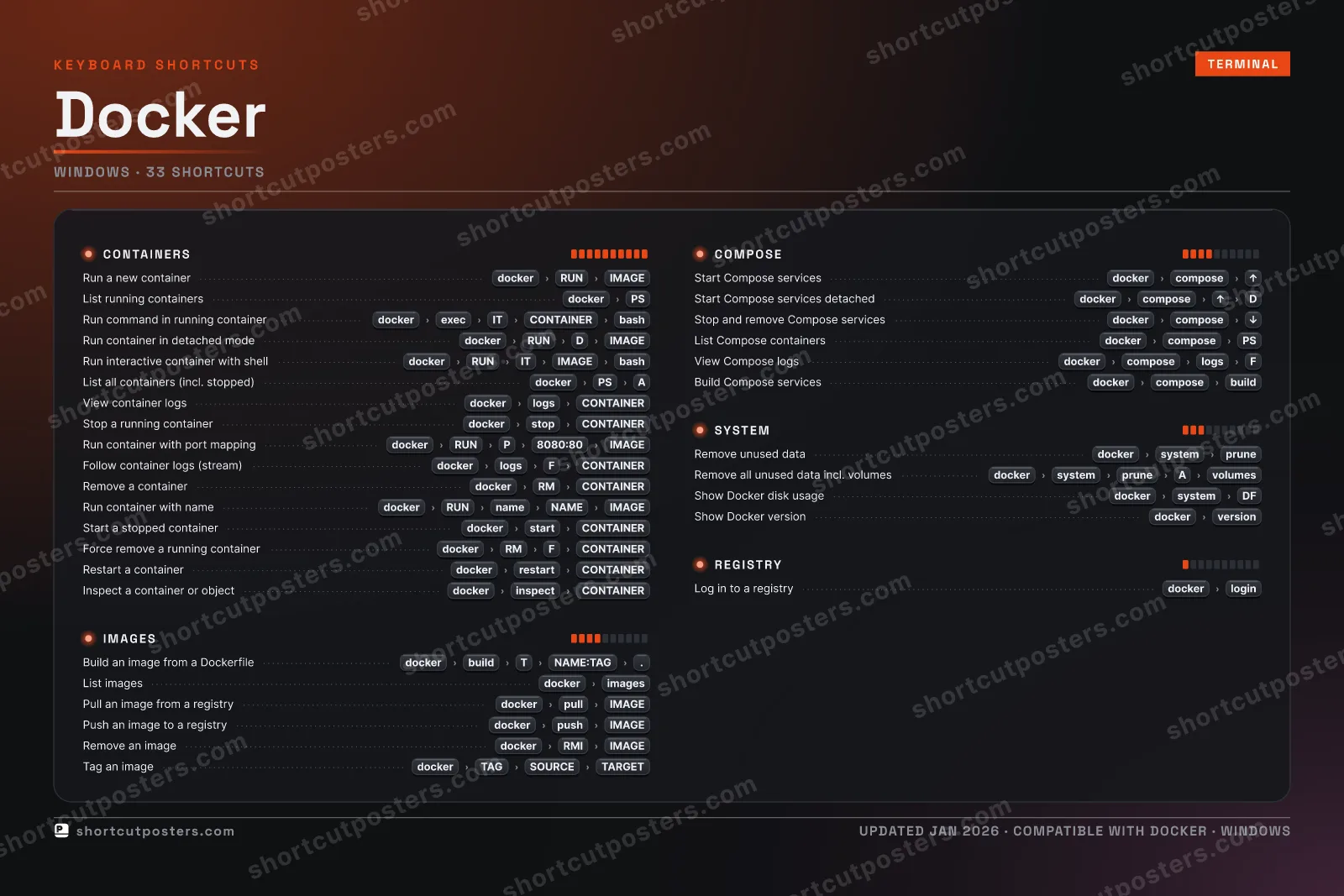
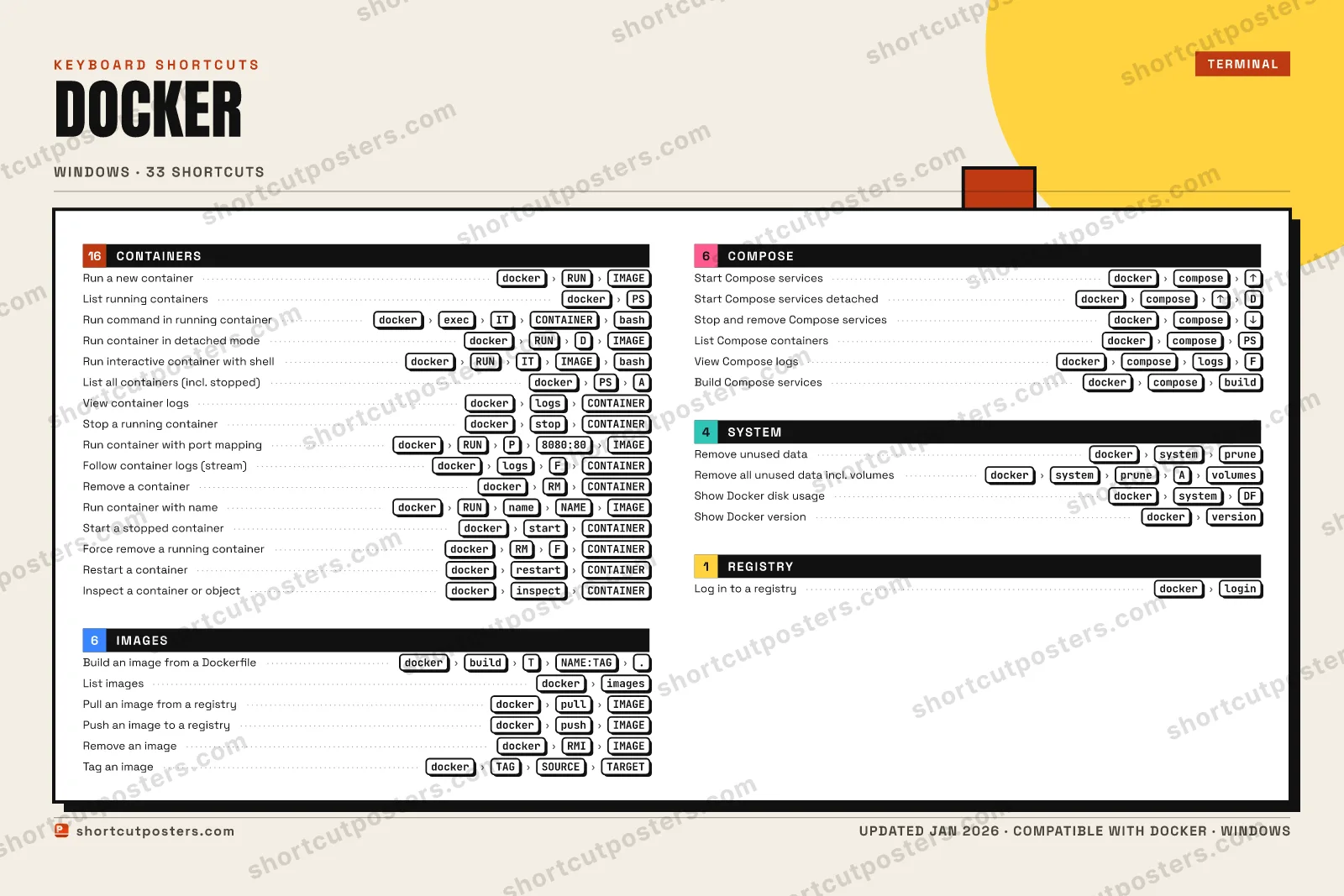
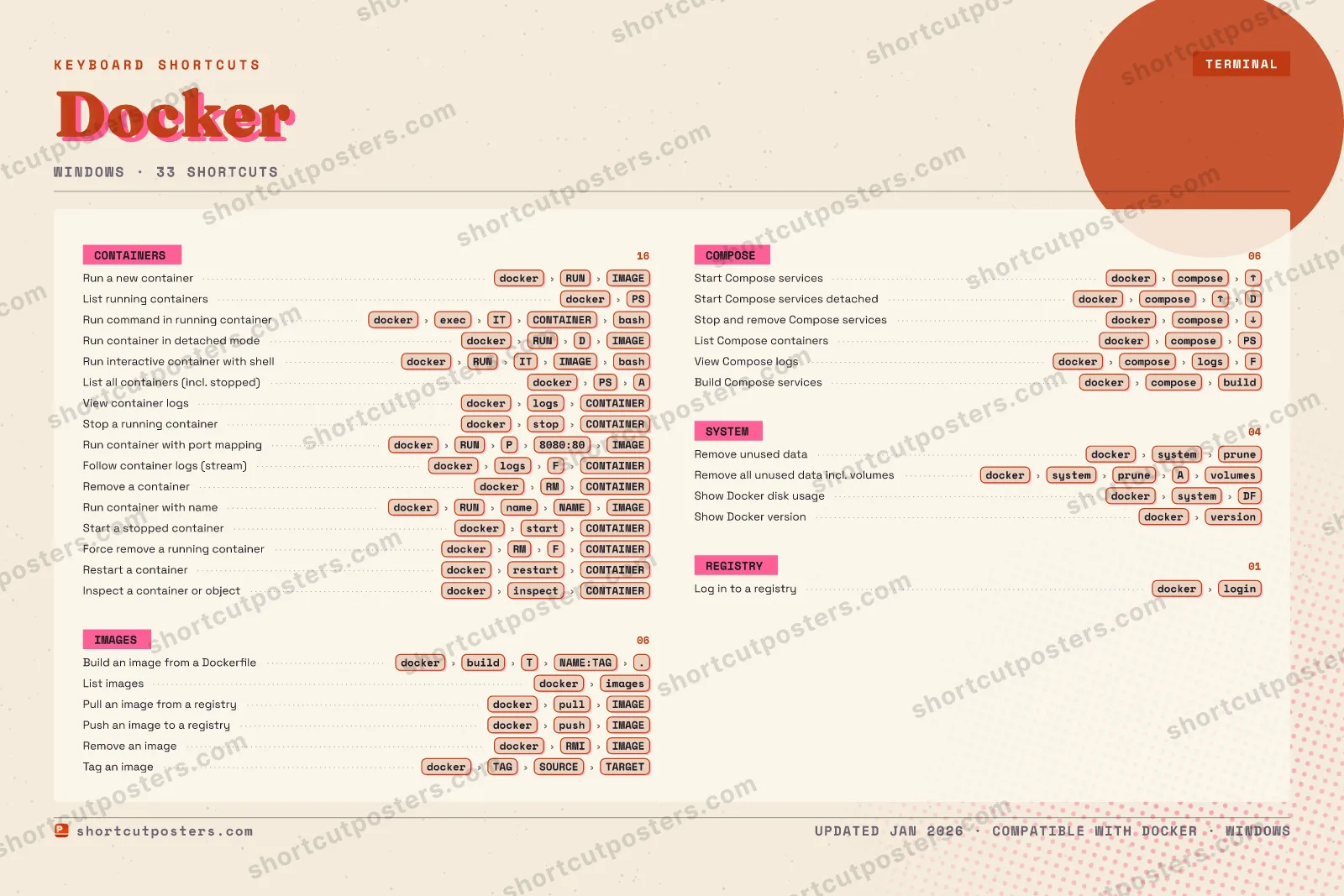
CONTAINERS16Run a new containerdockerRUNIMAGEList running containersdockerPSRun command in running containerdockerexecITCONTAINERbashRun container in detached modedockerRUNDIMAGERun interactive container with shelldockerRUNITIMAGEbashList all containers (incl. stopped)dockerPSAView container logsdockerlogsCONTAINERStop a running containerdockerstopCONTAINERRun container with port mappingdockerRUNP8080:80IMAGEFollow container logs (stream)dockerlogsFCONTAINERRemove a containerdockerRMCONTAINERRun container with namedockerRUNnameNAMEIMAGEStart a stopped containerdockerstartCONTAINERForce remove a running containerdockerRMFCONTAINERRestart a containerdockerrestartCONTAINERInspect a container or objectdockerinspectCONTAINERREGISTRY01Log in to a registrydockerloginIMAGES06Build an image from a DockerfiledockerbuildTNAME:TAG.List imagesdockerimagesPull an image from a registrydockerpullIMAGEPush an image to a registrydockerpushIMAGERemove an imagedockerRMIIMAGETag an imagedockerTAGSOURCETARGETCOMPOSE06Start Compose servicesdockercomposeUPStart Compose services detacheddockercomposeUPDStop and remove Compose servicesdockercomposedownList Compose containersdockercomposePSView Compose logsdockercomposelogsFBuild Compose servicesdockercomposebuildSYSTEM04Remove unused datadockersystempruneRemove all unused data incl. volumesdockersystempruneAvolumesShow Docker disk usagedockersystemDFShow Docker versiondockerversionDockerKEYBOARD SHORTCUTS · WINDOWS · 33BOTH LAYOUTSQWERTYQWERTYAZERTYAZERTYshortcutposters.comUPDATED JAN 2026 · COMPATIBLE WITH DOCKER · WINDOWS
DOCKER · KEYBOARD SHORTCUTSWindows · 5 SETS · No.01DOCKERTOTAL33SHORTCUTSFOR WINDOWS · SHIPPED COMBOSSETSCONTAINERS16IMAGES06COMPOSE06SYSTEM04REGISTRY01REF. EDITION · JAN 2026shortcutposters.comRun a new containerdockerRUNIMAGEList running containersdockerPSRun comman…dockerexecITCONTAINERbashRun container in detached m…dockerRUNDIMAGERun interactive …dockerRUNITIMAGEbashList all containers (incl. stopped)dockerPSAView container logsdockerlogsCONTAINERStop a running containerdockerstopCONTAINERRun container …dockerRUNP8080:80IMAGEFollow container logs…dockerlogsFCONTAINERRemove a containerdockerRMCONTAINERRun container …dockerRUNnameNAMEIMAGEStart a stopped containerdockerstartCONTAINERForce remove a running …dockerRMFCONTAINERRestart a containerdockerrestartCONTAINERInspect a container or …dockerinspectCONTAINERBuild an image …dockerbuildTNAME:TAG.List imagesdockerimagesPull an image from a registrydockerpullIMAGEPush an image to a registrydockerpushIMAGERemove an imagedockerRMIIMAGETag an imagedockerTAGSOURCETARGETStart Compose servicesdockercomposeUPStart Compose services det…dockercomposeUPDStop and remove Compose servi…dockercomposedownList Compose containersdockercomposePSView Compose logsdockercomposelogsFBuild Compose servicesdockercomposebuildRemove unused datadockersystempruneRemove all…dockersystempruneAvolumesShow Docker disk usagedockersystemDFShow Docker versiondockerversionLog in to a registrydockerlogin

Windows edition · 33 shortcuts

Docker Keyboard Shortcuts Poster

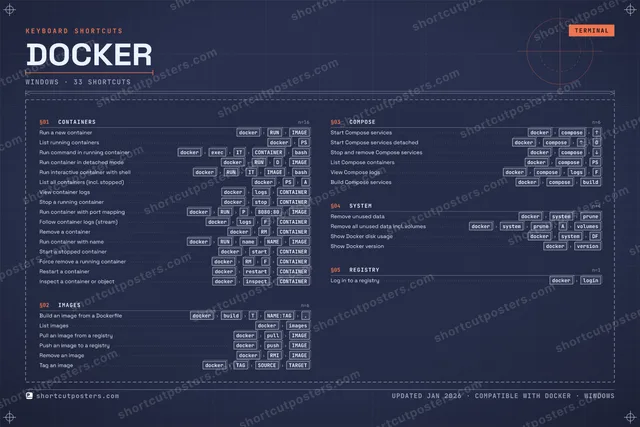
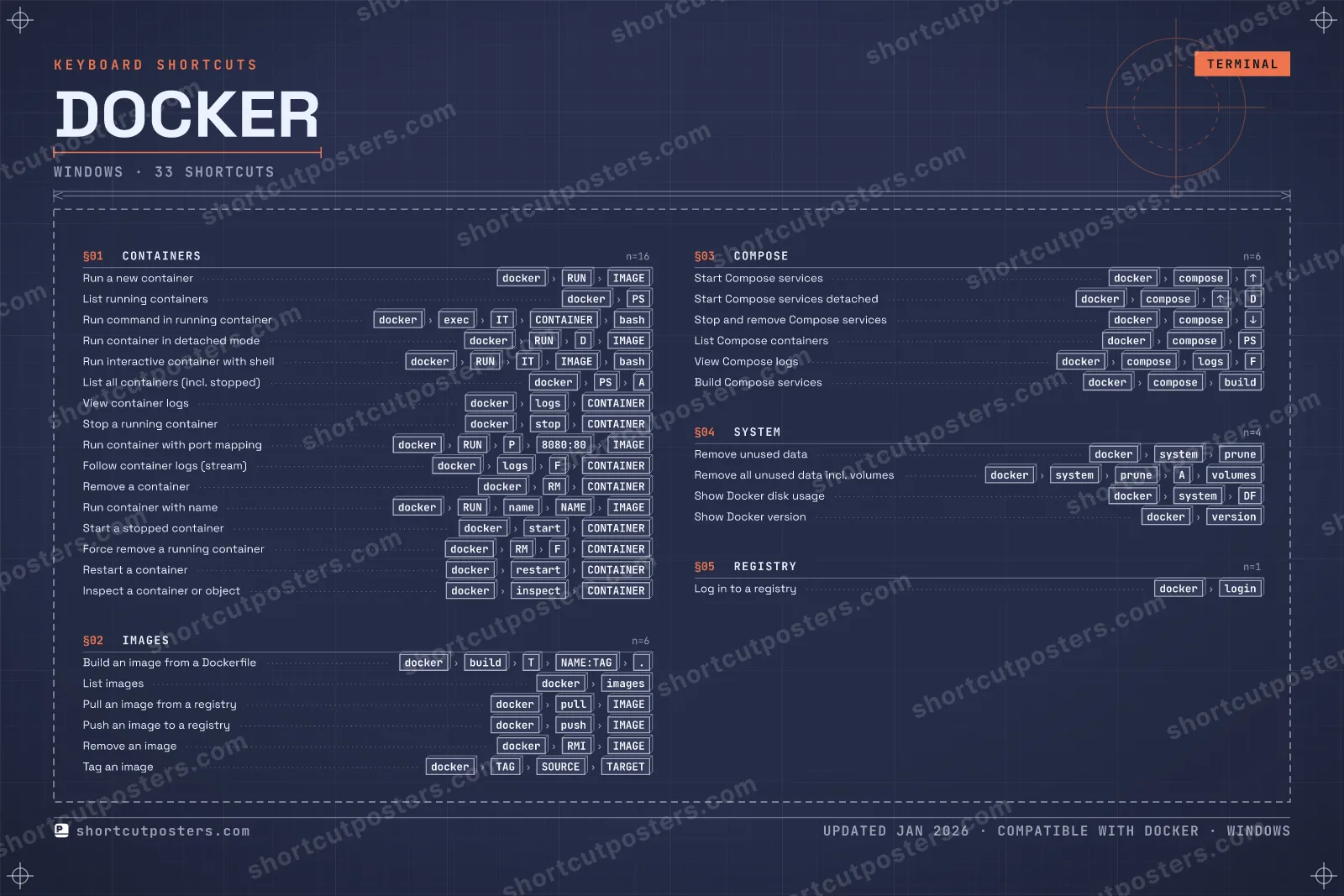
A printable, framed-quality poster of the essential Docker shortcuts for Windows — the keys worth keeping in view, designed to stay readable on a wall.

Edition
Apple Mac Windows Windows

Free PNG is web-resolution & lightly watermarked.

Customise this poster Pick the shortcuts, restyle the colours — download free. Get the framed-quality print Full 300 DPI, print-ready — at home or shipped to your door.

Docker packages applications and their dependencies into portable containers that run consistently across environments. While Docker Desktop provides a GUI, the docker command-line interface is the durable, well-documented way to build images, run containers, and manage the container lifecycle. These entries model the most essential docker CLI commands as quick-reference shortcuts.

All Docker keyboard shortcuts (Windows)

Containers 16

Action Shortcut
Run a new container dockerthenRUNthenIMAGE
List running containers dockerthenPS
Run command in running container dockerthenexecthenITthenCONTAINERthenbash
Run container in detached mode dockerthenRUNthenDthenIMAGE
Run interactive container with shell dockerthenRUNthenITthenIMAGEthenbash
List all containers (incl. stopped) dockerthenPSthenA
View container logs dockerthenlogsthenCONTAINER
Stop a running container dockerthenstopthenCONTAINER
Run container with port mapping dockerthenRUNthenPthen8080:80thenIMAGE
Follow container logs (stream) dockerthenlogsthenFthenCONTAINER
Remove a container dockerthenRMthenCONTAINER
Run container with name dockerthenRUNthennamethenNAMEthenIMAGE
Start a stopped container dockerthenstartthenCONTAINER
Force remove a running container dockerthenRMthenFthenCONTAINER
Restart a container dockerthenrestartthenCONTAINER
Inspect a container or object dockertheninspectthenCONTAINER

Images 6

Action Shortcut
Build an image from a Dockerfile dockerthenbuildthenTthenNAME:TAGthen.
List images dockerthenimages
Pull an image from a registry dockerthenpullthenIMAGE
Push an image to a registry dockerthenpushthenIMAGE
Remove an image dockerthenRMIthenIMAGE
Tag an image dockerthenTAGthenSOURCEthenTARGET

Compose 6

Action Shortcut
Start Compose services dockerthencomposethenUP
Start Compose services detached dockerthencomposethenUPthenD
Stop and remove Compose services dockerthencomposethendown
List Compose containers dockerthencomposethenPS
View Compose logs dockerthencomposethenlogsthenF
Build Compose services dockerthencomposethenbuild

System 4

Action Shortcut
Remove unused data dockerthensystemthenprune
Remove all unused data incl. volumes dockerthensystemthenprunethenAthenvolumes
Show Docker disk usage dockerthensystemthenDF
Show Docker version dockerthenversion

Registry 1

Action Shortcut
Log in to a registry dockerthenlogin

Sourced from docs.docker.com , docs.docker.com , docs.docker.com , docs.docker.com , docs.docker.com , docs.docker.com , docs.docker.com , docs.docker.com , docs.docker.com , docs.docker.com , docs.docker.com , docs.docker.com , docs.docker.com , docs.docker.com , docs.docker.com Last verified

Unofficial reference. ShortcutPosters is not affiliated with, endorsed by, or sponsored by Docker. All product names, logos, and trademarks are property of their respective owners. See our licensing & trademark notice.

Frequently asked questions

Does the poster include every Docker shortcut?
Docker has 33 keyboard shortcuts in total — the complete list is free to read on this page. The poster features the most essential ones, curated to stay readable on a wall.
Can I print it at home?
Yes. The digital download is a high-resolution 300 DPI file you can print at home or at any print shop, in standard frame sizes.
Does it cover both Mac and Windows?
We sell separate Mac and Windows editions so every key matches your keyboard exactly. This page is the Windows edition.
Is this an official Docker product?
No. This is an unofficial reference poster and is not affiliated with or endorsed by Docker. All trademarks belong to their respective owners.
For app makers

Promote your app

Built an app with great keyboard shortcuts? Get it into the database — a free, searchable reference page, and an optional printable poster your power users will pin to the wall.

  • Free shortcut reference page
  • Indexed & searchable
  • Optional framed poster