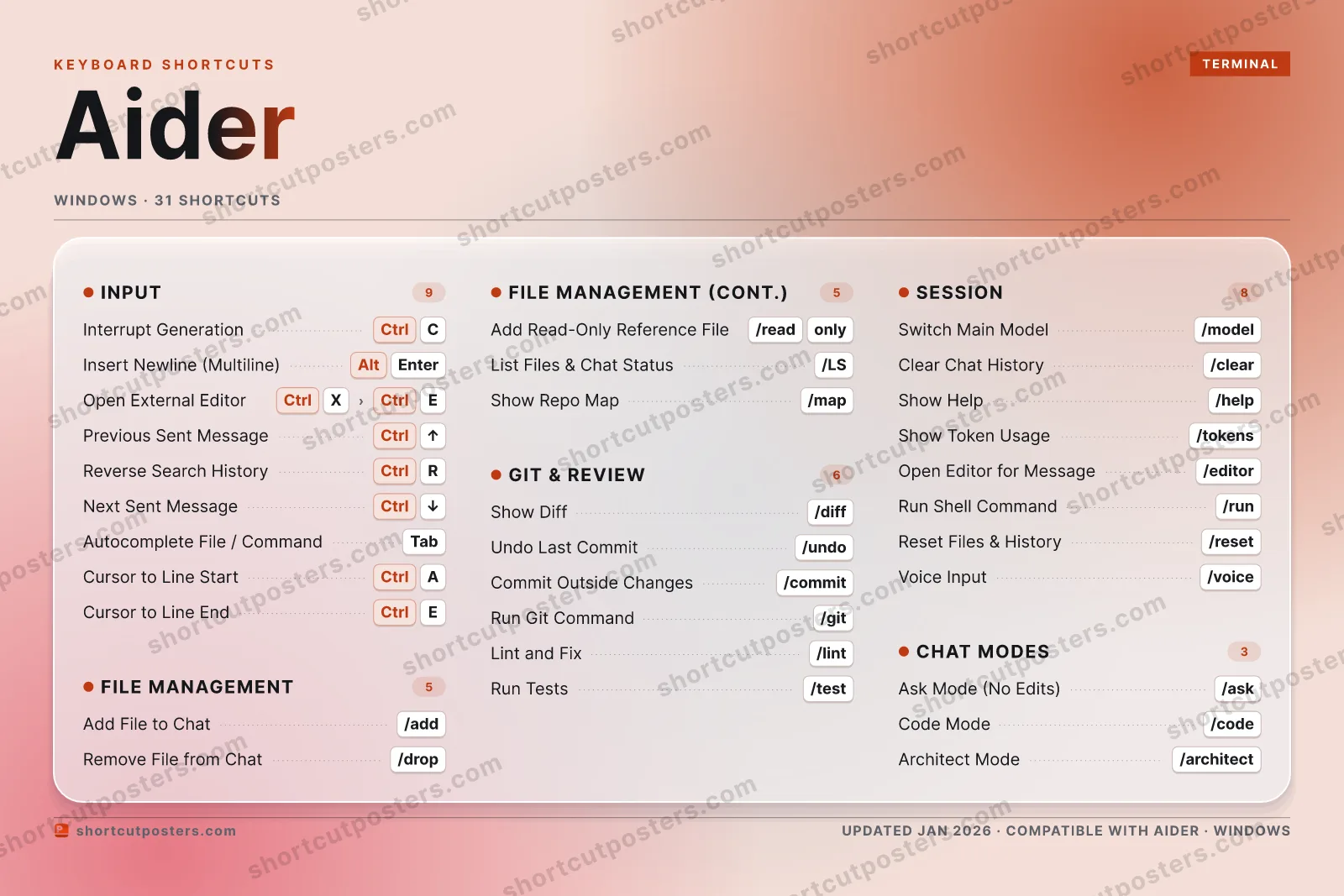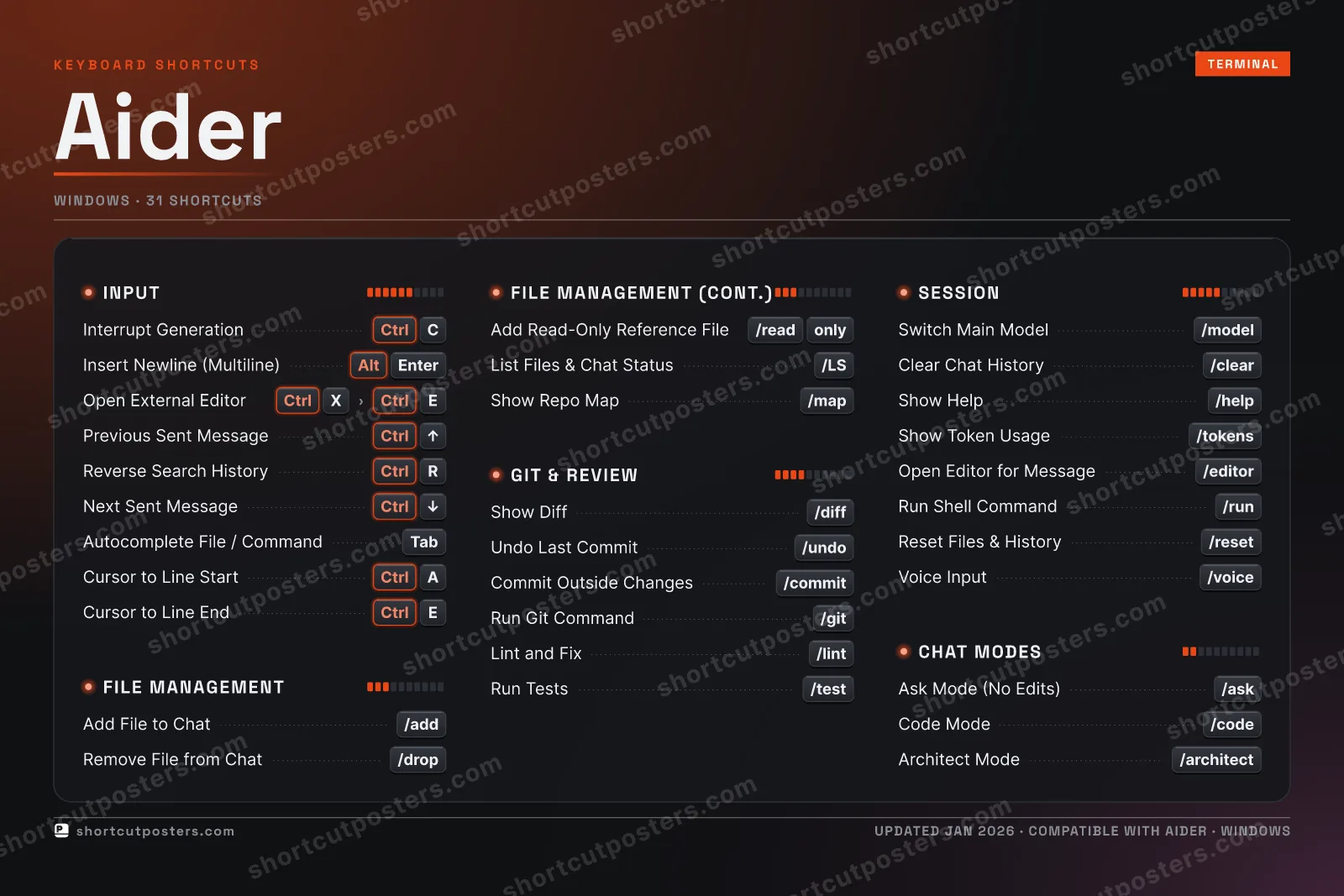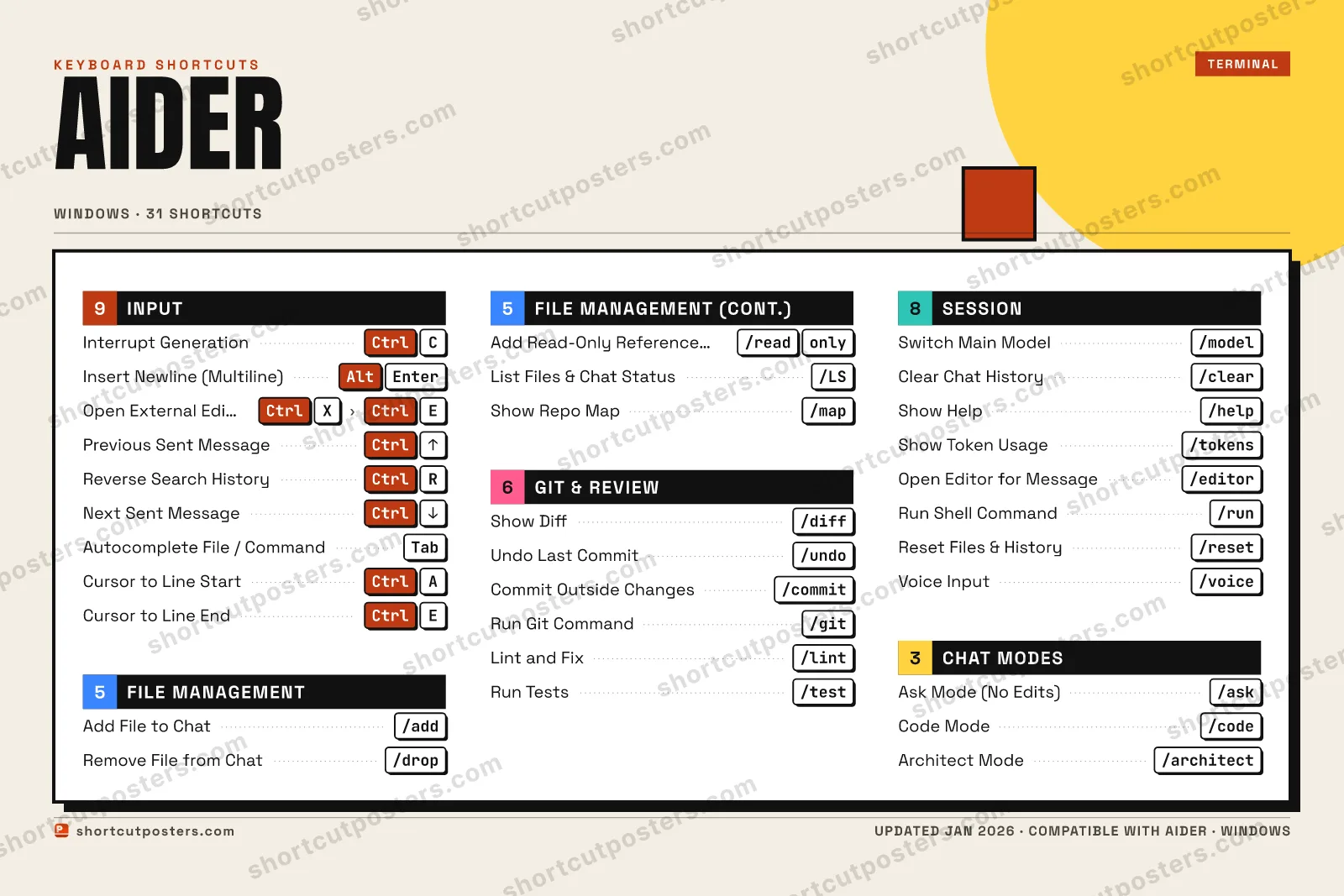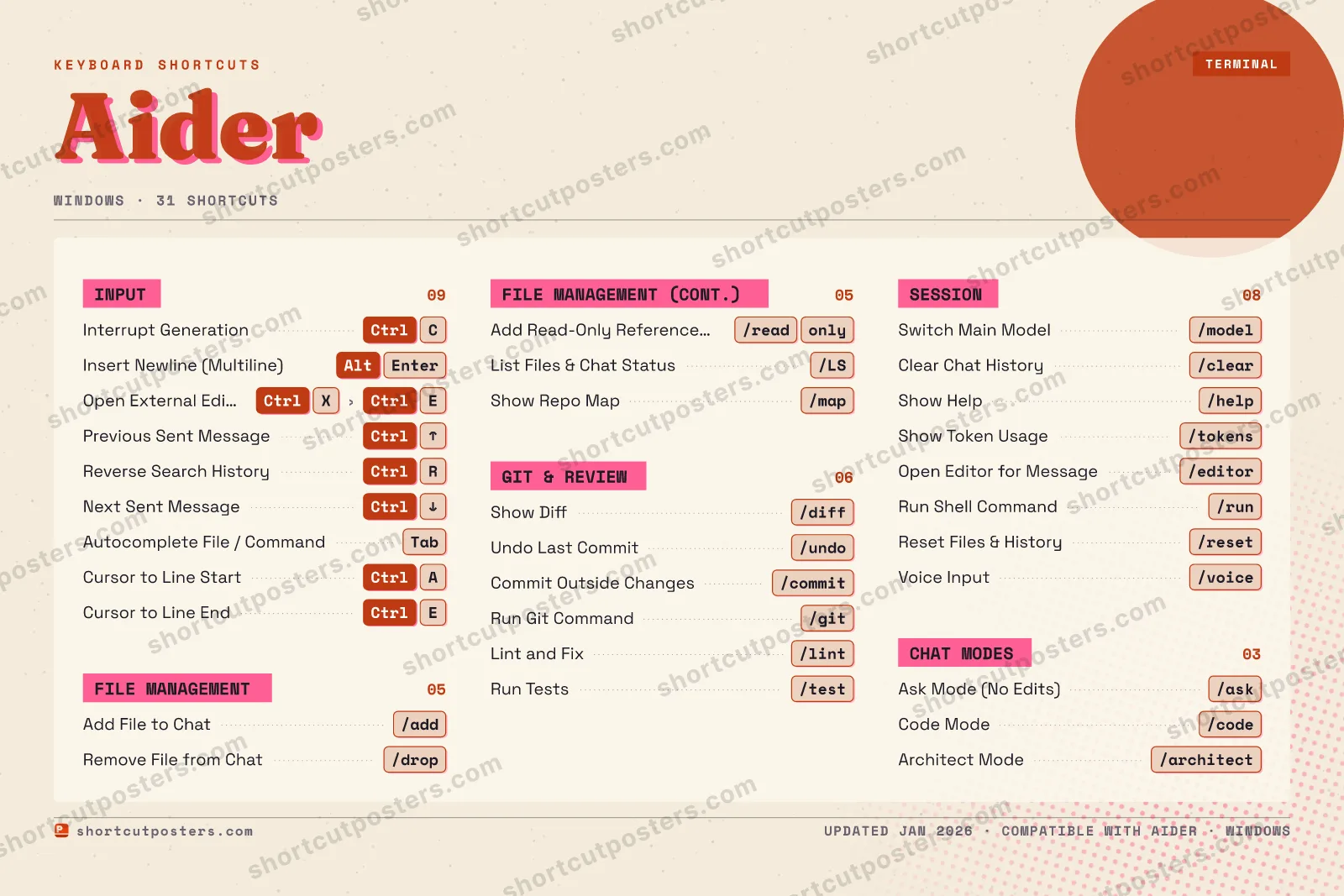

4 art directions — pick one below, click to zoom & compare.
⤢ AIDER KEYBOARD SHORTCUTS · WINDOWS · 30 ESSENTIAL 1 2 3 4 5 6 7 8 9 0 Q W E Ctrl Cursor t… R Ctrl Reverse … T Y U I O P A Ctrl Cursor t… S D F G H J K L Z X Ctrl Open Ext… C Ctrl Interrup… V B N M MORE SHORTCUTS Add File to C… /add Remove File f… /drop Show Diff /diff Undo Last Com… /undo Switch Main M… /model Insert Newlin… Alt Enter Ask Mode (No … /ask Commit Outsid… /commit Clear Chat Hi… /clear Previous Sent… Ctrl UP Code Mode /code Architect Mode /architect Show Help /help Next Sent Mes… Ctrl DOWN Autocomplete … Tab Add Read-Only… /read only List Files & … /LS Run Git Comma… /git Lint and Fix /lint Run Tests /test Show Token Us… /tokens Open Editor f… /editor Run Shell Com… /run Show Repo Map /map Reset Files &… /reset shortcutposters.com UPDATED JAN 2026 · COMPATIBLE WITH AIDER · WINDOWS
AIDER KEYBOARD SHORTCUTS · WINDOWS · 30 ESSENTIAL 1 2 3 4 5 6 7 8 9 0 A Ctrl Cursor t… Z E Ctrl Cursor t… R Ctrl Reverse … T Y U I O P Q S D F G H J K L M W X Ctrl Open Ext… C Ctrl Interrup… V B N MORE SHORTCUTS Add File to C… /add Remove File f… /drop Show Diff /diff Undo Last Com… /undo Switch Main M… /model Insert Newlin… Alt Enter Ask Mode (No … /ask Commit Outsid… /commit Clear Chat Hi… /clear Previous Sent… Ctrl UP Code Mode /code Architect Mode /architect Show Help /help Next Sent Mes… Ctrl DOWN Autocomplete … Tab Add Read-Only… /read only List Files & … /LS Run Git Comma… /git Lint and Fix /lint Run Tests /test Show Token Us… /tokens Open Editor f… /editor Run Shell Com… /run Show Repo Map /map Reset Files &… /reset shortcutposters.com UPDATED JAN 2026 · COMPATIBLE WITH AIDER · WINDOWS
⤢ GIT & REVIEW Show Diff /diff Undo Last Commit /undo Commit Outside Chang… /commit Run Git Command /git Lint and Fix /lint Run Tests /test CHAT MODES Ask Mode (No Edits) /ask Code Mode /code Architect Mode /architect INPUT Interrupt Generation Ctrl C Insert Newline (Mult… Alt Enter Open External Editor Ctrl X › Ctrl E Previous Sent Message Ctrl UP Reverse Search Histo… Ctrl R Next Sent Message Ctrl DOWN Autocomplete File / … Tab Cursor to Line Start Ctrl A Cursor to Line End Ctrl E FILE MANAGEMENT Add File to Chat /add Remove File from Chat /drop Add Read-Only Refere… /read only List Files & Chat St… /LS Show Repo Map /map SESSION Switch Main Model /model Clear Chat History /clear Show Help /help Show Token Usage /tokens Open Editor for Mess… /editor Run Shell Command /run Reset Files & History /reset Voice Input /voice Aider KEYBOARD SHORTCUTS · WINDOWS · 31 BOTH LAYOUTS QWERTY Q W E R T Y AZERTY A Z E R T Y shortcutposters.com UPDATED JAN 2026 · COMPATIBLE WITH AIDER · WINDOWS ⤢ FILE MANAGEMENT 05 Add File to Chat /add Remove File from Chat /drop Add Read-Only Reference File /read only List Files & Chat Status /LS Show Repo Map /map GIT & REVIEW 06 Show Diff /diff Undo Last Commit /undo Commit Outside Changes /commit Run Git Command /git Lint and Fix /lint Run Tests /test CHAT MODES 03 Ask Mode (No Edits) /ask Code Mode /code Architect Mode /architect INPUT 09 Interrupt Generation Ctrl C Insert Newline (Multiline) Alt Enter Open External Editor Ctrl X › Ctrl E Previous Sent Message Ctrl UP Reverse Search History Ctrl R Next Sent Message Ctrl DOWN Autocomplete File / Command Tab Cursor to Line Start Ctrl A Cursor to Line End Ctrl E SESSION 08 Switch Main Model /model Clear Chat History /clear Show Help /help Show Token Usage /tokens Open Editor for Message /editor Run Shell Command /run Reset Files & History /reset Voice Input /voice Aider KEYBOARD SHORTCUTS · WINDOWS · 31 BOTH LAYOUTS QWERTY Q W E R T Y AZERTY A Z E R T Y shortcutposters.com UPDATED JAN 2026 · COMPATIBLE WITH AIDER · WINDOWS
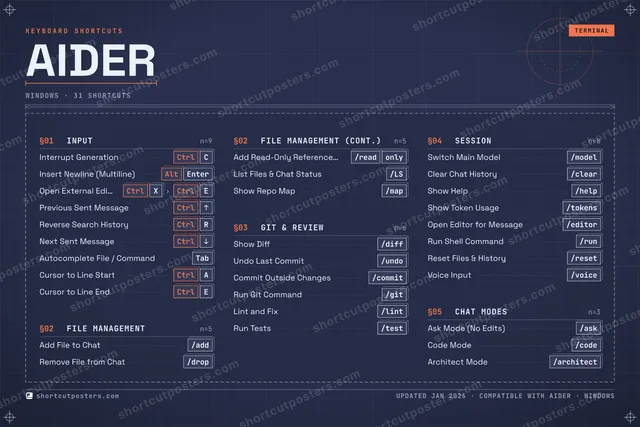
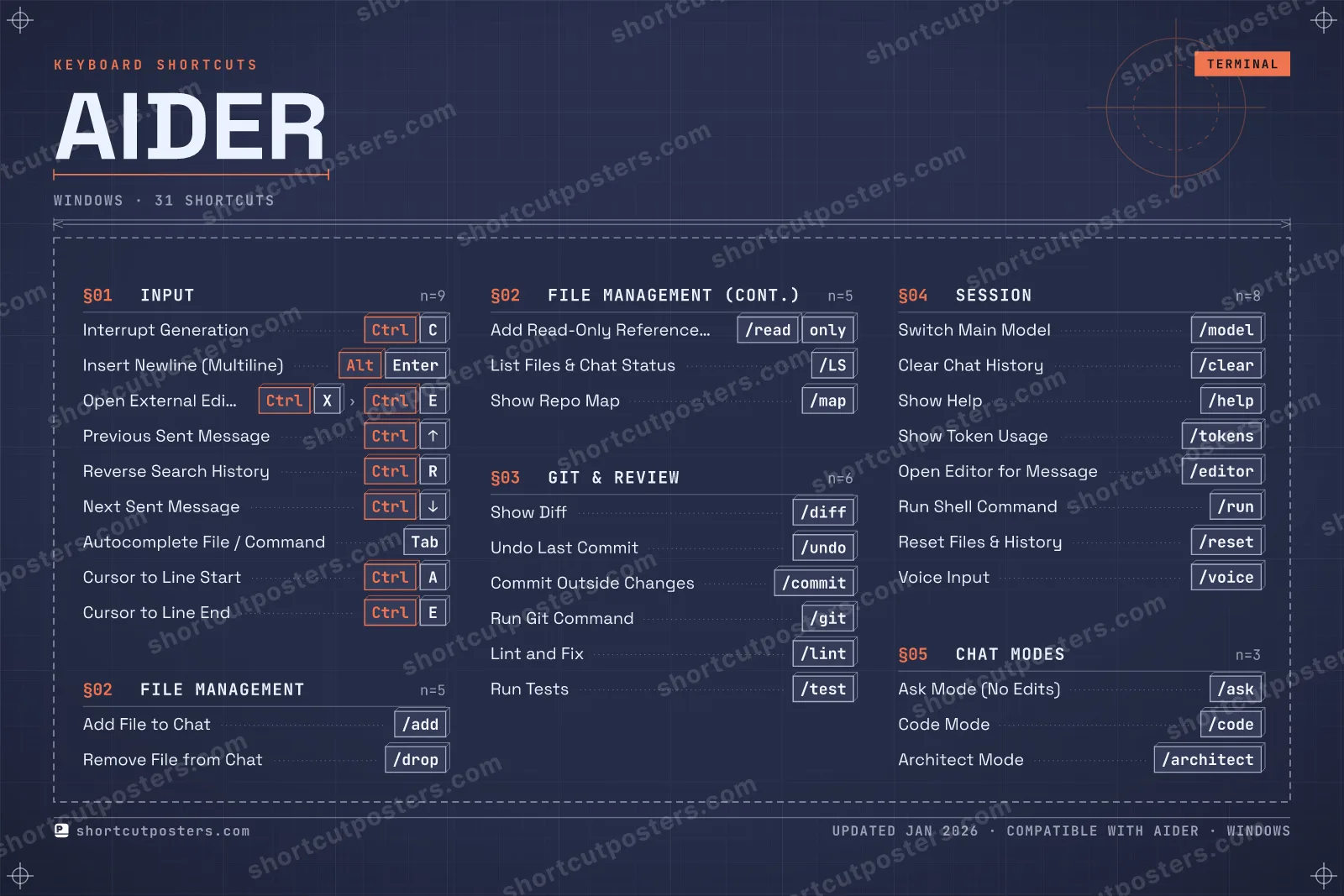
⤢ AIDER · KEYBOARD SHORTCUTS Windows · 5 SETS · No.01 AIDER TOTAL 31 SHORTCUTS FOR WINDOWS · SHIPPED COMBOS SETS INPUT 09 FILE MANAGEME 05 GIT & REVIEW 06 SESSION 08 CHAT MODES 03 REF. EDITION · JAN 2026 shortcutposters.com Interrupt Generation Ctrl C Insert Newline (Multiline) Alt Enter Open External Editor Ctrl X › Ctrl E Previous Sent Message Ctrl UP Reverse Search History Ctrl R Next Sent Message Ctrl DOWN Autocomplete File / Command Tab Cursor to Line Start Ctrl A Cursor to Line End Ctrl E Add File to Chat /add Remove File from Chat /drop Add Read-Only Reference File /read only List Files & Chat Status /LS Show Repo Map /map Show Diff /diff Undo Last Commit /undo Commit Outside Changes /commit Run Git Command /git Lint and Fix /lint Run Tests /test Switch Main Model /model Clear Chat History /clear Show Help /help Show Token Usage /tokens Open Editor for Message /editor Run Shell Command /run Reset Files & History /reset Voice Input /voice Ask Mode (No Edits) /ask Code Mode /code Architect Mode /architect
AIDER KEYBOARD SHORTCUTS · WINDOWS · 14 ESSENTIAL 1 2 3 4 5 6 7 8 9 0 Q W E R T Y U I O P A S D F G H J K L Z X Ctrl Open Ext… C Ctrl Interrup… V B N M MORE SHORTCUTS Add File to Chat /add Remove File from … /drop Show Diff /diff Undo Last Commit /undo Switch Main Model /model Insert Newline (M… Alt Enter Ask Mode (No Edit… /ask Commit Outside Ch… /commit Clear Chat History /clear Previous Sent Mes… Ctrl UP Code Mode /code Architect Mode /architect shortcutposters.com UPDATED JAN 2026 · COMPATIBLE WITH AIDER · WINDOWS Keyboard map FILE MANAGEMENT Add File to Chat /add Remove File from Chat /drop GIT & REVIEW Show Diff /diff Undo Last Commit /undo Commit Outside Changes /commit CHAT MODES Ask Mode (No Edits) /ask Code Mode /code Architect Mode /architect INPUT Interrupt Generation Ctrl C Insert Newline (Multiline) Alt Enter Open External Editor Ctrl X › Ctrl E Previous Sent Message Ctrl UP SESSION Switch Main Model /model Clear Chat History /clear Aider KEYBOARD SHORTCUTS · WINDOWS · 14 ESSENTIAL BOTH LAYOUTS QWERTY Q W E R T Y AZERTY A Z E R T Y shortcutposters.com UPDATED JAN 2026 · COMPATIBLE WITH AIDER · WINDOWS Isometric FILE MANAGEMENT 02 Add File to Chat /add Remove File from Chat /drop GIT & REVIEW 03 Show Diff /diff Undo Last Commit /undo Commit Outside Changes /commit CHAT MODES 03 Ask Mode (No Edits) /ask Code Mode /code Architect Mode /architect INPUT 04 Interrupt Generation Ctrl C Insert Newline (Multiline) Alt Enter Open External Editor Ctrl X › Ctrl E Previous Sent Message Ctrl UP SESSION 02 Switch Main Model /model Clear Chat History /clear Aider KEYBOARD SHORTCUTS · WINDOWS · 14 ESSENTIAL BOTH LAYOUTS QWERTY Q W E R T Y AZERTY A Z E R T Y shortcutposters.com UPDATED JAN 2026 · COMPATIBLE WITH AIDER · WINDOWS Typewriter AIDER · KEYBOARD SHORTCUTS Windows · 5 SETS · No.01 AIDER TOTAL 14 SHORTCUTS FOR WINDOWS · SHIPPED COMBOS SETS INPUT 04 FILE MANAGEME 02 GIT & REVIEW 03 SESSION 02 CHAT MODES 03 REF. EDITION · JAN 2026 shortcutposters.com Interrupt Generation Ctrl C Insert Newline (Multiline) Alt Enter Open External Editor Ctrl X › Ctrl E Previous Sent Message Ctrl UP Add File to Chat /add Remove File from Chat /drop Show Diff /diff Undo Last Commit /undo Commit Outside Changes /commit Switch Main Model /model Clear Chat History /clear Ask Mode (No Edits) /ask Code Mode /code Architect Mode /architect Editorial Aider is an open-source AI pair-programming tool that runs in your terminal, editing real files in your local git repo through a chat interface. Its slash commands and prompt-toolkit keybindings drive everything from adding files to the chat to committing, diffing, and undoing the AI's edits.
Official: Official site
All Aider keyboard shortcuts (Windows)
Input
+ 22 more controls in the table below
Input
+ 22 more controls in the table below
Input 9 Action Shortcut Interrupt Generation Ctrl C Insert Newline (Multiline) Alt Enter Open External Editor Ctrl X then Ctrl E Previous Sent Message Ctrl UP Reverse Search History Ctrl R Next Sent Message Ctrl DOWN Autocomplete File / Command Tab Cursor to Line Start Ctrl A Cursor to Line End Ctrl E
Session 8 Action Shortcut Switch Main Model /model Clear Chat History /clear Show Help /help Show Token Usage /tokens Open Editor for Message /editor Run Shell Command /run Reset Files & History /reset Voice Input /voice
Git & Review 6 Action Shortcut Show Diff /diff Undo Last Commit /undo Commit Outside Changes /commit Run Git Command /git Lint and Fix /lint Run Tests /test
File Management 5 Action Shortcut Add File to Chat /add Remove File from Chat /drop Add Read-Only Reference File /read-only List Files & Chat Status /ls Show Repo Map /map
Chat Modes 3 Action Shortcut Ask Mode (No Edits) /ask Code Mode /code Architect Mode /architect
Sourced from aider.chat , aider.chat
·
Last verified September 12, 2026
Unofficial reference. ShortcutPosters is not affiliated with, endorsed by, or
sponsored by Aider. All product names, logos, and trademarks are property of
their respective owners. See our licensing & trademark
notice .
Frequently asked questions
Does the poster include every Aider shortcut? Aider has 31 keyboard shortcuts in total — the complete list is free to read on this page. The poster features the most essential ones, curated to stay readable on a wall.
Can I print it at home? Yes. The digital download is a high-resolution 300 DPI file you can print at home or at any print shop, in standard frame sizes.
Does it cover both Mac and Windows? We sell separate Mac and Windows editions so every key matches your keyboard exactly. This page is the Windows edition.
Is this an official Aider product? No. This is an unofficial reference poster and is not affiliated with or endorsed by Aider. All trademarks belong to their respective owners. Was this reference helpful? Thanks — your feedback helps us improve.
▲ Yes
▼ No