ShortcutPosters

4 art directions — pick one below, click to zoom & compare.
Layout
SERATO DJ PROKEYBOARD SHORTCUTS · WINDOWS · 381Set / Ju…23456Set / Ju…7890QReverse …WPlay / P…EPitch Do…RPitch Up…TYUCensor (…ISet Temp…OSet / Ad…PSet / Ad…ASPlay / P…DFCtrlMove Cur…GHJCensor (…KSet Temp…LCtrlLocate L…ZPlay Sam…XCVBNCtrlStart Ne…MMORE SHORTCUTSLoad Selected…ShiftLEFTLoad Selected…ShiftRIGHTAutoloop On/O…Alt1Autoloop On/O…Alt6Move Up / Dow…UPLoop Roll 1 (…CtrlAlt1Move Up / Dow…CtrlShiftUPInstant Doubl…CtrlShiftLEFTInstant Doubl…CtrlShiftRIGHTKeylock (Left…F5Set Next Cue …Alt`Shift Highlig…TabAdd Track(s) …CtrlPUndo Track Lo…CtrlZEject Virtual…ShiftAltLEFTEject Virtual…ShiftAltRIGHTDelete Cue Po…ShiftCtrl1Stop Sample (…AltZZoom Main Wav…+Enter Beatgri…AltSpaceExit Serato D…Escshortcutposters.comUPDATED JAN 2026 · COMPATIBLE WITH SERATO DJ PRO · WINDOWS
LIBRARYLoad Selected Track …ShiftLEFTLoad Selected Track …ShiftRIGHTMove Up / Down Throu…UPMove Cursor to SearchCtrlFMove Up / Down Throu…CtrlShiftUPShift Highlight FocusTabLocate Last Loaded T…CtrlLAdd Track(s) to Prep…CtrlPUndo Track LoadCtrlZVIEWStart New RecordingCtrlNZoom Main Waveform D…+Enter Beatgrid Edit …AltSpaceExit Serato DJ ProEscCUESSet / Jump to Cue Po…1Set / Jump to Cue Po…6Set Temporary Cue Po…ISet Temporary Cue Po…KSet Next Cue Point (…Alt`Delete Cue Point 1 (…ShiftCtrl1LOOPSAutoloop On/Off 1 (L…Alt1Autoloop On/Off 6 (R…Alt6Loop Roll 1 (Left De…CtrlAlt1Set / Adjust Loop In…OSet / Adjust Loop Ou…PPLAYBACKPlay / Pause (Left D…WPlay / Pause (Right …SCensor (Left Deck)UCensor (Right Deck)JKeylock (Left Deck)F5Reverse Play Directi…QPitch Down (Left Dec…EPitch Up (Left Deck)RDECKSPlay Sample (Slot 1)ZInstant Double (Left…CtrlShiftLEFTInstant Double (Righ…CtrlShiftRIGHTEject Virtual Deck (…ShiftAltLEFTEject Virtual Deck (…ShiftAltRIGHTStop Sample (Slot 1)AltZSerato DJ ProKEYBOARD SHORTCUTS · WINDOWS · 38BOTH LAYOUTSQWERTYQWERTYAZERTYAZERTYshortcutposters.comUPDATED JAN 2026 · COMPATIBLE WITH SERATO DJ PRO · WINDOWS
LIBRARY09Load Selected Track (…ShiftLEFTLoad Selected Track (…ShiftRIGHTMove Up / Down Throug…UPMove Cursor to SearchCtrlFMove Up / Down Throug…CtrlShiftUPShift Highlight FocusTabLocate Last Loaded Tr…CtrlLAdd Track(s) to Prepa…CtrlPUndo Track LoadCtrlZVIEW04Start New RecordingCtrlNZoom Main Waveform Di…+Enter Beatgrid Edit M…AltSpaceExit Serato DJ ProEscCUES06Set / Jump to Cue Poi…1Set / Jump to Cue Poi…6Set Temporary Cue Poi…ISet Temporary Cue Poi…KSet Next Cue Point (L…Alt`Delete Cue Point 1 (L…ShiftCtrl1LOOPS05Autoloop On/Off 1 (Le…Alt1Autoloop On/Off 6 (Ri…Alt6Loop Roll 1 (Left Dec…CtrlAlt1Set / Adjust Loop In …OSet / Adjust Loop Out…PPLAYBACK08Play / Pause (Left De…WPlay / Pause (Right D…SCensor (Left Deck)UCensor (Right Deck)JKeylock (Left Deck)F5Reverse Play Directio…QPitch Down (Left Deck)EPitch Up (Left Deck)RDECKS06Play Sample (Slot 1)ZInstant Double (Left …CtrlShiftLEFTInstant Double (Right…CtrlShiftRIGHTEject Virtual Deck (L…ShiftAltLEFTEject Virtual Deck (R…ShiftAltRIGHTStop Sample (Slot 1)AltZSerato DJ ProKEYBOARD SHORTCUTS · WINDOWS · 38BOTH LAYOUTSQWERTYQWERTYAZERTYAZERTYshortcutposters.comUPDATED JAN 2026 · COMPATIBLE WITH SERATO DJ PRO · WINDOWS
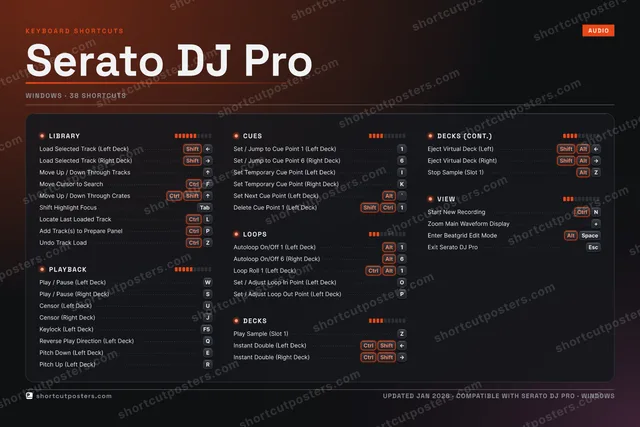
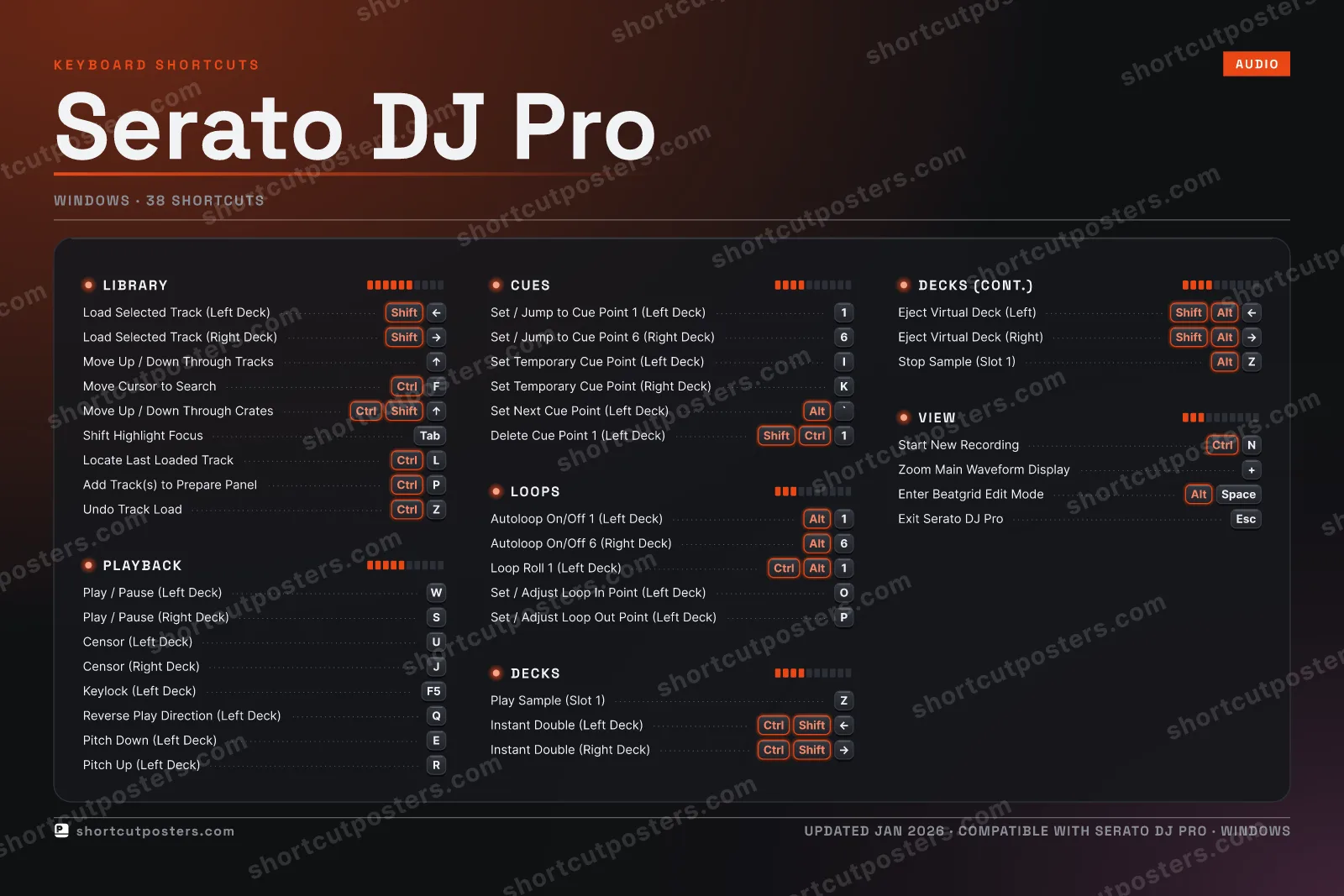
SERATO DJ PRO · KEYBOARD SHORTCUTSWindows · 6 SETS · No.01SERATO DJ PROTOTAL38SHORTCUTSFOR WINDOWS · SHIPPED COMBOSSETSLIBRARY09PLAYBACK08CUES06LOOPS05DECKS06VIEW04REF. EDITION · JAN 2026shortcutposters.comLoad Selected Track (Left Deck)ShiftLEFTLoad Selected Track (Right Deck)ShiftRIGHTMove Up / Down Through TracksUPMove Cursor to SearchCtrlFMove Up / Down Through CratesCtrlShiftUPShift Highlight FocusTabLocate Last Loaded TrackCtrlLAdd Track(s) to Prepare PanelCtrlPUndo Track LoadCtrlZPlay / Pause (Left Deck)WPlay / Pause (Right Deck)SCensor (Left Deck)UCensor (Right Deck)JKeylock (Left Deck)F5Reverse Play Direction (Left Deck)QPitch Down (Left Deck)EPitch Up (Left Deck)RSet / Jump to Cue Point 1 (Left Deck)1Set / Jump to Cue Point 6 (Right Deck)6Set Temporary Cue Point (Left Deck)ISet Temporary Cue Point (Right Deck)KSet Next Cue Point (Left Deck)Alt`Delete Cue Point 1 (Left Deck)ShiftCtrl1Autoloop On/Off 1 (Left Deck)Alt1Autoloop On/Off 6 (Right Deck)Alt6Loop Roll 1 (Left Deck)CtrlAlt1Set / Adjust Loop In Point (Left Deck)OSet / Adjust Loop Out Point (Left Deck)PPlay Sample (Slot 1)ZInstant Double (Left Deck)CtrlShiftLEFTInstant Double (Right Deck)CtrlShiftRIGHTEject Virtual Deck (Left)ShiftAltLEFTEject Virtual Deck (Right)ShiftAltRIGHTStop Sample (Slot 1)AltZStart New RecordingCtrlNZoom Main Waveform Display+Enter Beatgrid Edit ModeAltSpaceExit Serato DJ ProEsc

Windows edition · 38 shortcuts

Serato DJ Pro Keyboard Shortcuts Poster

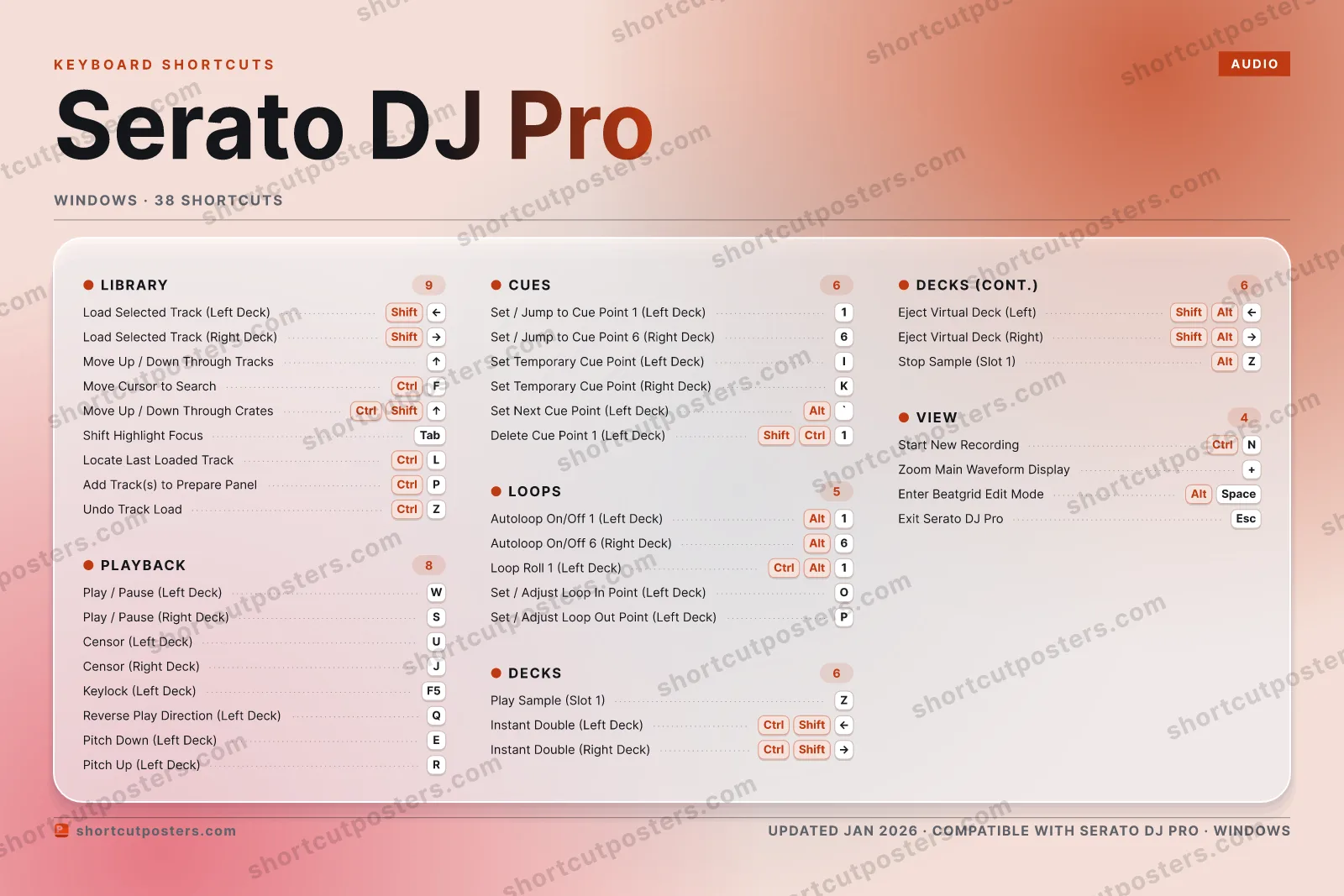
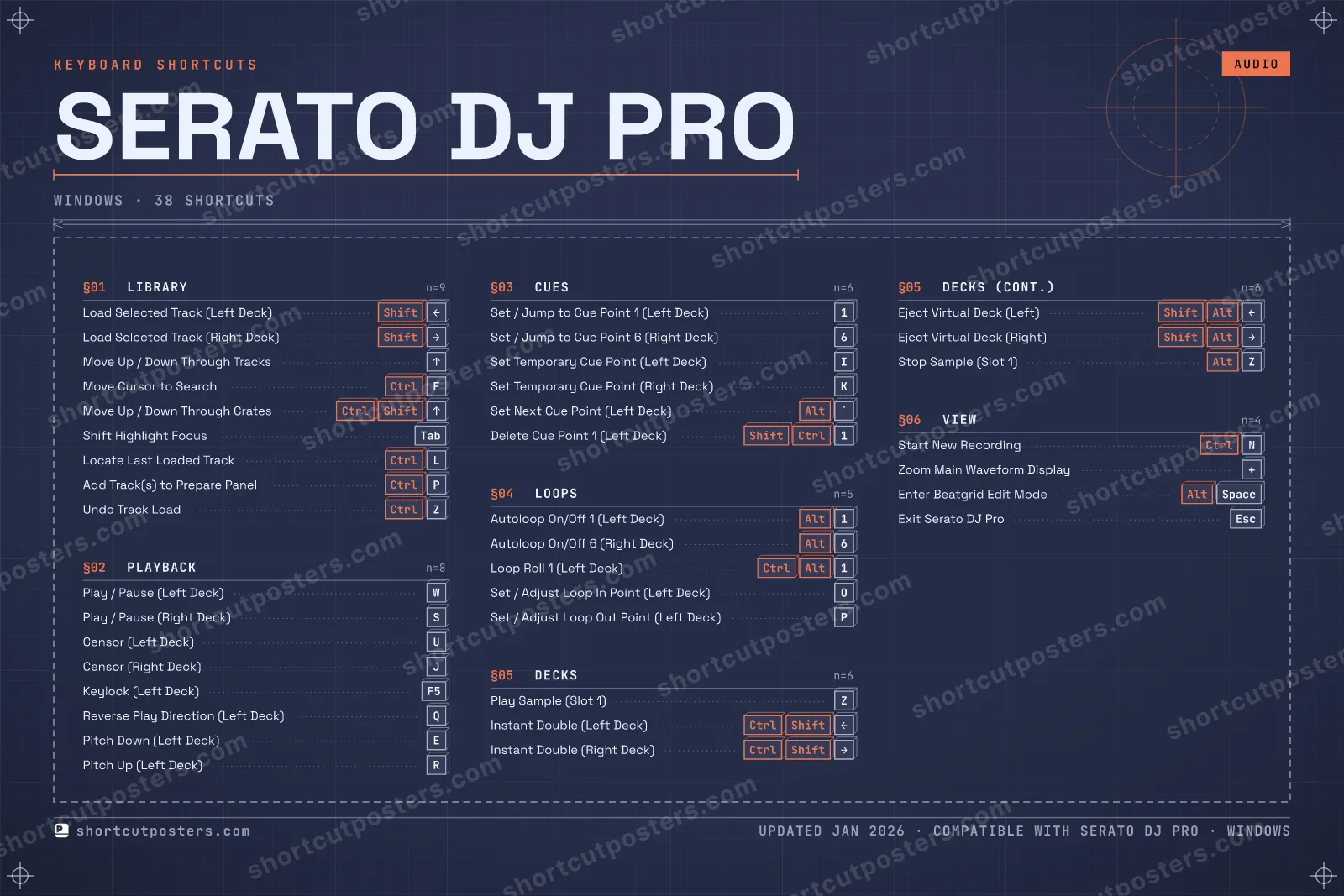
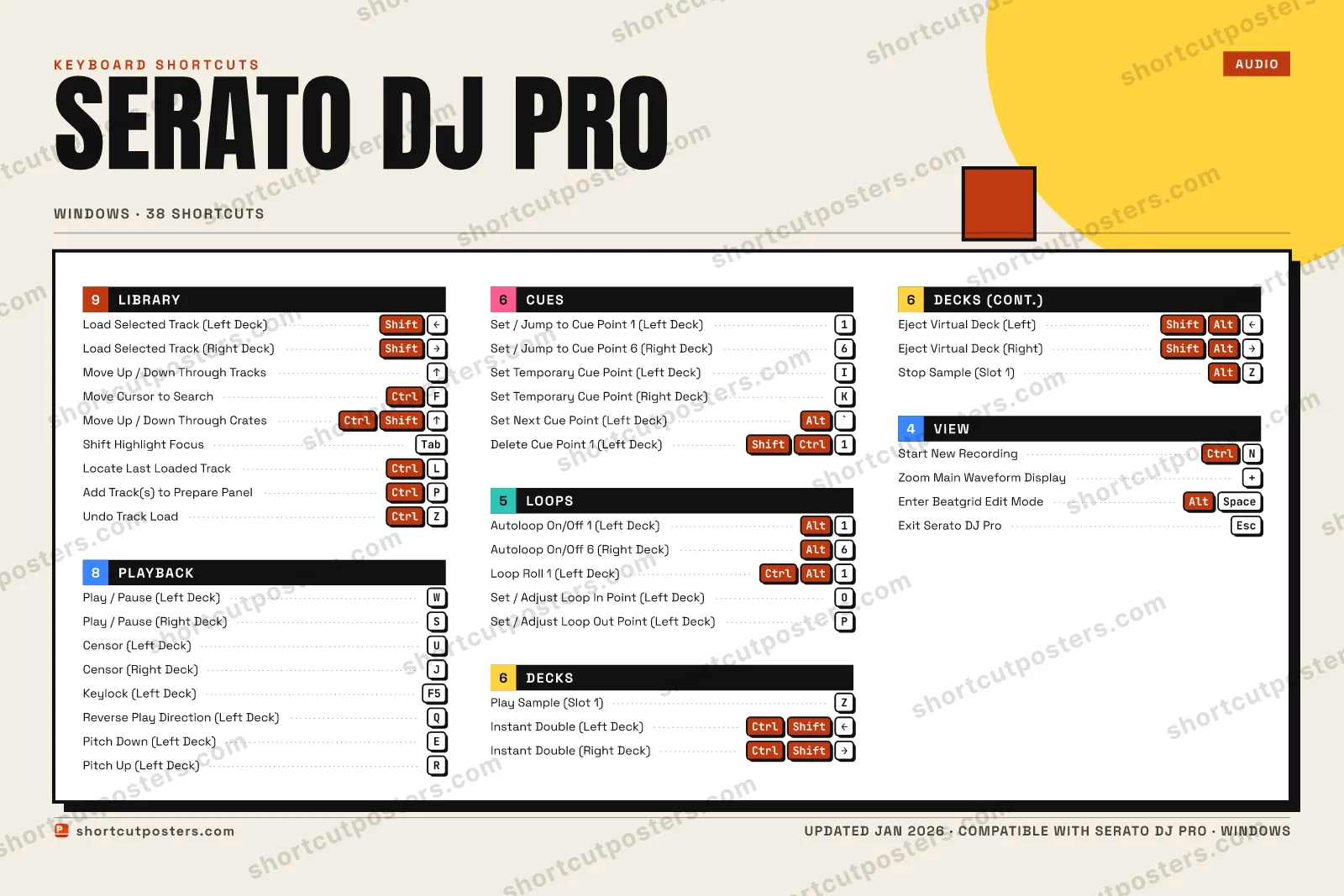
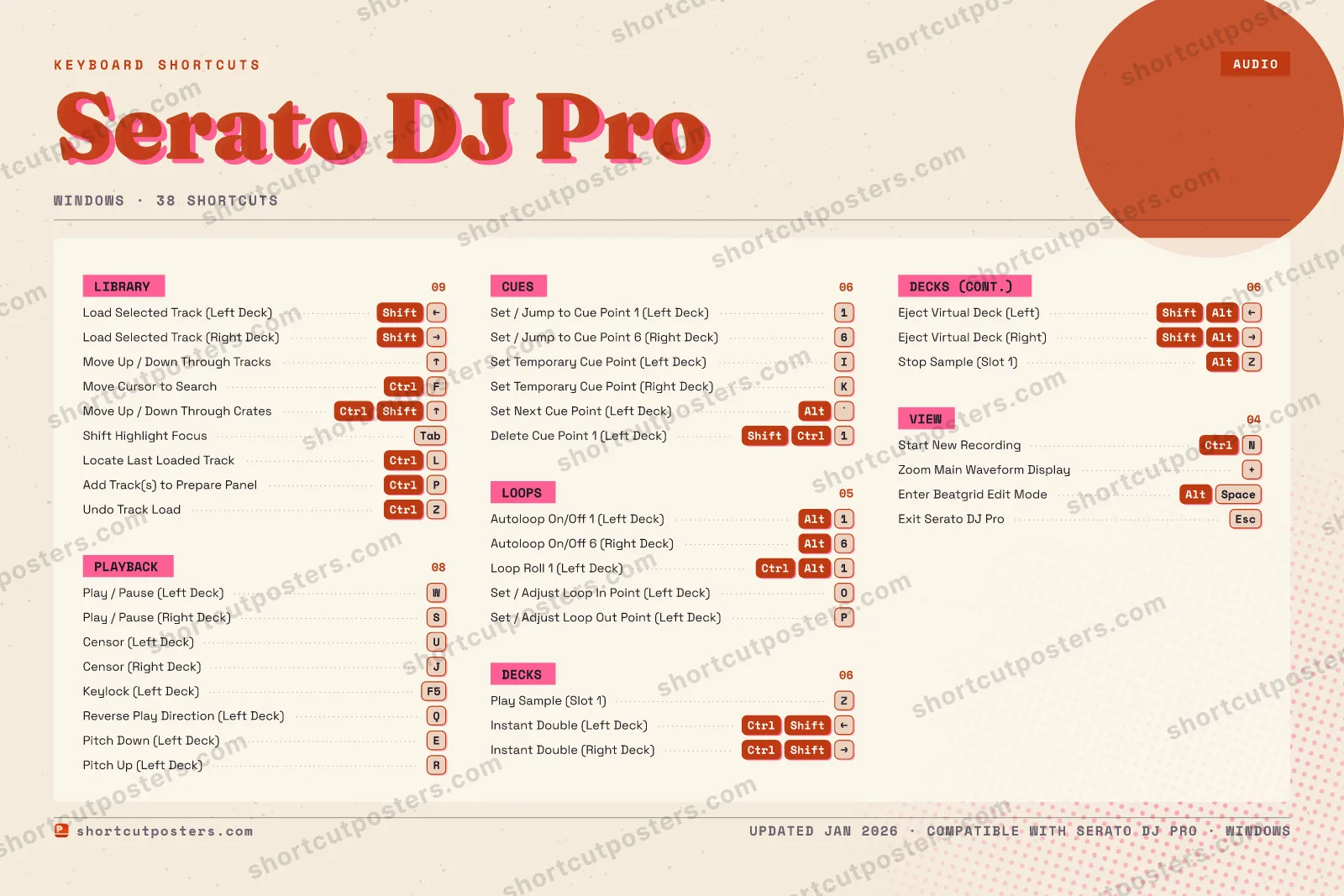
A printable, framed-quality poster of the essential Serato DJ Pro shortcuts for Windows — the keys worth keeping in view, designed to stay readable on a wall.

Edition
Apple Mac Windows Windows

Free PNG is web-resolution & lightly watermarked.

Customise this poster Pick the shortcuts, restyle the colours — download free. Get the framed-quality print Full 300 DPI, print-ready — at home or shipped to your door.

Serato DJ Pro lets you mix and perform entirely from your laptop, and its keyboard shortcuts speed up the workflow when you are away from a controller. Load tracks, trigger cues and loops, fire samples, and navigate your library without touching the mouse. Shortcuts use a US keyboard layout: on Windows [control] maps to [Command] and [Alt] maps to [Option] on Mac. Note that if 'Playback Keys Use Shift' is enabled, playback keys also require Shift or Caps Lock.

All Serato DJ Pro keyboard shortcuts (Windows)

Layout
Esc
F1
F2
F3
F4
F5
F6
F7
F8
F9
F10
F11
F12
`
1
2
3
4
5
6
7
8
9
0
-
=
⌫ Back
Tab
Q
W
E
R
T
Y
U
I
O
P
[
]
\
Caps
A
S
D
F
G
H
J
K
L
;
'
Enter ⏎
Shift
Z
X
C
V
B
N
M
,
.
/
Shift
Ctrl
Win
Alt
Space
Alt
Win
Menu
Ctrl

+ 1 more control in the table below

Library 9

Action Shortcut
Load Selected Track (Left Deck) ShiftLEFT
Load Selected Track (Right Deck) ShiftRIGHT
Move Up / Down Through Tracks UP
Move Cursor to Search CtrlF
Move Up / Down Through Crates CtrlShiftUP
Shift Highlight Focus Tab
Locate Last Loaded Track CtrlL
Add Track(s) to Prepare Panel CtrlP
Undo Track Load CtrlZ

Playback 8

Action Shortcut
Play / Pause (Left Deck) W
Play / Pause (Right Deck) S
Censor (Left Deck) U
Censor (Right Deck) J
Keylock (Left Deck) F5
Reverse Play Direction (Left Deck) Q
Pitch Down (Left Deck) E
Pitch Up (Left Deck) R

Decks 6

Action Shortcut
Play Sample (Slot 1) Z
Instant Double (Left Deck) CtrlShiftLEFT
Instant Double (Right Deck) CtrlShiftRIGHT
Eject Virtual Deck (Left) ShiftAltLEFT
Eject Virtual Deck (Right) ShiftAltRIGHT
Stop Sample (Slot 1) AltZ

Cues 6

Action Shortcut
Set / Jump to Cue Point 1 (Left Deck) 1
Set / Jump to Cue Point 6 (Right Deck) 6
Set Temporary Cue Point (Left Deck) I
Set Temporary Cue Point (Right Deck) K
Set Next Cue Point (Left Deck) Alt`
Delete Cue Point 1 (Left Deck) ShiftCtrl1

Loops 5

Action Shortcut
Autoloop On/Off 1 (Left Deck) Alt1
Autoloop On/Off 6 (Right Deck) Alt6
Loop Roll 1 (Left Deck) CtrlAlt1
Set / Adjust Loop In Point (Left Deck) O
Set / Adjust Loop Out Point (Left Deck) P

View 4

Action Shortcut
Start New Recording CtrlN
Zoom Main Waveform Display +
Enter Beatgrid Edit Mode AltSpace
Exit Serato DJ Pro Esc

Sourced from support.serato.com Last verified

Unofficial reference. ShortcutPosters is not affiliated with, endorsed by, or sponsored by Serato DJ Pro. All product names, logos, and trademarks are property of their respective owners. See our licensing & trademark notice.

Frequently asked questions

Does the poster include every Serato DJ Pro shortcut?
Serato DJ Pro has 38 keyboard shortcuts in total — the complete list is free to read on this page. The poster features the most essential ones, curated to stay readable on a wall.
Can I print it at home?
Yes. The digital download is a high-resolution 300 DPI file you can print at home or at any print shop, in standard frame sizes.
Does it cover both Mac and Windows?
We sell separate Mac and Windows editions so every key matches your keyboard exactly. This page is the Windows edition.
Is this an official Serato DJ Pro product?
No. This is an unofficial reference poster and is not affiliated with or endorsed by Serato DJ Pro. All trademarks belong to their respective owners.
For app makers

Promote your app

Built an app with great keyboard shortcuts? Get it into the database — a free, searchable reference page, and an optional printable poster your power users will pin to the wall.

  • Free shortcut reference page
  • Indexed & searchable
  • Optional framed poster