ShortcutPosters

Poster maker

Make your Serato DJ Pro shortcuts poster

Pick the shortcuts that matter, add your own, tune the colours and style — then download a free personalized PNG, or order the print-ready PDF.

Making a poster for:
Style
Accent
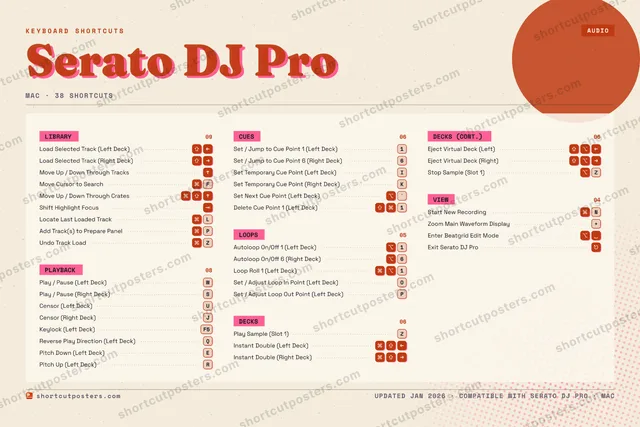
SERATO DJ PROKEYBOARD SHORTCUTS · MAC · 381Set / Ju…23456Set / Ju…7890QReverse …WPlay / P…EPitch Do…RPitch Up…TYUCensor (…ISet Temp…OSet / Ad…PSet / Ad…ASPlay / P…DFMove Cur…GHJCensor (…KSet Temp…LLocate L…ZPlay Sam…XCVBNStart Ne…MMORE SHORTCUTSLoad Selected…Load Selected…Autoloop On/O…1Autoloop On/O…6Move Up / Dow…Loop Roll 1 (…1Move Up / Dow…Instant Doubl…Instant Doubl…Keylock (Left…F5Set Next Cue …`Shift Highlig…Add Track(s) …PUndo Track Lo…ZEject Virtual…Eject Virtual…Delete Cue Po…1Stop Sample (…ZZoom Main Wav…+Enter Beatgri…Exit Serato D…shortcutposters.comUPDATED JAN 2026 · COMPATIBLE WITH SERATO DJ PRO · MAC

Hover to locate · click on the poster to disable · drag to reorder categories & shortcuts · to rename a category

Free PNG $0
  • Web resolution (1600 px)
  • Light watermark
  • Instant download
Made to order
Custom print-ready PDF $2.99
  • 300 DPI, framed-quality — no watermark
  • Every standard print size
  • Built to order from the poster above — checkout link emailed to you

Trouble ordering? Email business@shortcutposters.com.

How it works

  1. 1

    Choose a style

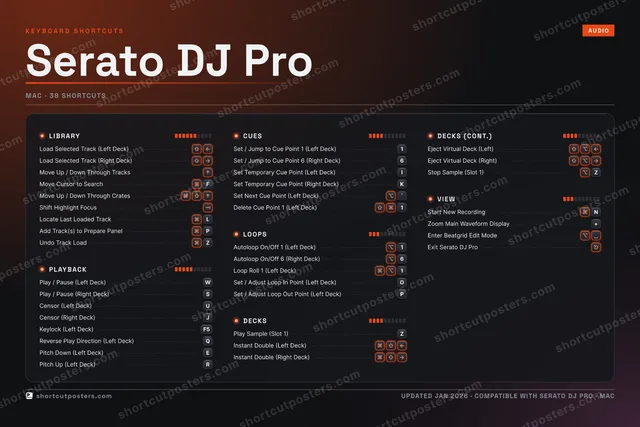
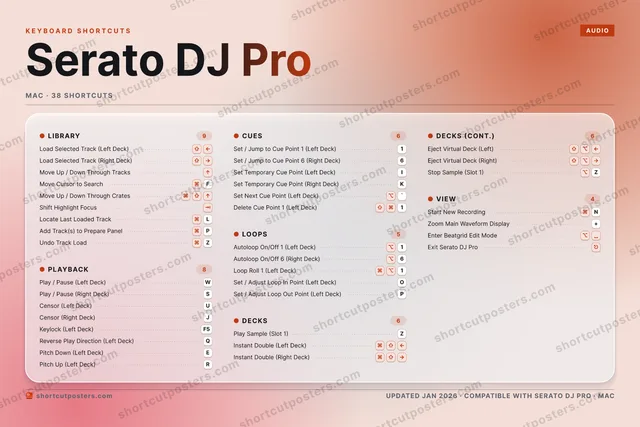
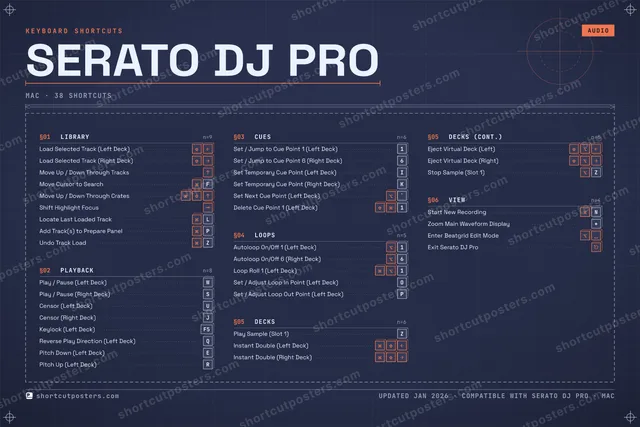
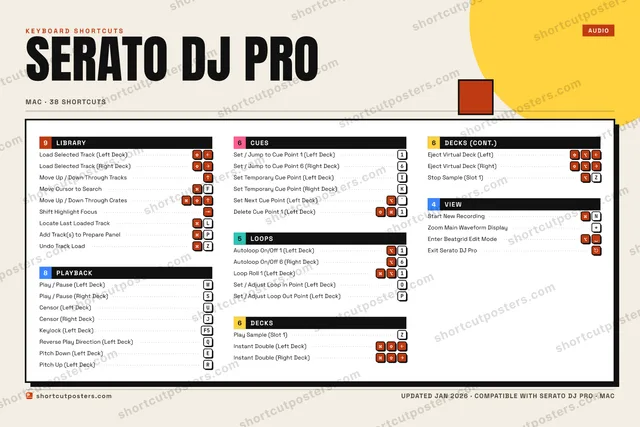
    Pick from four layouts: isometric keys, a typewriter list, a labelled keyboard map, or a bold editorial print.

  2. 2

    Make it yours

    Set the accent colour and palette, rename categories, and reorder anything.

  3. 3

    Pick the shortcuts

    Toggle exactly which shortcuts appear — or add your own custom ones.

  4. 4

    Download or print

    Export a free high-resolution PNG instantly, or order a print-ready PDF.

Four styles to choose from

SERATO DJ PROKEYBOARD SHORTCUTS · MAC · 20 ESSENTIAL1Set / Ju…23456Set / Ju…7890QWPlay / P…ERTYUCensor (…ISet Temp…OSet / Ad…PSet / Ad…ASPlay / P…DFMove Cur…GHJCensor (…KSet Temp…LZPlay Sam…XCVBNMMORE SHORTCUTSLoad Selected Tra…Load Selected Tra…Autoloop On/Off 1…1Autoloop On/Off 6…6Move Up / Down Th…Loop Roll 1 (Left…1Move Up / Down Th…Instant Double (L…shortcutposters.comUPDATED JAN 2026 · COMPATIBLE WITH SERATO DJ PRO · MAC
Keyboard map Every binding labelled on a realistic QWERTY or AZERTY keyboard.
PLAYBACKPlay / Pause (Left Deck)WPlay / Pause (Right Deck)SCensor (Left Deck)UCensor (Right Deck)JCUESSet / Jump to Cue Point 1 (Left De…1Set / Jump to Cue Point 6 (Right D…6Set Temporary Cue Point (Left Deck)ISet Temporary Cue Point (Right Dec…KDECKSPlay Sample (Slot 1)ZInstant Double (Left Deck)LIBRARYLoad Selected Track (Left Deck)Load Selected Track (Right Deck)Move Up / Down Through TracksMove Cursor to SearchFMove Up / Down Through CratesLOOPSAutoloop On/Off 1 (Left Deck)1Autoloop On/Off 6 (Right Deck)6Loop Roll 1 (Left Deck)1Set / Adjust Loop In Point (Left D…OSet / Adjust Loop Out Point (Left …PSerato DJ ProKEYBOARD SHORTCUTS · MAC · 20 ESSENTIALBOTH LAYOUTSQWERTYQWERTYAZERTYAZERTYshortcutposters.comUPDATED JAN 2026 · COMPATIBLE WITH SERATO DJ PRO · MAC
Isometric Shortcuts on a 3D isometric keyboard — bold and poster-like.
PLAYBACK04Play / Pause (Left Deck)WPlay / Pause (Right Deck)SCensor (Left Deck)UCensor (Right Deck)JCUES04Set / Jump to Cue Point 1 (Left De…1Set / Jump to Cue Point 6 (Right D…6Set Temporary Cue Point (Left Deck)ISet Temporary Cue Point (Right Dec…KDECKS02Play Sample (Slot 1)ZInstant Double (Left Deck)LIBRARY05Load Selected Track (Left Deck)Load Selected Track (Right Deck)Move Up / Down Through TracksMove Cursor to SearchFMove Up / Down Through CratesLOOPS05Autoloop On/Off 1 (Left Deck)1Autoloop On/Off 6 (Right Deck)6Loop Roll 1 (Left Deck)1Set / Adjust Loop In Point (Left D…OSet / Adjust Loop Out Point (Left …PSerato DJ ProKEYBOARD SHORTCUTS · MAC · 20 ESSENTIALBOTH LAYOUTSQWERTYQWERTYAZERTYAZERTYshortcutposters.comUPDATED JAN 2026 · COMPATIBLE WITH SERATO DJ PRO · MAC
Typewriter A clean printed list, grouped by category — dense and legible.
SERATO DJ PRO · KEYBOARD SHORTCUTSMac · 5 SETS · No.01SERATO DJ PROTOTAL20SHORTCUTSFOR MAC · SHIPPED COMBOSSETSLIBRARY05PLAYBACK04CUES04LOOPS05DECKS02REF. EDITION · JAN 2026shortcutposters.comLoad Selected Track (Left Deck)Load Selected Track (Right Deck)Move Up / Down Through TracksMove Cursor to SearchFMove Up / Down Through CratesPlay / Pause (Left Deck)WPlay / Pause (Right Deck)SCensor (Left Deck)UCensor (Right Deck)JSet / Jump to Cue Point 1 (Left Deck)1Set / Jump to Cue Point 6 (Right Deck)6Set Temporary Cue Point (Left Deck)ISet Temporary Cue Point (Right Deck)KAutoloop On/Off 1 (Left Deck)1Autoloop On/Off 6 (Right Deck)6Loop Roll 1 (Left Deck)1Set / Adjust Loop In Point (Left Deck)OSet / Adjust Loop Out Point (Left Deck)PPlay Sample (Slot 1)ZInstant Double (Left Deck)
Editorial A bold Swiss-style print: giant wordmark, dense keycap columns, and a totals rail.

Frequently asked questions

Is the Serato DJ Pro poster maker free?

Yes — you can design and download a high-resolution PNG of your Serato DJ Pro shortcuts poster for free. A print-ready PDF is an optional paid upgrade.

Can I choose which Serato DJ Pro shortcuts appear?

Yes. Toggle any shortcut on or off, reorder them, rename categories, and even add your own custom shortcuts.

Can I change the colours and style?

Yes. Pick an accent colour, choose a palette, and switch between the isometric, typewriter, and keyboard-map styles.

Which keyboard layout and operating system are supported?

Choose QWERTY or AZERTY, and switch the edition between the operating systems Serato DJ Pro supports (macOS, Windows, Linux).

How do I get a printed poster?

Download the free PNG to print yourself, or order the print-ready, framed-quality PDF directly from the maker.