ShortcutPosters

Poster maker

Make your FL Studio shortcuts poster

Pick the shortcuts that matter, add your own, tune the colours and style — then download a free personalized PNG, or order the print-ready PDF.

Making a poster for:
Style
Accent
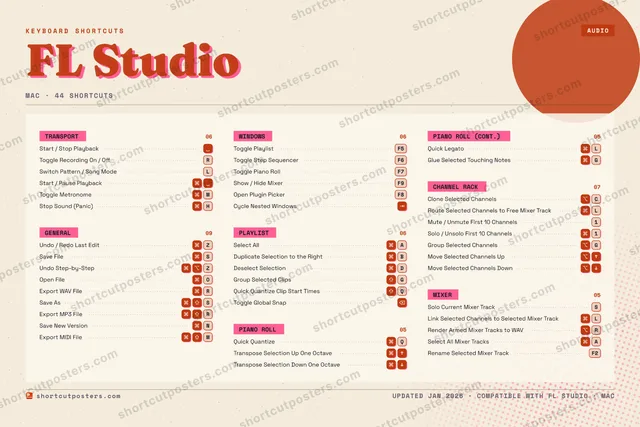
FL STUDIOKEYBOARD SHORTCUTS · MAC · 40 ESSENTIAL1Mute / U…234567890QQuick Qu…WERToggle R…TYUIOOpen FilePASelect A…SSave FileDDeselect…FGGroup Se…HStop Sou…JKLSwitch P…ZUndo / R…XCClone Se…VBDuplicat…NSave New…MToggle M…MORE SHORTCUTSStart / Stop …Toggle Playli…F5Toggle Step S…F6Toggle Piano …F7Show / Hide M…F9Undo Step-by-…ZExport WAV Fi…RStart / Pause…Save AsSExport MP3 Fi…ROpen Plugin P…F8Route Selecte…LTranspose Sel…Transpose Sel…Solo Current …SExport MIDI F…MCycle Nested …Solo / Unsolo…1Group Selecte…GQuick Quantiz…QToggle Global…Quick LegatoLGlue Selected…GLink Selected…LRender Armed …Rshortcutposters.comUPDATED JAN 2026 · COMPATIBLE WITH FL STUDIO · MAC

Hover to locate · click on the poster to disable · drag to reorder categories & shortcuts · to rename a category

Free PNG $0
  • Web resolution (1600 px)
  • Light watermark
  • Instant download
Made to order
Custom print-ready PDF $2.99
  • 300 DPI, framed-quality — no watermark
  • Every standard print size
  • Built to order from the poster above — checkout link emailed to you

Trouble ordering? Email business@shortcutposters.com.

How it works

  1. 1

    Choose a style

    Pick from four layouts: isometric keys, a typewriter list, a labelled keyboard map, or a bold editorial print.

  2. 2

    Make it yours

    Set the accent colour and palette, rename categories, and reorder anything.

  3. 3

    Pick the shortcuts

    Toggle exactly which shortcuts appear — or add your own custom ones.

  4. 4

    Download or print

    Export a free high-resolution PNG instantly, or order a print-ready PDF.

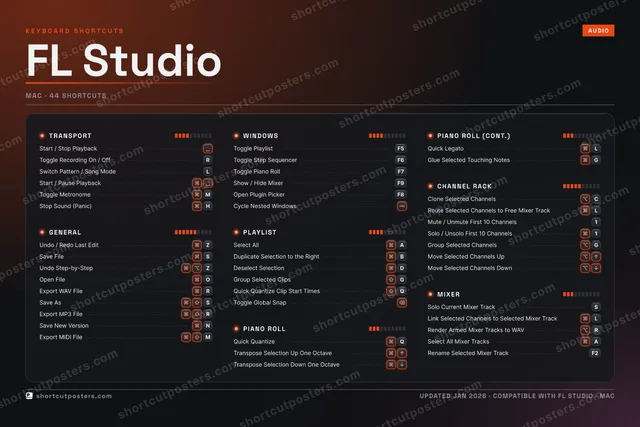
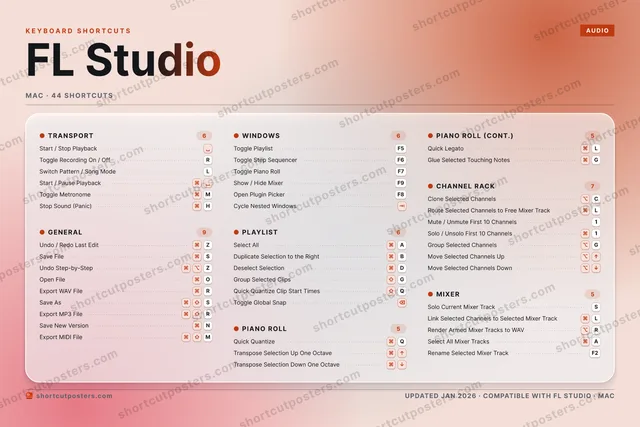
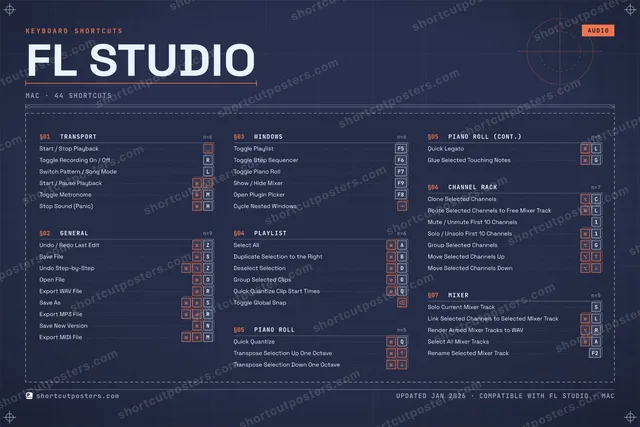
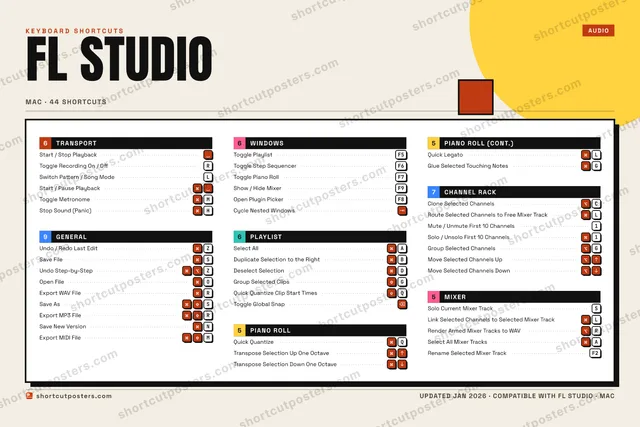
Four styles to choose from

FL STUDIOKEYBOARD SHORTCUTS · MAC · 20 ESSENTIAL1234567890QQuick Qu…WERToggle R…TYUIOOpen FilePASelect A…SSave FileDFGHStop Sou…JKLSwitch P…ZUndo / R…XCVBDuplicat…NMToggle M…MORE SHORTCUTSStart / Stop Play…Toggle PlaylistF5Toggle Step Seque…F6Toggle Piano RollF7Show / Hide MixerF9Undo Step-by-StepZExport WAV FileRStart / Pause Pla…Save AsSExport MP3 FileRshortcutposters.comUPDATED JAN 2026 · COMPATIBLE WITH FL STUDIO · MAC
Keyboard map Every binding labelled on a realistic QWERTY or AZERTY keyboard.
GENERALUndo / Redo Last EditZSave FileSUndo Step-by-StepZOpen FileOExport WAV FileRSave AsSExport MP3 FileRPLAYLISTSelect AllADuplicate Selection to the RightBPIANO ROLLQuick QuantizeQTRANSPORTStart / Stop PlaybackToggle Recording On / OffRSwitch Pattern / Song ModeLStart / Pause PlaybackToggle MetronomeMStop Sound (Panic)HWINDOWSToggle PlaylistF5Toggle Step SequencerF6Toggle Piano RollF7Show / Hide MixerF9FL StudioKEYBOARD SHORTCUTS · MAC · 20 ESSENTIALBOTH LAYOUTSQWERTYQWERTYAZERTYAZERTYshortcutposters.comUPDATED JAN 2026 · COMPATIBLE WITH FL STUDIO · MAC
Isometric Shortcuts on a 3D isometric keyboard — bold and poster-like.
GENERAL07Undo / Redo Last EditZSave FileSUndo Step-by-StepZOpen FileOExport WAV FileRSave AsSExport MP3 FileRPLAYLIST02Select AllADuplicate Selection to the RightBPIANO ROLL01Quick QuantizeQTRANSPORT06Start / Stop PlaybackToggle Recording On / OffRSwitch Pattern / Song ModeLStart / Pause PlaybackToggle MetronomeMStop Sound (Panic)HWINDOWS04Toggle PlaylistF5Toggle Step SequencerF6Toggle Piano RollF7Show / Hide MixerF9FL StudioKEYBOARD SHORTCUTS · MAC · 20 ESSENTIALBOTH LAYOUTSQWERTYQWERTYAZERTYAZERTYshortcutposters.comUPDATED JAN 2026 · COMPATIBLE WITH FL STUDIO · MAC
Typewriter A clean printed list, grouped by category — dense and legible.
FL STUDIO · KEYBOARD SHORTCUTSMac · 5 SETS · No.01FL STUDIOTOTAL20SHORTCUTSFOR MAC · SHIPPED COMBOSSETSTRANSPORT06GENERAL07WINDOWS04PLAYLIST02PIANO ROLL01REF. EDITION · JAN 2026shortcutposters.comStart / Stop PlaybackToggle Recording On / OffRSwitch Pattern / Song ModeLStart / Pause PlaybackToggle MetronomeMStop Sound (Panic)HUndo / Redo Last EditZSave FileSUndo Step-by-StepZOpen FileOExport WAV FileRSave AsSExport MP3 FileRToggle PlaylistF5Toggle Step SequencerF6Toggle Piano RollF7Show / Hide MixerF9Select AllADuplicate Selection to the RightBQuick QuantizeQ
Editorial A bold Swiss-style print: giant wordmark, dense keycap columns, and a totals rail.

Frequently asked questions

Is the FL Studio poster maker free?

Yes — you can design and download a high-resolution PNG of your FL Studio shortcuts poster for free. A print-ready PDF is an optional paid upgrade.

Can I choose which FL Studio shortcuts appear?

Yes. Toggle any shortcut on or off, reorder them, rename categories, and even add your own custom shortcuts.

Can I change the colours and style?

Yes. Pick an accent colour, choose a palette, and switch between the isometric, typewriter, and keyboard-map styles.

Which keyboard layout and operating system are supported?

Choose QWERTY or AZERTY, and switch the edition between the operating systems FL Studio supports (macOS, Windows, Linux).

How do I get a printed poster?

Download the free PNG to print yourself, or order the print-ready, framed-quality PDF directly from the maker.