
ShortcutPosters

4 art directions — pick one below, click to zoom & compare.
Layout
SCREENFLOWKEYBOARD SHORTCUTS · MAC · 52 ESSENTIAL1Show Vid…2⌘ ⇧Record (…3Show Scr…4Show Cal…5Show Ann…6Show Tex…7Show Med…890⌘ ⌥Set Prev…QWTrim Fro…EExport a…RAdd Scre…TSplit Cl…YUUngroup …IInsert I…OInsert O…PASelect A…SToggle L…DF⌘ ⇧Add Free…GGroup Cl…HHide Scr…JScrub Ba…KAdd Vide…LAdd Call…ZClear In…XC⌘ ⌥Paste Ca…V⌘ ⇧Insert M…BNNew Reco…MMORE SHORTCUTSPlay Presenta…Forward One F…Backward One …Ripple Delete…Trim End of S…EOpen Recordin…OAdd Additiona…RFast Backward…JJLLForward One S…Backward One …Move Scrubber…Move Scrubber…Move Scrubber…;Move Scrubber…'Split Clip (K…TInsert Marker…`Zoom In Timel…=Zoom Out Time…Show Audio Pr…2Move Scrubber…IMove Scrubber…ONest ClipsNLock / Unlock…LDeselect All …ANudge Clip on…][shortcutposters.comUPDATED JAN 2026 · COMPATIBLE WITH SCREENFLOW · MAC
TIMELINEInsert In PointIInsert Out PointOInsert Marker at Scrubber …`Zoom In Timeline=Zoom Out TimelineClear In and Out PointsZMove Scrubber to In PointIMove Scrubber to Out PointODelete Marker at Scrubber …`Next MarkerPrevious MarkerResize Timeline to Fit Vis…ZVIEWShow Video Properties1Show Audio Properties2Show Media7Set Preview Area to Natura…0Zoom In Preview Area=Zoom Out Preview AreaShow Screen Recording Prop…3Show Callout Properties4Show Annotations Properties5Show Text Properties6Hide ScreenFlow WindowsHHide Other WindowsHOpen Help Window/PLAYBACKPlay PresentationScrub Backwards / Stop / F…JKLForward One FrameBackward One FrameFast Backwards / Fast Forw…JJLLForward One SecondBackward One SecondMove Scrubber to Start of …Move Scrubber to End of Pr…Move Scrubber to Previous …;Move Scrubber to Next Clip…'Toggle Live Audio ScrubbingSRECORDINGRecord (default)2Export as VideoENew RecordingNOpen Recording DocumentOAdd Additional Recording t…REDITINGRipple Delete Between In/O…Split Clip (Keep Clip on L…TAdd Video ActionKTrim Front of Selected Cli…WTrim End of Selected Clip(…EAdd CalloutLAdd Screen Recording ActionRSplit Clip (Keep Clip on R…TAdd Freeze FrameFInsert Media at Scrubber P…VGroup ClipsGUngroup ClipsUSelect All ClipsANest ClipsNLock / Unlock ClipLDeselect All ClipsANudge Clip on Timeline][Insert Annotations ClipTPaste StyleVPaste and Match StyleVPaste Audio PropertiesAPaste Callout PropertiesCPaste Video PropertiesIPaste Screen Recording Pro…SScreenFlowKEYBOARD SHORTCUTS · MAC · 66BOTH LAYOUTSQWERTYQWERTYAZERTYAZERTYshortcutposters.comUPDATED JAN 2026 · COMPATIBLE WITH SCREENFLOW · MAC
RECORDING05Record (default)2Export as VideoENew RecordingNOpen Recording Docu…OAdd Additional Reco…RVIEW13Show Video Properti…1Show Audio Properti…2Show Media7Set Preview Area to…0Zoom In Preview Area=Zoom Out Preview Ar…Show Screen Recordi…3Show Callout Proper…4Show Annotations Pr…5Show Text Properties6Hide ScreenFlow Win…HHide Other WindowsHOpen Help Window/TIMELINE12Insert In PointIInsert Out PointOInsert Marker at Sc…`Zoom In Timeline=Zoom Out TimelineClear In and Out Po…ZMove Scrubber to In…IMove Scrubber to Ou…ODelete Marker at Sc…`Next MarkerPrevious MarkerResize Timeline to …ZPLAYBACK12Play PresentationScrub Backwards / S…JKLForward One FrameBackward One FrameFast Backwards / Fa…JJLLForward One SecondBackward One SecondMove Scrubber to St…Move Scrubber to En…Move Scrubber to Pr…;Move Scrubber to Ne…'Toggle Live Audio S…SEDITING24Ripple Delete Betwe…Split Clip (Keep Cl…TAdd Video ActionKTrim Front of Selec…WTrim End of Selecte…EAdd CalloutLAdd Screen Recordin…RSplit Clip (Keep Cl…TAdd Freeze FrameFInsert Media at Scr…VGroup ClipsGUngroup ClipsUSelect All ClipsANest ClipsNLock / Unlock ClipLDeselect All ClipsANudge Clip on Timel…][Insert Annotations …TPaste StyleVPaste and Match Sty…VPaste Audio Propert…APaste Callout Prope…CPaste Video Propert…IPaste Screen Record…SScreenFlowKEYBOARD SHORTCUTS · MAC · 66BOTH LAYOUTSQWERTYQWERTYAZERTYAZERTYshortcutposters.comUPDATED JAN 2026 · COMPATIBLE WITH SCREENFLOW · MAC
SCREENFLOW · KEYBOARD SHORTCUTSMac · 5 SETS · No.01SCREENFLOWTOTAL66SHORTCUTSFOR MAC · SHIPPED COMBOSSETSRECORDING05PLAYBACK12TIMELINE12EDITING24VIEW13REF. EDITION · JAN 2026shortcutposters.comRecord (default)2Export as VideoENew RecordingNOpen Recording DocumentOAdd Additional Recording to C…RPlay PresentationScrub Backwards / Stop…JKLForward One FrameBackward One FrameFast Backwards / Fast Forw…JJLLForward One SecondBackward One SecondMove Scrubber to Start of Presenta…Move Scrubber to End of Presentati…Move Scrubber to Previous Clip Sta…;Move Scrubber to Next Clip Start/E…'Toggle Live Audio ScrubbingSInsert In PointIInsert Out PointOInsert Marker at Scrubber Position`Zoom In Timeline=Zoom Out TimelineClear In and Out PointsZMove Scrubber to In PointIMove Scrubber to Out PointODelete Marker at Scrubber Positi…`Next MarkerPrevious MarkerResize Timeline to Fit Visible A…ZRipple Delete Between In/Out Poi…Split Clip (Keep Clip on Left Sele…TAdd Video ActionKTrim Front of Selected Clip(s) to …WTrim End of Selected Clip(s) to Sc…EAdd CalloutLAdd Screen Recording ActionRSplit Clip (Keep Clip on Right S…TAdd Freeze FrameFInsert Media at Scrubber Posi…VGroup ClipsGUngroup ClipsUSelect All ClipsANest ClipsNLock / Unlock ClipLDeselect All ClipsANudge Clip on Timeline][Insert Annotations ClipTPaste StyleVPaste and Match StyleVPaste Audio PropertiesAPaste Callout PropertiesCPaste Video PropertiesIPaste Screen Recording Proper…SShow Video Properties1Show Audio Properties2Show Media7Set Preview Area to Natural S…0Zoom In Preview Area=Zoom Out Preview AreaShow Screen Recording Properties3Show Callout Properties4Show Annotations Properties5Show Text Properties6Hide ScreenFlow WindowsHHide Other WindowsHOpen Help Window/

Mac edition · 66 shortcuts

ScreenFlow Keyboard Shortcuts Poster

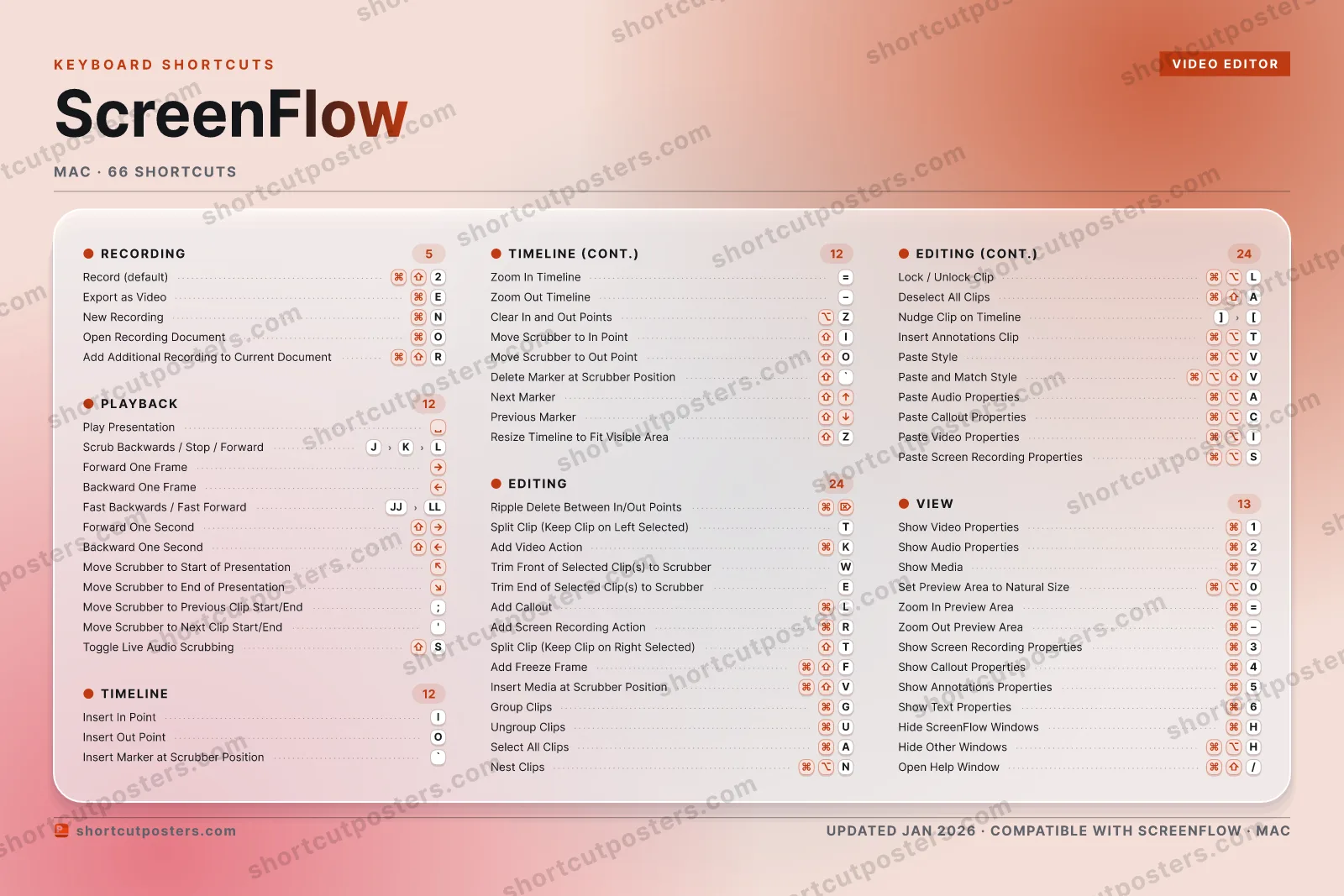
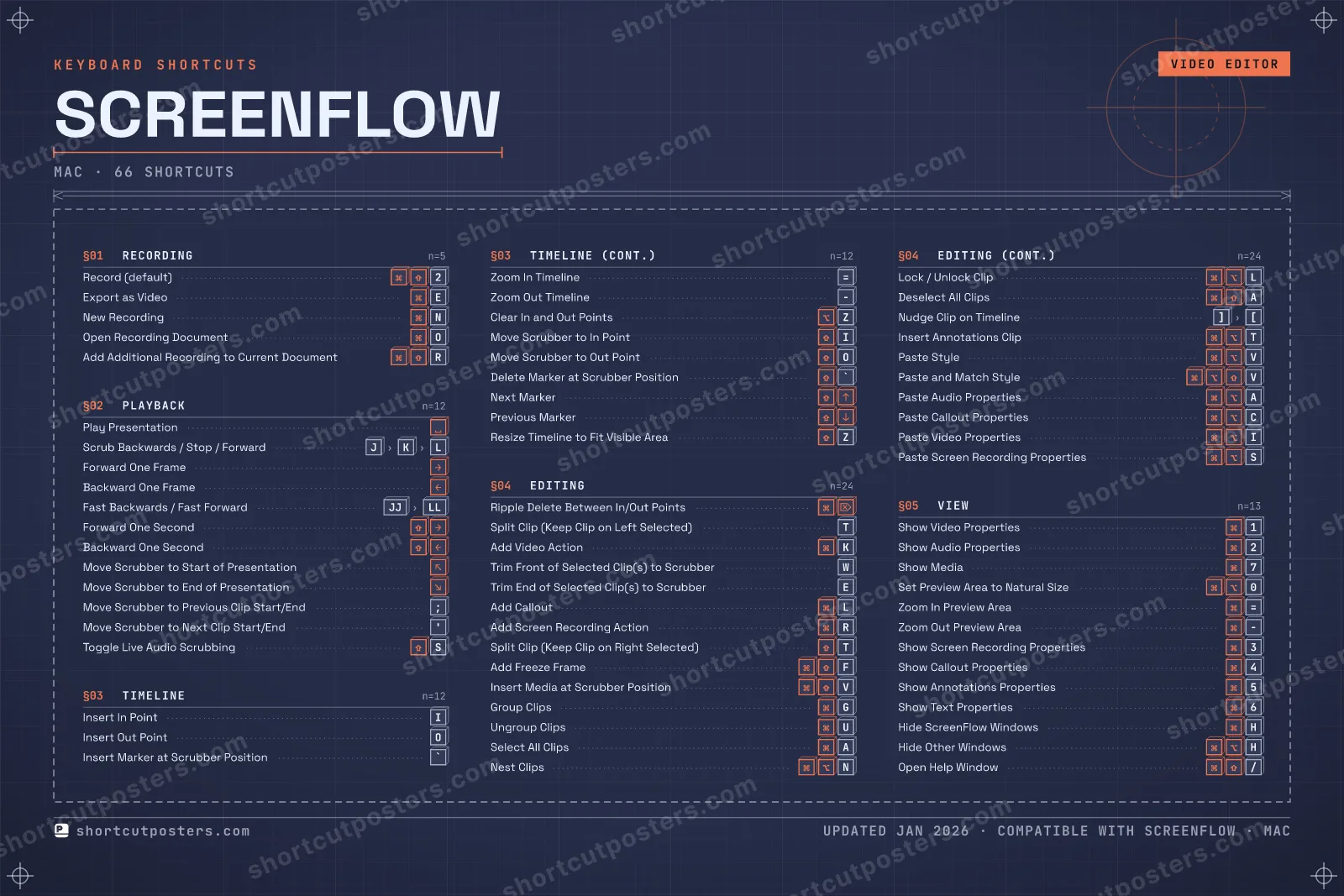
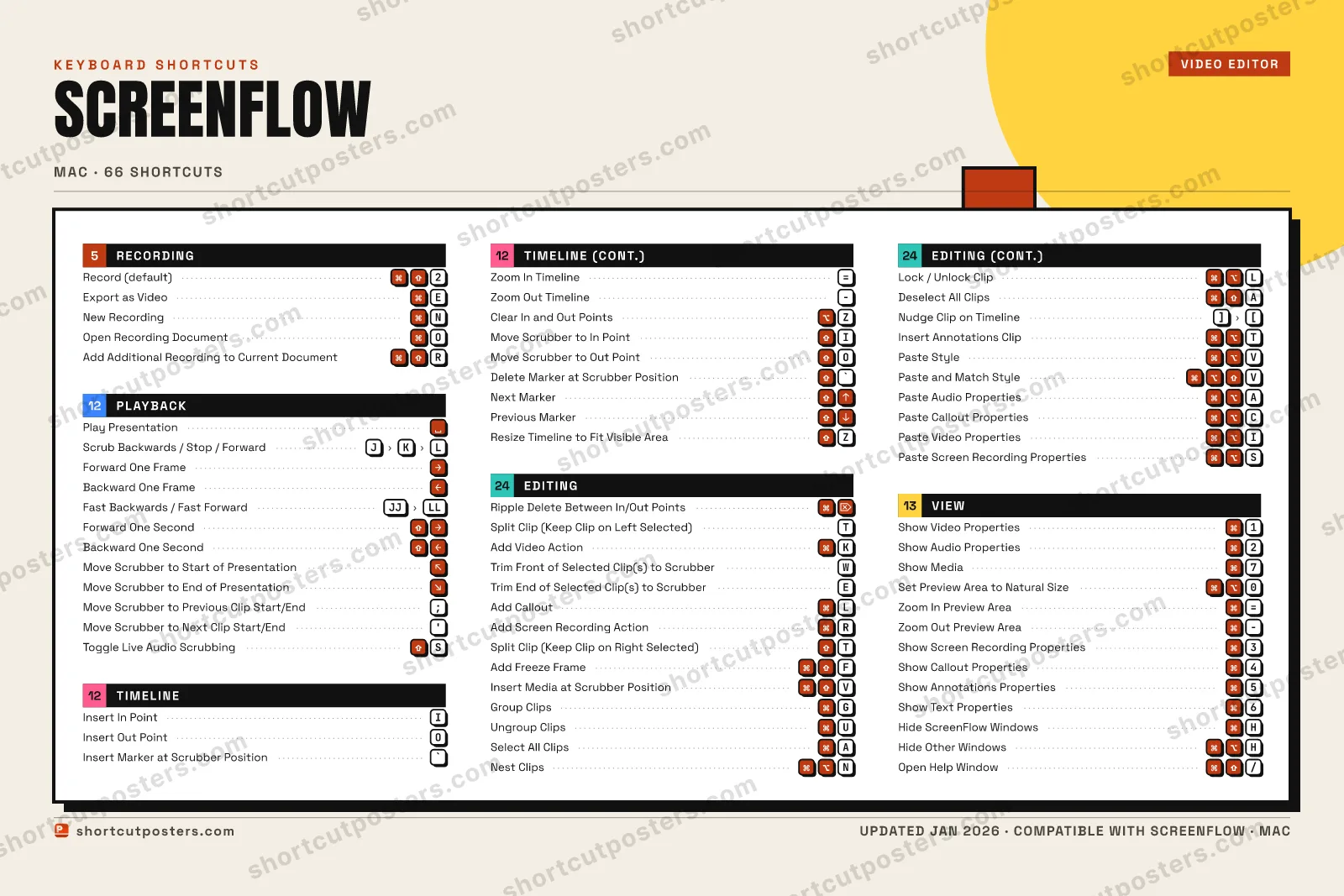
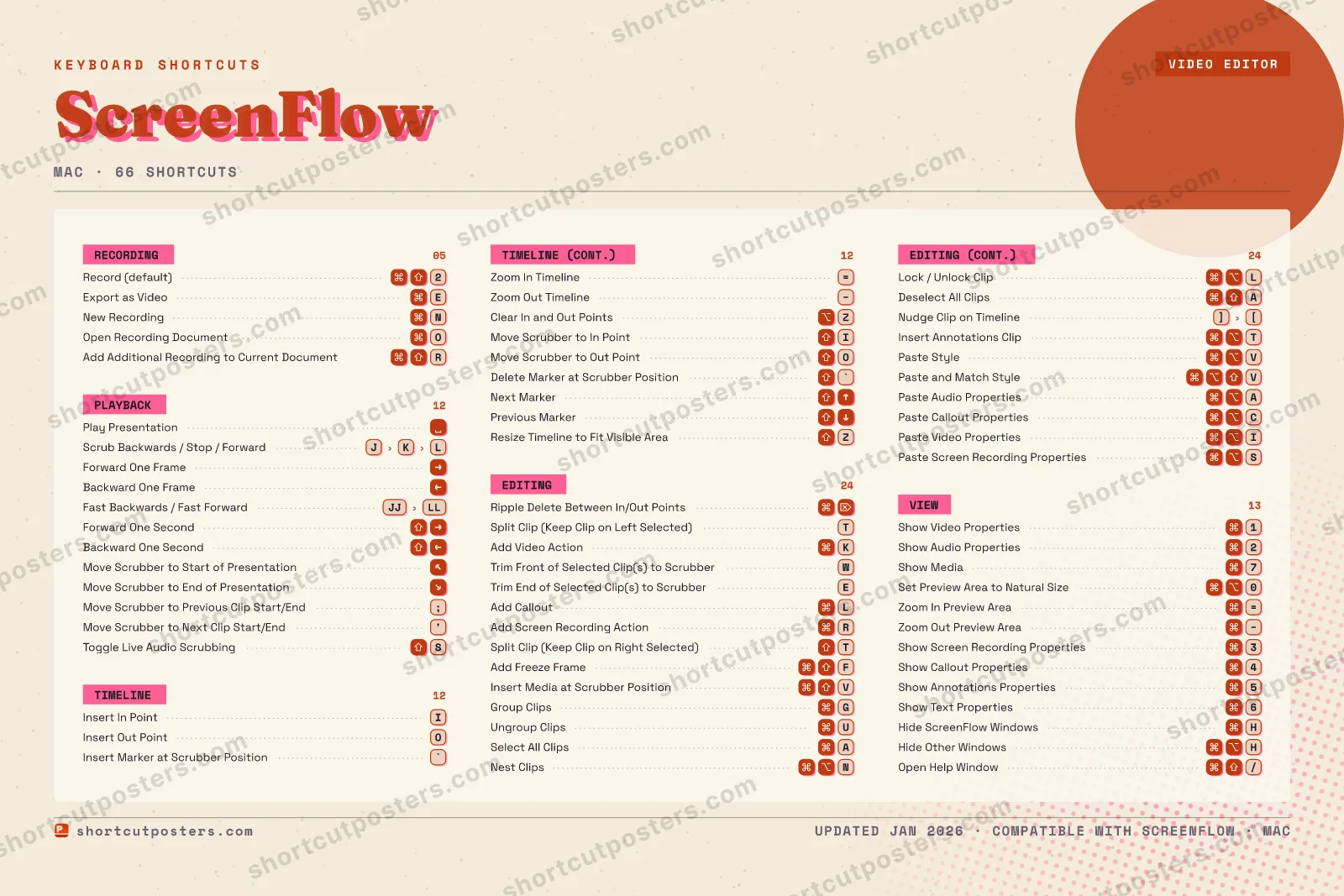
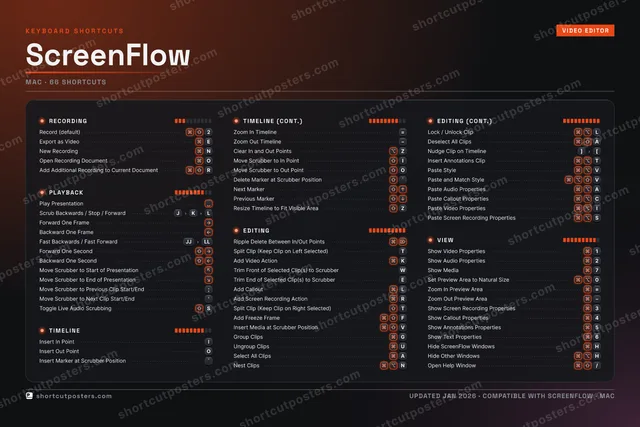
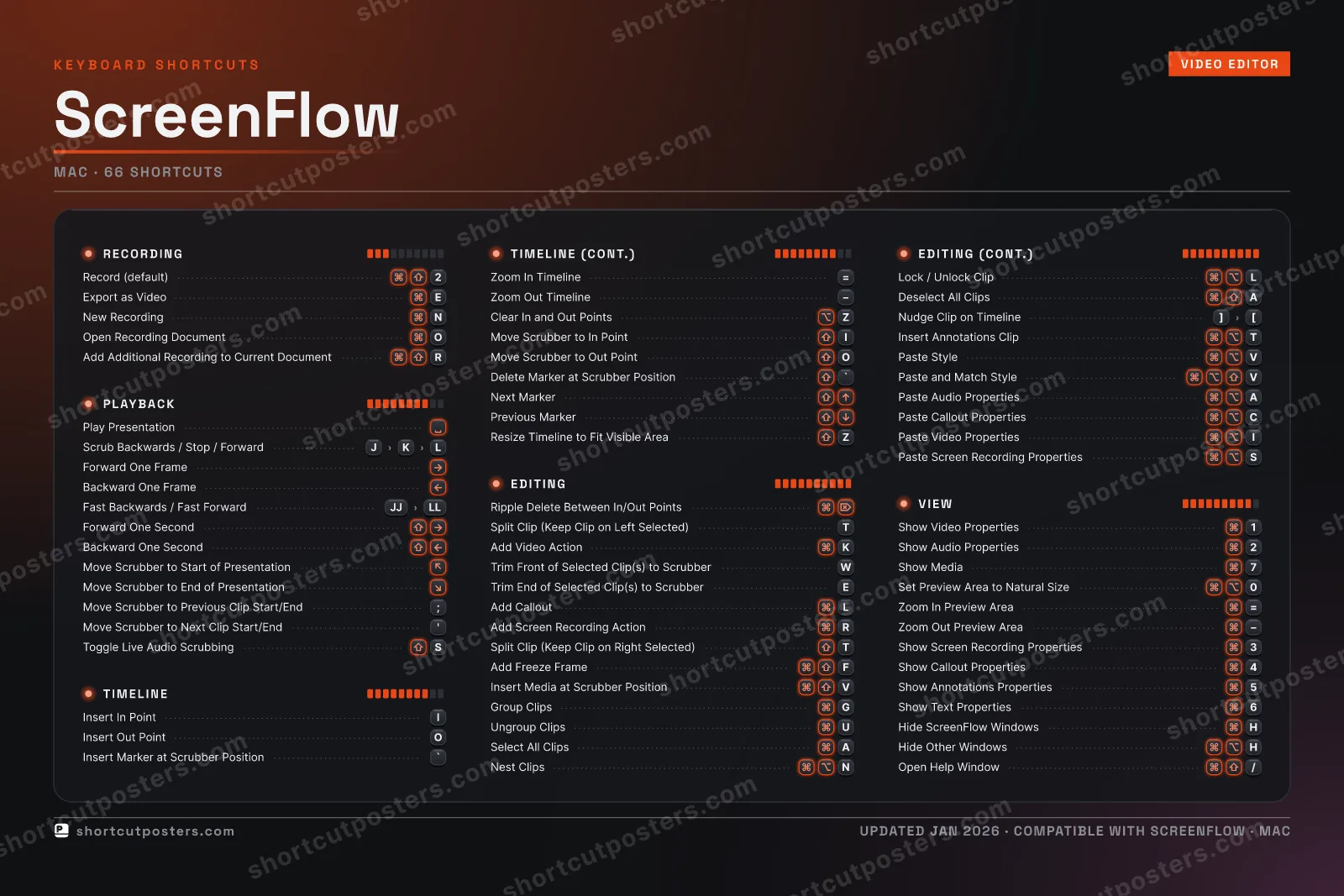
A printable, framed-quality poster of the essential ScreenFlow shortcuts for Mac — the keys worth keeping in view, designed to stay readable on a wall.

Free PNG is web-resolution & lightly watermarked.

Customise this poster Pick the shortcuts, restyle the colours — download free. Get the framed-quality print Full 300 DPI, print-ready — at home or shipped to your door.

ScreenFlow is Telestream's macOS screen-recording and video-editing app for tutorials, demos, and product videos. These shortcuts speed up recording, timeline trimming, and clip actions so you can edit without reaching for the menus.

All ScreenFlow keyboard shortcuts (Mac)

Layout
`
1
2
3
4
5
6
7
8
9
0
-
=
⌫ Back
Tab
Q
W
E
R
T
Y
U
I
O
P
[
]
\
Caps
A
S
D
F
G
H
J
K
L
;
'
Enter ⏎
Shift
Z
X
C
V
B
N
M
,
.
/
Shift
Ctrl
Win
Alt
Space
Alt
Win
Menu
Ctrl

+ 5 more controls in the table below

Editing 24

Action Shortcut
Ripple Delete Between In/Out Points
Split Clip (Keep Clip on Left Selected) T
Add Video Action K
Trim Front of Selected Clip(s) to Scrubber W
Trim End of Selected Clip(s) to Scrubber E
Add Callout L
Add Screen Recording Action R
Split Clip (Keep Clip on Right Selected) T
Add Freeze Frame F
Insert Media at Scrubber Position V
Group Clips G
Ungroup Clips U
Select All Clips A
Nest Clips N
Lock / Unlock Clip L
Deselect All Clips A
Nudge Clip on Timeline ]then[
Insert Annotations Clip T
Paste Style V
Paste and Match Style V
Paste Audio Properties A
Paste Callout Properties C
Paste Video Properties I
Paste Screen Recording Properties S

View 13

Action Shortcut
Show Video Properties 1
Show Audio Properties 2
Show Media 7
Set Preview Area to Natural Size 0
Zoom In Preview Area =
Zoom Out Preview Area
Show Screen Recording Properties 3
Show Callout Properties 4
Show Annotations Properties 5
Show Text Properties 6
Hide ScreenFlow Windows H
Hide Other Windows H
Open Help Window /

Playback 12

Action Shortcut
Play Presentation
Scrub Backwards / Stop / Forward JthenKthenL
Forward One Frame
Backward One Frame
Fast Backwards / Fast Forward JJthenLL
Forward One Second
Backward One Second
Move Scrubber to Start of Presentation
Move Scrubber to End of Presentation
Move Scrubber to Previous Clip Start/End ;
Move Scrubber to Next Clip Start/End '
Toggle Live Audio Scrubbing S

Timeline 12

Action Shortcut
Insert In Point I
Insert Out Point O
Insert Marker at Scrubber Position `
Zoom In Timeline =
Zoom Out Timeline
Clear In and Out Points Z
Move Scrubber to In Point I
Move Scrubber to Out Point O
Delete Marker at Scrubber Position `
Next Marker
Previous Marker
Resize Timeline to Fit Visible Area Z

Recording 5

Action Shortcut
Record (default) 2
Export as Video E
New Recording N
Open Recording Document O
Add Additional Recording to Current Document R

Sourced from telestream.net , telestream.net Last verified

Unofficial reference. ShortcutPosters is not affiliated with, endorsed by, or sponsored by ScreenFlow. All product names, logos, and trademarks are property of their respective owners. See our licensing & trademark notice.

Frequently asked questions

Does the poster include every ScreenFlow shortcut?
ScreenFlow has 66 keyboard shortcuts in total — the complete list is free to read on this page. The poster features the most essential ones, curated to stay readable on a wall.
Can I print it at home?
Yes. The digital download is a high-resolution 300 DPI file you can print at home or at any print shop, in standard frame sizes.
Does it cover both Mac and Windows?
We sell separate Mac and Windows editions so every key matches your keyboard exactly. This page is the macOS edition.
Is this an official ScreenFlow product?
No. This is an unofficial reference poster and is not affiliated with or endorsed by ScreenFlow. All trademarks belong to their respective owners.
For app makers

Promote your app

Built an app with great keyboard shortcuts? Get it into the database — a free, searchable reference page, and an optional printable poster your power users will pin to the wall.

  • Free shortcut reference page
  • Indexed & searchable
  • Optional framed poster