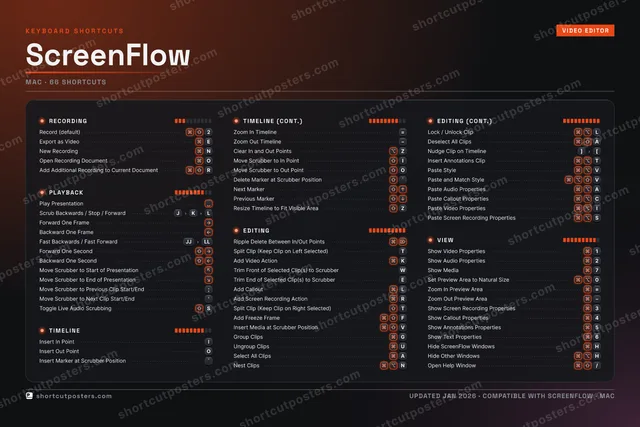
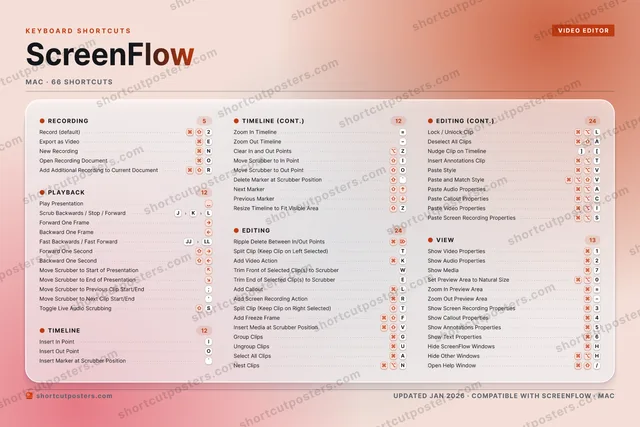
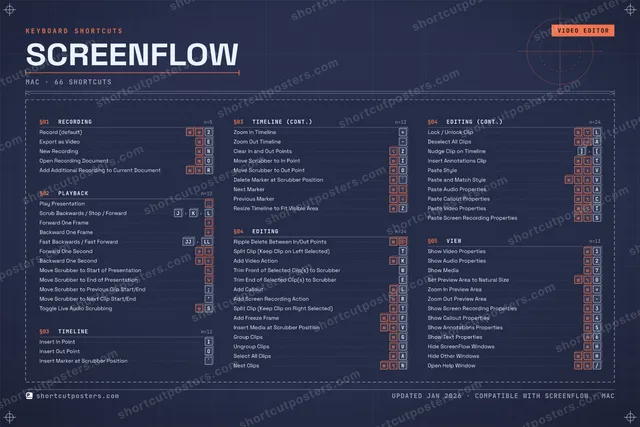
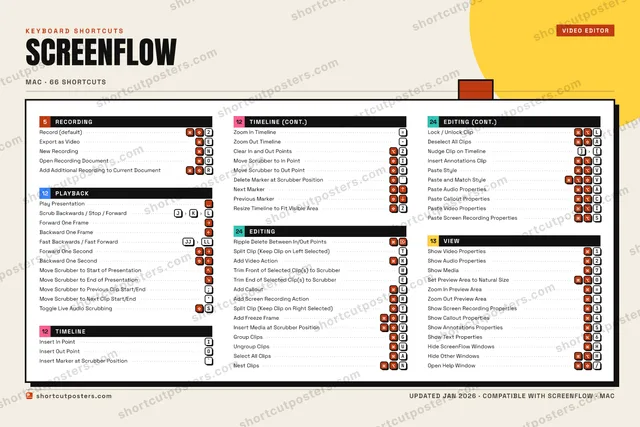
ShortcutPosters

Poster maker

Make your ScreenFlow shortcuts poster

Pick the shortcuts that matter, add your own, tune the colours and style — then download a free personalized PNG, or order the print-ready PDF.

Making a poster for:
Style
Accent
SCREENFLOWKEYBOARD SHORTCUTS · MAC · 52 ESSENTIAL1Show Vid…2⌘ ⇧Record (…3Show Scr…4Show Cal…5Show Ann…6Show Tex…7Show Med…890⌘ ⌥Set Prev…QWTrim Fro…EExport a…RAdd Scre…TSplit Cl…YUUngroup …IInsert I…OInsert O…PASelect A…SToggle L…DF⌘ ⇧Add Free…GGroup Cl…HHide Scr…JScrub Ba…KAdd Vide…LAdd Call…ZClear In…XC⌘ ⌥Paste Ca…V⌘ ⇧Insert M…BNNew Reco…MMORE SHORTCUTSPlay Presenta…Forward One F…Backward One …Ripple Delete…Trim End of S…EOpen Recordin…OAdd Additiona…RFast Backward…JJLLForward One S…Backward One …Move Scrubber…Move Scrubber…Move Scrubber…;Move Scrubber…'Split Clip (K…TInsert Marker…`Zoom In Timel…=Zoom Out Time…Show Audio Pr…2Move Scrubber…IMove Scrubber…ONest ClipsNLock / Unlock…LDeselect All …ANudge Clip on…][shortcutposters.comUPDATED JAN 2026 · COMPATIBLE WITH SCREENFLOW · MAC

Hover to locate · click on the poster to disable · drag to reorder categories & shortcuts · to rename a category

Free PNG $0
  • Web resolution (1600 px)
  • Light watermark
  • Instant download
Made to order
Custom print-ready PDF $2.99
  • 300 DPI, framed-quality — no watermark
  • Every standard print size
  • Built to order from the poster above — checkout link emailed to you

Trouble ordering? Email business@shortcutposters.com.

How it works

  1. 1

    Choose a style

    Pick from four layouts: isometric keys, a typewriter list, a labelled keyboard map, or a bold editorial print.

  2. 2

    Make it yours

    Set the accent colour and palette, rename categories, and reorder anything.

  3. 3

    Pick the shortcuts

    Toggle exactly which shortcuts appear — or add your own custom ones.

  4. 4

    Download or print

    Export a free high-resolution PNG instantly, or order a print-ready PDF.

Four styles to choose from

SCREENFLOWKEYBOARD SHORTCUTS · MAC · 20 ESSENTIAL12⌘ ⇧Record (…34567890QWTrim Fro…EExport a…RAdd Scre…TSplit Cl…YUIInsert I…OInsert O…PASDFGHJScrub Ba…KAdd Vide…LAdd Call…ZXCVBNNew Reco…MMORE SHORTCUTSPlay PresentationForward One FrameBackward One FrameRipple Delete Bet…Trim End of Selec…EOpen Recording Do…OAdd Additional Re…RFast Backwards / …JJLLForward One Secondshortcutposters.comUPDATED JAN 2026 · COMPATIBLE WITH SCREENFLOW · MAC
Keyboard map Every binding labelled on a realistic QWERTY or AZERTY keyboard.
PLAYBACKPlay PresentationScrub Backwards / Stop / ForwardJKLForward One FrameBackward One FrameFast Backwards / Fast ForwardJJLLForward One SecondEDITINGRipple Delete Between In/Out PointsSplit Clip (Keep Clip on Left Sele…TAdd Video ActionKTrim Front of Selected Clip(s) to …WTrim End of Selected Clip(s) to Sc…EAdd CalloutLAdd Screen Recording ActionRRECORDINGRecord (default)2Export as VideoENew RecordingNOpen Recording DocumentOAdd Additional Recording to Curren…RTIMELINEInsert In PointIInsert Out PointOScreenFlowKEYBOARD SHORTCUTS · MAC · 20 ESSENTIALBOTH LAYOUTSQWERTYQWERTYAZERTYAZERTYshortcutposters.comUPDATED JAN 2026 · COMPATIBLE WITH SCREENFLOW · MAC
Isometric Shortcuts on a 3D isometric keyboard — bold and poster-like.
PLAYBACK06Play PresentationScrub Backwards / Stop / ForwardJKLForward One FrameBackward One FrameFast Backwards / Fast ForwardJJLLForward One SecondEDITING07Ripple Delete Between In/Out PointsSplit Clip (Keep Clip on Left Sele…TAdd Video ActionKTrim Front of Selected Clip(s) to …WTrim End of Selected Clip(s) to Sc…EAdd CalloutLAdd Screen Recording ActionRRECORDING05Record (default)2Export as VideoENew RecordingNOpen Recording DocumentOAdd Additional Recording to Curren…RTIMELINE02Insert In PointIInsert Out PointOScreenFlowKEYBOARD SHORTCUTS · MAC · 20 ESSENTIALBOTH LAYOUTSQWERTYQWERTYAZERTYAZERTYshortcutposters.comUPDATED JAN 2026 · COMPATIBLE WITH SCREENFLOW · MAC
Typewriter A clean printed list, grouped by category — dense and legible.
SCREENFLOW · KEYBOARD SHORTCUTSMac · 4 SETS · No.01SCREENFLOWTOTAL20SHORTCUTSFOR MAC · SHIPPED COMBOSSETSRECORDING05PLAYBACK06TIMELINE02EDITING07REF. EDITION · JAN 2026shortcutposters.comRecord (default)2Export as VideoENew RecordingNOpen Recording DocumentOAdd Additional Recording to Current DocumentRPlay PresentationScrub Backwards / Stop / ForwardJKLForward One FrameBackward One FrameFast Backwards / Fast ForwardJJLLForward One SecondInsert In PointIInsert Out PointORipple Delete Between In/Out PointsSplit Clip (Keep Clip on Left Selected)TAdd Video ActionKTrim Front of Selected Clip(s) to ScrubberWTrim End of Selected Clip(s) to ScrubberEAdd CalloutLAdd Screen Recording ActionR
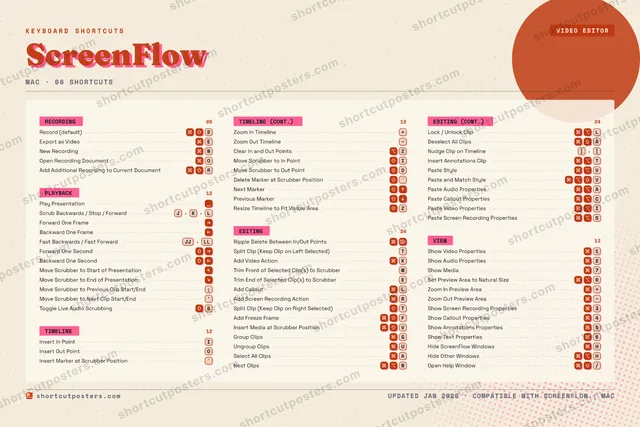
Editorial A bold Swiss-style print: giant wordmark, dense keycap columns, and a totals rail.

Frequently asked questions

Is the ScreenFlow poster maker free?

Yes — you can design and download a high-resolution PNG of your ScreenFlow shortcuts poster for free. A print-ready PDF is an optional paid upgrade.

Can I choose which ScreenFlow shortcuts appear?

Yes. Toggle any shortcut on or off, reorder them, rename categories, and even add your own custom shortcuts.

Can I change the colours and style?

Yes. Pick an accent colour, choose a palette, and switch between the isometric, typewriter, and keyboard-map styles.

Which keyboard layout and operating system are supported?

Choose QWERTY or AZERTY, and switch the edition between the operating systems ScreenFlow supports (macOS, Windows, Linux).

How do I get a printed poster?

Download the free PNG to print yourself, or order the print-ready, framed-quality PDF directly from the maker.