ShortcutPosters

Poster maker

Make your Adobe Premiere Pro shortcuts poster
Pick the shortcuts that matter, add your own, tune the colours and style — then download a free personalized PNG, or order the print-ready PDF.

Making a poster for:
Style
Accent
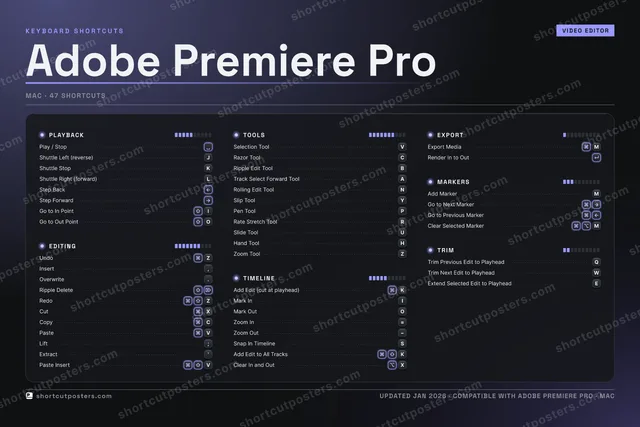
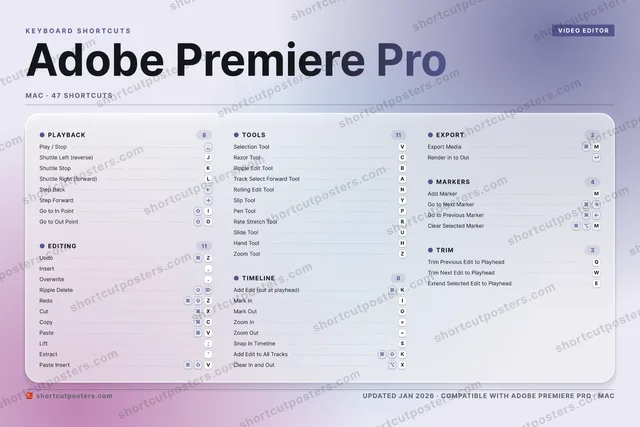
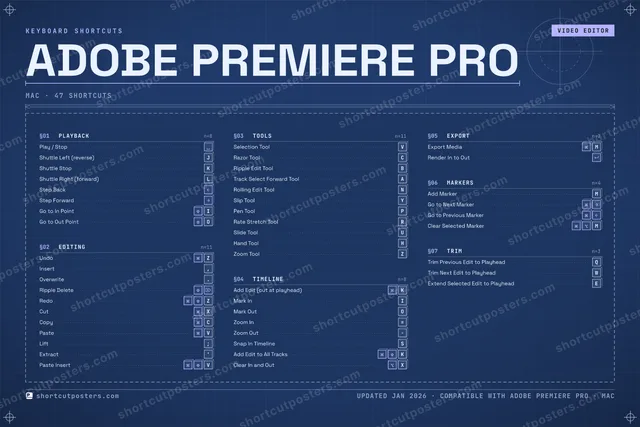
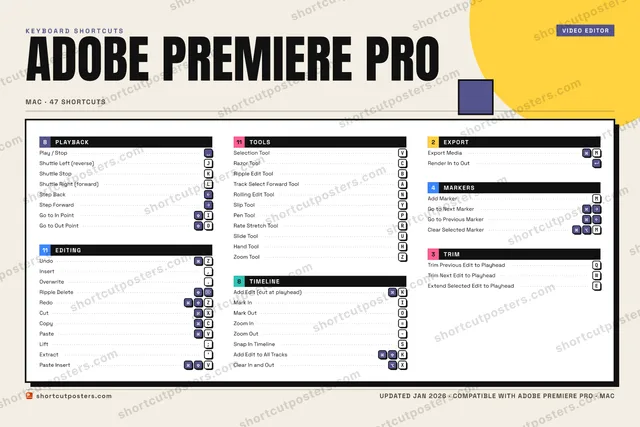
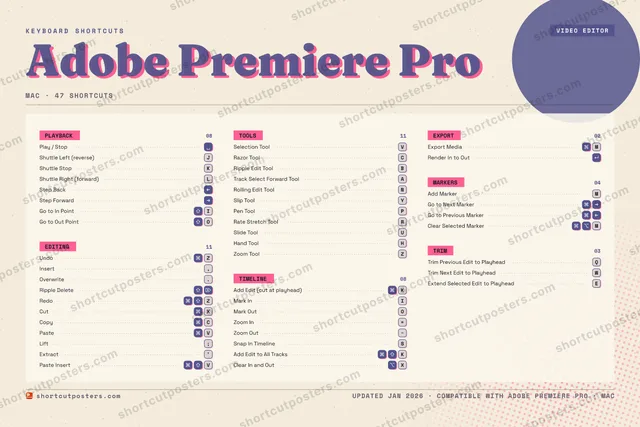
ADOBE PREMIERE PROKEYBOARD SHORTCUTS · MAC · 471234567890QTrim Pre…WTrim Nex…EExtend S…RRate Str…TYSlip ToolUSlide To…IMark InOMark OutPPen ToolATrack Se…SSnap In …DFGHHand ToolJShuttle …KShuttle …LShuttle …ZUndoXCutCRazor To…VSelectio…BRipple E…NRolling …MExport M…MORE SHORTCUTSPlay / StopInsert,Overwrite.Ripple DeleteRedoZAdd Edit (cut…KStep BackStep ForwardCopyCPasteVAdd MarkerMLift;Extract'Zoom In=Zoom OutGo to In PointIGo to Out Poi…OPaste InsertVAdd Edit to A…KClear In and …XGo to Next Ma…Go to Previou…Zoom ToolZRender In to …Clear Selecte…Mshortcutposters.comUPDATED JAN 2026 · COMPATIBLE WITH ADOBE PREMIERE PRO · MAC

Hover to locate · click on the poster to disable · drag to reorder categories & shortcuts · to rename a category

Free PNG $0
  • Web resolution (1600 px)
  • Light watermark
  • Instant download
Made to order
Custom print-ready PDF $2.99
  • 300 DPI, framed-quality — no watermark
  • Every standard print size
  • Built to order from the poster above — checkout link emailed to you

Trouble ordering? Email business@shortcutposters.com.

How it works

  1. 1

    Choose a style

    Pick from four layouts: isometric keys, a typewriter list, a labelled keyboard map, or a bold editorial print.

  2. 2

    Make it yours

    Set the accent colour and palette, rename categories, and reorder anything.

  3. 3

    Pick the shortcuts

    Toggle exactly which shortcuts appear — or add your own custom ones.

  4. 4

    Download or print

    Export a free high-resolution PNG instantly, or order a print-ready PDF.

Four styles to choose from

ADOBE PREMIERE PROKEYBOARD SHORTCUTS · MAC · 20 ESSENTIAL1234567890QWERTYUIMark InOMark OutPASDFGHJShuttle …KShuttle …LShuttle …ZUndoXCutCRazor To…VSelectio…BNMExport M…MORE SHORTCUTSPlay / StopInsert,Overwrite.Ripple DeleteRedoZAdd Edit (cut at …KStep BackStep ForwardCopyCPasteVshortcutposters.comUPDATED JAN 2026 · COMPATIBLE WITH ADOBE PREMIERE PRO · MAC
Keyboard map Every binding labelled on a realistic QWERTY or AZERTY keyboard.
PLAYBACKPlay / StopShuttle Left (reverse)JShuttle StopKShuttle Right (forward)LStep BackStep ForwardTOOLSSelection ToolVRazor ToolCEXPORTExport MediaMEDITINGUndoZInsert,Overwrite.Ripple DeleteRedoZCutXCopyCPasteVTIMELINEAdd Edit (cut at playhead)KMark InIMark OutOAdobe Premiere ProKEYBOARD SHORTCUTS · MAC · 20 ESSENTIALBOTH LAYOUTSQWERTYQWERTYAZERTYAZERTYshortcutposters.comUPDATED JAN 2026 · COMPATIBLE WITH ADOBE PREMIERE PRO · MAC
Isometric Shortcuts on a 3D isometric keyboard — bold and poster-like.
PLAYBACK06Play / StopShuttle Left (reverse)JShuttle StopKShuttle Right (forward)LStep BackStep ForwardTOOLS02Selection ToolVRazor ToolCEXPORT01Export MediaMEDITING08UndoZInsert,Overwrite.Ripple DeleteRedoZCutXCopyCPasteVTIMELINE03Add Edit (cut at playhead)KMark InIMark OutOAdobe Premiere ProKEYBOARD SHORTCUTS · MAC · 20 ESSENTIALBOTH LAYOUTSQWERTYQWERTYAZERTYAZERTYshortcutposters.comUPDATED JAN 2026 · COMPATIBLE WITH ADOBE PREMIERE PRO · MAC
Typewriter A clean printed list, grouped by category — dense and legible.
ADOBE PREMIERE PRO · KEYBOARD SHORTCUTSMac · 5 SETS · No.01ADOBE PREMIERE PROTOTAL20SHORTCUTSFOR MAC · SHIPPED COMBOSSETSPLAYBACK06EDITING08TOOLS02TIMELINE03EXPORT01REF. EDITION · JAN 2026shortcutposters.comPlay / StopShuttle Left (reverse)JShuttle StopKShuttle Right (forward)LStep BackStep ForwardUndoZInsert,Overwrite.Ripple DeleteRedoZCutXCopyCPasteVSelection ToolVRazor ToolCAdd Edit (cut at playhead)KMark InIMark OutOExport MediaM
Editorial A bold Swiss-style print: giant wordmark, dense keycap columns, and a totals rail.

Frequently asked questions

Is the Adobe Premiere Pro poster maker free?

Yes — you can design and download a high-resolution PNG of your Adobe Premiere Pro shortcuts poster for free. A print-ready PDF is an optional paid upgrade.

Can I choose which Adobe Premiere Pro shortcuts appear?

Yes. Toggle any shortcut on or off, reorder them, rename categories, and even add your own custom shortcuts.

Can I change the colours and style?

Yes. Pick an accent colour, choose a palette, and switch between the isometric, typewriter, and keyboard-map styles.

Which keyboard layout and operating system are supported?

Choose QWERTY or AZERTY, and switch the edition between the operating systems Adobe Premiere Pro supports (macOS, Windows, Linux).

How do I get a printed poster?

Download the free PNG to print yourself, or order the print-ready, framed-quality PDF directly from the maker.