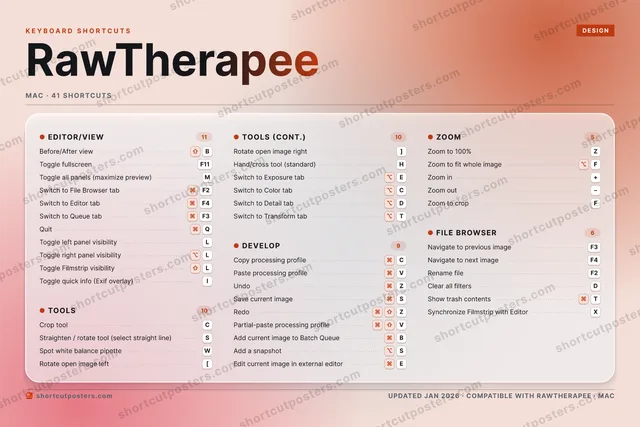
4 art directions — pick one below, click to zoom & compare.
⤢ RAWTHERAPEE KEYBOARD SHORTCUTS · MAC · 41 1 2 3 4 5 6 7 8 9 0 Q ⌘ Quit W Spot whi… E ⌥ Switch t… R T ⌥ Switch t… Y U I Toggle q… O P A S ⌘ Save cur… D ⌥ Switch t… F ⌥ Zoom to … G H Hand/cro… J K L Toggle l… Z ⌘ Undo X Synchron… C Crop tool V ⌘ Paste pr… B ⇧ Before/A… N M Toggle a… MORE SHORTCUTS Copy processi… ⌘ C Toggle fullsc… F11 Zoom to 100% Z Zoom in + Zoom out − Straighten / … S Redo ⌘ ⇧ Z Navigate to p… F3 Navigate to n… F4 Switch to Fil… ⌘ F2 Switch to Edi… ⌘ F4 Rotate open i… [ Rotate open i… ] Partial-paste… ⌘ ⇧ V Add current i… ⌘ B Switch to Que… ⌘ F3 Zoom to crop F Switch to Col… ⌥ C Add a snapshot ⌥ S Edit current … ⌘ E Rename file F2 Toggle right … ⌥ L Toggle Filmst… ⇧ L Clear all fil… D Show trash co… ⌘ T shortcutposters.com UPDATED JAN 2026 · COMPATIBLE WITH RAWTHERAPEE · MAC
RAWTHERAPEE KEYBOARD SHORTCUTS · MAC · 41 1 2 3 4 5 6 7 8 9 0 A Z ⌘ Undo E ⌥ Switch t… R T ⌥ Switch t… Y U I Toggle q… O P Q ⌘ Quit S ⌘ Save cur… D ⌥ Switch t… F ⌥ Zoom to … G H Hand/cro… J K L Toggle l… M Toggle a… W Spot whi… X Synchron… C Crop tool V ⌘ Paste pr… B ⇧ Before/A… N MORE SHORTCUTS Copy processi… ⌘ C Toggle fullsc… F11 Zoom to 100% Z Zoom in + Zoom out − Straighten / … S Redo ⌘ ⇧ Z Navigate to p… F3 Navigate to n… F4 Switch to Fil… ⌘ F2 Switch to Edi… ⌘ F4 Rotate open i… [ Rotate open i… ] Partial-paste… ⌘ ⇧ V Add current i… ⌘ B Switch to Que… ⌘ F3 Zoom to crop F Switch to Col… ⌥ C Add a snapshot ⌥ S Edit current … ⌘ E Rename file F2 Toggle right … ⌥ L Toggle Filmst… ⇧ L Clear all fil… D Show trash co… ⌘ T shortcutposters.com UPDATED JAN 2026 · COMPATIBLE WITH RAWTHERAPEE · MAC
⤢ TOOLS Crop tool C Straighten / rotate to… S Spot white balance pip… W Rotate open image left [ Rotate open image right ] Hand/cross tool (stand… H Switch to Exposure tab ⌥ E Switch to Color tab ⌥ C Switch to Detail tab ⌥ D Switch to Transform tab ⌥ T FILE BROWSER Navigate to previous i… F3 Navigate to next image F4 Rename file F2 Clear all filters D Show trash contents ⌘ T Synchronize Filmstrip … X EDITOR/VIEW Before/After view ⇧ B Toggle fullscreen F11 Toggle all panels (max… M Switch to File Browser… ⌘ F2 Switch to Editor tab ⌘ F4 Switch to Queue tab ⌘ F3 Quit ⌘ Q Toggle left panel visi… L Toggle right panel vis… ⌥ L Toggle Filmstrip visib… ⇧ L Toggle quick info (Exi… I DEVELOP Copy processing profile ⌘ C Paste processing profi… ⌘ V Undo ⌘ Z Save current image ⌘ S Redo ⌘ ⇧ Z Partial-paste processi… ⌘ ⇧ V Add current image to B… ⌘ B Add a snapshot ⌥ S Edit current image in … ⌘ E ZOOM Zoom to 100% Z Zoom to fit whole image ⌥ F Zoom in + Zoom out − Zoom to crop F RawTherapee KEYBOARD SHORTCUTS · MAC · 41 BOTH LAYOUTS QWERTY Q W E R T Y AZERTY A Z E R T Y shortcutposters.com UPDATED JAN 2026 · COMPATIBLE WITH RAWTHERAPEE · MAC ⤢ TOOLS 10 Crop tool C Straighten / rotate t… S Spot white balance pi… W Rotate open image left [ Rotate open image rig… ] Hand/cross tool (stan… H Switch to Exposure tab ⌥ E Switch to Color tab ⌥ C Switch to Detail tab ⌥ D Switch to Transform t… ⌥ T FILE BROWSER 06 Navigate to previous … F3 Navigate to next image F4 Rename file F2 Clear all filters D Show trash contents ⌘ T Synchronize Filmstrip… X EDITOR/VIEW 11 Before/After view ⇧ B Toggle fullscreen F11 Toggle all panels (ma… M Switch to File Browse… ⌘ F2 Switch to Editor tab ⌘ F4 Switch to Queue tab ⌘ F3 Quit ⌘ Q Toggle left panel vis… L Toggle right panel vi… ⌥ L Toggle Filmstrip visi… ⇧ L Toggle quick info (Ex… I DEVELOP 09 Copy processing profi… ⌘ C Paste processing prof… ⌘ V Undo ⌘ Z Save current image ⌘ S Redo ⌘ ⇧ Z Partial-paste process… ⌘ ⇧ V Add current image to … ⌘ B Add a snapshot ⌥ S Edit current image in… ⌘ E ZOOM 05 Zoom to 100% Z Zoom to fit whole ima… ⌥ F Zoom in + Zoom out − Zoom to crop F RawTherapee KEYBOARD SHORTCUTS · MAC · 41 BOTH LAYOUTS QWERTY Q W E R T Y AZERTY A Z E R T Y shortcutposters.com UPDATED JAN 2026 · COMPATIBLE WITH RAWTHERAPEE · MAC
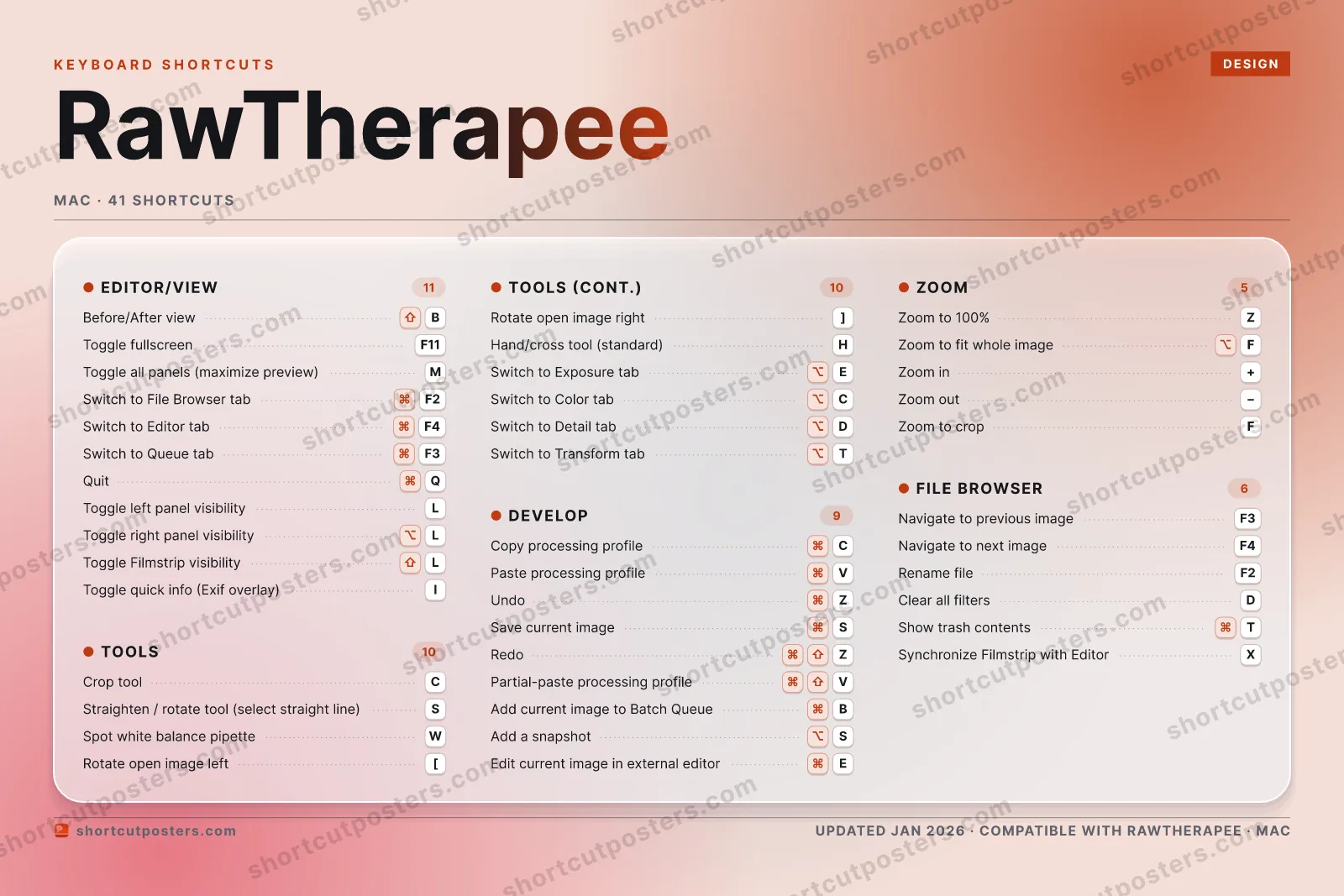
⤢ RAWTHERAPEE · KEYBOARD SHORTCUTS Mac · 5 SETS · No.01 RAWTHERAPEE TOTAL 41 SHORTCUTS FOR MAC · SHIPPED COMBOS SETS EDITOR/VIEW 11 TOOLS 10 DEVELOP 09 ZOOM 05 FILE BROWSER 06 REF. EDITION · JAN 2026 shortcutposters.com Before/After view ⇧ B Toggle fullscreen F11 Toggle all panels (maximize preview) M Switch to File Browser tab ⌘ F2 Switch to Editor tab ⌘ F4 Switch to Queue tab ⌘ F3 Quit ⌘ Q Toggle left panel visibility L Toggle right panel visibility ⌥ L Toggle Filmstrip visibility ⇧ L Toggle quick info (Exif overlay) I Crop tool C Straighten / rotate tool (select straight line) S Spot white balance pipette W Rotate open image left [ Rotate open image right ] Hand/cross tool (standard) H Switch to Exposure tab ⌥ E Switch to Color tab ⌥ C Switch to Detail tab ⌥ D Switch to Transform tab ⌥ T Copy processing profile ⌘ C Paste processing profile ⌘ V Undo ⌘ Z Save current image ⌘ S Redo ⌘ ⇧ Z Partial-paste processing profile ⌘ ⇧ V Add current image to Batch Queue ⌘ B Add a snapshot ⌥ S Edit current image in external editor ⌘ E Zoom to 100% Z Zoom to fit whole image ⌥ F Zoom in + Zoom out − Zoom to crop F Navigate to previous image F3 Navigate to next image F4 Rename file F2 Clear all filters D Show trash contents ⌘ T Synchronize Filmstrip with Editor X
RAWTHERAPEE KEYBOARD SHORTCUTS · MAC · 14 ESSENTIAL 1 2 3 4 5 6 7 8 9 0 Q W E R T Y U I O P A S ⌘ Save cur… D F ⌥ Zoom to … G H J K L Z ⌘ Undo X C Crop tool V ⌘ Paste pr… B ⇧ Before/A… N M Toggle a… MORE SHORTCUTS Copy processing p… ⌘ C Toggle fullscreen F11 Zoom to 100% Z Zoom in + Zoom out − Straighten / rota… S Redo ⌘ ⇧ Z shortcutposters.com UPDATED JAN 2026 · COMPATIBLE WITH RAWTHERAPEE · MAC Keyboard map EDITOR/VIEW Before/After view ⇧ B Toggle fullscreen F11 Toggle all panels (maximize previe… M ZOOM Zoom to 100% Z Zoom to fit whole image ⌥ F Zoom in + Zoom out − TOOLS Crop tool C Straighten / rotate tool (select s… S DEVELOP Copy processing profile ⌘ C Paste processing profile ⌘ V Undo ⌘ Z Save current image ⌘ S Redo ⌘ ⇧ Z RawTherapee KEYBOARD SHORTCUTS · MAC · 14 ESSENTIAL BOTH LAYOUTS QWERTY Q W E R T Y AZERTY A Z E R T Y shortcutposters.com UPDATED JAN 2026 · COMPATIBLE WITH RAWTHERAPEE · MAC Isometric EDITOR/VIEW 03 Before/After view ⇧ B Toggle fullscreen F11 Toggle all panels (maximize previe… M ZOOM 04 Zoom to 100% Z Zoom to fit whole image ⌥ F Zoom in + Zoom out − TOOLS 02 Crop tool C Straighten / rotate tool (select s… S DEVELOP 05 Copy processing profile ⌘ C Paste processing profile ⌘ V Undo ⌘ Z Save current image ⌘ S Redo ⌘ ⇧ Z RawTherapee KEYBOARD SHORTCUTS · MAC · 14 ESSENTIAL BOTH LAYOUTS QWERTY Q W E R T Y AZERTY A Z E R T Y shortcutposters.com UPDATED JAN 2026 · COMPATIBLE WITH RAWTHERAPEE · MAC Typewriter RAWTHERAPEE · KEYBOARD SHORTCUTS Mac · 4 SETS · No.01 RAWTHERAPEE TOTAL 14 SHORTCUTS FOR MAC · SHIPPED COMBOS SETS EDITOR/VIEW 03 TOOLS 02 DEVELOP 05 ZOOM 04 REF. EDITION · JAN 2026 shortcutposters.com Before/After view ⇧ B Toggle fullscreen F11 Toggle all panels (maximize preview) M Crop tool C Straighten / rotate tool (select straight line) S Copy processing profile ⌘ C Paste processing profile ⌘ V Undo ⌘ Z Save current image ⌘ S Redo ⌘ ⇧ Z Zoom to 100% Z Zoom to fit whole image ⌥ F Zoom in + Zoom out − Editorial RawTherapee is a free, open-source RAW photo developer for Windows, macOS, and Linux. These keyboard shortcuts speed up culling in the File Browser and tweaking exposure, color, and crops in the Editor without reaching for the mouse.
Official: Official site
All RawTherapee keyboard shortcuts (Mac)
Editor/View Tools Develop File Browser Zoom
+ 3 more controls in the table below
Editor/View Tools Develop File Browser Zoom
+ 3 more controls in the table below
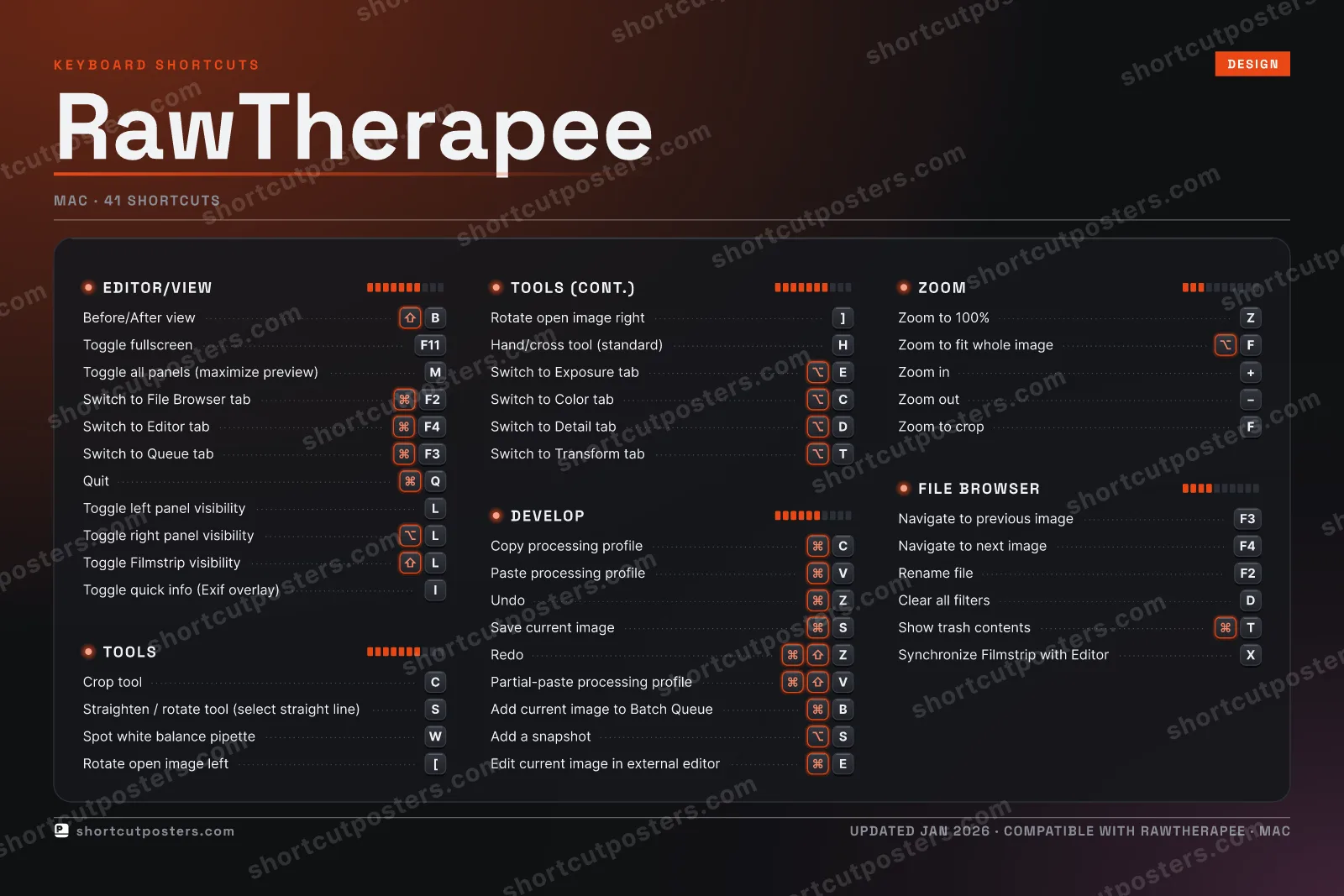
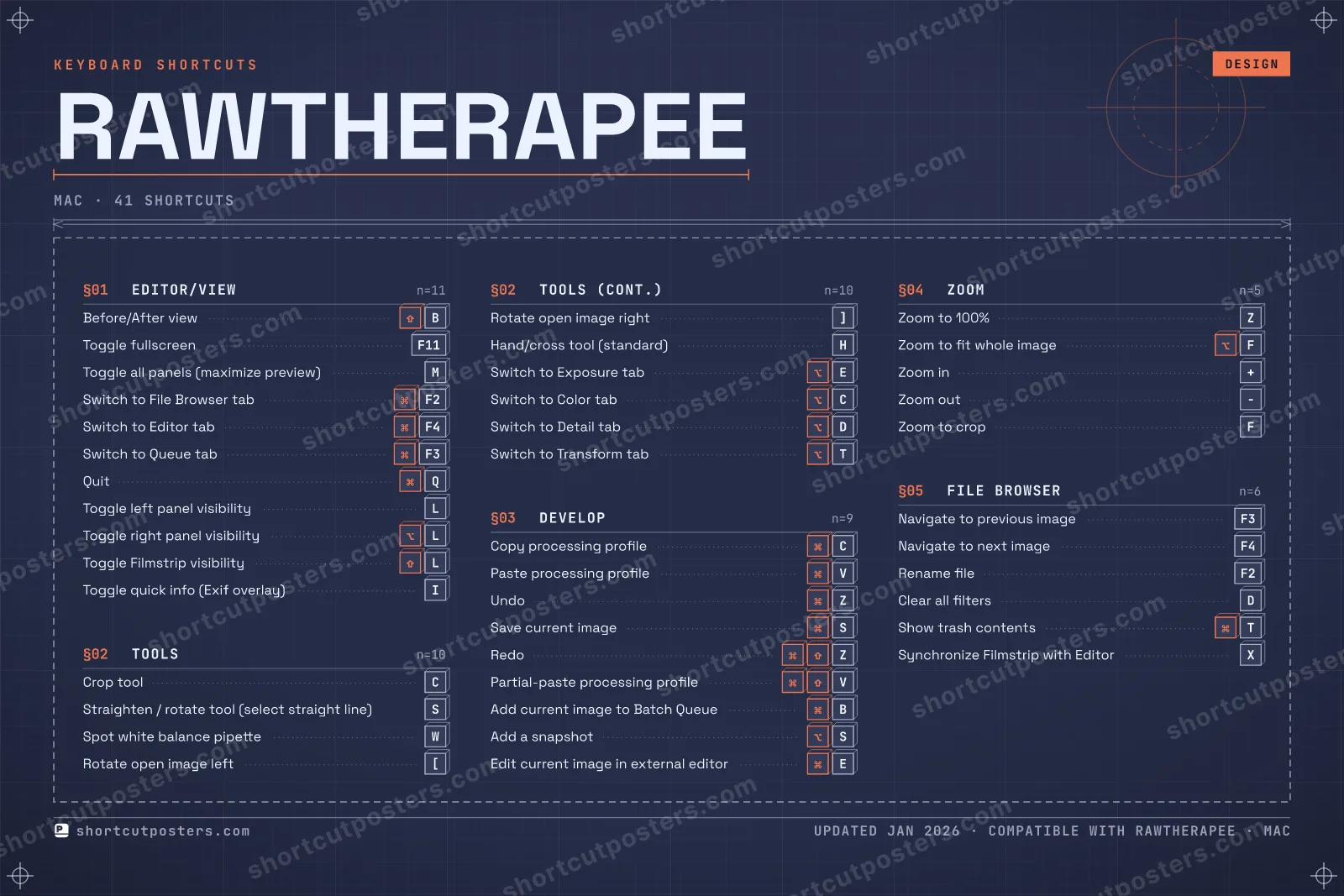
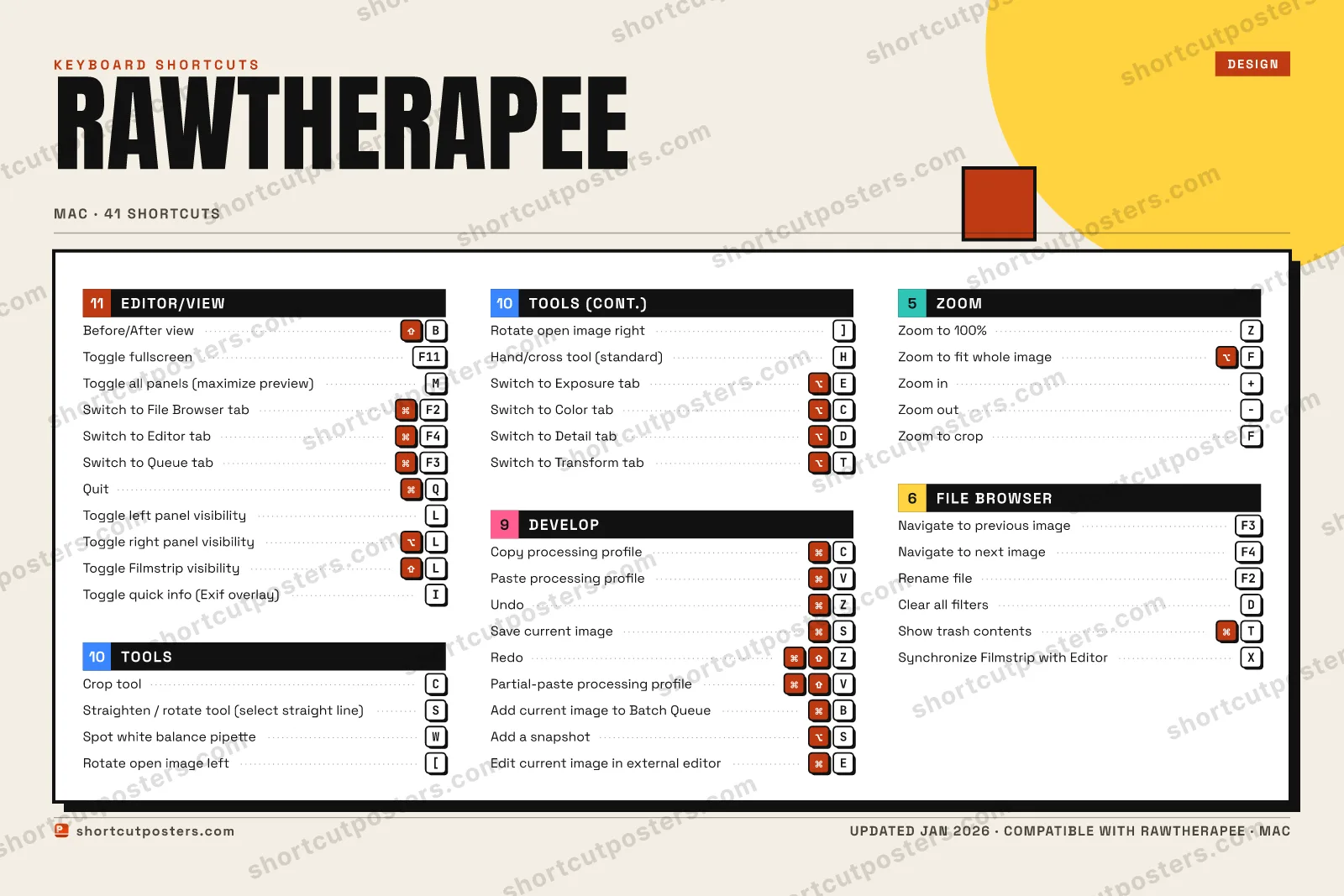
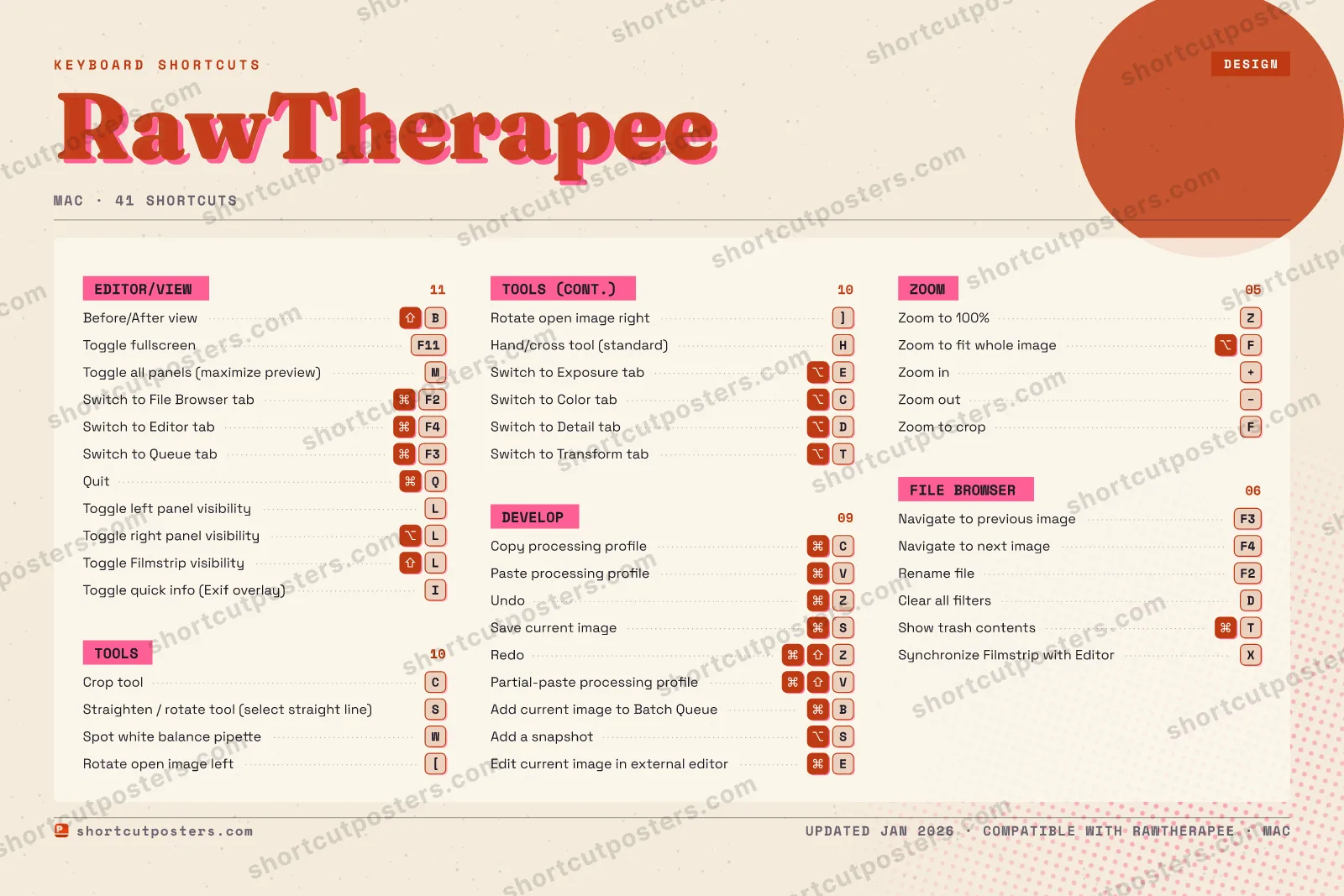
Editor/View 11 Action Shortcut Before/After view ⇧ B Toggle fullscreen F11 Toggle all panels (maximize preview) M Switch to File Browser tab ⌘ F2 Switch to Editor tab ⌘ F4 Switch to Queue tab ⌘ F3 Quit ⌘ Q Toggle left panel visibility L Toggle right panel visibility ⌥ L Toggle Filmstrip visibility ⇧ L Toggle quick info (Exif overlay) I
Tools 10 Action Shortcut Crop tool C Straighten / rotate tool (select straight line) S Spot white balance pipette W Rotate open image left [ Rotate open image right ] Hand/cross tool (standard) H Switch to Exposure tab ⌥ E Switch to Color tab ⌥ C Switch to Detail tab ⌥ D Switch to Transform tab ⌥ T
Develop 9 Action Shortcut Copy processing profile ⌘ C Paste processing profile ⌘ V Undo ⌘ Z Save current image ⌘ S Redo ⌘ ⇧ Z Partial-paste processing profile ⌘ ⇧ V Add current image to Batch Queue ⌘ B Add a snapshot ⌥ S Edit current image in external editor ⌘ E
File Browser 6 Action Shortcut Navigate to previous image F3 Navigate to next image F4 Rename file F2 Clear all filters D Show trash contents ⌘ T Synchronize Filmstrip with Editor X
Zoom 5 Action Shortcut Zoom to 100% Z Zoom to fit whole image ⌥ F Zoom in + Zoom out − Zoom to crop F
Sourced from rawpedia.rawtherapee.com
·
Last verified June 18, 2026
Unofficial reference. ShortcutPosters is not affiliated with, endorsed by, or
sponsored by RawTherapee. All product names, logos, and trademarks are property of
their respective owners. See our licensing & trademark
notice .
Frequently asked questions
Does the poster include every RawTherapee shortcut? RawTherapee has 41 keyboard shortcuts in total — the complete list is free to read on this page. The poster features the most essential ones, curated to stay readable on a wall.
Can I print it at home? Yes. The digital download is a high-resolution 300 DPI file you can print at home or at any print shop, in standard frame sizes.
Does it cover both Mac and Windows? We sell separate Mac and Windows editions so every key matches your keyboard exactly. This page is the macOS edition.
Is this an official RawTherapee product? No. This is an unofficial reference poster and is not affiliated with or endorsed by RawTherapee. All trademarks belong to their respective owners. Was this reference helpful? Thanks — your feedback helps us improve.
▲ Yes
▼ No