
ShortcutPosters

4 art directions — pick one below, click to zoom & compare.
Layout
MUSICBEEKEYBOARD SHORTCUTS · WINDOWS · 3512345Ctrl AltRate now…67890Ctrl AltRate now…QWCtrlClose tabEAltShow tag…RTCtrl ShiftAuto-tag…YUIOCtrlPreferen…PCtrlPlay / P…ACtrlSelect a…SCtrlStopDCtrlStart / …FAltShow now…GHJAltShow now…KLCtrlAuto-tag…ZXCCtrlCopy tag…VCtrlPaste co…BCtrlPrevious…NCtrlPlay nex…MMORE SHORTCUTSQueue nextCtrlShiftEnterQueue lastCtrlEnterRemove (hard dele…ShiftDelRescan / add filesINSERTShow visualizer f…F11Rate now playing:…CtrlAltRate selected tra…Alt0Rate selected tra…AltPlay nowAltEnterVolume upCtrlAltUPVolume downCtrlAltDOWNMute on / offCtrlAltVEdit tagsShiftEnterRemove (delete)DelRefreshF5Create new tabCtrlTRate selected tra…Alt5Custom searchCtrlFshortcutposters.comUPDATED JAN 2026 · COMPATIBLE WITH MUSICBEE · WINDOWS
LIBRARYCopy tags and artworkCtrlCPaste copied tagsCtrlVRemove (hard delete)ShiftDelRescan / add filesINSERTAuto-tag by trackCtrlLAuto-tag by albumCtrlShiftTSelect allCtrlAEdit tagsShiftEnterRemove (delete)DelCustom searchCtrlFRATINGRate now playing: 0 st…CtrlAlt0Rate now playing: unra…CtrlAltRate selected tracks: …Alt0Rate selected tracks: …AltRate now playing: 5 st…CtrlAlt5Rate selected tracks: …Alt5PLAYBACKQueue nextCtrlShiftEnterQueue lastCtrlEnterPlay nowAltEnterVolume upCtrlAltUPVolume downCtrlAltDOWNMute on / offCtrlAltVPlay / PauseCtrlPStopCtrlSPlay next trackCtrlNPrevious trackCtrlBNAVIGATIONStart / end bookmarkCtrlDCreate new tabCtrlTClose tabCtrlWVIEWShow now playing assis…AltJShow now playing track…AltFShow tag managerAltEShow visualizer full s…F11RefreshF5PreferencesCtrlOMusicBeeKEYBOARD SHORTCUTS · WINDOWS · 35BOTH LAYOUTSQWERTYQWERTYAZERTYAZERTYshortcutposters.comUPDATED JAN 2026 · COMPATIBLE WITH MUSICBEE · WINDOWS
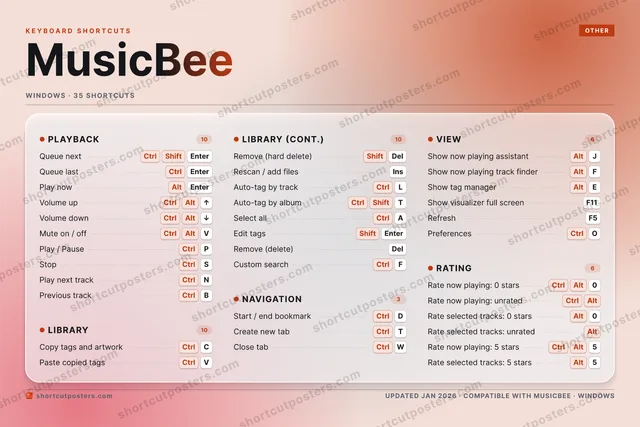
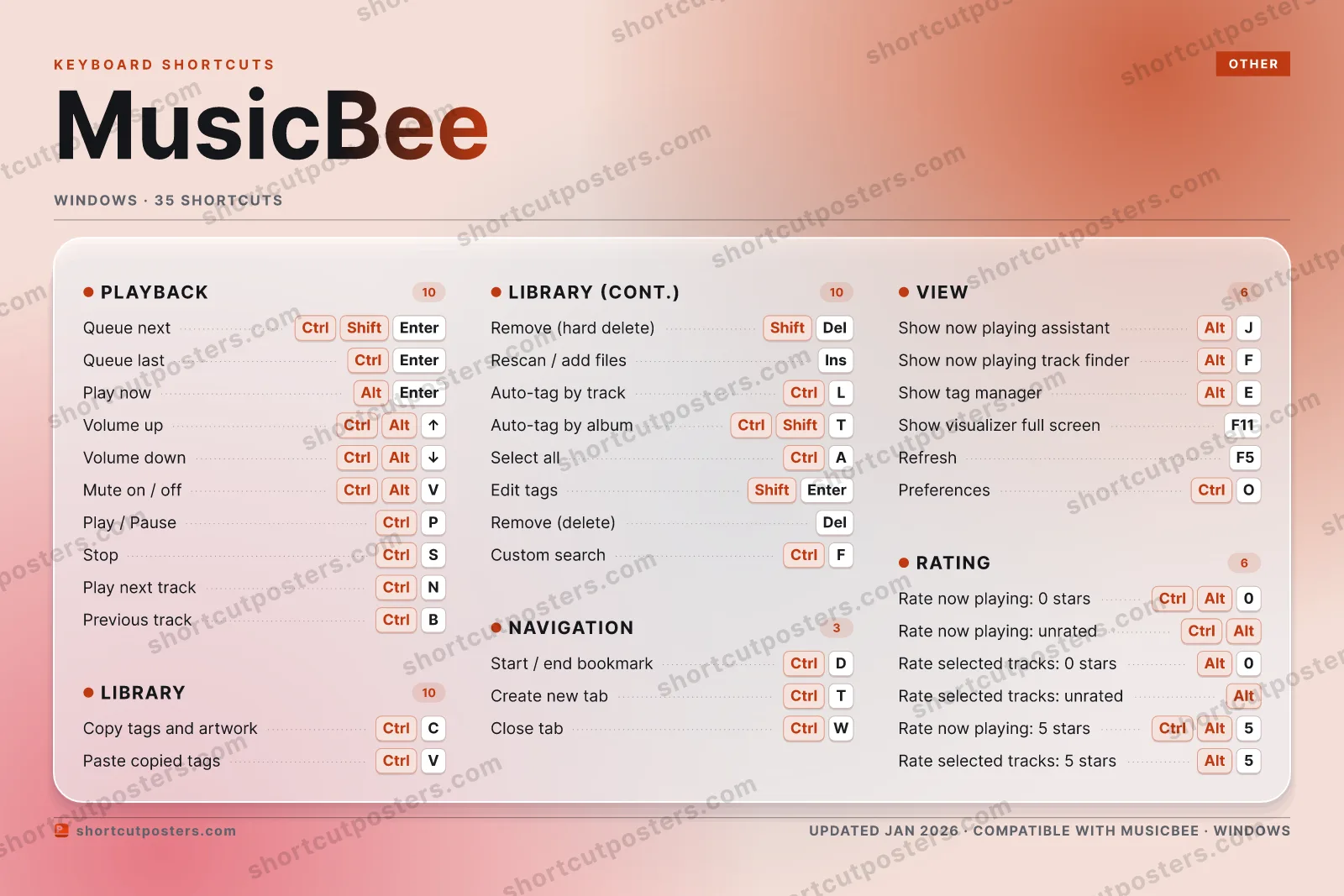
LIBRARY10Copy tags and artworkCtrlCPaste copied tagsCtrlVRemove (hard delete)ShiftDelRescan / add filesINSERTAuto-tag by trackCtrlLAuto-tag by albumCtrlShiftTSelect allCtrlAEdit tagsShiftEnterRemove (delete)DelCustom searchCtrlFNAVIGATION03Start / end bookmarkCtrlDCreate new tabCtrlTClose tabCtrlWRATING06Rate now playing: 0 starsCtrlAlt0Rate now playing: unratedCtrlAltRate selected tracks: 0 starsAlt0Rate selected tracks: unratedAltRate now playing: 5 starsCtrlAlt5Rate selected tracks: 5 starsAlt5PLAYBACK10Queue nextCtrlShiftEnterQueue lastCtrlEnterPlay nowAltEnterVolume upCtrlAltUPVolume downCtrlAltDOWNMute on / offCtrlAltVPlay / PauseCtrlPStopCtrlSPlay next trackCtrlNPrevious trackCtrlBVIEW06Show now playing assistantAltJShow now playing track finderAltFShow tag managerAltEShow visualizer full screenF11RefreshF5PreferencesCtrlOMusicBeeKEYBOARD SHORTCUTS · WINDOWS · 35BOTH LAYOUTSQWERTYQWERTYAZERTYAZERTYshortcutposters.comUPDATED JAN 2026 · COMPATIBLE WITH MUSICBEE · WINDOWS
MUSICBEE · KEYBOARD SHORTCUTSWindows · 5 SETS · No.01MUSICBEETOTAL35SHORTCUTSFOR WINDOWS · SHIPPED COMBOSSETSPLAYBACK10LIBRARY10NAVIGATION03VIEW06RATING06REF. EDITION · JAN 2026shortcutposters.comQueue nextCtrlShiftEnterQueue lastCtrlEnterPlay nowAltEnterVolume upCtrlAltUPVolume downCtrlAltDOWNMute on / offCtrlAltVPlay / PauseCtrlPStopCtrlSPlay next trackCtrlNPrevious trackCtrlBCopy tags and artworkCtrlCPaste copied tagsCtrlVRemove (hard delete)ShiftDelRescan / add filesINSERTAuto-tag by trackCtrlLAuto-tag by albumCtrlShiftTSelect allCtrlAEdit tagsShiftEnterRemove (delete)DelCustom searchCtrlFStart / end bookmarkCtrlDCreate new tabCtrlTClose tabCtrlWShow now playing assistantAltJShow now playing track finderAltFShow tag managerAltEShow visualizer full screenF11RefreshF5PreferencesCtrlORate now playing: 0 starsCtrlAlt0Rate now playing: unratedCtrlAltRate selected tracks: 0 starsAlt0Rate selected tracks: unratedAltRate now playing: 5 starsCtrlAlt5Rate selected tracks: 5 starsAlt5

Windows edition · 35 shortcuts

MusicBee Keyboard Shortcuts Poster

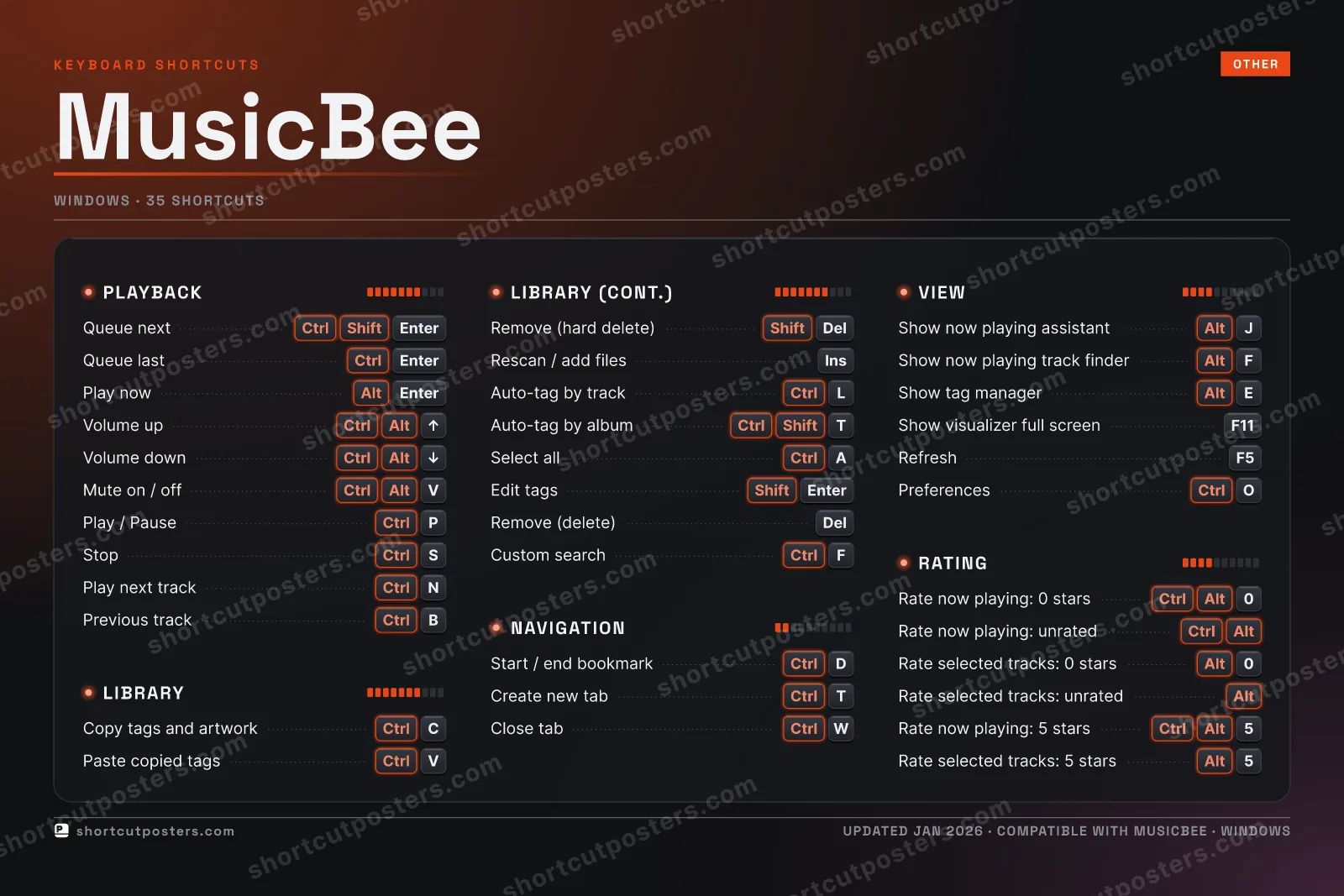
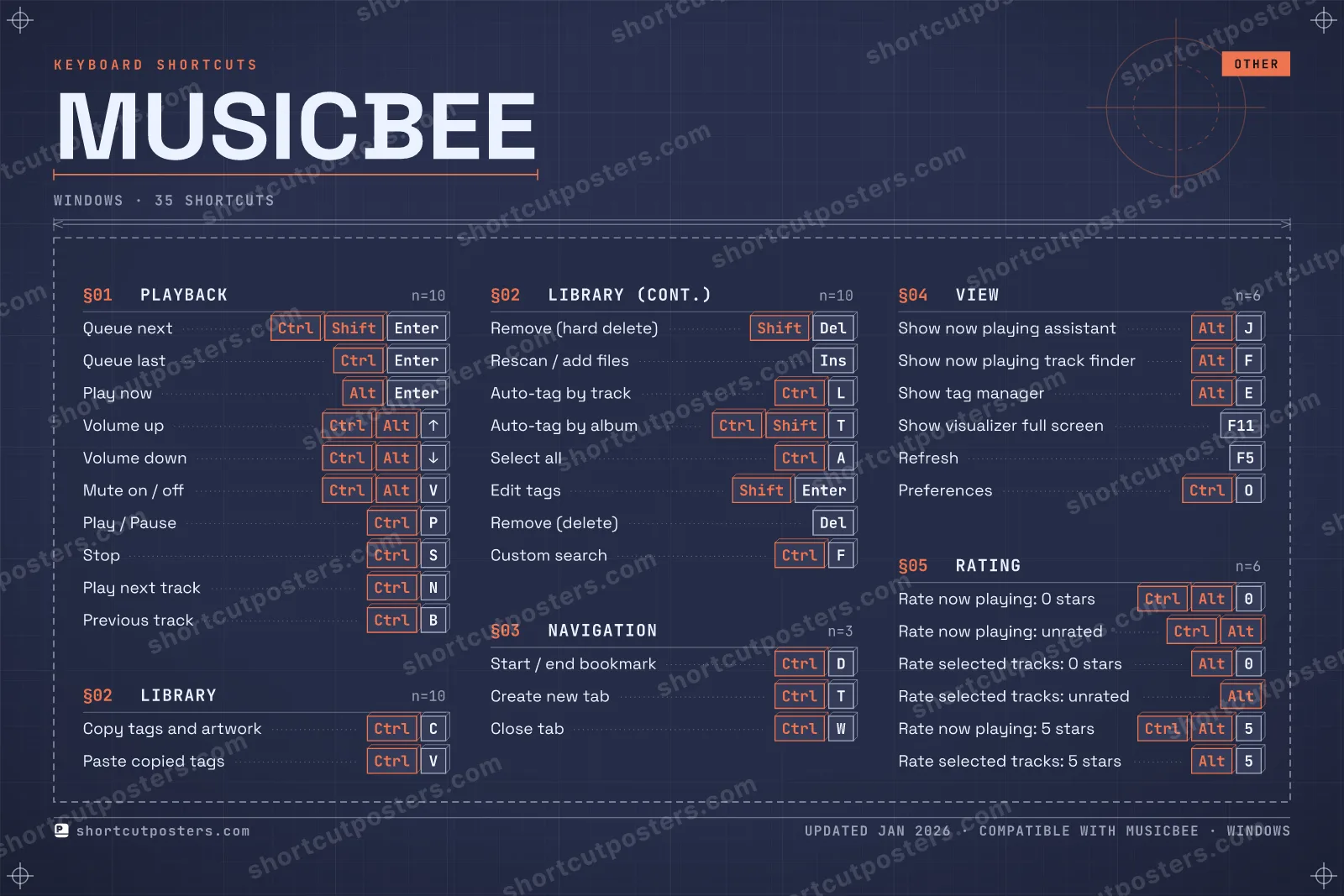
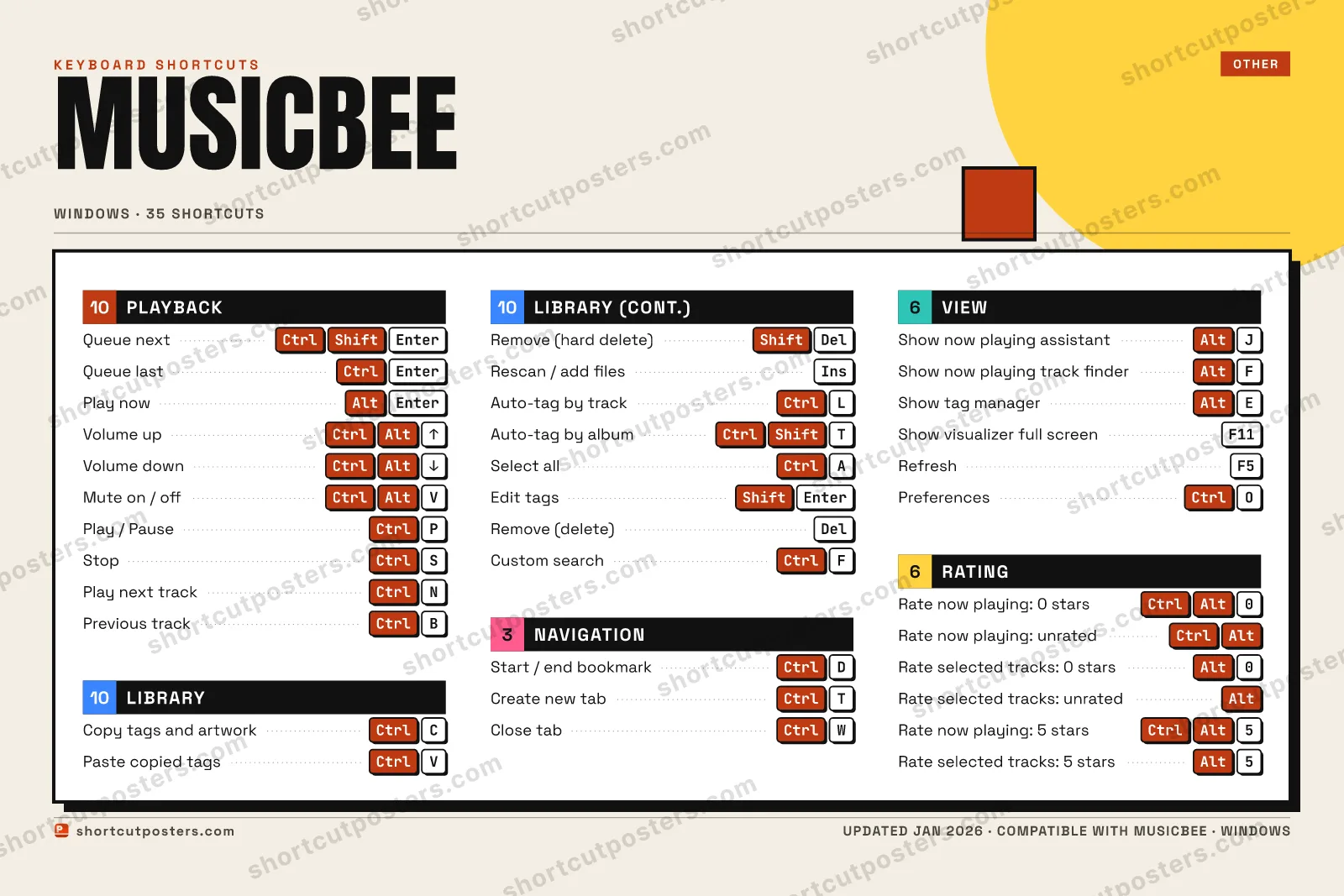
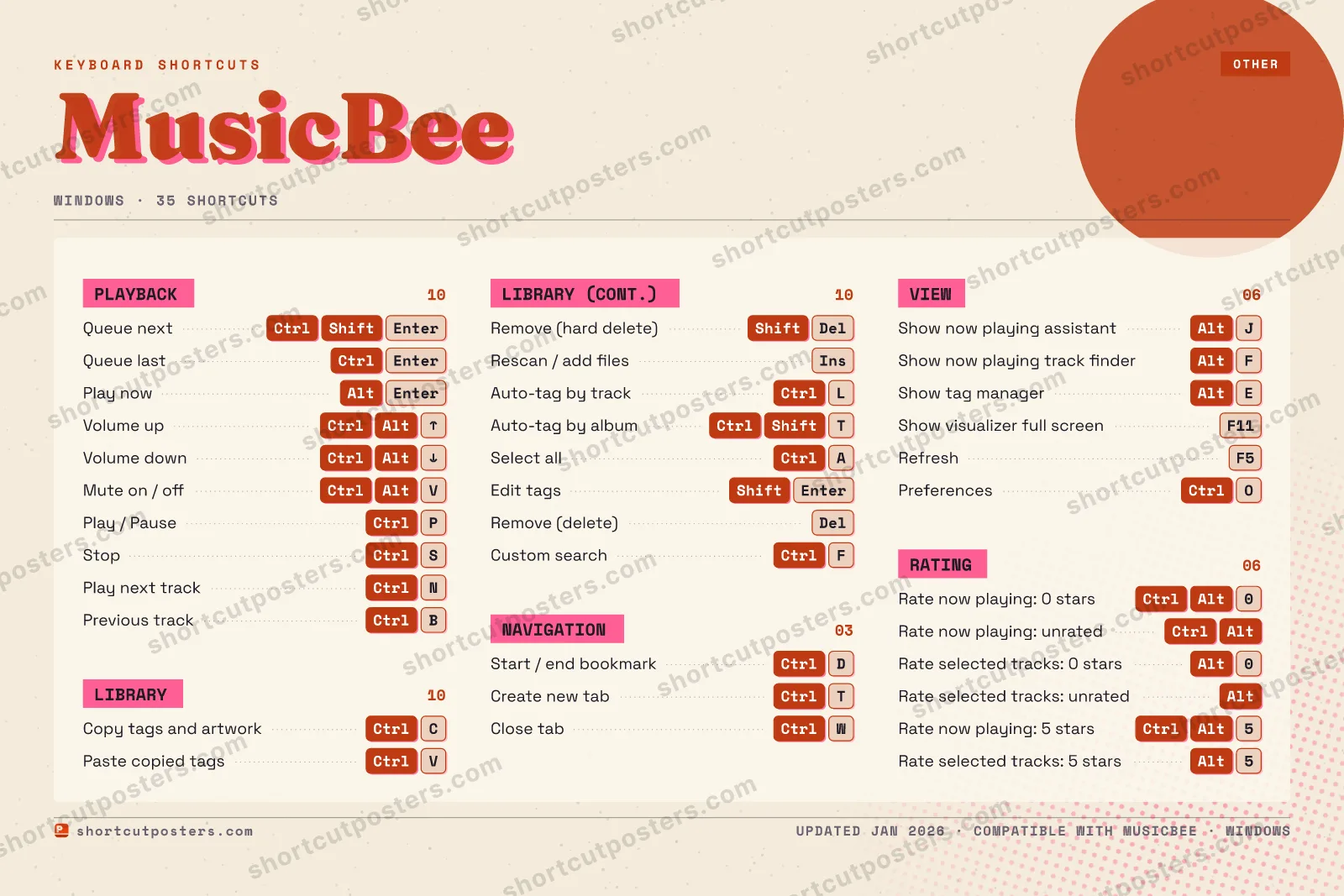
A printable, framed-quality poster of the essential MusicBee shortcuts for Windows — the keys worth keeping in view, designed to stay readable on a wall.

Free PNG is web-resolution & lightly watermarked.

Customise this poster Pick the shortcuts, restyle the colours — download free. Get the framed-quality print Full 300 DPI, print-ready — at home or shipped to your door.

MusicBee is a feature-rich Windows music manager and player for organizing large libraries, tagging, and playback. It exposes over 150 assignable hotkey commands, but only a subset is configured by default at installation; these are the documented defaults.

All MusicBee keyboard shortcuts (Windows)

Layout
Esc
F1
F2
F3
F4
F5
F6
F7
F8
F9
F10
F11
F12
`
1
2
3
4
5
6
7
8
9
0
-
=
⌫ Back
Tab
Q
W
E
R
T
Y
U
I
O
P
[
]
\
Caps
A
S
D
F
G
H
J
K
L
;
'
Enter ⏎
Shift
Z
X
C
V
B
N
M
,
.
/
Shift
Ctrl
Win
Alt
Space
Alt
Win
Menu
Ctrl

+ 4 more controls in the table below

Playback 10

Action Shortcut
Queue next CtrlShiftEnter
Queue last CtrlEnter
Play now AltEnter
Volume up CtrlAltUP
Volume down CtrlAltDOWN
Mute on / off CtrlAltV
Play / Pause CtrlP
Stop CtrlS
Play next track CtrlN
Previous track CtrlB

Library 10

Action Shortcut
Copy tags and artwork CtrlC
Paste copied tags CtrlV
Remove (hard delete) ShiftDel
Rescan / add files INSERT
Auto-tag by track CtrlL
Auto-tag by album CtrlShiftT
Select all CtrlA
Edit tags ShiftEnter
Remove (delete) Del
Custom search CtrlF

View 6

Action Shortcut
Show now playing assistant AltJ
Show now playing track finder AltF
Show tag manager AltE
Show visualizer full screen F11
Refresh F5
Preferences CtrlO

Rating 6

Action Shortcut
Rate now playing: 0 stars CtrlAlt0
Rate now playing: unrated CtrlAlt
Rate selected tracks: 0 stars Alt0
Rate selected tracks: unrated Alt
Rate now playing: 5 stars CtrlAlt5
Rate selected tracks: 5 stars Alt5

Navigation 3

Action Shortcut
Start / end bookmark CtrlD
Create new tab CtrlT
Close tab CtrlW

Sourced from musicbee.fandom.com Last verified

Unofficial reference. ShortcutPosters is not affiliated with, endorsed by, or sponsored by MusicBee. All product names, logos, and trademarks are property of their respective owners. See our licensing & trademark notice.

Frequently asked questions

Does the poster include every MusicBee shortcut?
MusicBee has 35 keyboard shortcuts in total — the complete list is free to read on this page. The poster features the most essential ones, curated to stay readable on a wall.
Can I print it at home?
Yes. The digital download is a high-resolution 300 DPI file you can print at home or at any print shop, in standard frame sizes.
Does it cover both Mac and Windows?
We sell separate Mac and Windows editions so every key matches your keyboard exactly. This page is the Windows edition.
Is this an official MusicBee product?
No. This is an unofficial reference poster and is not affiliated with or endorsed by MusicBee. All trademarks belong to their respective owners.
For app makers

Promote your app

Built an app with great keyboard shortcuts? Get it into the database — a free, searchable reference page, and an optional printable poster your power users will pin to the wall.

  • Free shortcut reference page
  • Indexed & searchable
  • Optional framed poster