ShortcutPosters

Poster maker

Make your MusicBee shortcuts poster

Pick the shortcuts that matter, add your own, tune the colours and style — then download a free personalized PNG, or order the print-ready PDF.

Making a poster for:
Style
Accent
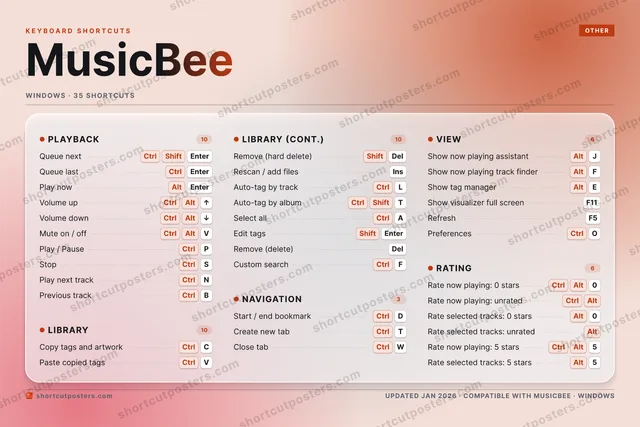
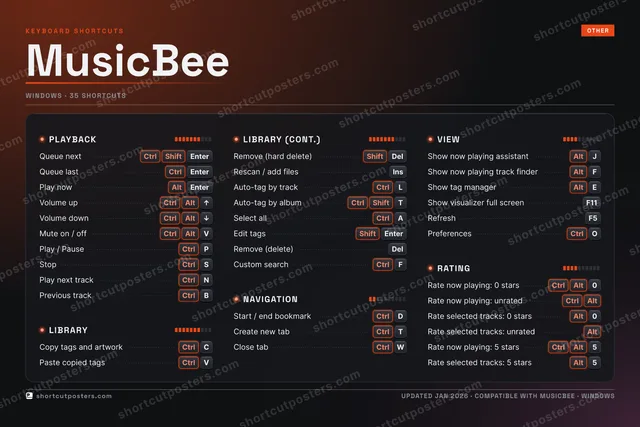
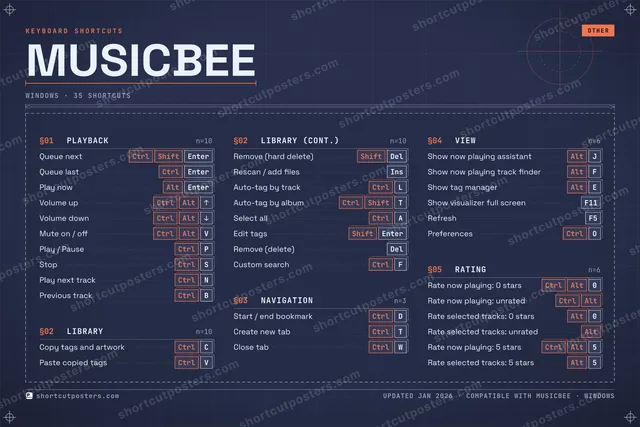
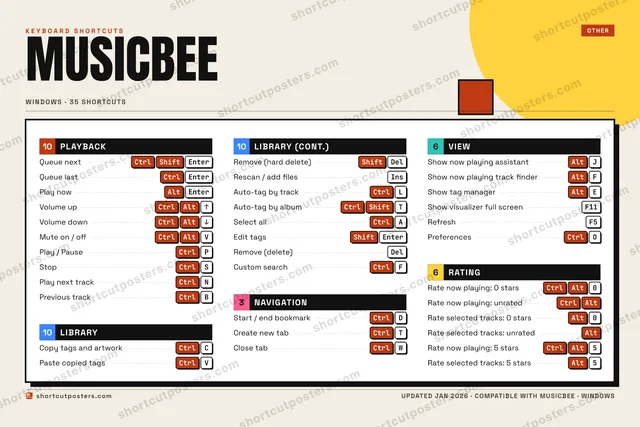
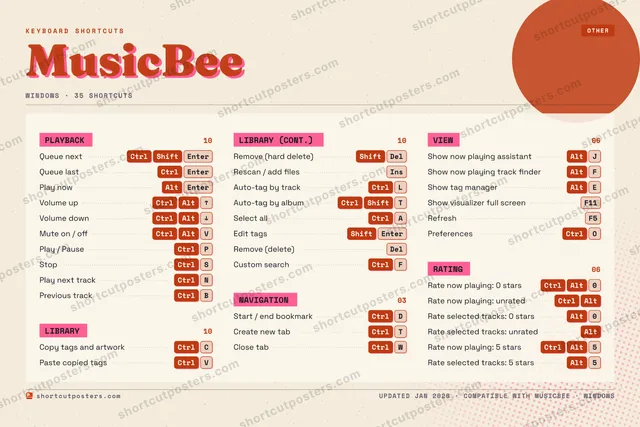
MUSICBEEKEYBOARD SHORTCUTS · WINDOWS · 3512345Ctrl AltRate now…67890Ctrl AltRate now…QWCtrlClose tabEAltShow tag…RTCtrl ShiftAuto-tag…YUIOCtrlPreferen…PCtrlPlay / P…ACtrlSelect a…SCtrlStopDCtrlStart / …FAltShow now…GHJAltShow now…KLCtrlAuto-tag…ZXCCtrlCopy tag…VCtrlPaste co…BCtrlPrevious…NCtrlPlay nex…MMORE SHORTCUTSQueue nextCtrlShiftEnterQueue lastCtrlEnterRemove (hard dele…ShiftDelRescan / add filesINSERTShow visualizer f…F11Rate now playing:…CtrlAltRate selected tra…Alt0Rate selected tra…AltPlay nowAltEnterVolume upCtrlAltUPVolume downCtrlAltDOWNMute on / offCtrlAltVEdit tagsShiftEnterRemove (delete)DelRefreshF5Create new tabCtrlTRate selected tra…Alt5Custom searchCtrlFshortcutposters.comUPDATED JAN 2026 · COMPATIBLE WITH MUSICBEE · WINDOWS

Hover to locate · click on the poster to disable · drag to reorder categories & shortcuts · to rename a category

Free PNG $0
  • Web resolution (1600 px)
  • Light watermark
  • Instant download
Made to order
Custom print-ready PDF $2.99
  • 300 DPI, framed-quality — no watermark
  • Every standard print size
  • Built to order from the poster above — checkout link emailed to you

Trouble ordering? Email business@shortcutposters.com.

How it works

  1. 1

    Choose a style

    Pick from four layouts: isometric keys, a typewriter list, a labelled keyboard map, or a bold editorial print.

  2. 2

    Make it yours

    Set the accent colour and palette, rename categories, and reorder anything.

  3. 3

    Pick the shortcuts

    Toggle exactly which shortcuts appear — or add your own custom ones.

  4. 4

    Download or print

    Export a free high-resolution PNG instantly, or order a print-ready PDF.

Four styles to choose from

MUSICBEEKEYBOARD SHORTCUTS · WINDOWS · 20 ESSENTIAL1234567890Ctrl AltRate now…QWEAltShow tag…RTCtrl ShiftAuto-tag…YUIOPASDCtrlStart / …FAltShow now…GHJAltShow now…KLCtrlAuto-tag…ZXCCtrlCopy tag…VCtrlPaste co…BNMMORE SHORTCUTSQueue nextCtrlShiftEnterQueue lastCtrlEnterRemove (hard dele…ShiftDelRescan / add filesINSERTShow visualizer f…F11Rate now playing:…CtrlAltRate selected tra…Alt0Rate selected tra…AltPlay nowAltEnterVolume upCtrlAltUPVolume downCtrlAltDOWNshortcutposters.comUPDATED JAN 2026 · COMPATIBLE WITH MUSICBEE · WINDOWS
Keyboard map Every binding labelled on a realistic QWERTY or AZERTY keyboard.
PLAYBACKQueue nextCtrlShiftEnterQueue lastCtrlEnterPlay nowAltEnterVolume upCtrlAltUPVolume downCtrlAltDOWNNAVIGATIONStart / end bookmarkCtrlDRATINGRate now playing: 0 starsCtrlAlt0Rate now playing: unratedCtrlAltRate selected tracks: 0 starsAlt0Rate selected tracks: unratedAltLIBRARYCopy tags and artworkCtrlCPaste copied tagsCtrlVRemove (hard delete)ShiftDelRescan / add filesINSERTAuto-tag by trackCtrlLAuto-tag by albumCtrlShiftTVIEWShow now playing assistantAltJShow now playing track finderAltFShow tag managerAltEShow visualizer full screenF11MusicBeeKEYBOARD SHORTCUTS · WINDOWS · 20 ESSENTIALBOTH LAYOUTSQWERTYQWERTYAZERTYAZERTYshortcutposters.comUPDATED JAN 2026 · COMPATIBLE WITH MUSICBEE · WINDOWS
Isometric Shortcuts on a 3D isometric keyboard — bold and poster-like.
PLAYBACK05Queue nextCtrlShiftEnterQueue lastCtrlEnterPlay nowAltEnterVolume upCtrlAltUPVolume downCtrlAltDOWNNAVIGATION01Start / end bookmarkCtrlDRATING04Rate now playing: 0 starsCtrlAlt0Rate now playing: unratedCtrlAltRate selected tracks: 0 starsAlt0Rate selected tracks: unratedAltLIBRARY06Copy tags and artworkCtrlCPaste copied tagsCtrlVRemove (hard delete)ShiftDelRescan / add filesINSERTAuto-tag by trackCtrlLAuto-tag by albumCtrlShiftTVIEW04Show now playing assistantAltJShow now playing track finderAltFShow tag managerAltEShow visualizer full screenF11MusicBeeKEYBOARD SHORTCUTS · WINDOWS · 20 ESSENTIALBOTH LAYOUTSQWERTYQWERTYAZERTYAZERTYshortcutposters.comUPDATED JAN 2026 · COMPATIBLE WITH MUSICBEE · WINDOWS
Typewriter A clean printed list, grouped by category — dense and legible.
MUSICBEE · KEYBOARD SHORTCUTSWindows · 5 SETS · No.01MUSICBEETOTAL20SHORTCUTSFOR WINDOWS · SHIPPED COMBOSSETSPLAYBACK05LIBRARY06NAVIGATION01VIEW04RATING04REF. EDITION · JAN 2026shortcutposters.comQueue nextCtrlShiftEnterQueue lastCtrlEnterPlay nowAltEnterVolume upCtrlAltUPVolume downCtrlAltDOWNCopy tags and artworkCtrlCPaste copied tagsCtrlVRemove (hard delete)ShiftDelRescan / add filesINSERTAuto-tag by trackCtrlLAuto-tag by albumCtrlShiftTStart / end bookmarkCtrlDShow now playing assistantAltJShow now playing track finderAltFShow tag managerAltEShow visualizer full screenF11Rate now playing: 0 starsCtrlAlt0Rate now playing: unratedCtrlAltRate selected tracks: 0 starsAlt0Rate selected tracks: unratedAlt
Editorial A bold Swiss-style print: giant wordmark, dense keycap columns, and a totals rail.

Frequently asked questions

Is the MusicBee poster maker free?

Yes — you can design and download a high-resolution PNG of your MusicBee shortcuts poster for free. A print-ready PDF is an optional paid upgrade.

Can I choose which MusicBee shortcuts appear?

Yes. Toggle any shortcut on or off, reorder them, rename categories, and even add your own custom shortcuts.

Can I change the colours and style?

Yes. Pick an accent colour, choose a palette, and switch between the isometric, typewriter, and keyboard-map styles.

Which keyboard layout and operating system are supported?

Choose QWERTY or AZERTY, and switch the edition between the operating systems MusicBee supports (macOS, Windows, Linux).

How do I get a printed poster?

Download the free PNG to print yourself, or order the print-ready, framed-quality PDF directly from the maker.