ShortcutPosters

Poster maker

Make your Discord shortcuts poster

Pick the shortcuts that matter, add your own, tune the colours and style — then download a free personalized PNG, or order the print-ready PDF.

Making a poster for:
Style
Accent
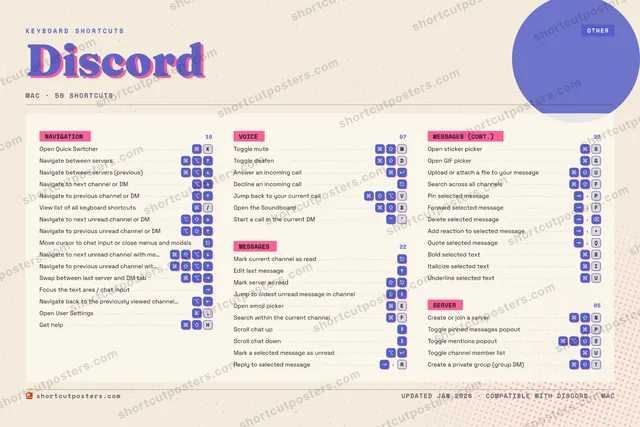
DISCORDKEYBOARD SHORTCUTS · MAC · 38 ESSENTIAL12⌘ ⇧Toggle m…34567890QWEOpen emo…RT⌘ ⇧Create a…YU⌘ ⇧Upload o…IOPToggle p…ASOpen sti…D⌘ ⇧Toggle d…FGOpen GIF…HJKOpen Qui…LZXCV⌘ ⇧ ⌥Jump bac…B⌘ ⇧Open the…N⌘ ⇧Create o…M⌘ ⇧Toggle m…MORE SHORTCUTSNavigate betw…Navigate betw…Navigate to n…Navigate to p…Mark current …Edit last mes…View list of …/Navigate to n…Navigate to p…Move cursor t…Mark server a…Jump to oldes…Answer an inc…Decline an in…Navigate to n…Navigate to p…Swap between …Focus the tex…Scroll chat upScroll chat d…Mark a select…Reply to sele…RToggle channe…UPin selected …PForward selec…Fshortcutposters.comUPDATED JAN 2026 · COMPATIBLE WITH DISCORD · MAC

Hover to locate · click on the poster to disable · drag to reorder categories & shortcuts · to rename a category

Free PNG $0
  • Web resolution (1600 px)
  • Light watermark
  • Instant download
Made to order
Custom print-ready PDF $2.99
  • 300 DPI, framed-quality — no watermark
  • Every standard print size
  • Built to order from the poster above — checkout link emailed to you

Trouble ordering? Email business@shortcutposters.com.

How it works

  1. 1

    Choose a style

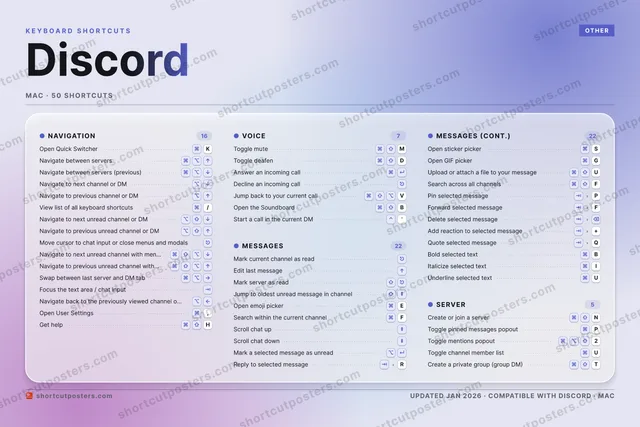
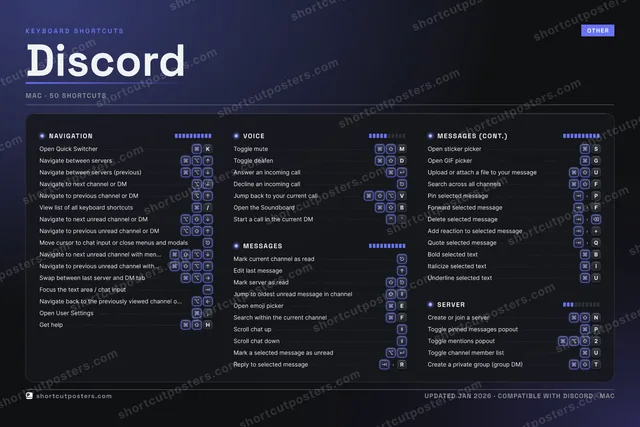
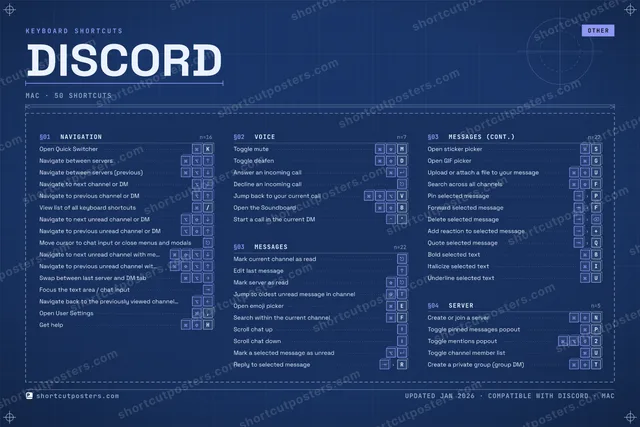
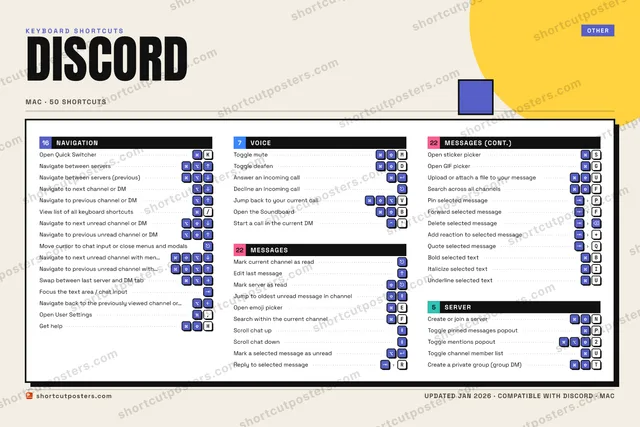
    Pick from four layouts: isometric keys, a typewriter list, a labelled keyboard map, or a bold editorial print.

  2. 2

    Make it yours

    Set the accent colour and palette, rename categories, and reorder anything.

  3. 3

    Pick the shortcuts

    Toggle exactly which shortcuts appear — or add your own custom ones.

  4. 4

    Download or print

    Export a free high-resolution PNG instantly, or order a print-ready PDF.

Four styles to choose from

DISCORDKEYBOARD SHORTCUTS · MAC · 20 ESSENTIAL1234567890QWEOpen emo…RTYUIOPASD⌘ ⇧Toggle d…FGHJKOpen Qui…LZXCVBN⌘ ⇧Create o…M⌘ ⇧Toggle m…MORE SHORTCUTSNavigate between …Navigate between …Navigate to next …Navigate to previ…Mark current chan…Edit last messageView list of all …/Navigate to next …Navigate to previ…Move cursor to ch…Mark server as re…Jump to oldest un…Answer an incomin…Decline an incomi…Navigate to next …shortcutposters.comUPDATED JAN 2026 · COMPATIBLE WITH DISCORD · MAC
Keyboard map Every binding labelled on a realistic QWERTY or AZERTY keyboard.
NAVIGATIONOpen Quick Switcher (find or start…KNavigate between serversNavigate between servers (previous)Navigate to next channel or DMNavigate to previous channel or DMView list of all keyboard shortcuts/Navigate to next unread channel or…Navigate to previous unread channe…Move cursor to chat input or close…Navigate to next unread channel wi…SERVERCreate or join a serverNVOICEToggle muteMToggle deafenDAnswer an incoming callDecline an incoming callMESSAGESMark current channel as readEdit last messageMark server as readJump to oldest unread message in c…Open emoji pickerEDiscordKEYBOARD SHORTCUTS · MAC · 20 ESSENTIALBOTH LAYOUTSQWERTYQWERTYAZERTYAZERTYshortcutposters.comUPDATED JAN 2026 · COMPATIBLE WITH DISCORD · MAC
Isometric Shortcuts on a 3D isometric keyboard — bold and poster-like.
NAVIGATION10Open Quick Switcher (find or start…KNavigate between serversNavigate between servers (previous)Navigate to next channel or DMNavigate to previous channel or DMView list of all keyboard shortcuts/Navigate to next unread channel or…Navigate to previous unread channe…Move cursor to chat input or close…Navigate to next unread channel wi…SERVER01Create or join a serverNVOICE04Toggle muteMToggle deafenDAnswer an incoming callDecline an incoming callMESSAGES05Mark current channel as readEdit last messageMark server as readJump to oldest unread message in c…Open emoji pickerEDiscordKEYBOARD SHORTCUTS · MAC · 20 ESSENTIALBOTH LAYOUTSQWERTYQWERTYAZERTYAZERTYshortcutposters.comUPDATED JAN 2026 · COMPATIBLE WITH DISCORD · MAC
Typewriter A clean printed list, grouped by category — dense and legible.
DISCORD · KEYBOARD SHORTCUTSMac · 4 SETS · No.01DISCORDTOTAL20SHORTCUTSFOR MAC · SHIPPED COMBOSSETSNAVIGATION10VOICE04MESSAGES05SERVER01REF. EDITION · JAN 2026shortcutposters.comOpen Quick Switcher (find or start a DM / jump to server or channel)KNavigate between serversNavigate between servers (previous)Navigate to next channel or DMNavigate to previous channel or DMView list of all keyboard shortcuts/Navigate to next unread channel or DMNavigate to previous unread channel or DMMove cursor to chat input or close menus and modalsNavigate to next unread channel with mentionsToggle muteMToggle deafenDAnswer an incoming callDecline an incoming callMark current channel as readEdit last messageMark server as readJump to oldest unread message in channelOpen emoji pickerECreate or join a serverN
Editorial A bold Swiss-style print: giant wordmark, dense keycap columns, and a totals rail.

Frequently asked questions

Is the Discord poster maker free?

Yes — you can design and download a high-resolution PNG of your Discord shortcuts poster for free. A print-ready PDF is an optional paid upgrade.

Can I choose which Discord shortcuts appear?

Yes. Toggle any shortcut on or off, reorder them, rename categories, and even add your own custom shortcuts.

Can I change the colours and style?

Yes. Pick an accent colour, choose a palette, and switch between the isometric, typewriter, and keyboard-map styles.

Which keyboard layout and operating system are supported?

Choose QWERTY or AZERTY, and switch the edition between the operating systems Discord supports (macOS, Windows, Linux).

How do I get a printed poster?

Download the free PNG to print yourself, or order the print-ready, framed-quality PDF directly from the maker.