ShortcutPosters

Poster maker

Make your Windsurf shortcuts poster

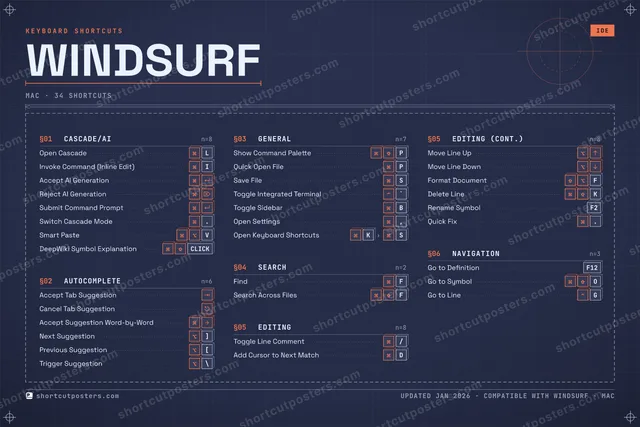
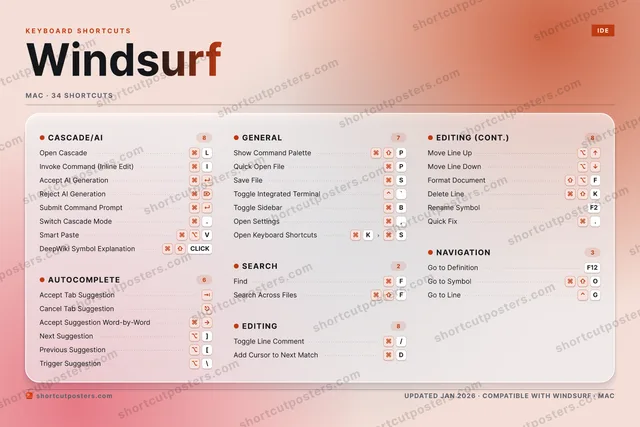
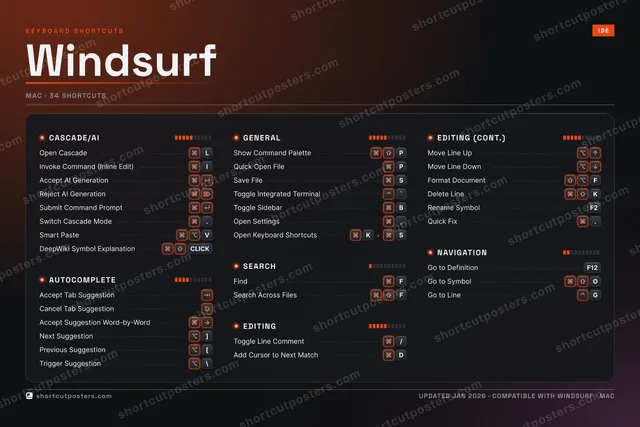
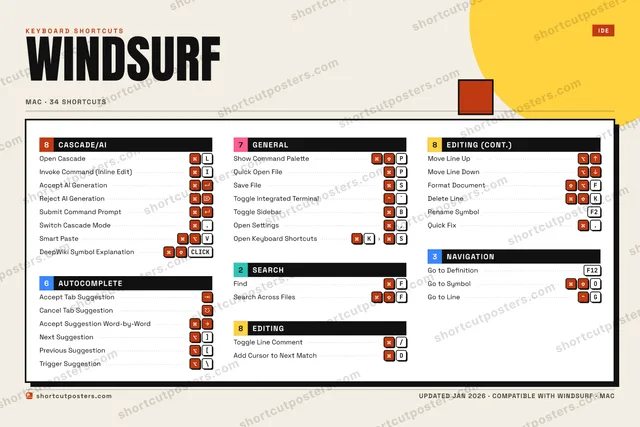
Pick the shortcuts that matter, add your own, tune the colours and style — then download a free personalized PNG, or order the print-ready PDF.

Making a poster for:
Style
Accent
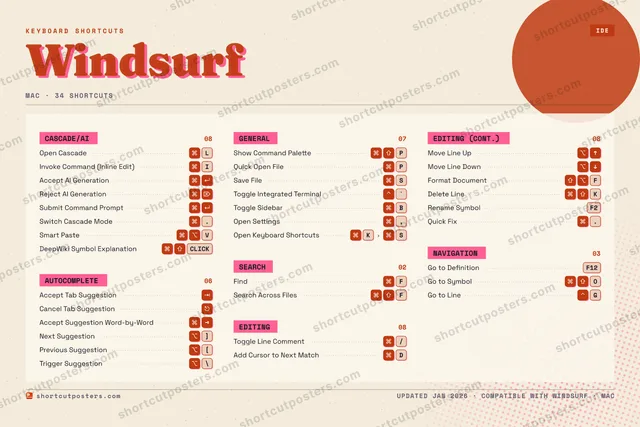
WINDSURFKEYBOARD SHORTCUTS · MAC · 341234567890QWERReject A…TYUIInvoke C…O⌘ ⇧Go to Sy…P⌘ ⇧Show Com…AAccept A…SSave FileDAdd Curs…FFindGGo to Li…HJK⌘ ⇧Delete L…LOpen Cas…ZXCV⌘ ⌥Smart Pa…BToggle S…NMMORE SHORTCUTSAccept Tab Su…Quick Open Fi…PToggle Integr…`Toggle Line C…/Search Across…FGo to Definit…F12Open Cascade …ASubmit Comman…Cancel Tab Su…Move Line UpMove Line DownFormat Docume…FAccept Sugges…Open Settings,Rename SymbolF2Quick Fix.Follow-up on …FNext Suggesti…]Previous Sugg…[Trigger Sugge…\Open Keyboard…KSshortcutposters.comUPDATED JAN 2026 · COMPATIBLE WITH WINDSURF · MAC

Hover to locate · click on the poster to disable · drag to reorder categories & shortcuts · to rename a category

Free PNG $0
  • Web resolution (1600 px)
  • Light watermark
  • Instant download
Made to order
Custom print-ready PDF $2.99
  • 300 DPI, framed-quality — no watermark
  • Every standard print size
  • Built to order from the poster above — checkout link emailed to you

Trouble ordering? Email business@shortcutposters.com.

How it works

  1. 1

    Choose a style

    Pick from four layouts: isometric keys, a typewriter list, a labelled keyboard map, or a bold editorial print.

  2. 2

    Make it yours

    Set the accent colour and palette, rename categories, and reorder anything.

  3. 3

    Pick the shortcuts

    Toggle exactly which shortcuts appear — or add your own custom ones.

  4. 4

    Download or print

    Export a free high-resolution PNG instantly, or order a print-ready PDF.

Four styles to choose from

WINDSURFKEYBOARD SHORTCUTS · MAC · 20 ESSENTIAL1234567890QWERReject A…TYUIInvoke C…OP⌘ ⇧Show Com…AAccept A…SSave FileDAdd Curs…FFindGHJKLOpen Cas…ZXCVBToggle S…NMMORE SHORTCUTSAccept Tab Sugges…Quick Open FilePToggle Integrated…`Toggle Line Comme…/Search Across Fil…FGo to DefinitionF12Open Cascade Chat…ASubmit Command Pr…Cancel Tab Sugges…Move Line UpMove Line Downshortcutposters.comUPDATED JAN 2026 · COMPATIBLE WITH WINDSURF · MAC
Keyboard map Every binding labelled on a realistic QWERTY or AZERTY keyboard.
CASCADE/AIOpen CascadeLInvoke Command (Inline Edit)IAccept AI GenerationAReject AI GenerationROpen Cascade Chat PanelASubmit Command PromptSEARCHFindFSearch Across FilesFNAVIGATIONGo to DefinitionF12AUTOCOMPLETEAccept Tab SuggestionCancel Tab SuggestionGENERALShow Command PalettePQuick Open FilePSave FileSToggle Integrated Terminal`Toggle SidebarBEDITINGToggle Line Comment/Add Cursor to Next MatchDMove Line UpMove Line DownWindsurfKEYBOARD SHORTCUTS · MAC · 20 ESSENTIALBOTH LAYOUTSQWERTYQWERTYAZERTYAZERTYshortcutposters.comUPDATED JAN 2026 · COMPATIBLE WITH WINDSURF · MAC
Isometric Shortcuts on a 3D isometric keyboard — bold and poster-like.
CASCADE/AI06Open CascadeLInvoke Command (Inline Edit)IAccept AI GenerationAReject AI GenerationROpen Cascade Chat PanelASubmit Command PromptSEARCH02FindFSearch Across FilesFNAVIGATION01Go to DefinitionF12AUTOCOMPLETE02Accept Tab SuggestionCancel Tab SuggestionGENERAL05Show Command PalettePQuick Open FilePSave FileSToggle Integrated Terminal`Toggle SidebarBEDITING04Toggle Line Comment/Add Cursor to Next MatchDMove Line UpMove Line DownWindsurfKEYBOARD SHORTCUTS · MAC · 20 ESSENTIALBOTH LAYOUTSQWERTYQWERTYAZERTYAZERTYshortcutposters.comUPDATED JAN 2026 · COMPATIBLE WITH WINDSURF · MAC
Typewriter A clean printed list, grouped by category — dense and legible.
WINDSURF · KEYBOARD SHORTCUTSMac · 6 SETS · No.01WINDSURFTOTAL20SHORTCUTSFOR MAC · SHIPPED COMBOSSETSCASCADE/AI06AUTOCOMPLETE02GENERAL05SEARCH02EDITING04NAVIGATION01REF. EDITION · JAN 2026shortcutposters.comOpen CascadeLInvoke Command (Inline Edit)IAccept AI GenerationAReject AI GenerationROpen Cascade Chat PanelASubmit Command PromptAccept Tab SuggestionCancel Tab SuggestionShow Command PalettePQuick Open FilePSave FileSToggle Integrated Terminal`Toggle SidebarBFindFSearch Across FilesFToggle Line Comment/Add Cursor to Next MatchDMove Line UpMove Line DownGo to DefinitionF12
Editorial A bold Swiss-style print: giant wordmark, dense keycap columns, and a totals rail.

Frequently asked questions

Is the Windsurf poster maker free?

Yes — you can design and download a high-resolution PNG of your Windsurf shortcuts poster for free. A print-ready PDF is an optional paid upgrade.

Can I choose which Windsurf shortcuts appear?

Yes. Toggle any shortcut on or off, reorder them, rename categories, and even add your own custom shortcuts.

Can I change the colours and style?

Yes. Pick an accent colour, choose a palette, and switch between the isometric, typewriter, and keyboard-map styles.

Which keyboard layout and operating system are supported?

Choose QWERTY or AZERTY, and switch the edition between the operating systems Windsurf supports (macOS, Windows, Linux).

How do I get a printed poster?

Download the free PNG to print yourself, or order the print-ready, framed-quality PDF directly from the maker.