ShortcutPosters

Poster maker

Make your RStudio shortcuts poster

Pick the shortcuts that matter, add your own, tune the colours and style — then download a free personalized PNG, or order the print-ready PDF.

Making a poster for:
Style
Accent
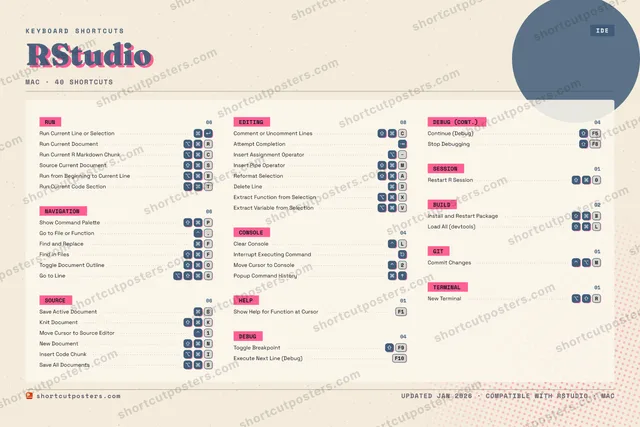
RSTUDIOKEYBOARD SHORTCUTS · MAC · 401Move Cur…2Move Cur…34567890⇧ ⌘Restart …QWER⌥ ⌘Run Curr…T⌥ ⌘Run Curr…YUI⌥ ⌘Insert C…O⇧ ⌘Toggle D…P⇧ ⌘Show Com…A⇧ ⌘Reformat…SSave Act…DDelete L…FFind and…G⌥ ⇧ ⌘Go to Li…HJK⇧ ⌘Knit Doc…LClear Co…ZX⌥ ⌘Extract …C⇧ ⌘Comment …V⌥ ⌘Extract …B⌥ ⌘Run from…N⇧ ⌘New Docu…M⇧ ⌘Insert P…MORE SHORTCUTSRun Current Line …Interrupt Executi…Go to File or Fun….Attempt CompletionRun Current R Mar…CSource Current Do…SInsert Assignment…Find in FilesFShow Help for Fun…F1Toggle BreakpointF9Save All DocumentsSExecute Next Line…F10Install and Resta…BLoad All (devtool…LCommit ChangesMPopup Command His…Continue (Debug)F5Stop DebuggingF8New TerminalRshortcutposters.comUPDATED JAN 2026 · COMPATIBLE WITH RSTUDIO · MAC

Hover to locate · click on the poster to disable · drag to reorder categories & shortcuts · to rename a category

Free PNG $0
  • Web resolution (1600 px)
  • Light watermark
  • Instant download
Made to order
Custom print-ready PDF $2.99
  • 300 DPI, framed-quality — no watermark
  • Every standard print size
  • Built to order from the poster above — checkout link emailed to you

Trouble ordering? Email business@shortcutposters.com.

How it works

  1. 1

    Choose a style

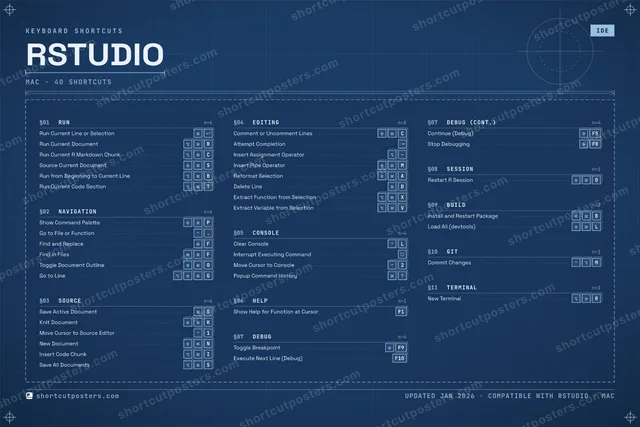
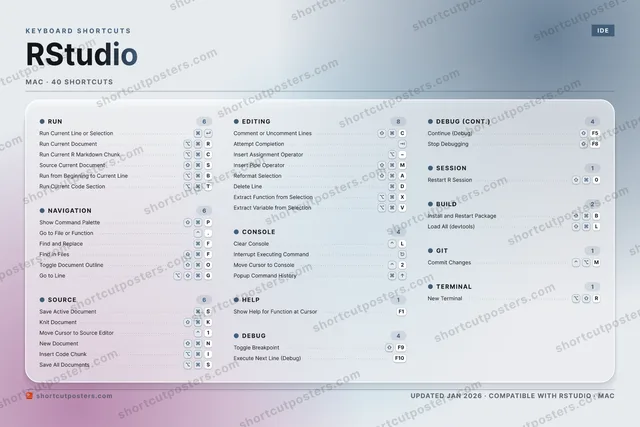
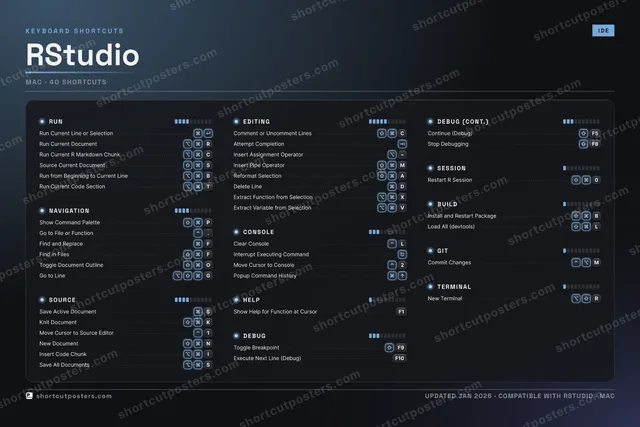
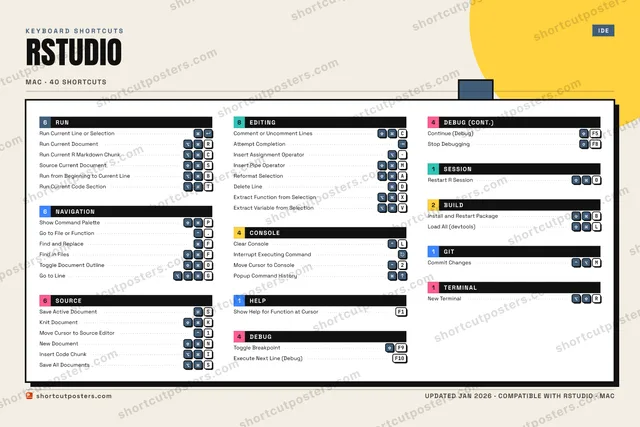
    Pick from four layouts: isometric keys, a typewriter list, a labelled keyboard map, or a bold editorial print.

  2. 2

    Make it yours

    Set the accent colour and palette, rename categories, and reorder anything.

  3. 3

    Pick the shortcuts

    Toggle exactly which shortcuts appear — or add your own custom ones.

  4. 4

    Download or print

    Export a free high-resolution PNG instantly, or order a print-ready PDF.

Four styles to choose from

RSTUDIOKEYBOARD SHORTCUTS · MAC · 20 ESSENTIAL1Move Cur…2Move Cur…34567890QWER⌥ ⌘Run Curr…TYUI⌥ ⌘Insert C…OP⇧ ⌘Show Com…ASSave Act…DFFind and…GHJK⇧ ⌘Knit Doc…LClear Co…ZXC⇧ ⌘Comment …VBN⇧ ⌘New Docu…M⇧ ⌘Insert P…MORE SHORTCUTSRun Current Line …Interrupt Executi…Go to File or Fun….Attempt CompletionRun Current R Mar…CSource Current Do…SInsert Assignment…Find in FilesFshortcutposters.comUPDATED JAN 2026 · COMPATIBLE WITH RSTUDIO · MAC
Keyboard map Every binding labelled on a realistic QWERTY or AZERTY keyboard.
RUNRun Current Line or SelectionRun Current DocumentRRun Current R Markdown ChunkCSource Current DocumentSEDITINGComment or Uncomment LinesCAttempt CompletionInsert Assignment OperatorInsert Pipe OperatorMCONSOLEClear ConsoleLInterrupt Executing CommandMove Cursor to Console2NAVIGATIONShow Command PalettePGo to File or Function.Find and ReplaceFFind in FilesFSOURCESave Active DocumentSKnit DocumentKMove Cursor to Source Editor1New DocumentNInsert Code ChunkIRStudioKEYBOARD SHORTCUTS · MAC · 20 ESSENTIALBOTH LAYOUTSQWERTYQWERTYAZERTYAZERTYshortcutposters.comUPDATED JAN 2026 · COMPATIBLE WITH RSTUDIO · MAC
Isometric Shortcuts on a 3D isometric keyboard — bold and poster-like.
RUN04Run Current Line or SelectionRun Current DocumentRRun Current R Markdown ChunkCSource Current DocumentSEDITING04Comment or Uncomment LinesCAttempt CompletionInsert Assignment OperatorInsert Pipe OperatorMCONSOLE03Clear ConsoleLInterrupt Executing CommandMove Cursor to Console2NAVIGATION04Show Command PalettePGo to File or Function.Find and ReplaceFFind in FilesFSOURCE05Save Active DocumentSKnit DocumentKMove Cursor to Source Editor1New DocumentNInsert Code ChunkIRStudioKEYBOARD SHORTCUTS · MAC · 20 ESSENTIALBOTH LAYOUTSQWERTYQWERTYAZERTYAZERTYshortcutposters.comUPDATED JAN 2026 · COMPATIBLE WITH RSTUDIO · MAC
Typewriter A clean printed list, grouped by category — dense and legible.
RSTUDIO · KEYBOARD SHORTCUTSMac · 5 SETS · No.01RSTUDIOTOTAL20SHORTCUTSFOR MAC · SHIPPED COMBOSSETSRUN04NAVIGATION04SOURCE05EDITING04CONSOLE03REF. EDITION · JAN 2026shortcutposters.comRun Current Line or SelectionRun Current DocumentRRun Current R Markdown ChunkCSource Current DocumentSShow Command PalettePGo to File or Function.Find and ReplaceFFind in FilesFSave Active DocumentSKnit DocumentKMove Cursor to Source Editor1New DocumentNInsert Code ChunkIComment or Uncomment LinesCAttempt CompletionInsert Assignment OperatorInsert Pipe OperatorMClear ConsoleLInterrupt Executing CommandMove Cursor to Console2
Editorial A bold Swiss-style print: giant wordmark, dense keycap columns, and a totals rail.

Frequently asked questions

Is the RStudio poster maker free?

Yes — you can design and download a high-resolution PNG of your RStudio shortcuts poster for free. A print-ready PDF is an optional paid upgrade.

Can I choose which RStudio shortcuts appear?

Yes. Toggle any shortcut on or off, reorder them, rename categories, and even add your own custom shortcuts.

Can I change the colours and style?

Yes. Pick an accent colour, choose a palette, and switch between the isometric, typewriter, and keyboard-map styles.

Which keyboard layout and operating system are supported?

Choose QWERTY or AZERTY, and switch the edition between the operating systems RStudio supports (macOS, Windows, Linux).

How do I get a printed poster?

Download the free PNG to print yourself, or order the print-ready, framed-quality PDF directly from the maker.