ShortcutPosters

Poster maker

Make your Onshape shortcuts poster

Pick the shortcuts that matter, add your own, tune the colours and style — then download a free personalized PNG, or order the print-ready PDF.

Making a poster for:
Style
Accent
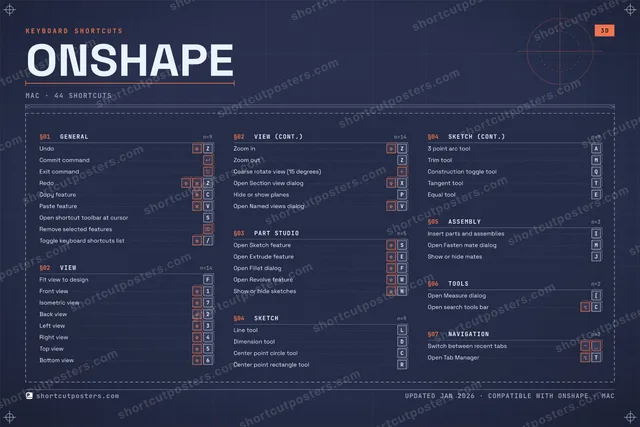
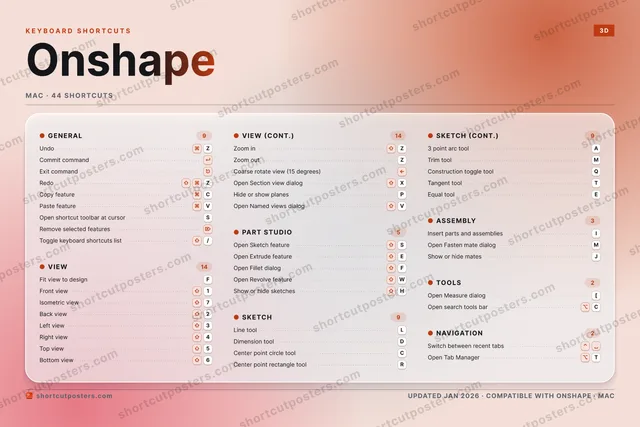
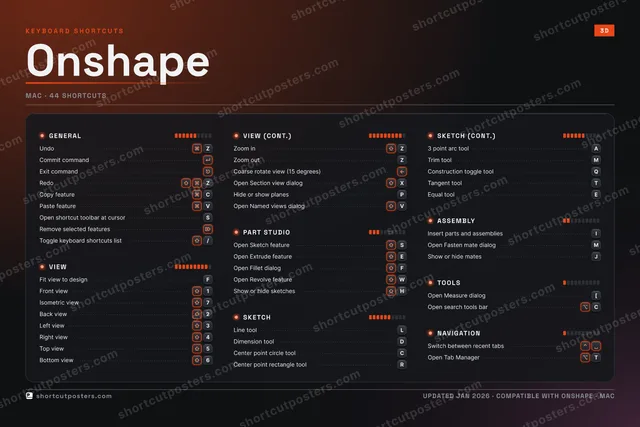
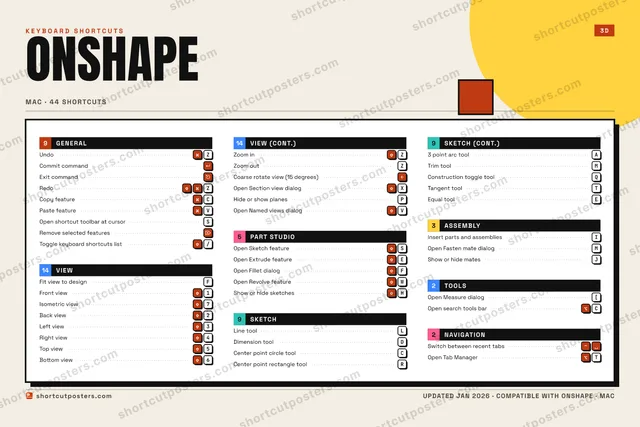
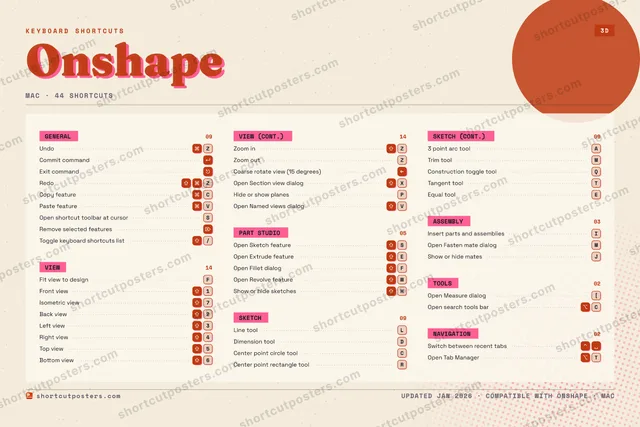
ONSHAPEKEYBOARD SHORTCUTS · MAC · 441Front vi…2Back view3Left view4Right vi…5Top view6Bottom v…7Isometri…890QConstruc…WOpen Rev…EOpen Ext…RCenter p…TOpen Tab…YUIInsert p…OPHide or …A3 point …SOpen Ske…DDimensio…FFit view…GHShow or …JShow or …KLLine toolZUndoXOpen Sec…CCopy fea…VPaste fe…BNMTrim toolMORE SHORTCUTSCommit commandExit commandRedoZOpen shortcut too…SOpen Fillet dialogFCenter point circ…CRemove selected f…Toggle keyboard s…/Open Measure dial…[Open Fasten mate …MOpen search tools…CSwitch between re…Zoom inZZoom outZCoarse rotate vie…Tangent toolTEqual toolEOpen Named views …Vshortcutposters.comUPDATED JAN 2026 · COMPATIBLE WITH ONSHAPE · MAC

Hover to locate · click on the poster to disable · drag to reorder categories & shortcuts · to rename a category

Free PNG $0
  • Web resolution (1600 px)
  • Light watermark
  • Instant download
Made to order
Custom print-ready PDF $2.99
  • 300 DPI, framed-quality — no watermark
  • Every standard print size
  • Built to order from the poster above — checkout link emailed to you

Trouble ordering? Email business@shortcutposters.com.

How it works

  1. 1

    Choose a style

    Pick from four layouts: isometric keys, a typewriter list, a labelled keyboard map, or a bold editorial print.

  2. 2

    Make it yours

    Set the accent colour and palette, rename categories, and reorder anything.

  3. 3

    Pick the shortcuts

    Toggle exactly which shortcuts appear — or add your own custom ones.

  4. 4

    Download or print

    Export a free high-resolution PNG instantly, or order a print-ready PDF.

Four styles to choose from

ONSHAPEKEYBOARD SHORTCUTS · MAC · 20 ESSENTIAL1Front vi…234567Isometri…890QWEOpen Ext…RTYUIInsert p…OPASOpen Ske…DDimensio…FFit view…GHJKLLine toolZUndoXCCopy fea…VPaste fe…BNMMORE SHORTCUTSCommit commandExit commandRedoZOpen shortcut too…SOpen Fillet dialogFCenter point circ…CRemove selected f…Toggle keyboard s…/Open Measure dial…[shortcutposters.comUPDATED JAN 2026 · COMPATIBLE WITH ONSHAPE · MAC
Keyboard map Every binding labelled on a realistic QWERTY or AZERTY keyboard.
VIEWFit view to designFFront view1Isometric view7PART STUDIOOpen Sketch featureSOpen Extrude featureEOpen Fillet dialogFASSEMBLYInsert parts and assembliesITOOLSOpen Measure dialog[GENERALUndoZCommit commandExit commandRedoZCopy featureCPaste featureVOpen shortcut toolbar at cursorSRemove selected featuresToggle keyboard shortcuts list/SKETCHLine toolLDimension toolDCenter point circle toolCOnshapeKEYBOARD SHORTCUTS · MAC · 20 ESSENTIALBOTH LAYOUTSQWERTYQWERTYAZERTYAZERTYshortcutposters.comUPDATED JAN 2026 · COMPATIBLE WITH ONSHAPE · MAC
Isometric Shortcuts on a 3D isometric keyboard — bold and poster-like.
GENERAL09UndoZCommit commandExit commandRedoZCopy featureCPaste featureVOpen shortcut toolbar at cursorSRemove selected featuresToggle keyboard shortcuts list/ASSEMBLY01Insert parts and assembliesITOOLS01Open Measure dialog[VIEW03Fit view to designFFront view1Isometric view7PART STUDIO03Open Sketch featureSOpen Extrude featureEOpen Fillet dialogFSKETCH03Line toolLDimension toolDCenter point circle toolCOnshapeKEYBOARD SHORTCUTS · MAC · 20 ESSENTIALBOTH LAYOUTSQWERTYQWERTYAZERTYAZERTYshortcutposters.comUPDATED JAN 2026 · COMPATIBLE WITH ONSHAPE · MAC
Typewriter A clean printed list, grouped by category — dense and legible.
ONSHAPE · KEYBOARD SHORTCUTSMac · 6 SETS · No.01ONSHAPETOTAL20SHORTCUTSFOR MAC · SHIPPED COMBOSSETSGENERAL09VIEW03PART STUDIO03SKETCH03ASSEMBLY01TOOLS01REF. EDITION · JAN 2026shortcutposters.comUndoZCommit commandExit commandRedoZCopy featureCPaste featureVOpen shortcut toolbar at cursorSRemove selected featuresToggle keyboard shortcuts list/Fit view to designFFront view1Isometric view7Open Sketch featureSOpen Extrude featureEOpen Fillet dialogFLine toolLDimension toolDCenter point circle toolCInsert parts and assembliesIOpen Measure dialog[
Editorial A bold Swiss-style print: giant wordmark, dense keycap columns, and a totals rail.

Frequently asked questions

Is the Onshape poster maker free?

Yes — you can design and download a high-resolution PNG of your Onshape shortcuts poster for free. A print-ready PDF is an optional paid upgrade.

Can I choose which Onshape shortcuts appear?

Yes. Toggle any shortcut on or off, reorder them, rename categories, and even add your own custom shortcuts.

Can I change the colours and style?

Yes. Pick an accent colour, choose a palette, and switch between the isometric, typewriter, and keyboard-map styles.

Which keyboard layout and operating system are supported?

Choose QWERTY or AZERTY, and switch the edition between the operating systems Onshape supports (macOS, Windows, Linux).

How do I get a printed poster?

Download the free PNG to print yourself, or order the print-ready, framed-quality PDF directly from the maker.