ShortcutPosters

Poster maker

Make your Autodesk Maya shortcuts poster

Pick the shortcuts that matter, add your own, tune the colours and style — then download a free personalized PNG, or order the print-ready PDF.

Making a poster for:
Style
Accent
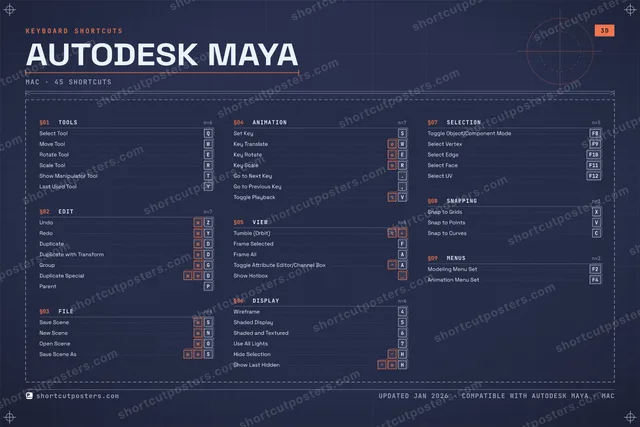
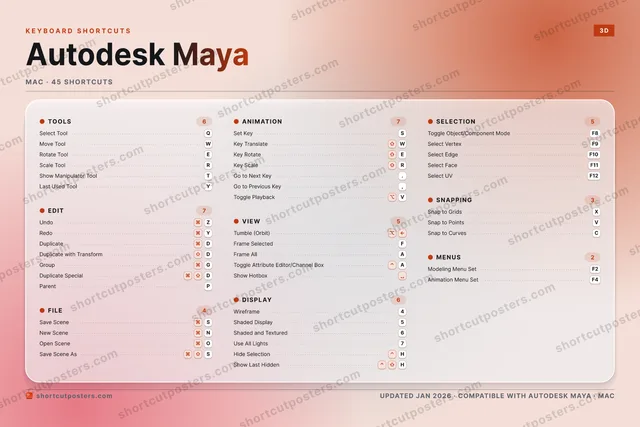
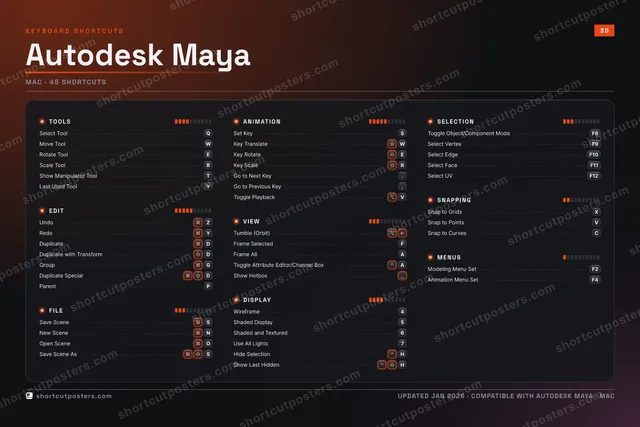
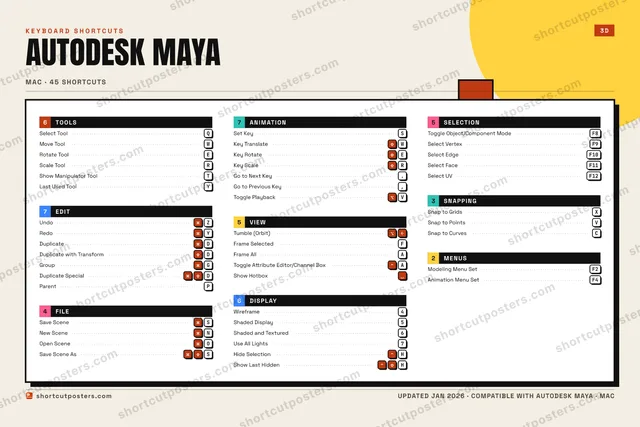
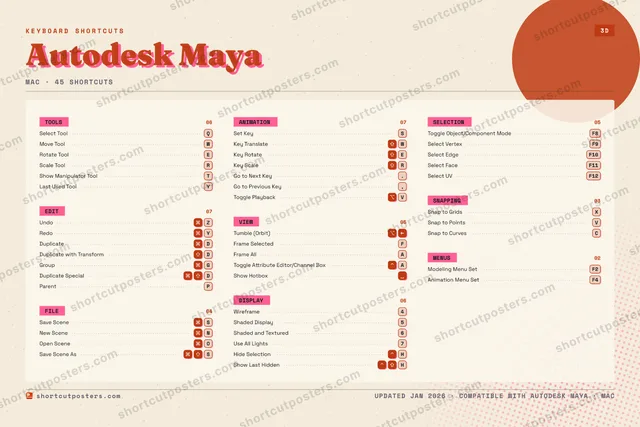
AUTODESK MAYAKEYBOARD SHORTCUTS · MAC · 451234Wireframe5Shaded D…6Shaded a…7Use All …890QSelect T…WMove ToolERotate T…RScale To…TShow Man…YRedoUIOOpen Sce…PParentAFrame AllSSave Sce…DDuplicateFFrame Se…GGroupHHide Sel…JKLZUndoXSnap to …CSnap to …VToggle P…BNNew SceneMMORE SHORTCUTSSet KeySTumble (Orbit)Duplicate wit…DToggle Object…F8Select VertexF9Select EdgeF10Select FaceF11Duplicate Spe…DSave Scene AsSKey TranslateWKey RotateEKey ScaleRGo to Next Key.Go to Previou…,Snap to PointsVLast Used ToolYShow Last Hid…HSelect UVF12Toggle Attrib…AShow HotboxModeling Menu…F2Animation Men…F4shortcutposters.comUPDATED JAN 2026 · COMPATIBLE WITH AUTODESK MAYA · MAC

Hover to locate · click on the poster to disable · drag to reorder categories & shortcuts · to rename a category

Free PNG $0
  • Web resolution (1600 px)
  • Light watermark
  • Instant download
Made to order
Custom print-ready PDF $2.99
  • 300 DPI, framed-quality — no watermark
  • Every standard print size
  • Built to order from the poster above — checkout link emailed to you

Trouble ordering? Email business@shortcutposters.com.

How it works

  1. 1

    Choose a style

    Pick from four layouts: isometric keys, a typewriter list, a labelled keyboard map, or a bold editorial print.

  2. 2

    Make it yours

    Set the accent colour and palette, rename categories, and reorder anything.

  3. 3

    Pick the shortcuts

    Toggle exactly which shortcuts appear — or add your own custom ones.

  4. 4

    Download or print

    Export a free high-resolution PNG instantly, or order a print-ready PDF.

Four styles to choose from

AUTODESK MAYAKEYBOARD SHORTCUTS · MAC · 20 ESSENTIAL1234Wireframe5Shaded D…6Shaded a…7890QSelect T…WMove ToolERotate T…RScale To…TYRedoUIOPASSave Sce…DDuplicateFFrame Se…GGroupHJKLZUndoXCVBNMMORE SHORTCUTSSet KeySTumble (Orbit)Duplicate with Tr…DToggle Object/Com…F8Select VertexF9Select EdgeF10Select FaceF11shortcutposters.comUPDATED JAN 2026 · COMPATIBLE WITH AUTODESK MAYA · MAC
Keyboard map Every binding labelled on a realistic QWERTY or AZERTY keyboard.
TOOLSSelect ToolQMove ToolWRotate ToolEScale ToolRFILESave SceneSVIEWTumble (Orbit)Frame SelectedFSELECTIONToggle Object/Component ModeF8Select VertexF9Select EdgeF10Select FaceF11EDITUndoZRedoYDuplicateDDuplicate with TransformDGroupGANIMATIONSet KeySDISPLAYWireframe4Shaded Display5Shaded and Textured6Autodesk MayaKEYBOARD SHORTCUTS · MAC · 20 ESSENTIALBOTH LAYOUTSQWERTYQWERTYAZERTYAZERTYshortcutposters.comUPDATED JAN 2026 · COMPATIBLE WITH AUTODESK MAYA · MAC
Isometric Shortcuts on a 3D isometric keyboard — bold and poster-like.
TOOLS04Select ToolQMove ToolWRotate ToolEScale ToolRFILE01Save SceneSVIEW02Tumble (Orbit)Frame SelectedFSELECTION04Toggle Object/Component ModeF8Select VertexF9Select EdgeF10Select FaceF11EDIT05UndoZRedoYDuplicateDDuplicate with TransformDGroupGANIMATION01Set KeySDISPLAY03Wireframe4Shaded Display5Shaded and Textured6Autodesk MayaKEYBOARD SHORTCUTS · MAC · 20 ESSENTIALBOTH LAYOUTSQWERTYQWERTYAZERTYAZERTYshortcutposters.comUPDATED JAN 2026 · COMPATIBLE WITH AUTODESK MAYA · MAC
Typewriter A clean printed list, grouped by category — dense and legible.
AUTODESK MAYA · KEYBOARD SHORTCUTSMac · 7 SETS · No.01AUTODESK MAYATOTAL20SHORTCUTSFOR MAC · SHIPPED COMBOSSETSTOOLS04EDIT05FILE01ANIMATION01VIEW02DISPLAY03SELECTION04REF. EDITION · JAN 2026shortcutposters.comSelect ToolQMove ToolWRotate ToolEScale ToolRUndoZRedoYDuplicateDDuplicate with TransformDGroupGSave SceneSSet KeySTumble (Orbit)Frame SelectedFWireframe4Shaded Display5Shaded and Textured6Toggle Object/Component ModeF8Select VertexF9Select EdgeF10Select FaceF11
Editorial A bold Swiss-style print: giant wordmark, dense keycap columns, and a totals rail.

Frequently asked questions

Is the Autodesk Maya poster maker free?

Yes — you can design and download a high-resolution PNG of your Autodesk Maya shortcuts poster for free. A print-ready PDF is an optional paid upgrade.

Can I choose which Autodesk Maya shortcuts appear?

Yes. Toggle any shortcut on or off, reorder them, rename categories, and even add your own custom shortcuts.

Can I change the colours and style?

Yes. Pick an accent colour, choose a palette, and switch between the isometric, typewriter, and keyboard-map styles.

Which keyboard layout and operating system are supported?

Choose QWERTY or AZERTY, and switch the edition between the operating systems Autodesk Maya supports (macOS, Windows, Linux).

How do I get a printed poster?

Download the free PNG to print yourself, or order the print-ready, framed-quality PDF directly from the maker.