ShortcutPosters

Poster maker

Make your Adobe Lightroom Classic shortcuts poster

Pick the shortcuts that matter, add your own, tune the colours and style — then download a free personalized PNG, or order the print-ready PDF.

Making a poster for:
Style
Accent
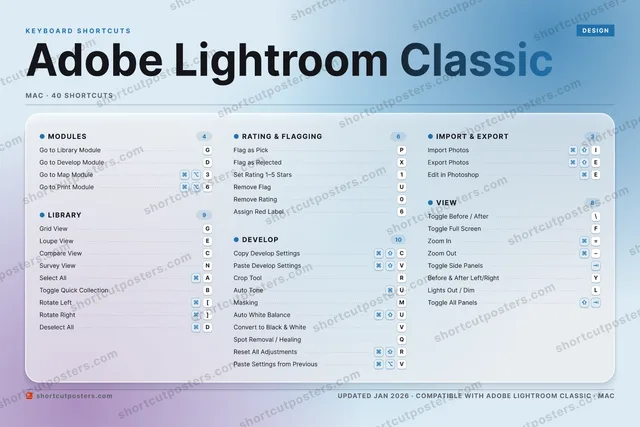
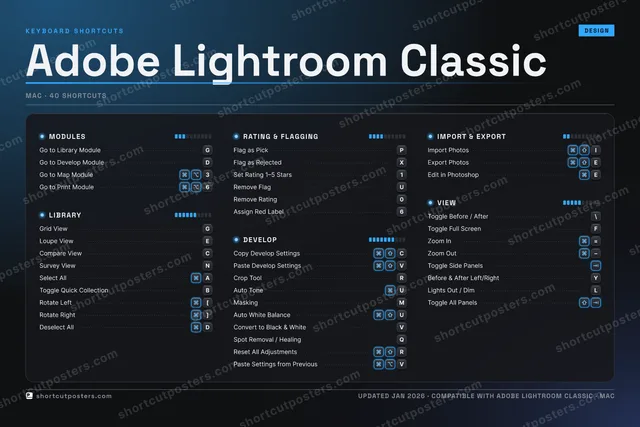
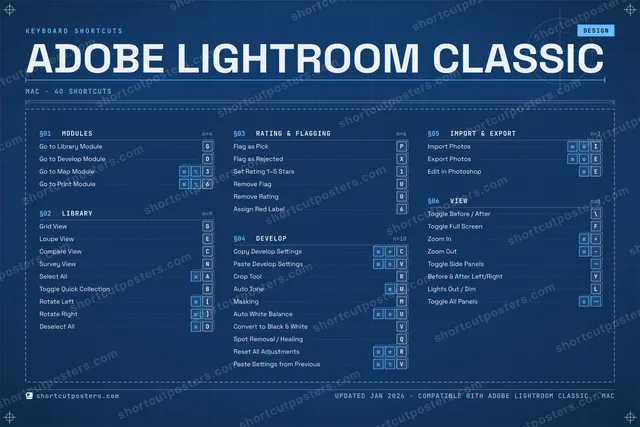
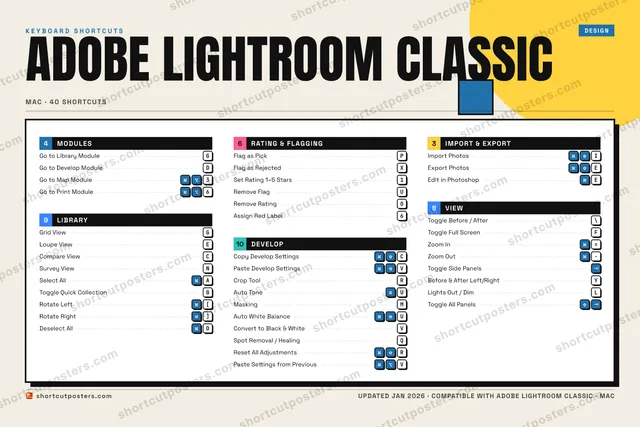
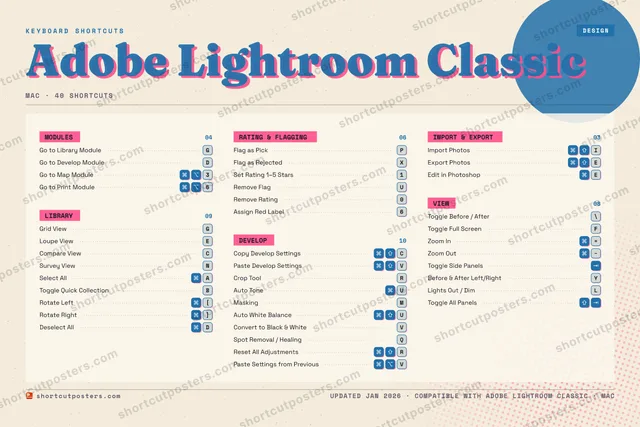
ADOBE LIGHTROOM CLASSICKEYBOARD SHORTCUTS · MAC · 401Set Rati…23⌘ ⌥Go to Ma…456Assign R…7890Remove R…QSpot Rem…WELoupe Vi…RCrop ToolTYBefore &…UAuto ToneI⌘ ⇧Import P…OPFlag as …ASelect A…SDGo to De…FToggle F…GGo to Li…HJKLLights O…ZXFlag as …C⌘ ⇧Copy Dev…V⌘ ⇧Paste De…BToggle Q…NSurvey V…MMaskingMORE SHORTCUTSGrid ViewGExport PhotosECompare ViewCToggle Before / A…\Remove FlagUAuto White BalanceUConvert to Black …VReset All Adjustm…RZoom In=Zoom OutToggle Side PanelsEdit in PhotoshopERotate Left[Rotate Right]Deselect AllDPaste Settings fr…VToggle All PanelsGo to Print Module6shortcutposters.comUPDATED JAN 2026 · COMPATIBLE WITH ADOBE LIGHTROOM CLASSIC · MAC

Hover to locate · click on the poster to disable · drag to reorder categories & shortcuts · to rename a category

Free PNG $0
  • Web resolution (1600 px)
  • Light watermark
  • Instant download
Made to order
Custom print-ready PDF $2.99
  • 300 DPI, framed-quality — no watermark
  • Every standard print size
  • Built to order from the poster above — checkout link emailed to you

Trouble ordering? Email business@shortcutposters.com.

How it works

  1. 1

    Choose a style

    Pick from four layouts: isometric keys, a typewriter list, a labelled keyboard map, or a bold editorial print.

  2. 2

    Make it yours

    Set the accent colour and palette, rename categories, and reorder anything.

  3. 3

    Pick the shortcuts

    Toggle exactly which shortcuts appear — or add your own custom ones.

  4. 4

    Download or print

    Export a free high-resolution PNG instantly, or order a print-ready PDF.

Four styles to choose from

ADOBE LIGHTROOM CLASSICKEYBOARD SHORTCUTS · MAC · 20 ESSENTIAL1Set Rati…234567890QWELoupe Vi…RCrop ToolTYUAuto ToneI⌘ ⇧Import P…OPFlag as …ASelect A…SDGo to De…FToggle F…GGo to Li…HJKLZXFlag as …C⌘ ⇧Copy Dev…V⌘ ⇧Paste De…BNSurvey V…MMaskingMORE SHORTCUTSGrid ViewGExport PhotosECompare ViewCToggle Before / A…\Remove FlagUshortcutposters.comUPDATED JAN 2026 · COMPATIBLE WITH ADOBE LIGHTROOM CLASSIC · MAC
Keyboard map Every binding labelled on a realistic QWERTY or AZERTY keyboard.
LIBRARYGrid ViewGLoupe ViewECompare ViewCSurvey ViewNSelect AllADEVELOPCopy Develop SettingsCPaste Develop SettingsVCrop ToolRAuto ToneUMaskingMVIEWToggle Before / After\Toggle Full ScreenFMODULESGo to Library ModuleGGo to Develop ModuleDRATING & FLAGGINGFlag as PickPFlag as RejectedXSet Rating 1–5 Stars1Remove FlagUIMPORT & EXPORTImport PhotosIExport PhotosEAdobe Lightroom ClassicKEYBOARD SHORTCUTS · MAC · 20 ESSENTIALBOTH LAYOUTSQWERTYQWERTYAZERTYAZERTYshortcutposters.comUPDATED JAN 2026 · COMPATIBLE WITH ADOBE LIGHTROOM CLASSIC · MAC
Isometric Shortcuts on a 3D isometric keyboard — bold and poster-like.
LIBRARY05Grid ViewGLoupe ViewECompare ViewCSurvey ViewNSelect AllADEVELOP05Copy Develop SettingsCPaste Develop SettingsVCrop ToolRAuto ToneUMaskingMVIEW02Toggle Before / After\Toggle Full ScreenFMODULES02Go to Library ModuleGGo to Develop ModuleDRATING & FLAGGING04Flag as PickPFlag as RejectedXSet Rating 1–5 Stars1Remove FlagUIMPORT & EXPORT02Import PhotosIExport PhotosEAdobe Lightroom ClassicKEYBOARD SHORTCUTS · MAC · 20 ESSENTIALBOTH LAYOUTSQWERTYQWERTYAZERTYAZERTYshortcutposters.comUPDATED JAN 2026 · COMPATIBLE WITH ADOBE LIGHTROOM CLASSIC · MAC
Typewriter A clean printed list, grouped by category — dense and legible.
ADOBE LIGHTROOM CLASSIC · KEYBOARD SHORTCUTSMac · 6 SETS · No.01ADOBE LIGHTROOM CLASSICTOTAL20SHORTCUTSFOR MAC · SHIPPED COMBOSSETSMODULES02LIBRARY05RATING & FLAG04DEVELOP05IMPORT & EXPO02VIEW02REF. EDITION · JAN 2026shortcutposters.comGo to Library ModuleGGo to Develop ModuleDGrid ViewGLoupe ViewECompare ViewCSurvey ViewNSelect AllAFlag as PickPFlag as RejectedXSet Rating 1–5 Stars1Remove FlagUCopy Develop SettingsCPaste Develop SettingsVCrop ToolRAuto ToneUMaskingMImport PhotosIExport PhotosEToggle Before / After\Toggle Full ScreenF
Editorial A bold Swiss-style print: giant wordmark, dense keycap columns, and a totals rail.

Frequently asked questions

Is the Adobe Lightroom Classic poster maker free?

Yes — you can design and download a high-resolution PNG of your Adobe Lightroom Classic shortcuts poster for free. A print-ready PDF is an optional paid upgrade.

Can I choose which Adobe Lightroom Classic shortcuts appear?

Yes. Toggle any shortcut on or off, reorder them, rename categories, and even add your own custom shortcuts.

Can I change the colours and style?

Yes. Pick an accent colour, choose a palette, and switch between the isometric, typewriter, and keyboard-map styles.

Which keyboard layout and operating system are supported?

Choose QWERTY or AZERTY, and switch the edition between the operating systems Adobe Lightroom Classic supports (macOS, Windows, Linux).

How do I get a printed poster?

Download the free PNG to print yourself, or order the print-ready, framed-quality PDF directly from the maker.