ShortcutPosters

Poster maker

Make your Midjourney shortcuts poster
Pick the shortcuts that matter, add your own, tune the colours and style — then download a free personalized PNG, or order the print-ready PDF.

Making a poster for:
Style
Accent
MIDJOURNEYKEYBOARD SHORTCUTS · MAC · 26 ESSENTIAL1234567890QWERTYUIOPASDFGHJKLZXCVSet mode…BNMMORE SHORTCUTSGenerate imag…Generate an i…/imagineRun prompt & …Set aspect ra…AR#:#Describe an i…/describeBlend uploade…/blendView/adjust b…/settingsExclude eleme…NOSet stylize a…stylize#Turn on Raw m…RAWView account …/infoToggle Remix …/preferremixAdd variety (…chaos#Set qualityquality#Lock a seedseed#Apply a Style…srefSwitch to the…niji#Regenerate a …/showSwitch to Fas…/fastSwitch to Rel…/relaxSwitch to Tur…/turboApply an Omni…orefOpen creation…LMBSet a suffix …/prefersuffixToggle Strong…/prefervariabilityshortcutposters.comUPDATED JAN 2026 · COMPATIBLE WITH MIDJOURNEY · MAC

Hover to locate · click on the poster to disable · drag to reorder categories & shortcuts · to rename a category

Free PNG $0
  • Web resolution (1600 px)
  • Light watermark
  • Instant download
Made to order
Custom print-ready PDF $2.99
  • 300 DPI, framed-quality — no watermark
  • Every standard print size
  • Built to order from the poster above — checkout link emailed to you

Trouble ordering? Email business@shortcutposters.com.

How it works

  1. 1

    Choose a style

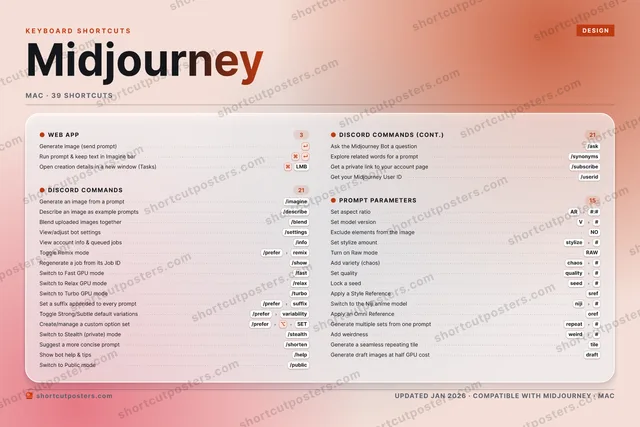
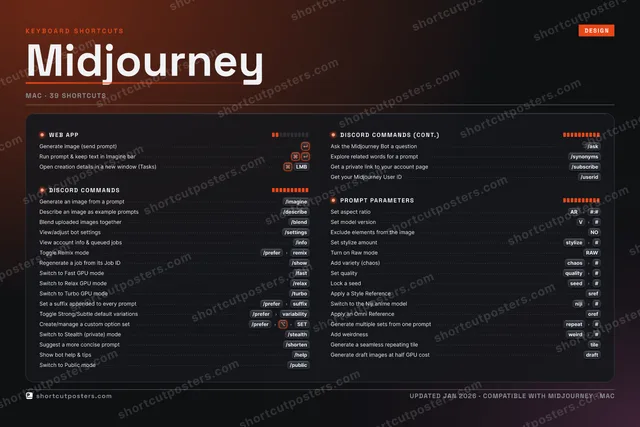
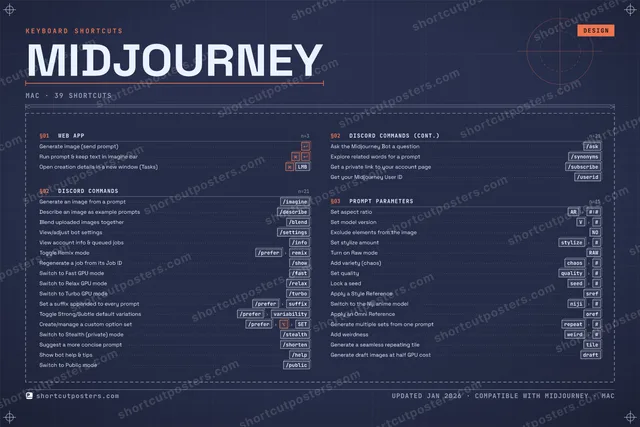
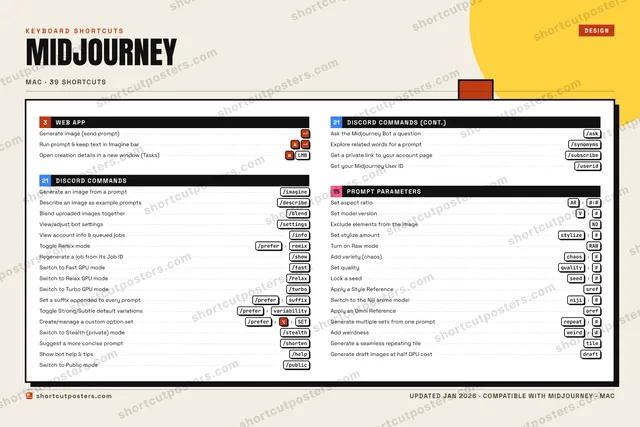
    Pick from four layouts: isometric keys, a typewriter list, a labelled keyboard map, or a bold editorial print.

  2. 2

    Make it yours

    Set the accent colour and palette, rename categories, and reorder anything.

  3. 3

    Pick the shortcuts

    Toggle exactly which shortcuts appear — or add your own custom ones.

  4. 4

    Download or print

    Export a free high-resolution PNG instantly, or order a print-ready PDF.

Four styles to choose from

MIDJOURNEYKEYBOARD SHORTCUTS · MAC · 20 ESSENTIAL1234567890QWERTYUIOPASDFGHJKLZXCVSet mode…BNMMORE SHORTCUTSGenerate image (s…Generate an image…/imagineRun prompt & keep…Set aspect ratioAR#:#Describe an image…/describeBlend uploaded im…/blendView/adjust bot s…/settingsExclude elements …NOSet stylize amountstylize#Turn on Raw modeRAWView account info…/infoToggle Remix mode/preferremixAdd variety (chao…chaos#Set qualityquality#Lock a seedseed#Apply a Style Ref…srefSwitch to the Nij…niji#Regenerate a job …/showSwitch to Fast GP…/fastshortcutposters.comUPDATED JAN 2026 · COMPATIBLE WITH MIDJOURNEY · MAC
Keyboard map Every binding labelled on a realistic QWERTY or AZERTY keyboard.
WEB APPGenerate image (send prompt)Run prompt & keep text in Imagine …PROMPT PARAMETERSSet aspect ratioAR#:#Set model versionV#Exclude elements from the imageNOSet stylize amountstylize#Turn on Raw modeRAWAdd variety (chaos)chaos#Set qualityquality#Lock a seedseed#Apply a Style ReferencesrefSwitch to the Niji anime modelniji#DISCORD COMMANDSGenerate an image from a prompt/imagineDescribe an image as example promp…/describeBlend uploaded images together/blendView/adjust bot settings/settingsView account info & queued jobs/infoToggle Remix mode/preferremixRegenerate a job from its Job ID/showSwitch to Fast GPU mode/fastMidjourneyKEYBOARD SHORTCUTS · MAC · 20 ESSENTIALBOTH LAYOUTSQWERTYQWERTYAZERTYAZERTYshortcutposters.comUPDATED JAN 2026 · COMPATIBLE WITH MIDJOURNEY · MAC
Isometric Shortcuts on a 3D isometric keyboard — bold and poster-like.
WEB APP02Generate image (send prompt)Run prompt & keep text in Imagine …PROMPT PARAMETERS10Set aspect ratioAR#:#Set model versionV#Exclude elements from the imageNOSet stylize amountstylize#Turn on Raw modeRAWAdd variety (chaos)chaos#Set qualityquality#Lock a seedseed#Apply a Style ReferencesrefSwitch to the Niji anime modelniji#DISCORD COMMANDS08Generate an image from a prompt/imagineDescribe an image as example promp…/describeBlend uploaded images together/blendView/adjust bot settings/settingsView account info & queued jobs/infoToggle Remix mode/preferremixRegenerate a job from its Job ID/showSwitch to Fast GPU mode/fastMidjourneyKEYBOARD SHORTCUTS · MAC · 20 ESSENTIALBOTH LAYOUTSQWERTYQWERTYAZERTYAZERTYshortcutposters.comUPDATED JAN 2026 · COMPATIBLE WITH MIDJOURNEY · MAC
Typewriter A clean printed list, grouped by category — dense and legible.
MIDJOURNEY · KEYBOARD SHORTCUTSMac · 3 SETS · No.01MIDJOURNEYTOTAL20SHORTCUTSFOR MAC · SHIPPED COMBOSSETSWEB APP02DISCORD COMMA08PROMPT PARAME10REF. EDITION · JAN 2026shortcutposters.comGenerate image (send prompt)Run prompt & keep text in Imagine barGenerate an image from a prompt/imagineDescribe an image as example prompts/describeBlend uploaded images together/blendView/adjust bot settings/settingsView account info & queued jobs/infoToggle Remix mode/preferremixRegenerate a job from its Job ID/showSwitch to Fast GPU mode/fastSet aspect ratioAR#:#Set model versionV#Exclude elements from the imageNOSet stylize amountstylize#Turn on Raw modeRAWAdd variety (chaos)chaos#Set qualityquality#Lock a seedseed#Apply a Style ReferencesrefSwitch to the Niji anime modelniji#
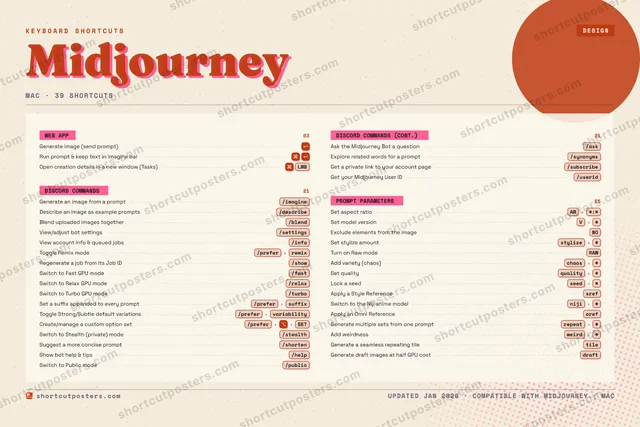
Editorial A bold Swiss-style print: giant wordmark, dense keycap columns, and a totals rail.

Frequently asked questions

Is the Midjourney poster maker free?

Yes — you can design and download a high-resolution PNG of your Midjourney shortcuts poster for free. A print-ready PDF is an optional paid upgrade.

Can I choose which Midjourney shortcuts appear?

Yes. Toggle any shortcut on or off, reorder them, rename categories, and even add your own custom shortcuts.

Can I change the colours and style?

Yes. Pick an accent colour, choose a palette, and switch between the isometric, typewriter, and keyboard-map styles.

Which keyboard layout and operating system are supported?

Choose QWERTY or AZERTY, and switch the edition between the operating systems Midjourney supports (macOS, Windows, Linux).

How do I get a printed poster?

Download the free PNG to print yourself, or order the print-ready, framed-quality PDF directly from the maker.