ShortcutPosters
iPhone appNew

Make your Kimi Code shortcuts poster

Pick the shortcuts that matter, add your own, tune the colours and style — then download a free personalized PNG, or order the print-ready PDF.

Making a poster for:
Style
Accent
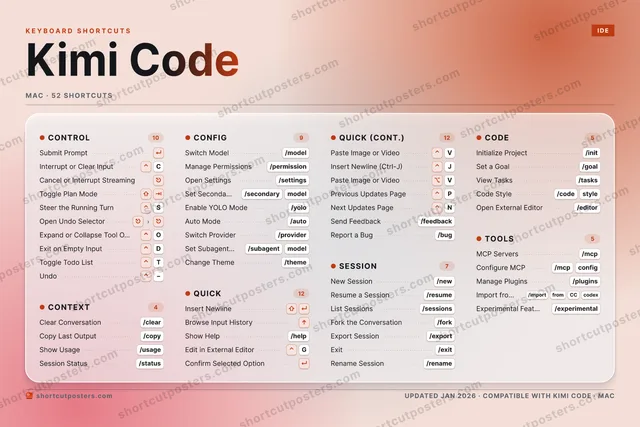
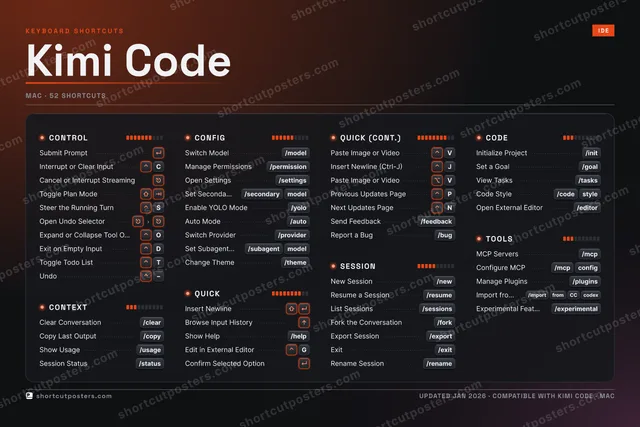
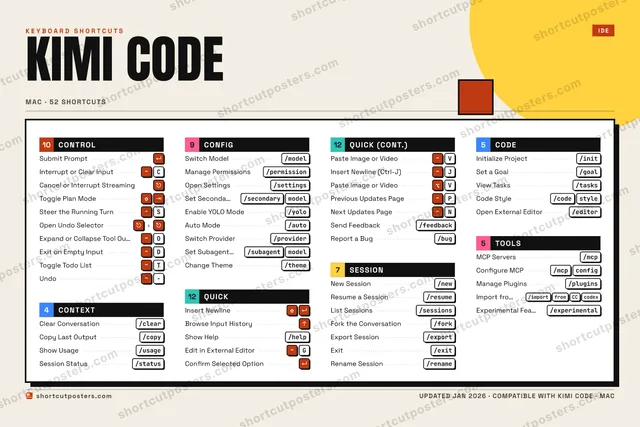
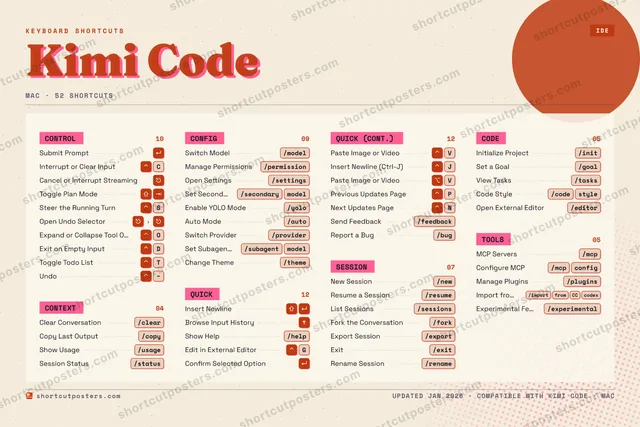
§01CONTROLn=10Submit Prompt↵Interrupt or Clear Input⌃CCancel or Interrupt Streaming⎋Toggle Plan Mode⇧⇥Steer the Running Turn⌃SOpen Undo Selector⎋›⎋Expand or Collapse Tool O…⌃OExit on Empty Input⌃DToggle Todo List⌃TUndo⌃−§02CONTEXTn=4Clear Conversation/clearCopy Last Output/copyShow Usage/usageSession Status/status§03CONFIGn=9Switch Model/modelManage Permissions/permissionOpen Settings/settingsSet Second…/secondarymodelEnable YOLO Mode/yoloAuto Mode/autoSwitch Provider/providerSet Subagen…/subagentmodelChange Theme/theme§04QUICKn=12Insert Newline⇧↵Browse Input History↑Show Help/helpEdit in External Editor⌃GConfirm Selected Option↵§04QUICK (CONT.)n=12Paste Image or Video⌃VInsert Newline (Ctrl-J)⌃JPaste Image or Video⌥VPrevious Updates Page⌃PNext Updates Page⌃NSend Feedback/feedbackReport a Bug/bug§05SESSIONn=7New Session/newResume a Session/resumeList Sessions/sessionsFork the Conversation/forkExport Session/exportExit/exitRename Session/rename§06CODEn=5Initialize Project/initSet a Goal/goalView Tasks/tasksCode Style/codestyleOpen External Editor/editor§07TOOLSn=5MCP Servers/mcpConfigure MCP/mcpconfigManage Plugins/pluginsImport fro…/importfromCCcodexExperimental Fe…/experimentalKEYBOARD SHORTCUTSIDEKIMI CODEMAC · 52 SHORTCUTSshortcutposters.comUPDATED JAN 2026 · COMPATIBLE WITH KIMI CODE · MACshortcutposters.comshortcutposters.comshortcutposters.comshortcutposters.comshortcutposters.comshortcutposters.comshortcutposters.comshortcutposters.comshortcutposters.comshortcutposters.comshortcutposters.comshortcutposters.comshortcutposters.comshortcutposters.comshortcutposters.comshortcutposters.comshortcutposters.comshortcutposters.comshortcutposters.comshortcutposters.comshortcutposters.comshortcutposters.comshortcutposters.comshortcutposters.comshortcutposters.comshortcutposters.comshortcutposters.comshortcutposters.comshortcutposters.comshortcutposters.comshortcutposters.comshortcutposters.comshortcutposters.comshortcutposters.comshortcutposters.comshortcutposters.comshortcutposters.comshortcutposters.comshortcutposters.comshortcutposters.comshortcutposters.comshortcutposters.comshortcutposters.comshortcutposters.comshortcutposters.comshortcutposters.comshortcutposters.comshortcutposters.comshortcutposters.comshortcutposters.comshortcutposters.comshortcutposters.comshortcutposters.comshortcutposters.comshortcutposters.comshortcutposters.comshortcutposters.comshortcutposters.comshortcutposters.comshortcutposters.comshortcutposters.comshortcutposters.comshortcutposters.comshortcutposters.comshortcutposters.comshortcutposters.comshortcutposters.comshortcutposters.comshortcutposters.comshortcutposters.comshortcutposters.comshortcutposters.comshortcutposters.comshortcutposters.comshortcutposters.comshortcutposters.comshortcutposters.comshortcutposters.comshortcutposters.comshortcutposters.comshortcutposters.comshortcutposters.comshortcutposters.comshortcutposters.comshortcutposters.comshortcutposters.comshortcutposters.comshortcutposters.comshortcutposters.comshortcutposters.comshortcutposters.comshortcutposters.comshortcutposters.comshortcutposters.comshortcutposters.comshortcutposters.comshortcutposters.comshortcutposters.comshortcutposters.comshortcutposters.comshortcutposters.comshortcutposters.comshortcutposters.comshortcutposters.comshortcutposters.comshortcutposters.comshortcutposters.comshortcutposters.comshortcutposters.comshortcutposters.comshortcutposters.com

Hover to locate · click on the poster to disable · drag to reorder categories & shortcuts · ✎ to rename a category

Free PNG $0
  • Web resolution (1600 px)
  • Light watermark
  • Instant download
Made to order
Custom print-ready PDF $2.99
  • 300 DPI, framed-quality — no watermark
  • Every standard print size
  • Built to order from the poster above — checkout link emailed to you

Trouble ordering? Email business@shortcutposters.com.

How it works

  1. 1

    Choose a style

    Pick one of five styles — Studio, Blueprint, Aurora, Block or Riso — each in the app's own colours. Games start from generative Arcade art.

  2. 2

    Make it yours

    Set the accent colour, rename categories, and reorder anything.

  3. 3

    Pick the shortcuts

    Toggle exactly which shortcuts appear — or add your own custom ones.

  4. 4

    Download or print

    Export a free high-resolution PNG instantly, or order a print-ready PDF.

Five styles to choose from
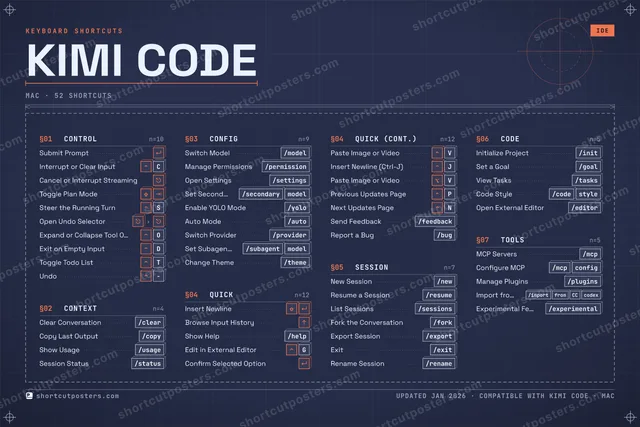
Kimi Code blueprint shortcuts poster preview
Blueprint A technical drawing: grid, dimension lines, numbered sections and wireframe keys.
Kimi Code aurora shortcuts poster preview
Aurora Frosted glass on soft halos of the app's colour, white keycaps — light and premium.
Kimi Code studio shortcuts poster preview
Studio A dark console with 3D keys, the modifiers lit and a level meter on each group.
Kimi Code block shortcuts poster preview
Block Neo-brutal Swiss: a giant condensed title, black section bars and hard shadows.
Kimi Code riso shortcuts poster preview
Riso Two inks, grain and an off-register title, like a risograph print.

Frequently asked questions

Is the Kimi Code poster maker free?

Yes — you can design and download a high-resolution PNG of your Kimi Code shortcuts poster for free. A print-ready PDF is an optional paid upgrade.

Can I choose which Kimi Code shortcuts appear?

Yes. Toggle any shortcut on or off, reorder them, rename categories, and even add your own custom shortcuts.

Can I change the colours and style?

Yes. Pick an accent colour and switch between the Studio, Blueprint, Aurora, Block and Riso styles.

Which operating systems are supported?

Switch the edition between the operating systems Kimi Code supports (macOS, Windows, Linux): every key is shown as it is on that system.

How do I get a printed poster?

Download the free PNG to print yourself, or order the print-ready, framed-quality PDF directly from the maker.