ShortcutPosters

Poster maker

Make your KeePassXC shortcuts poster

Pick the shortcuts that matter, add your own, tune the colours and style — then download a free personalized PNG, or order the print-ready PDF.

Making a poster for:
Style
Accent
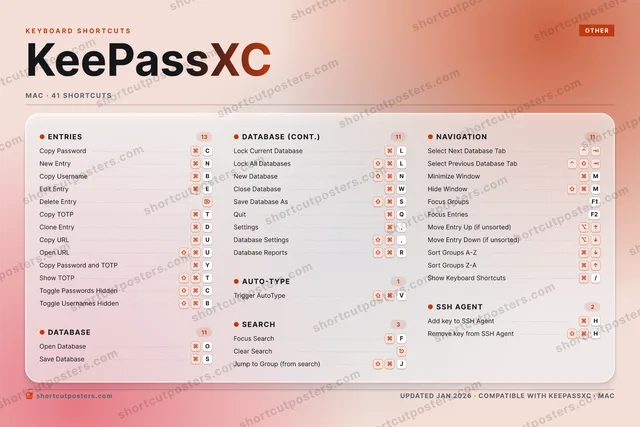
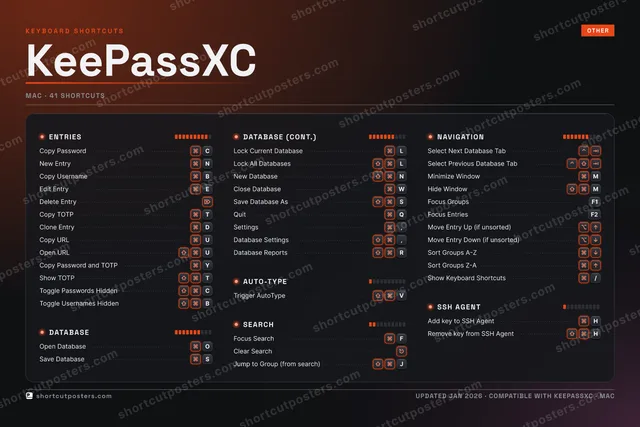
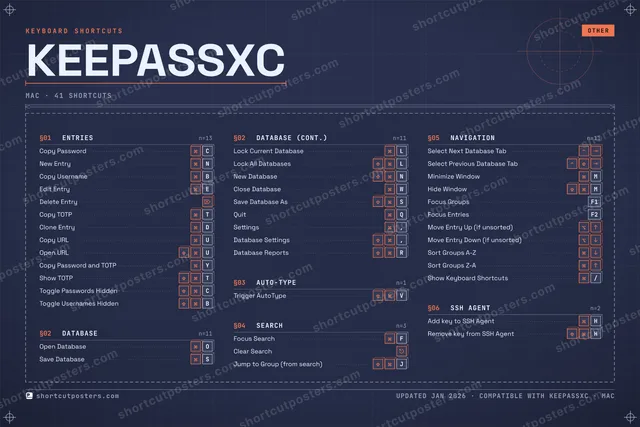
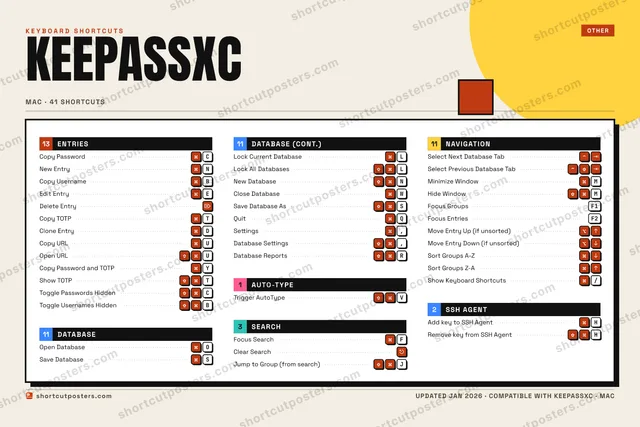
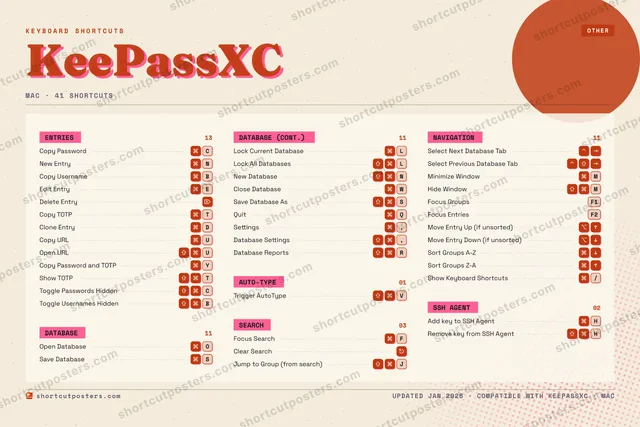
KEEPASSXCKEYBOARD SHORTCUTS · MAC · 411234567890QQuitWClose Da…EEdit Ent…R⇧ ⌘Database…TCopy TOTPYCopy Pas…UCopy URLIOOpen Dat…PASSave Dat…DClone En…FFocus Se…GHAdd key …J⇧ ⌘Jump to …KLLock Cur…ZXCCopy Pas…V⇧ ⌘Trigger …BCopy Use…NNew EntryMMinimize…MORE SHORTCUTSLock All Data…LNew DatabaseNDelete EntrySave Database…SOpen URLUClear SearchSelect Next D…Select Previo…Settings,Database Sett…,Show TOTPTToggle Passwo…CHide WindowMFocus GroupsF1Focus EntriesF2Toggle Userna…BRemove key fr…HMove Entry Up…Move Entry Do…Sort Groups A…Sort Groups Z…Show Keyboard…/shortcutposters.comUPDATED JAN 2026 · COMPATIBLE WITH KEEPASSXC · MAC

Hover to locate · click on the poster to disable · drag to reorder categories & shortcuts · to rename a category

Free PNG $0
  • Web resolution (1600 px)
  • Light watermark
  • Instant download
Made to order
Custom print-ready PDF $2.99
  • 300 DPI, framed-quality — no watermark
  • Every standard print size
  • Built to order from the poster above — checkout link emailed to you

Trouble ordering? Email business@shortcutposters.com.

How it works

  1. 1

    Choose a style

    Pick from four layouts: isometric keys, a typewriter list, a labelled keyboard map, or a bold editorial print.

  2. 2

    Make it yours

    Set the accent colour and palette, rename categories, and reorder anything.

  3. 3

    Pick the shortcuts

    Toggle exactly which shortcuts appear — or add your own custom ones.

  4. 4

    Download or print

    Export a free high-resolution PNG instantly, or order a print-ready PDF.

Four styles to choose from

KEEPASSXCKEYBOARD SHORTCUTS · MAC · 20 ESSENTIAL1234567890QQuitWClose Da…EEdit Ent…RTCopy TOTPYCopy Pas…UCopy URLIOOpen Dat…PASSave Dat…DClone En…FFocus Se…GHJKLLock Cur…ZXCCopy Pas…V⇧ ⌘Trigger …BCopy Use…NNew EntryMMORE SHORTCUTSLock All DatabasesLNew DatabaseNDelete EntrySave Database AsSOpen URLUshortcutposters.comUPDATED JAN 2026 · COMPATIBLE WITH KEEPASSXC · MAC
Keyboard map Every binding labelled on a realistic QWERTY or AZERTY keyboard.
ENTRIESCopy PasswordCNew EntryNCopy UsernameBEdit EntryEDelete EntryCopy TOTPTClone EntryDCopy URLUOpen URLUCopy Password and TOTPYSEARCHFocus SearchFDATABASEOpen DatabaseOSave DatabaseSLock Current DatabaseLLock All DatabasesLNew DatabaseNClose DatabaseWSave Database AsSQuitQAUTO-TYPETrigger AutoTypeVKeePassXCKEYBOARD SHORTCUTS · MAC · 20 ESSENTIALBOTH LAYOUTSQWERTYQWERTYAZERTYAZERTYshortcutposters.comUPDATED JAN 2026 · COMPATIBLE WITH KEEPASSXC · MAC
Isometric Shortcuts on a 3D isometric keyboard — bold and poster-like.
ENTRIES10Copy PasswordCNew EntryNCopy UsernameBEdit EntryEDelete EntryCopy TOTPTClone EntryDCopy URLUOpen URLUCopy Password and TOTPYSEARCH01Focus SearchFDATABASE08Open DatabaseOSave DatabaseSLock Current DatabaseLLock All DatabasesLNew DatabaseNClose DatabaseWSave Database AsSQuitQAUTO-TYPE01Trigger AutoTypeVKeePassXCKEYBOARD SHORTCUTS · MAC · 20 ESSENTIALBOTH LAYOUTSQWERTYQWERTYAZERTYAZERTYshortcutposters.comUPDATED JAN 2026 · COMPATIBLE WITH KEEPASSXC · MAC
Typewriter A clean printed list, grouped by category — dense and legible.
KEEPASSXC · KEYBOARD SHORTCUTSMac · 4 SETS · No.01KEEPASSXCTOTAL20SHORTCUTSFOR MAC · SHIPPED COMBOSSETSENTRIES10DATABASE08AUTO-TYPE01SEARCH01REF. EDITION · JAN 2026shortcutposters.comCopy PasswordCNew EntryNCopy UsernameBEdit EntryEDelete EntryCopy TOTPTClone EntryDCopy URLUOpen URLUCopy Password and TOTPYOpen DatabaseOSave DatabaseSLock Current DatabaseLLock All DatabasesLNew DatabaseNClose DatabaseWSave Database AsSQuitQTrigger AutoTypeVFocus SearchF
Editorial A bold Swiss-style print: giant wordmark, dense keycap columns, and a totals rail.

Frequently asked questions

Is the KeePassXC poster maker free?

Yes — you can design and download a high-resolution PNG of your KeePassXC shortcuts poster for free. A print-ready PDF is an optional paid upgrade.

Can I choose which KeePassXC shortcuts appear?

Yes. Toggle any shortcut on or off, reorder them, rename categories, and even add your own custom shortcuts.

Can I change the colours and style?

Yes. Pick an accent colour, choose a palette, and switch between the isometric, typewriter, and keyboard-map styles.

Which keyboard layout and operating system are supported?

Choose QWERTY or AZERTY, and switch the edition between the operating systems KeePassXC supports (macOS, Windows, Linux).

How do I get a printed poster?

Download the free PNG to print yourself, or order the print-ready, framed-quality PDF directly from the maker.