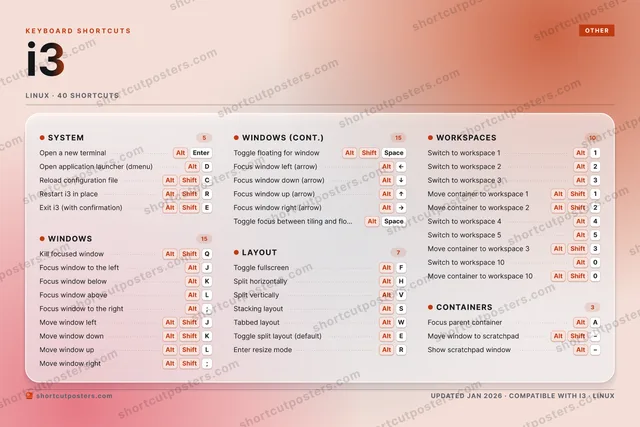
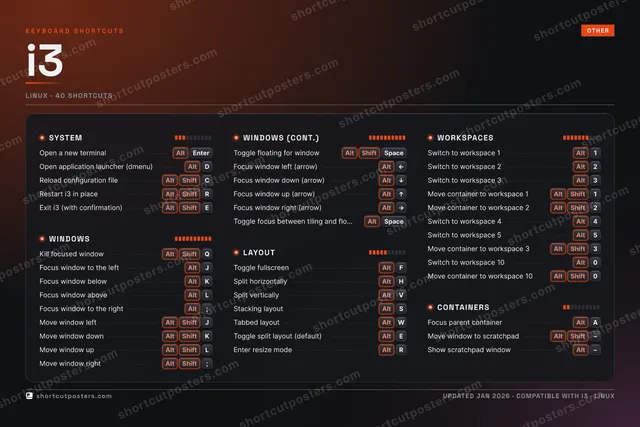
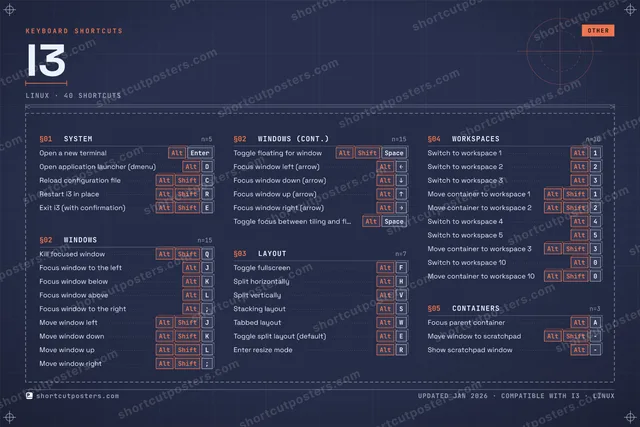
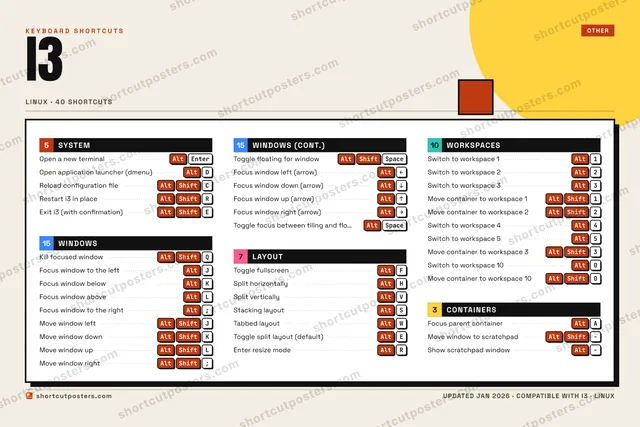
ShortcutPosters

Poster maker

Make your i3 shortcuts poster

Pick the shortcuts that matter, add your own, tune the colours and style — then download a free personalized PNG, or order the print-ready PDF.

Making a poster for:
Style
Accent
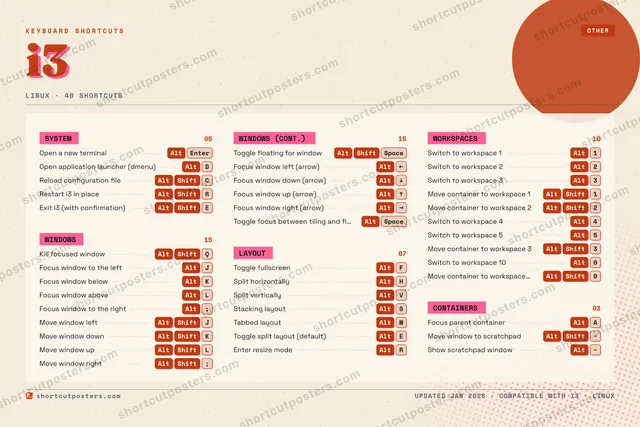
I3KEYBOARD SHORTCUTS · LINUX · 401AltSwitch t…2AltSwitch t…3AltSwitch t…4AltSwitch t…5AltSwitch t…67890AltSwitch t…QAlt ShiftKill foc…WAltTabbed l…EAltToggle s…RAlt ShiftRestart …TYUIOPAAltFocus pa…SAltStacking…DAltOpen app…FAltToggle f…GHAltSplit ho…JAltFocus wi…KAltFocus wi…LAltFocus wi…ZXCAlt ShiftReload c…VAltSplit ve…BNMMORE SHORTCUTSOpen a new termin…AltEnterFocus window to t…Alt;Move window leftAltShiftJMove window downAltShiftKMove window upAltShiftLMove window rightAltShift;Toggle floating f…AltShiftSpaceMove container to…AltShift1Move container to…AltShift2Exit i3 (with con…AltShiftEFocus window left…AltLEFTFocus window down…AltDOWNFocus window up (…AltUPFocus window righ…AltRIGHTToggle focus betw…AltSpaceEnter resize modeAltRMove container to…AltShift3Move window to sc…AltShiftShow scratchpad w…AltMove container to…AltShift0shortcutposters.comUPDATED JAN 2026 · COMPATIBLE WITH I3 · LINUX

Hover to locate · click on the poster to disable · drag to reorder categories & shortcuts · to rename a category

Free PNG $0
  • Web resolution (1600 px)
  • Light watermark
  • Instant download
Made to order
Custom print-ready PDF $2.99
  • 300 DPI, framed-quality — no watermark
  • Every standard print size
  • Built to order from the poster above — checkout link emailed to you

Trouble ordering? Email business@shortcutposters.com.

How it works

  1. 1

    Choose a style

    Pick from four layouts: isometric keys, a typewriter list, a labelled keyboard map, or a bold editorial print.

  2. 2

    Make it yours

    Set the accent colour and palette, rename categories, and reorder anything.

  3. 3

    Pick the shortcuts

    Toggle exactly which shortcuts appear — or add your own custom ones.

  4. 4

    Download or print

    Export a free high-resolution PNG instantly, or order a print-ready PDF.

Four styles to choose from

I3KEYBOARD SHORTCUTS · LINUX · 20 ESSENTIAL1AltSwitch t…2AltSwitch t…34567890QAlt ShiftKill foc…WAltTabbed l…EAltToggle s…RTYUIOPASAltStacking…DAltOpen app…FAltToggle f…GHAltSplit ho…JAltFocus wi…KAltFocus wi…LAltFocus wi…ZXCVAltSplit ve…BNMMORE SHORTCUTSOpen a new termin…AltEnterFocus window to t…Alt;Move window leftAltShiftJMove window downAltShiftKMove window upAltShiftLMove window rightAltShift;Toggle floating f…AltShiftSpaceshortcutposters.comUPDATED JAN 2026 · COMPATIBLE WITH I3 · LINUX
Keyboard map Every binding labelled on a realistic QWERTY or AZERTY keyboard.
WINDOWSKill focused windowAltShiftQFocus window to the leftAltJFocus window belowAltKFocus window aboveAltLFocus window to the rightAlt;Move window leftAltShiftJMove window downAltShiftKMove window upAltShiftLMove window rightAltShift;Toggle floating for windowAltShiftSpaceWORKSPACESSwitch to workspace 1Alt1Switch to workspace 2Alt2SYSTEMOpen a new terminalAltEnterOpen application launcher (dmenu)AltDLAYOUTToggle fullscreenAltFSplit horizontallyAltHSplit verticallyAltVStacking layoutAltSTabbed layoutAltWToggle split layout (default)AltEi3KEYBOARD SHORTCUTS · LINUX · 20 ESSENTIALBOTH LAYOUTSQWERTYQWERTYAZERTYAZERTYshortcutposters.comUPDATED JAN 2026 · COMPATIBLE WITH I3 · LINUX
Isometric Shortcuts on a 3D isometric keyboard — bold and poster-like.
WINDOWS10Kill focused windowAltShiftQFocus window to the leftAltJFocus window belowAltKFocus window aboveAltLFocus window to the rightAlt;Move window leftAltShiftJMove window downAltShiftKMove window upAltShiftLMove window rightAltShift;Toggle floating for windowAltShiftSpaceWORKSPACES02Switch to workspace 1Alt1Switch to workspace 2Alt2SYSTEM02Open a new terminalAltEnterOpen application launcher (dmenu)AltDLAYOUT06Toggle fullscreenAltFSplit horizontallyAltHSplit verticallyAltVStacking layoutAltSTabbed layoutAltWToggle split layout (default)AltEi3KEYBOARD SHORTCUTS · LINUX · 20 ESSENTIALBOTH LAYOUTSQWERTYQWERTYAZERTYAZERTYshortcutposters.comUPDATED JAN 2026 · COMPATIBLE WITH I3 · LINUX
Typewriter A clean printed list, grouped by category — dense and legible.
I3 · KEYBOARD SHORTCUTSLinux · 4 SETS · No.01I3TOTAL20SHORTCUTSFOR LINUX · SHIPPED COMBOSSETSSYSTEM02WINDOWS10LAYOUT06WORKSPACES02REF. EDITION · JAN 2026shortcutposters.comOpen a new terminalAltEnterOpen application launcher (dmenu)AltDKill focused windowAltShiftQFocus window to the leftAltJFocus window belowAltKFocus window aboveAltLFocus window to the rightAlt;Move window leftAltShiftJMove window downAltShiftKMove window upAltShiftLMove window rightAltShift;Toggle floating for windowAltShiftSpaceToggle fullscreenAltFSplit horizontallyAltHSplit verticallyAltVStacking layoutAltSTabbed layoutAltWToggle split layout (default)AltESwitch to workspace 1Alt1Switch to workspace 2Alt2
Editorial A bold Swiss-style print: giant wordmark, dense keycap columns, and a totals rail.

Frequently asked questions

Is the i3 poster maker free?

Yes — you can design and download a high-resolution PNG of your i3 shortcuts poster for free. A print-ready PDF is an optional paid upgrade.

Can I choose which i3 shortcuts appear?

Yes. Toggle any shortcut on or off, reorder them, rename categories, and even add your own custom shortcuts.

Can I change the colours and style?

Yes. Pick an accent colour, choose a palette, and switch between the isometric, typewriter, and keyboard-map styles.

Which keyboard layout and operating system are supported?

Choose QWERTY or AZERTY, and switch the edition between the operating systems i3 supports (macOS, Windows, Linux).

How do I get a printed poster?

Download the free PNG to print yourself, or order the print-ready, framed-quality PDF directly from the maker.