ShortcutPosters

Poster maker

Make your Hyprland shortcuts poster

Pick the shortcuts that matter, add your own, tune the colours and style — then download a free personalized PNG, or order the print-ready PDF.

Making a poster for:
Style
Accent
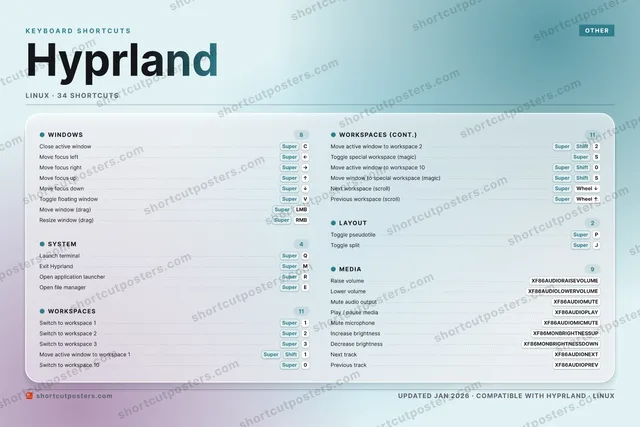
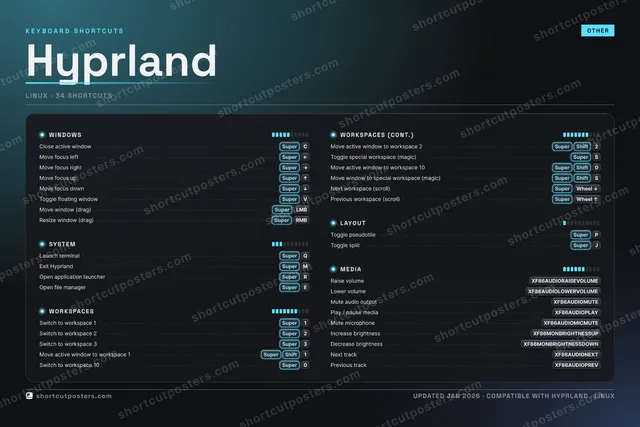
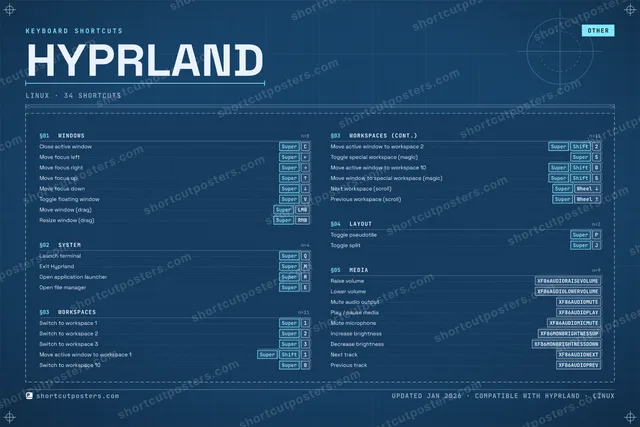
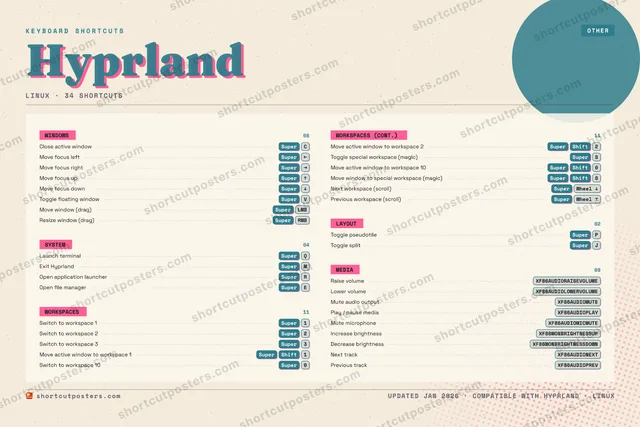
HYPRLANDKEYBOARD SHORTCUTS · LINUX · 341SuperSwitch t…2SuperSwitch t…3SuperSwitch t…4567890SuperSwitch t…QSuperLaunch t…WESuperOpen fil…RSuperOpen app…TYUIOPSuperToggle p…ASSuperToggle s…DFGHJSuperToggle s…KLZXCSuperClose ac…VSuperToggle f…BNMSuperExit Hyp…MORE SHORTCUTSMove focus le…SuperLEFTMove focus ri…SuperRIGHTMove focus upSuperUPMove focus do…SuperDOWNMove active w…SuperShift1Move active w…SuperShift2Move window (…SuperMOUSE_LEFTResize window…SuperMOUSE_RIGHTMove active w…SuperShift0Move window t…SuperShiftSNext workspac…SuperMOUSE_DOWNPrevious work…SuperMOUSE_UPRaise volumeXF86AUDIORAISEVOLUMELower volumeXF86AUDIOLOWERVOLUMEMute audio ou…XF86AUDIOMUTEPlay / pause …XF86AUDIOPLAYMute micropho…XF86AUDIOMICMUTEIncrease brig…XF86MONBRIGHTNESSUPDecrease brig…XF86MONBRIGHTNESSDOWNNext trackXF86AUDIONEXTPrevious trackXF86AUDIOPREVshortcutposters.comUPDATED JAN 2026 · COMPATIBLE WITH HYPRLAND · LINUX

Hover to locate · click on the poster to disable · drag to reorder categories & shortcuts · to rename a category

Free PNG $0
  • Web resolution (1600 px)
  • Light watermark
  • Instant download
Made to order
Custom print-ready PDF $2.99
  • 300 DPI, framed-quality — no watermark
  • Every standard print size
  • Built to order from the poster above — checkout link emailed to you

Trouble ordering? Email business@shortcutposters.com.

How it works

  1. 1

    Choose a style

    Pick from four layouts: isometric keys, a typewriter list, a labelled keyboard map, or a bold editorial print.

  2. 2

    Make it yours

    Set the accent colour and palette, rename categories, and reorder anything.

  3. 3

    Pick the shortcuts

    Toggle exactly which shortcuts appear — or add your own custom ones.

  4. 4

    Download or print

    Export a free high-resolution PNG instantly, or order a print-ready PDF.

Four styles to choose from

HYPRLANDKEYBOARD SHORTCUTS · LINUX · 20 ESSENTIAL1SuperSwitch t…2SuperSwitch t…3SuperSwitch t…4567890SuperSwitch t…QSuperLaunch t…WESuperOpen fil…RSuperOpen app…TYUIOPSuperToggle p…ASSuperToggle s…DFGHJKLZXCSuperClose ac…VSuperToggle f…BNMSuperExit Hyp…MORE SHORTCUTSMove focus leftSuperLEFTMove focus rightSuperRIGHTMove focus upSuperUPMove focus downSuperDOWNMove active windo…SuperShift1Move active windo…SuperShift2Move window (drag)SuperMOUSE_LEFTResize window (dr…SuperMOUSE_RIGHTshortcutposters.comUPDATED JAN 2026 · COMPATIBLE WITH HYPRLAND · LINUX
Keyboard map Every binding labelled on a realistic QWERTY or AZERTY keyboard.
WINDOWSClose active windowSuperCMove focus leftSuperLEFTMove focus rightSuperRIGHTMove focus upSuperUPMove focus downSuperDOWNToggle floating windowSuperVMove window (drag)SuperMOUSE_LEFTResize window (drag)SuperMOUSE_RIGHTLAYOUTToggle pseudotileSuperPSYSTEMLaunch terminalSuperQExit HyprlandSuperMOpen application launcherSuperROpen file managerSuperEWORKSPACESSwitch to workspace 1Super1Switch to workspace 2Super2Switch to workspace 3Super3Move active window to workspace 1SuperShift1Switch to workspace 10Super0Move active window to workspace 2SuperShift2Toggle special workspace (magic)SuperSHyprlandKEYBOARD SHORTCUTS · LINUX · 20 ESSENTIALBOTH LAYOUTSQWERTYQWERTYAZERTYAZERTYshortcutposters.comUPDATED JAN 2026 · COMPATIBLE WITH HYPRLAND · LINUX
Isometric Shortcuts on a 3D isometric keyboard — bold and poster-like.
WINDOWS08Close active windowSuperCMove focus leftSuperLEFTMove focus rightSuperRIGHTMove focus upSuperUPMove focus downSuperDOWNToggle floating windowSuperVMove window (drag)SuperMOUSE_LEFTResize window (drag)SuperMOUSE_RIGHTLAYOUT01Toggle pseudotileSuperPSYSTEM04Launch terminalSuperQExit HyprlandSuperMOpen application launcherSuperROpen file managerSuperEWORKSPACES07Switch to workspace 1Super1Switch to workspace 2Super2Switch to workspace 3Super3Move active window to workspace 1SuperShift1Switch to workspace 10Super0Move active window to workspace 2SuperShift2Toggle special workspace (magic)SuperSHyprlandKEYBOARD SHORTCUTS · LINUX · 20 ESSENTIALBOTH LAYOUTSQWERTYQWERTYAZERTYAZERTYshortcutposters.comUPDATED JAN 2026 · COMPATIBLE WITH HYPRLAND · LINUX
Typewriter A clean printed list, grouped by category — dense and legible.
HYPRLAND · KEYBOARD SHORTCUTSLinux · 4 SETS · No.01HYPRLANDTOTAL20SHORTCUTSFOR LINUX · SHIPPED COMBOSSETSWINDOWS08SYSTEM04WORKSPACES07LAYOUT01REF. EDITION · JAN 2026shortcutposters.comClose active windowSuperCMove focus leftSuperLEFTMove focus rightSuperRIGHTMove focus upSuperUPMove focus downSuperDOWNToggle floating windowSuperVMove window (drag)SuperMOUSE_LEFTResize window (drag)SuperMOUSE_RIGHTLaunch terminalSuperQExit HyprlandSuperMOpen application launcherSuperROpen file managerSuperESwitch to workspace 1Super1Switch to workspace 2Super2Switch to workspace 3Super3Move active window to workspace 1SuperShift1Switch to workspace 10Super0Move active window to workspace 2SuperShift2Toggle special workspace (magic)SuperSToggle pseudotileSuperP
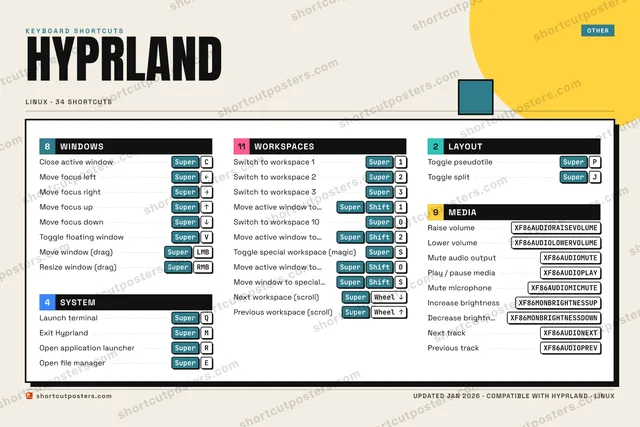
Editorial A bold Swiss-style print: giant wordmark, dense keycap columns, and a totals rail.

Frequently asked questions

Is the Hyprland poster maker free?

Yes — you can design and download a high-resolution PNG of your Hyprland shortcuts poster for free. A print-ready PDF is an optional paid upgrade.

Can I choose which Hyprland shortcuts appear?

Yes. Toggle any shortcut on or off, reorder them, rename categories, and even add your own custom shortcuts.

Can I change the colours and style?

Yes. Pick an accent colour, choose a palette, and switch between the isometric, typewriter, and keyboard-map styles.

Which keyboard layout and operating system are supported?

Choose QWERTY or AZERTY, and switch the edition between the operating systems Hyprland supports (macOS, Windows, Linux).

How do I get a printed poster?

Download the free PNG to print yourself, or order the print-ready, framed-quality PDF directly from the maker.