ShortcutPosters

Poster maker

Make your Houdini shortcuts poster

Pick the shortcuts that matter, add your own, tune the colours and style — then download a free personalized PNG, or order the print-ready PDF.

Making a poster for:
Style
Accent
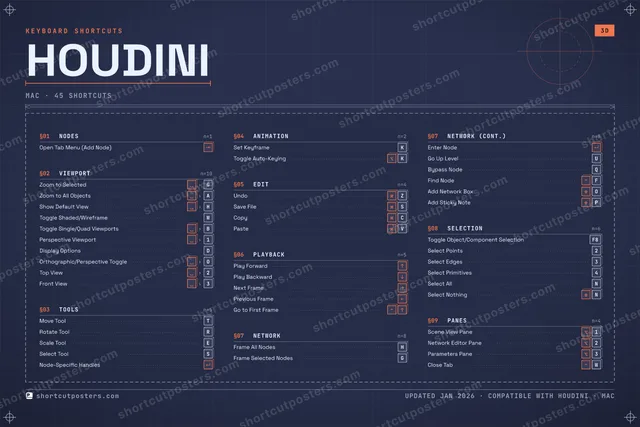
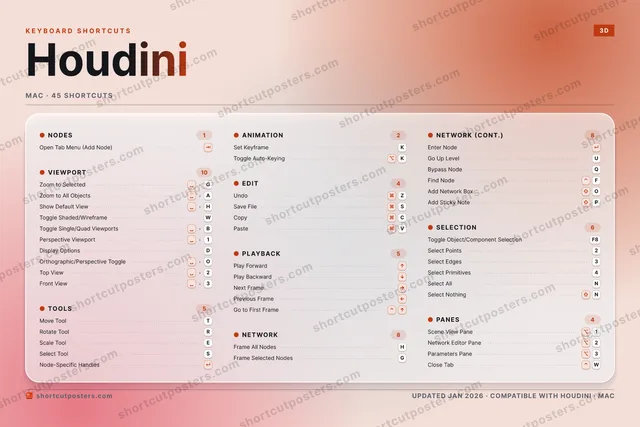
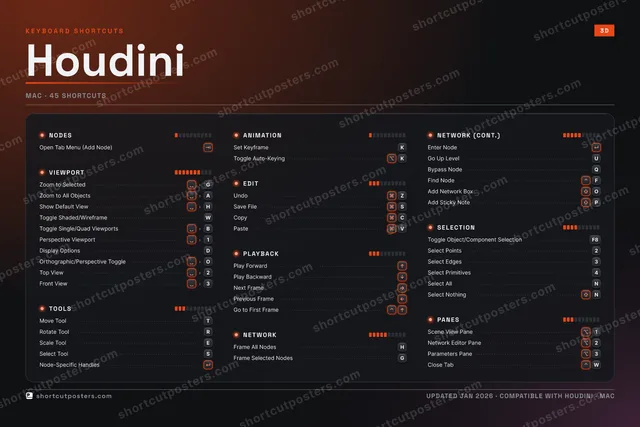
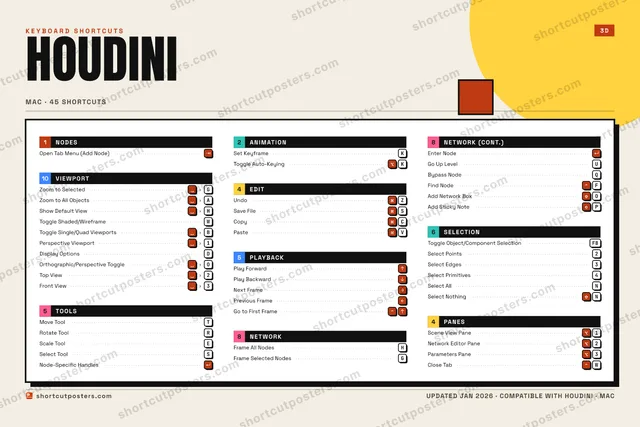
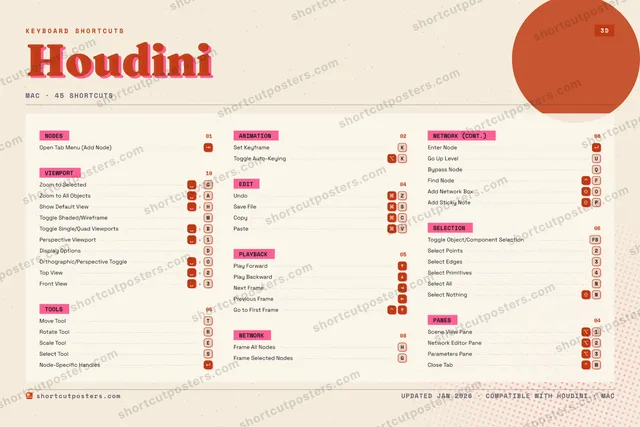
HOUDINIKEYBOARD SHORTCUTS · MAC · 451Scene Vi…2Select P…3Select E…4Select P…567890QBypass N…WToggle S…EScale To…RRotate T…TMove ToolYUGo Up Le…IOAdd Netw…PAdd Stic…ASSave FileDDisplay …FFind NodeGFrame Se…HFrame Al…JKSet Keyf…LZUndoXCCopyVPasteBNSelect A…MMORE SHORTCUTSOpen Tab Menu…Zoom to Selec…GZoom to All O…ASelect ToolSPlay ForwardEnter NodeShow Default …HToggle Single…BPerspective V…1Node-Specific…Toggle Object…F8Toggle Auto-K…KPlay BackwardNext FramePrevious FrameGo to First F…Network Edito…2Parameters Pa…3Orthographic/…OTop View2Front View3Select NothingNClose TabWshortcutposters.comUPDATED JAN 2026 · COMPATIBLE WITH HOUDINI · MAC

Hover to locate · click on the poster to disable · drag to reorder categories & shortcuts · to rename a category

Free PNG $0
  • Web resolution (1600 px)
  • Light watermark
  • Instant download
Made to order
Custom print-ready PDF $2.99
  • 300 DPI, framed-quality — no watermark
  • Every standard print size
  • Built to order from the poster above — checkout link emailed to you

Trouble ordering? Email business@shortcutposters.com.

How it works

  1. 1

    Choose a style

    Pick from four layouts: isometric keys, a typewriter list, a labelled keyboard map, or a bold editorial print.

  2. 2

    Make it yours

    Set the accent colour and palette, rename categories, and reorder anything.

  3. 3

    Pick the shortcuts

    Toggle exactly which shortcuts appear — or add your own custom ones.

  4. 4

    Download or print

    Export a free high-resolution PNG instantly, or order a print-ready PDF.

Four styles to choose from

HOUDINIKEYBOARD SHORTCUTS · MAC · 20 ESSENTIAL1234567890QBypass N…WToggle S…EScale To…RRotate T…TMove ToolYUGo Up Le…IOPASSave FileDFGFrame Se…HFrame Al…JKSet Keyf…LZUndoXCCopyVPasteBNMMORE SHORTCUTSOpen Tab Menu (Ad…Zoom to SelectedGZoom to All Objec…ASelect ToolSPlay ForwardEnter NodeShow Default ViewHshortcutposters.comUPDATED JAN 2026 · COMPATIBLE WITH HOUDINI · MAC
Keyboard map Every binding labelled on a realistic QWERTY or AZERTY keyboard.
NODESOpen Tab Menu (Add Node)TOOLSMove ToolTRotate ToolRScale ToolESelect ToolSPLAYBACKPlay ForwardNETWORKFrame All NodesHFrame Selected NodesGEnter NodeGo Up LevelUBypass NodeQVIEWPORTZoom to SelectedGZoom to All ObjectsAShow Default ViewHToggle Shaded/WireframeWANIMATIONSet KeyframeKEDITUndoZSave FileSCopyCPasteVHoudiniKEYBOARD SHORTCUTS · MAC · 20 ESSENTIALBOTH LAYOUTSQWERTYQWERTYAZERTYAZERTYshortcutposters.comUPDATED JAN 2026 · COMPATIBLE WITH HOUDINI · MAC
Isometric Shortcuts on a 3D isometric keyboard — bold and poster-like.
NODES01Open Tab Menu (Add Node)TOOLS04Move ToolTRotate ToolRScale ToolESelect ToolSPLAYBACK01Play ForwardNETWORK05Frame All NodesHFrame Selected NodesGEnter NodeGo Up LevelUBypass NodeQVIEWPORT04Zoom to SelectedGZoom to All ObjectsAShow Default ViewHToggle Shaded/WireframeWANIMATION01Set KeyframeKEDIT04UndoZSave FileSCopyCPasteVHoudiniKEYBOARD SHORTCUTS · MAC · 20 ESSENTIALBOTH LAYOUTSQWERTYQWERTYAZERTYAZERTYshortcutposters.comUPDATED JAN 2026 · COMPATIBLE WITH HOUDINI · MAC
Typewriter A clean printed list, grouped by category — dense and legible.
HOUDINI · KEYBOARD SHORTCUTSMac · 7 SETS · No.01HOUDINITOTAL20SHORTCUTSFOR MAC · SHIPPED COMBOSSETSNODES01VIEWPORT04TOOLS04ANIMATION01EDIT04PLAYBACK01NETWORK05REF. EDITION · JAN 2026shortcutposters.comOpen Tab Menu (Add Node)Zoom to SelectedGZoom to All ObjectsAShow Default ViewHToggle Shaded/WireframeWMove ToolTRotate ToolRScale ToolESelect ToolSSet KeyframeKUndoZSave FileSCopyCPasteVPlay ForwardFrame All NodesHFrame Selected NodesGEnter NodeGo Up LevelUBypass NodeQ
Editorial A bold Swiss-style print: giant wordmark, dense keycap columns, and a totals rail.

Frequently asked questions

Is the Houdini poster maker free?

Yes — you can design and download a high-resolution PNG of your Houdini shortcuts poster for free. A print-ready PDF is an optional paid upgrade.

Can I choose which Houdini shortcuts appear?

Yes. Toggle any shortcut on or off, reorder them, rename categories, and even add your own custom shortcuts.

Can I change the colours and style?

Yes. Pick an accent colour, choose a palette, and switch between the isometric, typewriter, and keyboard-map styles.

Which keyboard layout and operating system are supported?

Choose QWERTY or AZERTY, and switch the edition between the operating systems Houdini supports (macOS, Windows, Linux).

How do I get a printed poster?

Download the free PNG to print yourself, or order the print-ready, framed-quality PDF directly from the maker.