ShortcutPosters

Poster maker

Make your HandBrake shortcuts poster

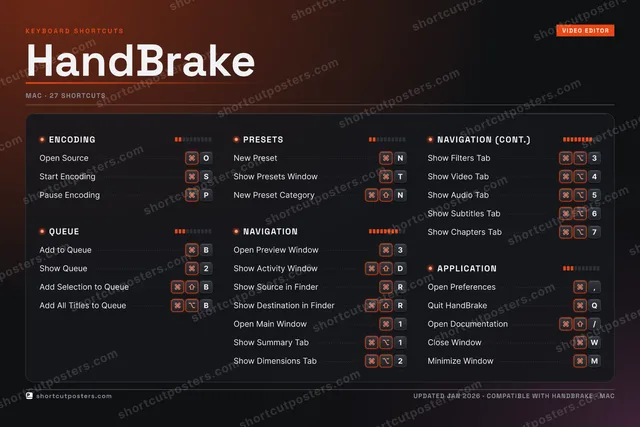
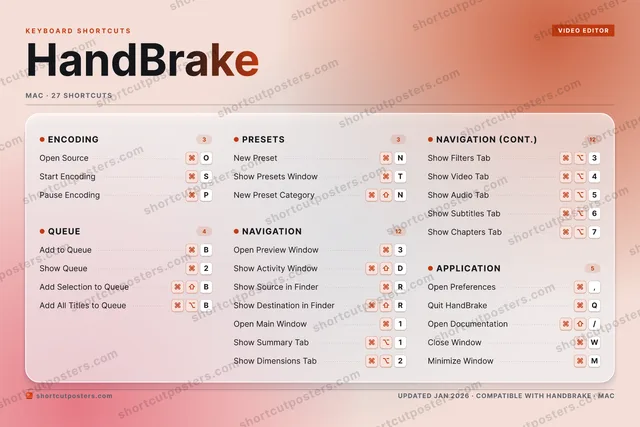
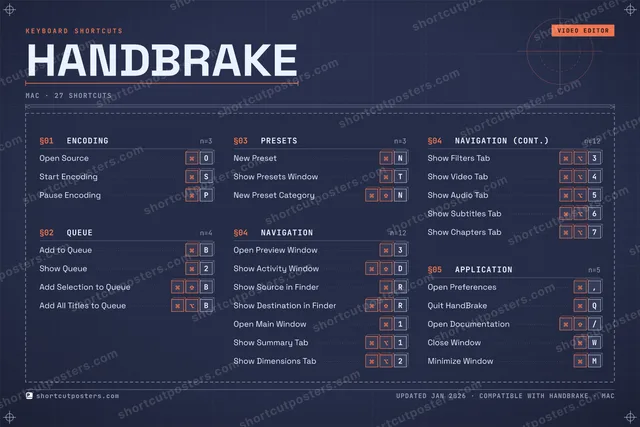
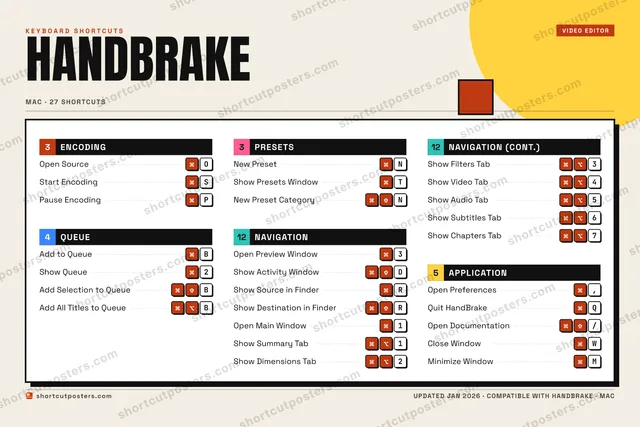
Pick the shortcuts that matter, add your own, tune the colours and style — then download a free personalized PNG, or order the print-ready PDF.

Making a poster for:
Style
Accent
HANDBRAKEKEYBOARD SHORTCUTS · MAC · 271Open Mai…2Show Que…3Open Pre…4⌘ ⌥Show Vid…5⌘ ⌥Show Aud…6⌘ ⌥Show Sub…7⌘ ⌥Show Cha…890QQuit Han…WClose Wi…ERShow Sou…TShow Pre…YUIOOpen Sou…PPause En…ASStart En…D⌘ ⇧Show Act…FGHJKLZXCVBAdd to Q…NNew Pres…MMinimize…MORE SHORTCUTSAdd Selection to …BAdd All Titles to…BOpen Preferences,Show Destination …RNew Preset Catego…NShow Summary Tab1Show Dimensions T…2Show Filters Tab3Open Documentation/shortcutposters.comUPDATED JAN 2026 · COMPATIBLE WITH HANDBRAKE · MAC

Hover to locate · click on the poster to disable · drag to reorder categories & shortcuts · to rename a category

Free PNG $0
  • Web resolution (1600 px)
  • Light watermark
  • Instant download
Made to order
Custom print-ready PDF $2.99
  • 300 DPI, framed-quality — no watermark
  • Every standard print size
  • Built to order from the poster above — checkout link emailed to you

Trouble ordering? Email business@shortcutposters.com.

How it works

  1. 1

    Choose a style

    Pick from four layouts: isometric keys, a typewriter list, a labelled keyboard map, or a bold editorial print.

  2. 2

    Make it yours

    Set the accent colour and palette, rename categories, and reorder anything.

  3. 3

    Pick the shortcuts

    Toggle exactly which shortcuts appear — or add your own custom ones.

  4. 4

    Download or print

    Export a free high-resolution PNG instantly, or order a print-ready PDF.

Four styles to choose from

HANDBRAKEKEYBOARD SHORTCUTS · MAC · 20 ESSENTIAL1Open Mai…2Show Que…3Open Pre…4⌘ ⌥Show Vid…567890QWERShow Sou…TShow Pre…YUIOOpen Sou…PPause En…ASStart En…D⌘ ⇧Show Act…FGHJKLZXCVBAdd to Q…NNew Pres…MMORE SHORTCUTSAdd Selection to …BAdd All Titles to…BOpen Preferences,Show Destination …RNew Preset Catego…NShow Summary Tab1Show Dimensions T…2Show Filters Tab3shortcutposters.comUPDATED JAN 2026 · COMPATIBLE WITH HANDBRAKE · MAC
Keyboard map Every binding labelled on a realistic QWERTY or AZERTY keyboard.
ENCODINGOpen SourceOStart EncodingSPause EncodingPPRESETSNew PresetNShow Presets WindowTNew Preset CategoryNAPPLICATIONOpen Preferences,QUEUEAdd to QueueBShow Queue2Add Selection to QueueBAdd All Titles to QueueBNAVIGATIONOpen Preview Window3Show Activity WindowDShow Source in FinderRShow Destination in FinderROpen Main Window1Show Summary Tab1Show Dimensions Tab2Show Filters Tab3Show Video Tab4HandBrakeKEYBOARD SHORTCUTS · MAC · 20 ESSENTIALBOTH LAYOUTSQWERTYQWERTYAZERTYAZERTYshortcutposters.comUPDATED JAN 2026 · COMPATIBLE WITH HANDBRAKE · MAC
Isometric Shortcuts on a 3D isometric keyboard — bold and poster-like.
ENCODING03Open SourceOStart EncodingSPause EncodingPPRESETS03New PresetNShow Presets WindowTNew Preset CategoryNAPPLICATION01Open Preferences,QUEUE04Add to QueueBShow Queue2Add Selection to QueueBAdd All Titles to QueueBNAVIGATION09Open Preview Window3Show Activity WindowDShow Source in FinderRShow Destination in FinderROpen Main Window1Show Summary Tab1Show Dimensions Tab2Show Filters Tab3Show Video Tab4HandBrakeKEYBOARD SHORTCUTS · MAC · 20 ESSENTIALBOTH LAYOUTSQWERTYQWERTYAZERTYAZERTYshortcutposters.comUPDATED JAN 2026 · COMPATIBLE WITH HANDBRAKE · MAC
Typewriter A clean printed list, grouped by category — dense and legible.
HANDBRAKE · KEYBOARD SHORTCUTSMac · 5 SETS · No.01HANDBRAKETOTAL20SHORTCUTSFOR MAC · SHIPPED COMBOSSETSENCODING03QUEUE04PRESETS03NAVIGATION09APPLICATION01REF. EDITION · JAN 2026shortcutposters.comOpen SourceOStart EncodingSPause EncodingPAdd to QueueBShow Queue2Add Selection to QueueBAdd All Titles to QueueBNew PresetNShow Presets WindowTNew Preset CategoryNOpen Preview Window3Show Activity WindowDShow Source in FinderRShow Destination in FinderROpen Main Window1Show Summary Tab1Show Dimensions Tab2Show Filters Tab3Show Video Tab4Open Preferences,
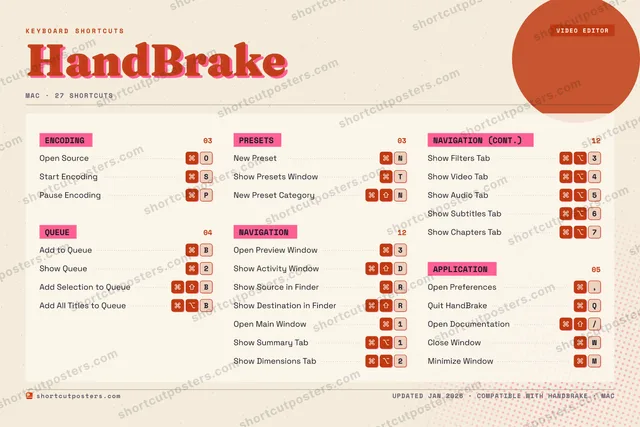
Editorial A bold Swiss-style print: giant wordmark, dense keycap columns, and a totals rail.

Frequently asked questions

Is the HandBrake poster maker free?

Yes — you can design and download a high-resolution PNG of your HandBrake shortcuts poster for free. A print-ready PDF is an optional paid upgrade.

Can I choose which HandBrake shortcuts appear?

Yes. Toggle any shortcut on or off, reorder them, rename categories, and even add your own custom shortcuts.

Can I change the colours and style?

Yes. Pick an accent colour, choose a palette, and switch between the isometric, typewriter, and keyboard-map styles.

Which keyboard layout and operating system are supported?

Choose QWERTY or AZERTY, and switch the edition between the operating systems HandBrake supports (macOS, Windows, Linux).

How do I get a printed poster?

Download the free PNG to print yourself, or order the print-ready, framed-quality PDF directly from the maker.