ShortcutPosters

Poster maker

Make your GNU Emacs shortcuts poster

Pick the shortcuts that matter, add your own, tune the colours and style — then download a free personalized PNG, or order the print-ready PDF.

Making a poster for:
Style
Accent
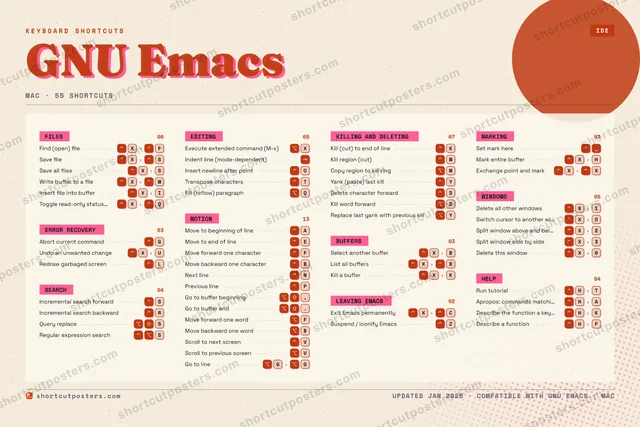
GNU EMACSKEYBOARD SHORTCUTS · MAC · 47 ESSENTIAL12345⌥ ⇧Query re…67890QFill (re…WKill reg…EMove to …RIncremen…TTranspos…YYank (pa…UIOInsert n…PPrevious…AMove to …SIncremen…DDelete c…FMove for…GAbort cu…HRun tuto…JKKill (cu…LRedraw g…ZSuspend …XFind (op…CVScroll t…BMove bac…NNext lineMMORE SHORTCUTSSave fileXSUndo an unwan…XUExecute exten…XCopy region t…WSelect anothe…XBExit Emacs pe…XCSet mark hereMark entire b…XHDelete all ot…X1Switch cursor…XOSave all filesXSGo to buffer …,Go to buffer ….Split window …X2Split window …X3Delete this w…X0List all buff…XBKill a bufferXKIndent line (…Write buffer …XWMove forward …FMove backward…BScroll to pre…VGo to lineGGKill word for…Dshortcutposters.comUPDATED JAN 2026 · COMPATIBLE WITH GNU EMACS · MAC

Hover to locate · click on the poster to disable · drag to reorder categories & shortcuts · to rename a category

Free PNG $0
  • Web resolution (1600 px)
  • Light watermark
  • Instant download
Made to order
Custom print-ready PDF $2.99
  • 300 DPI, framed-quality — no watermark
  • Every standard print size
  • Built to order from the poster above — checkout link emailed to you

Trouble ordering? Email business@shortcutposters.com.

How it works

  1. 1

    Choose a style

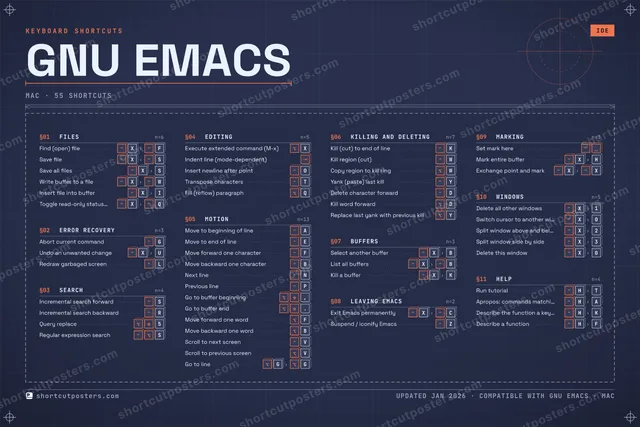
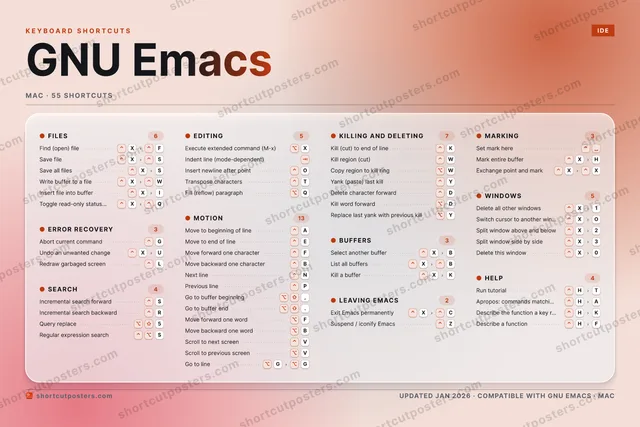
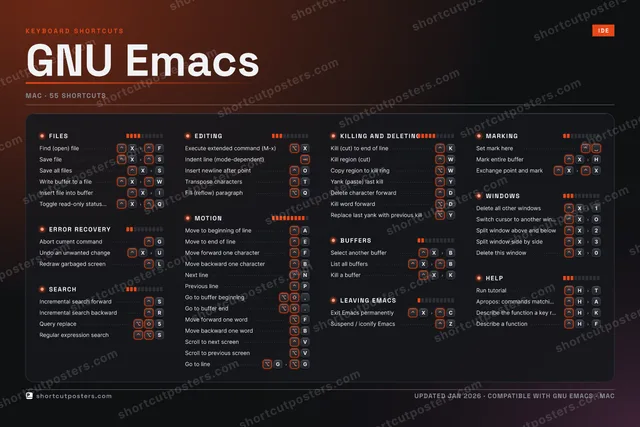
    Pick from four layouts: isometric keys, a typewriter list, a labelled keyboard map, or a bold editorial print.

  2. 2

    Make it yours

    Set the accent colour and palette, rename categories, and reorder anything.

  3. 3

    Pick the shortcuts

    Toggle exactly which shortcuts appear — or add your own custom ones.

  4. 4

    Download or print

    Export a free high-resolution PNG instantly, or order a print-ready PDF.

Four styles to choose from

GNU EMACSKEYBOARD SHORTCUTS · MAC · 20 ESSENTIAL12345⌥ ⇧Query re…67890QWKill reg…EMove to …RIncremen…TYYank (pa…UIOPAMove to …SIncremen…DFGAbort cu…HJKKill (cu…LZXFind (op…CVBNMMORE SHORTCUTSSave fileXSUndo an unwanted …XUExecute extended …XCopy region to ki…WSelect another bu…XBExit Emacs perman…XCSet mark hereMark entire bufferXHDelete all other …X1Switch cursor to …XOshortcutposters.comUPDATED JAN 2026 · COMPATIBLE WITH GNU EMACS · MAC
Keyboard map Every binding labelled on a realistic QWERTY or AZERTY keyboard.
ERROR RECOVERYAbort current commandGUndo an unwanted changeXUSEARCHIncremental search forwardSIncremental search backwardRQuery replace5KILLING AND DELETINGKill (cut) to end of lineKKill region (cut)WCopy region to kill ringWYank (paste) last killYLEAVING EMACSExit Emacs permanentlyXCWINDOWSDelete all other windowsX1Switch cursor to another windowXOFILESFind (open) fileXFSave fileXSEDITINGExecute extended command (M-x)XMOTIONMove to beginning of lineAMove to end of lineEBUFFERSSelect another bufferXBMARKINGSet mark hereMark entire bufferXHGNU EmacsKEYBOARD SHORTCUTS · MAC · 20 ESSENTIALBOTH LAYOUTSQWERTYQWERTYAZERTYAZERTYshortcutposters.comUPDATED JAN 2026 · COMPATIBLE WITH GNU EMACS · MAC
Isometric Shortcuts on a 3D isometric keyboard — bold and poster-like.
FILES02Find (open) fileXFSave fileXSEDITING01Execute extended command (M-x)XMOTION02Move to beginning of lineAMove to end of lineEBUFFERS01Select another bufferXBLEAVING EMACS01Exit Emacs permanentlyXCWINDOWS02Delete all other windowsX1Switch cursor to another windowXOERROR RECOVERY02Abort current commandGUndo an unwanted changeXUSEARCH03Incremental search forwardSIncremental search backwardRQuery replace5KILLING AND DELETING04Kill (cut) to end of lineKKill region (cut)WCopy region to kill ringWYank (paste) last killYMARKING02Set mark hereMark entire bufferXHGNU EmacsKEYBOARD SHORTCUTS · MAC · 20 ESSENTIALBOTH LAYOUTSQWERTYQWERTYAZERTYAZERTYshortcutposters.comUPDATED JAN 2026 · COMPATIBLE WITH GNU EMACS · MAC
Typewriter A clean printed list, grouped by category — dense and legible.
GNU EMACS · KEYBOARD SHORTCUTSMac · 10 SETS · No.01GNU EMACSTOTAL20SHORTCUTSFOR MAC · SHIPPED COMBOSSETSFILES02ERROR RECOVER02SEARCH03EDITING01MOTION02KILLING AND D04BUFFERS01LEAVING EMACS01MARKING02WINDOWS02REF. EDITION · JAN 2026shortcutposters.comFind (open) fileXFSave fileXSAbort current commandGUndo an unwanted changeXUIncremental search forwardSIncremental search backwardRQuery replace5Execute extended command (M-x)XMove to beginning of lineAMove to end of lineEKill (cut) to end of lineKKill region (cut)WCopy region to kill ringWYank (paste) last killYSelect another bufferXBExit Emacs permanentlyXCSet mark hereMark entire bufferXHDelete all other windowsX1Switch cursor to another windowXO
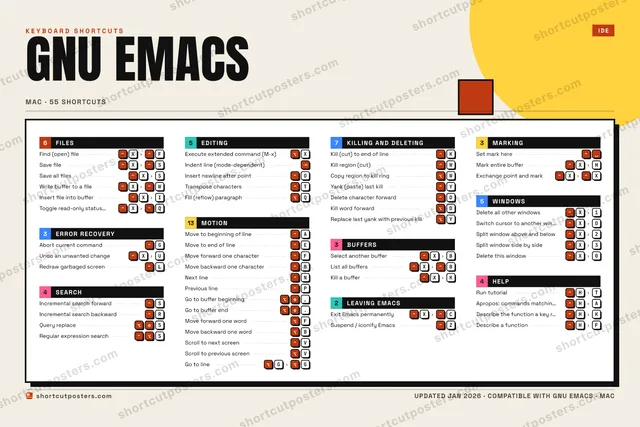
Editorial A bold Swiss-style print: giant wordmark, dense keycap columns, and a totals rail.

Frequently asked questions

Is the GNU Emacs poster maker free?

Yes — you can design and download a high-resolution PNG of your GNU Emacs shortcuts poster for free. A print-ready PDF is an optional paid upgrade.

Can I choose which GNU Emacs shortcuts appear?

Yes. Toggle any shortcut on or off, reorder them, rename categories, and even add your own custom shortcuts.

Can I change the colours and style?

Yes. Pick an accent colour, choose a palette, and switch between the isometric, typewriter, and keyboard-map styles.

Which keyboard layout and operating system are supported?

Choose QWERTY or AZERTY, and switch the edition between the operating systems GNU Emacs supports (macOS, Windows, Linux).

How do I get a printed poster?

Download the free PNG to print yourself, or order the print-ready, framed-quality PDF directly from the maker.