ShortcutPosters
iPhone appNew

Make your Dwarf Fortress controls poster

Pick the keybinds that matter, add your own, tune the colours and style — then download a free personalized PNG.

Making a poster for:
Style
Accent
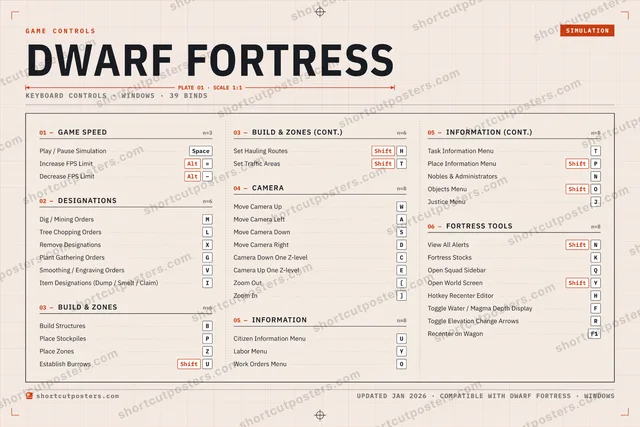
01 —GAME SPEEDn=3Play / Pause SimulationSpaceIncrease FPS LimitAlt=Decrease FPS LimitAlt−02 —DESIGNATIONSn=6Dig / Mining OrdersMTree Chopping OrdersLRemove DesignationsXPlant Gathering OrdersGSmoothing / Engraving OrdersVItem Designations (Dump / Smelt / Claim)I03 —BUILD & ZONESn=6Build StructuresBPlace StockpilesPPlace ZonesZEstablish BurrowsShiftU03 —BUILD & ZONES (CONT.)n=6Set Hauling RoutesShiftHSet Traffic AreasShiftT04 —CAMERAn=8Move Camera UpWMove Camera LeftAMove Camera DownSMove Camera RightDCamera Down One Z-levelCCamera Up One Z-levelEZoom Out[Zoom In]05 —INFORMATIONn=8Citizen Information MenuULabor MenuYWork Orders MenuO05 —INFORMATION (CONT.)n=8Task Information MenuTPlace Information MenuShiftPNobles & AdministratorsNObjects MenuShiftOJustice MenuJ06 —FORTRESS TOOLSn=8View All AlertsShiftNFortress StocksKOpen Squad SidebarQOpen World ScreenShiftYHotkey Recenter EditorHToggle Water / Magma Depth DisplayFToggle Elevation Change ArrowsRRecenter on WagonF1GAME CONTROLSSIMULATIONDWARF FORTRESSPLATE 01 · SCALE 1:1KEYBOARD CONTROLS · WINDOWS · 39 BINDSshortcutposters.comUPDATED JAN 2026 · COMPATIBLE WITH DWARF FORTRESS · WINDOWSshortcutposters.comshortcutposters.comshortcutposters.comshortcutposters.comshortcutposters.comshortcutposters.comshortcutposters.comshortcutposters.comshortcutposters.comshortcutposters.comshortcutposters.comshortcutposters.comshortcutposters.comshortcutposters.comshortcutposters.comshortcutposters.comshortcutposters.comshortcutposters.comshortcutposters.comshortcutposters.comshortcutposters.comshortcutposters.comshortcutposters.comshortcutposters.comshortcutposters.comshortcutposters.comshortcutposters.comshortcutposters.comshortcutposters.comshortcutposters.comshortcutposters.comshortcutposters.comshortcutposters.comshortcutposters.comshortcutposters.comshortcutposters.comshortcutposters.comshortcutposters.comshortcutposters.comshortcutposters.comshortcutposters.comshortcutposters.comshortcutposters.comshortcutposters.comshortcutposters.comshortcutposters.comshortcutposters.comshortcutposters.comshortcutposters.comshortcutposters.comshortcutposters.comshortcutposters.comshortcutposters.comshortcutposters.comshortcutposters.comshortcutposters.comshortcutposters.comshortcutposters.comshortcutposters.comshortcutposters.comshortcutposters.comshortcutposters.comshortcutposters.comshortcutposters.comshortcutposters.comshortcutposters.comshortcutposters.comshortcutposters.comshortcutposters.comshortcutposters.comshortcutposters.comshortcutposters.comshortcutposters.comshortcutposters.comshortcutposters.comshortcutposters.comshortcutposters.comshortcutposters.comshortcutposters.comshortcutposters.comshortcutposters.comshortcutposters.comshortcutposters.comshortcutposters.comshortcutposters.comshortcutposters.comshortcutposters.comshortcutposters.comshortcutposters.comshortcutposters.comshortcutposters.comshortcutposters.comshortcutposters.comshortcutposters.comshortcutposters.comshortcutposters.comshortcutposters.comshortcutposters.comshortcutposters.comshortcutposters.comshortcutposters.comshortcutposters.comshortcutposters.comshortcutposters.comshortcutposters.comshortcutposters.comshortcutposters.comshortcutposters.comshortcutposters.comshortcutposters.comshortcutposters.com

Hover to locate · click on the poster to disable · drag to reorder categories & shortcuts · ✎ to rename a category

Free PNG $0
  • Web resolution (1600 px)
  • Light watermark
  • Instant download
Made to order
Custom print-ready PDF $2.99
  • 300 DPI, framed-quality — no watermark
  • Every standard print size
  • Built to order from the poster above — checkout link emailed to you

Trouble ordering? Email business@shortcutposters.com.

How it works

  1. 1

    Choose a style

    Start from the generative Arcade art, or switch to isometric keys, a typewriter list, a keyboard map, or an editorial print.

  2. 2

    Make it yours

    Set the accent colour, rename categories, and reorder anything.

  3. 3

    Pick the controls

    Toggle exactly which keybinds appear — or add your own custom ones.

  4. 4

    Download or print

    Export a free high-resolution PNG instantly, or order a print-ready PDF.

Five styles to choose from
Dwarf Fortress controls poster preview
Arcade Generative art drawn from the game's genre and colour — pure geometry, zero spoilers.
DWARF FORTRESSKEYBOARD SHORTCUTS · WINDOWS · 20 ESSENTIAL1234567890QWMove Cam…ECamera U…RTYLabor MenuUCitizen Inf…IOWork Orde…PPlace Stoc…AMove Cam…SMove Cam…DMove Cam…FGPlant Gath…HJKLTree Chop…ZPlace ZonesXRemove D…CCamera D…VSmoothing…BBuild Struc…NMDig / Minin…MORE SHORTCUTSPlay / Pause SimulationSpaceZoom Out[Zoom In]shortcutposters.comUPDATED JAN 2026 · COMPATIBLE WITH DWARF FORTRESS · WINDOWS
Keyboard map Every binding labelled on a realistic QWERTY or AZERTY keyboard.
GAME SPEEDPlay / Pause SimulationSpaceBUILD & ZONESBuild StructuresBPlace StockpilesPPlace ZonesZINFORMATIONCitizen Information MenuULabor MenuYWork Orders MenuODESIGNATIONSDig / Mining OrdersMTree Chopping OrdersLRemove DesignationsXPlant Gathering OrdersGSmoothing / Engraving OrdersVCAMERAMove Camera UpWMove Camera LeftAMove Camera DownSMove Camera RightDCamera Down One Z-levelCCamera Up One Z-levelEZoom Out[Zoom In]Dwarf FortressKEYBOARD SHORTCUTS · WINDOWS · 20 ESSENTIALBOTH LAYOUTSQWERTYQWERTYAZERTYAZERTYshortcutposters.comUPDATED JAN 2026 · COMPATIBLE WITH DWARF FORTRESS · WINDOWS
Isometric Shortcuts on a 3D isometric keyboard — bold and poster-like.
GAME SPEED01Play / Pause SimulationSpaceBUILD & ZONES03Build StructuresBPlace StockpilesPPlace ZonesZINFORMATION03Citizen Information MenuULabor MenuYWork Orders MenuODESIGNATIONS05Dig / Mining OrdersMTree Chopping OrdersLRemove DesignationsXPlant Gathering OrdersGSmoothing / Engraving OrdersVCAMERA08Move Camera UpWMove Camera LeftAMove Camera DownSMove Camera RightDCamera Down One Z-levelCCamera Up One Z-levelEZoom Out[Zoom In]Dwarf FortressKEYBOARD SHORTCUTS · WINDOWS · 20 ESSENTIALBOTH LAYOUTSQWERTYQWERTYAZERTYAZERTYshortcutposters.comUPDATED JAN 2026 · COMPATIBLE WITH DWARF FORTRESS · WINDOWS
Typewriter A clean printed list, grouped by category — dense and legible.
DWARF FORTRESS · KEYBOARD SHORTCUTSWindows · 5 SETS · No.01DWARF FORTRESSTOTAL20SHORTCUTSFOR WINDOWS · SHIPPED COMBOSSETSGAME SPEED01DESIGNATIONS05BUILD & ZONES03CAMERA08INFORMATION03REF. EDITION · JAN 2026shortcutposters.comPlay / Pause SimulationSpaceDig / Mining OrdersMTree Chopping OrdersLRemove DesignationsXPlant Gathering OrdersGSmoothing / Engraving OrdersVBuild StructuresBPlace StockpilesPPlace ZonesZMove Camera UpWMove Camera LeftAMove Camera DownSMove Camera RightDCamera Down One Z-levelCCamera Up One Z-levelEZoom Out[Zoom In]Citizen Information MenuULabor MenuYWork Orders MenuO
Editorial A bold Swiss-style print: giant wordmark, dense keycap columns, and a totals rail.

Frequently asked questions

Is the Dwarf Fortress controls poster maker free?

Yes — design your Dwarf Fortress keybinds poster and download it as a free, watermarked PNG. A print-ready PDF (PC / keyboard edition) is an optional paid upgrade.

Can I choose which Dwarf Fortress controls appear?

Yes. Toggle any keybind on or off, reorder them, rename categories, and add your own custom binds.

Which styles can I use?

Start from the Arcade style — generative art based on the game's genre — or switch to the isometric, typewriter, keyboard-map or editorial layouts, and pick your accent colour.

Does the poster use official Dwarf Fortress artwork?

No. The poster is built only from the keybinds, text and abstract generated shapes — never logos, covers, screenshots or key art.