ShortcutPosters

Poster maker

Make your Cinnamon shortcuts poster

Pick the shortcuts that matter, add your own, tune the colours and style — then download a free personalized PNG, or order the print-ready PDF.

Making a poster for:
Style
Accent
CINNAMONKEYBOARD SHORTCUTS · LINUX · 30 ESSENTIAL1234567890QWESuperOpen Hom…RCtrl Shift AltToggle s…TCtrl AltLaunch t…YUIOPASDSuperShow des…FGHJKLCtrl AltLock scr…ZXCVBNMMORE SHORTCUTSCycle through…AltTabClose windowAltF4Switch to wor…CtrlAltLEFTSwitch to wor…CtrlAltRIGHTCycle through…ShiftAltTabToggle maximi…AltF10Tile window t…SuperLEFTTile window t…SuperRIGHTTake a screen…PRINTShow window s…CtrlAltDOWNShow workspac…CtrlAltUPTile window t…SuperUPTile window t…SuperDOWNRun dialogAltF2Move window t…CtrlShiftAltLEFTMove window t…CtrlShiftAltRIGHTUnmaximize wi…AltF5Activate wind…AltSpaceLog outCtrlAltDelScreenshot of…AltPRINTScreenshot of…ShiftPRINTCycle through…CtrlAltTabMove window i…AltF7Resize window…AltF8Move window t…SuperShiftLEFTshortcutposters.comUPDATED JAN 2026 · COMPATIBLE WITH CINNAMON · LINUX

Hover to locate · click on the poster to disable · drag to reorder categories & shortcuts · to rename a category

Free PNG $0
  • Web resolution (1600 px)
  • Light watermark
  • Instant download
Made to order
Custom print-ready PDF $2.99
  • 300 DPI, framed-quality — no watermark
  • Every standard print size
  • Built to order from the poster above — checkout link emailed to you

Trouble ordering? Email business@shortcutposters.com.

How it works

  1. 1

    Choose a style

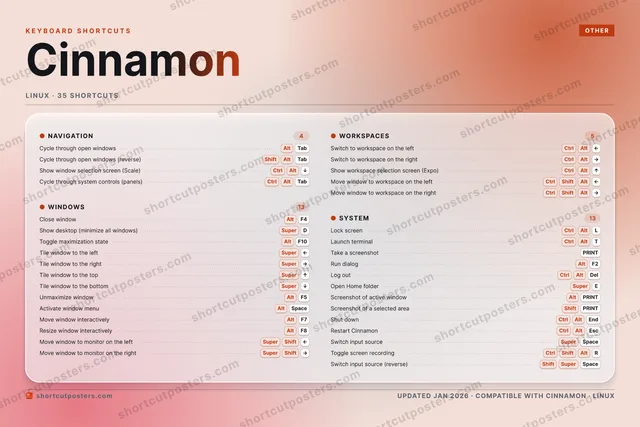
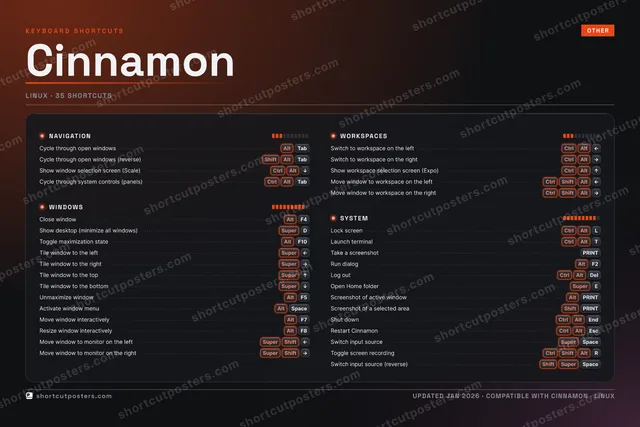
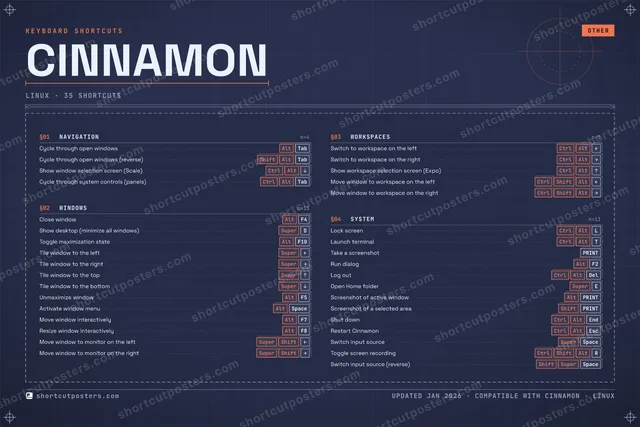
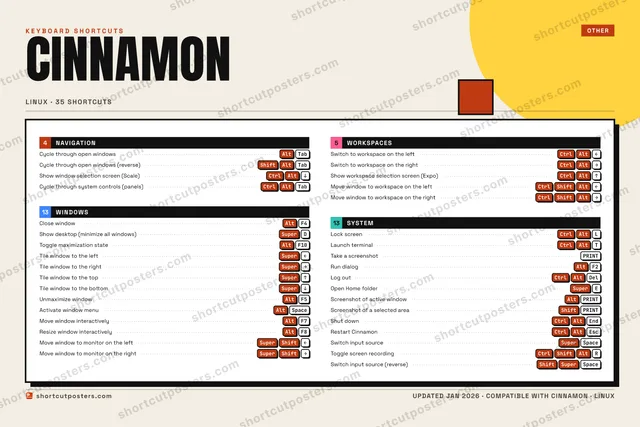
    Pick from four layouts: isometric keys, a typewriter list, a labelled keyboard map, or a bold editorial print.

  2. 2

    Make it yours

    Set the accent colour and palette, rename categories, and reorder anything.

  3. 3

    Pick the shortcuts

    Toggle exactly which shortcuts appear — or add your own custom ones.

  4. 4

    Download or print

    Export a free high-resolution PNG instantly, or order a print-ready PDF.

Four styles to choose from

CINNAMONKEYBOARD SHORTCUTS · LINUX · 20 ESSENTIAL1234567890QWERTCtrl AltLaunch t…YUIOPASDSuperShow des…FGHJKLCtrl AltLock scr…ZXCVBNMMORE SHORTCUTSCycle through ope…AltTabClose windowAltF4Switch to workspa…CtrlAltLEFTSwitch to workspa…CtrlAltRIGHTCycle through ope…ShiftAltTabToggle maximizati…AltF10Tile window to th…SuperLEFTTile window to th…SuperRIGHTTake a screenshotPRINTShow window selec…CtrlAltDOWNShow workspace se…CtrlAltUPTile window to th…SuperUPTile window to th…SuperDOWNRun dialogAltF2Move window to wo…CtrlShiftAltLEFTMove window to wo…CtrlShiftAltRIGHTUnmaximize windowAltF5shortcutposters.comUPDATED JAN 2026 · COMPATIBLE WITH CINNAMON · LINUX
Keyboard map Every binding labelled on a realistic QWERTY or AZERTY keyboard.
WINDOWSClose windowAltF4Show desktop (minimize all windows)SuperDToggle maximization stateAltF10Tile window to the leftSuperLEFTTile window to the rightSuperRIGHTTile window to the topSuperUPTile window to the bottomSuperDOWNUnmaximize windowAltF5SYSTEMLock screenCtrlAltLLaunch terminalCtrlAltTTake a screenshotPRINTRun dialogAltF2NAVIGATIONCycle through open windowsAltTabCycle through open windows (revers…ShiftAltTabShow window selection screen (Scal…CtrlAltDOWNWORKSPACESSwitch to workspace on the leftCtrlAltLEFTSwitch to workspace on the rightCtrlAltRIGHTShow workspace selection screen (E…CtrlAltUPMove window to workspace on the le…CtrlShiftAltLEFTMove window to workspace on the ri…CtrlShiftAltRIGHTCinnamonKEYBOARD SHORTCUTS · LINUX · 20 ESSENTIALBOTH LAYOUTSQWERTYQWERTYAZERTYAZERTYshortcutposters.comUPDATED JAN 2026 · COMPATIBLE WITH CINNAMON · LINUX
Isometric Shortcuts on a 3D isometric keyboard — bold and poster-like.
WINDOWS08Close windowAltF4Show desktop (minimize all windows)SuperDToggle maximization stateAltF10Tile window to the leftSuperLEFTTile window to the rightSuperRIGHTTile window to the topSuperUPTile window to the bottomSuperDOWNUnmaximize windowAltF5SYSTEM04Lock screenCtrlAltLLaunch terminalCtrlAltTTake a screenshotPRINTRun dialogAltF2NAVIGATION03Cycle through open windowsAltTabCycle through open windows (revers…ShiftAltTabShow window selection screen (Scal…CtrlAltDOWNWORKSPACES05Switch to workspace on the leftCtrlAltLEFTSwitch to workspace on the rightCtrlAltRIGHTShow workspace selection screen (E…CtrlAltUPMove window to workspace on the le…CtrlShiftAltLEFTMove window to workspace on the ri…CtrlShiftAltRIGHTCinnamonKEYBOARD SHORTCUTS · LINUX · 20 ESSENTIALBOTH LAYOUTSQWERTYQWERTYAZERTYAZERTYshortcutposters.comUPDATED JAN 2026 · COMPATIBLE WITH CINNAMON · LINUX
Typewriter A clean printed list, grouped by category — dense and legible.
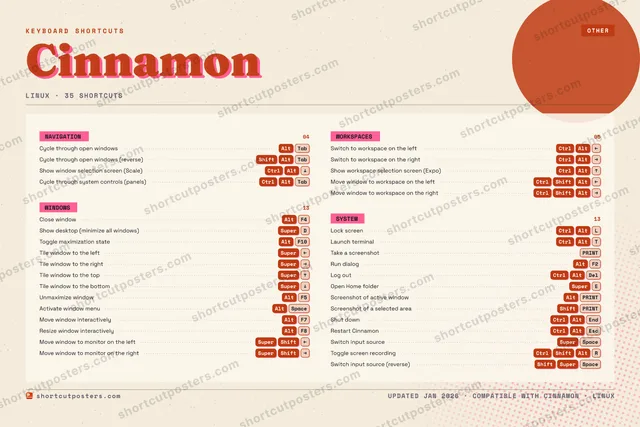
CINNAMON · KEYBOARD SHORTCUTSLinux · 4 SETS · No.01CINNAMONTOTAL20SHORTCUTSFOR LINUX · SHIPPED COMBOSSETSNAVIGATION03WINDOWS08WORKSPACES05SYSTEM04REF. EDITION · JAN 2026shortcutposters.comCycle through open windowsAltTabCycle through open windows (reverse)ShiftAltTabShow window selection screen (Scale)CtrlAltDOWNClose windowAltF4Show desktop (minimize all windows)SuperDToggle maximization stateAltF10Tile window to the leftSuperLEFTTile window to the rightSuperRIGHTTile window to the topSuperUPTile window to the bottomSuperDOWNUnmaximize windowAltF5Switch to workspace on the leftCtrlAltLEFTSwitch to workspace on the rightCtrlAltRIGHTShow workspace selection screen (Expo)CtrlAltUPMove window to workspace on the leftCtrlShiftAltLEFTMove window to workspace on the rightCtrlShiftAltRIGHTLock screenCtrlAltLLaunch terminalCtrlAltTTake a screenshotPRINTRun dialogAltF2
Editorial A bold Swiss-style print: giant wordmark, dense keycap columns, and a totals rail.

Frequently asked questions

Is the Cinnamon poster maker free?

Yes — you can design and download a high-resolution PNG of your Cinnamon shortcuts poster for free. A print-ready PDF is an optional paid upgrade.

Can I choose which Cinnamon shortcuts appear?

Yes. Toggle any shortcut on or off, reorder them, rename categories, and even add your own custom shortcuts.

Can I change the colours and style?

Yes. Pick an accent colour, choose a palette, and switch between the isometric, typewriter, and keyboard-map styles.

Which keyboard layout and operating system are supported?

Choose QWERTY or AZERTY, and switch the edition between the operating systems Cinnamon supports (macOS, Windows, Linux).

How do I get a printed poster?

Download the free PNG to print yourself, or order the print-ready, framed-quality PDF directly from the maker.