ShortcutPosters

Poster maker

Make your Cinema 4D shortcuts poster

Pick the shortcuts that matter, add your own, tune the colours and style — then download a free personalized PNG, or order the print-ready PDF.

Making a poster for:
Style
Accent
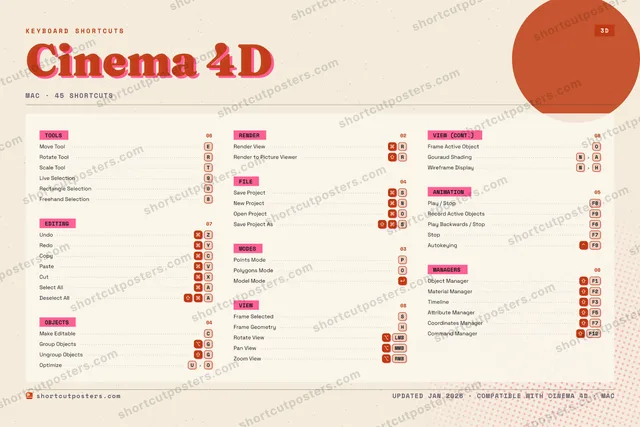
CINEMA 4DKEYBOARD SHORTCUTS · MAC · 44 ESSENTIAL12345678Freehand…9Live Sel…0Rectangl…QWEMove ToolRRotate T…TScale To…YRedoUOptimizeIOPolygons…PPoints M…ASelect A…SSave Pro…DFGGroup Ob…HFrame Ge…JKLZUndoXCutCMake Edi…VPasteBNNew Proj…MMORE SHORTCUTSRender ViewRRender to Pic…RFrame SelectedSCopyCPlay / StopF8Object ManagerF1Model ModeUngroup Objec…GRotate ViewLMBPan ViewMMBZoom ViewRMBOpen ProjectORecord Active…F9Material Mana…F2TimelineF3Attribute Man…F5Frame Active …OGouraud Shadi…NAWireframe Dis…NHDeselect AllASave Project …SPlay Backward…F6StopF7AutokeyingF9Coordinates M…F7shortcutposters.comUPDATED JAN 2026 · COMPATIBLE WITH CINEMA 4D · MAC

Hover to locate · click on the poster to disable · drag to reorder categories & shortcuts · to rename a category

Free PNG $0
  • Web resolution (1600 px)
  • Light watermark
  • Instant download
Made to order
Custom print-ready PDF $2.99
  • 300 DPI, framed-quality — no watermark
  • Every standard print size
  • Built to order from the poster above — checkout link emailed to you

Trouble ordering? Email business@shortcutposters.com.

How it works

  1. 1

    Choose a style

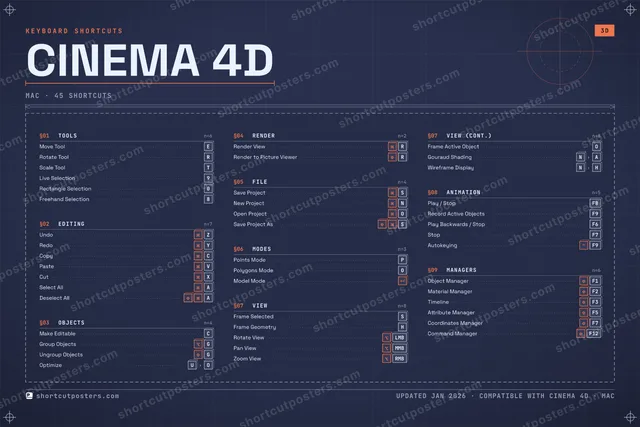
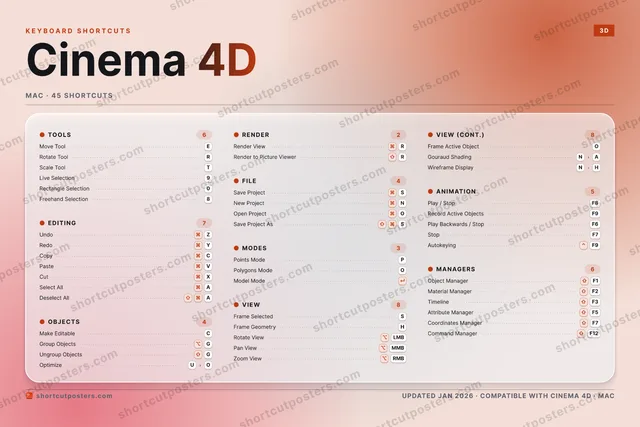
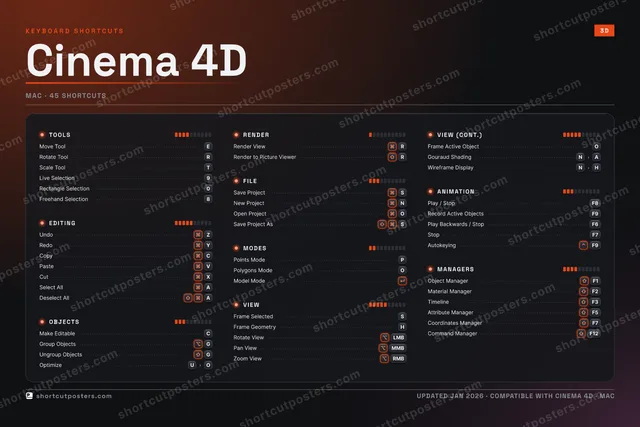
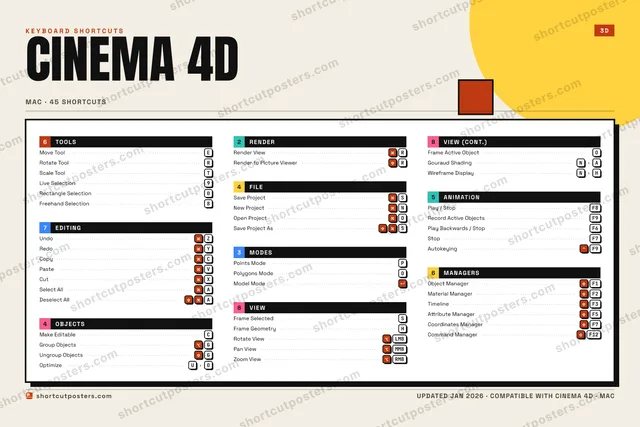
    Pick from four layouts: isometric keys, a typewriter list, a labelled keyboard map, or a bold editorial print.

  2. 2

    Make it yours

    Set the accent colour and palette, rename categories, and reorder anything.

  3. 3

    Pick the shortcuts

    Toggle exactly which shortcuts appear — or add your own custom ones.

  4. 4

    Download or print

    Export a free high-resolution PNG instantly, or order a print-ready PDF.

Four styles to choose from

CINEMA 4DKEYBOARD SHORTCUTS · MAC · 20 ESSENTIAL123456789Live Sel…0Rectangl…QWEMove ToolRRotate T…TScale To…YRedoUIOPolygons…PPoints M…ASSave Pro…DFGGroup Ob…HJKLZUndoXCMake Edi…VPasteBNMMORE SHORTCUTSRender ViewRRender to Picture…RFrame SelectedSCopyCPlay / StopF8Object ManagerF1Model Modeshortcutposters.comUPDATED JAN 2026 · COMPATIBLE WITH CINEMA 4D · MAC
Keyboard map Every binding labelled on a realistic QWERTY or AZERTY keyboard.
EDITINGUndoZRedoYCopyCPasteVOBJECTSMake EditableCGroup ObjectsGFILESave ProjectSVIEWFrame SelectedSMANAGERSObject ManagerF1TOOLSMove ToolERotate ToolRScale ToolTLive Selection9Rectangle Selection0RENDERRender ViewRRender to Picture ViewerRMODESPoints ModePPolygons ModeOModel ModeANIMATIONPlay / StopF8Cinema 4DKEYBOARD SHORTCUTS · MAC · 20 ESSENTIALBOTH LAYOUTSQWERTYQWERTYAZERTYAZERTYshortcutposters.comUPDATED JAN 2026 · COMPATIBLE WITH CINEMA 4D · MAC
Isometric Shortcuts on a 3D isometric keyboard — bold and poster-like.
EDITING04UndoZRedoYCopyCPasteVOBJECTS02Make EditableCGroup ObjectsGFILE01Save ProjectSVIEW01Frame SelectedSMANAGERS01Object ManagerF1TOOLS05Move ToolERotate ToolRScale ToolTLive Selection9Rectangle Selection0RENDER02Render ViewRRender to Picture ViewerRMODES03Points ModePPolygons ModeOModel ModeANIMATION01Play / StopF8Cinema 4DKEYBOARD SHORTCUTS · MAC · 20 ESSENTIALBOTH LAYOUTSQWERTYQWERTYAZERTYAZERTYshortcutposters.comUPDATED JAN 2026 · COMPATIBLE WITH CINEMA 4D · MAC
Typewriter A clean printed list, grouped by category — dense and legible.
CINEMA 4D · KEYBOARD SHORTCUTSMac · 9 SETS · No.01CINEMA 4DTOTAL20SHORTCUTSFOR MAC · SHIPPED COMBOSSETSTOOLS05EDITING04OBJECTS02RENDER02FILE01MODES03VIEW01ANIMATION01MANAGERS01REF. EDITION · JAN 2026shortcutposters.comMove ToolERotate ToolRScale ToolTLive Selection9Rectangle Selection0UndoZRedoYCopyCPasteVMake EditableCGroup ObjectsGRender ViewRRender to Picture ViewerRSave ProjectSPoints ModePPolygons ModeOModel ModeFrame SelectedSPlay / StopF8Object ManagerF1
Editorial A bold Swiss-style print: giant wordmark, dense keycap columns, and a totals rail.

Frequently asked questions

Is the Cinema 4D poster maker free?

Yes — you can design and download a high-resolution PNG of your Cinema 4D shortcuts poster for free. A print-ready PDF is an optional paid upgrade.

Can I choose which Cinema 4D shortcuts appear?

Yes. Toggle any shortcut on or off, reorder them, rename categories, and even add your own custom shortcuts.

Can I change the colours and style?

Yes. Pick an accent colour, choose a palette, and switch between the isometric, typewriter, and keyboard-map styles.

Which keyboard layout and operating system are supported?

Choose QWERTY or AZERTY, and switch the edition between the operating systems Cinema 4D supports (macOS, Windows, Linux).

How do I get a printed poster?

Download the free PNG to print yourself, or order the print-ready, framed-quality PDF directly from the maker.