ShortcutPosters

Poster maker

Make your Bruno shortcuts poster
Pick the shortcuts that matter, add your own, tune the colours and style — then download a free personalized PNG, or order the print-ready PDF.

Making a poster for:
Style
Accent
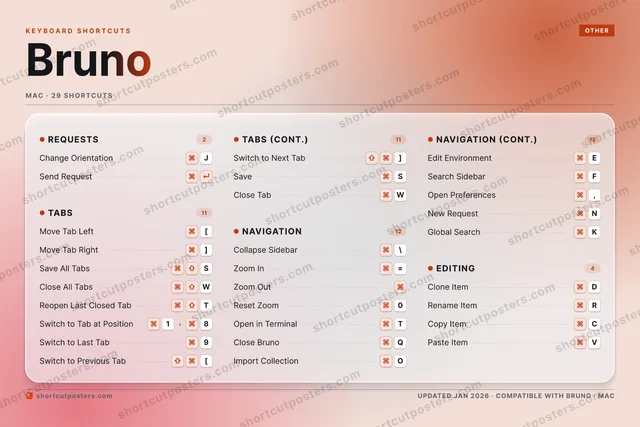
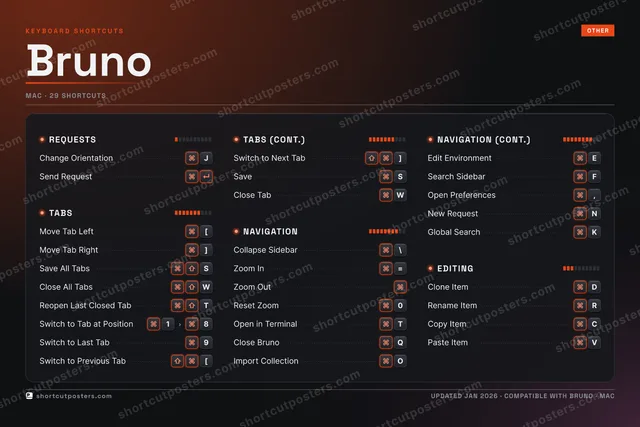
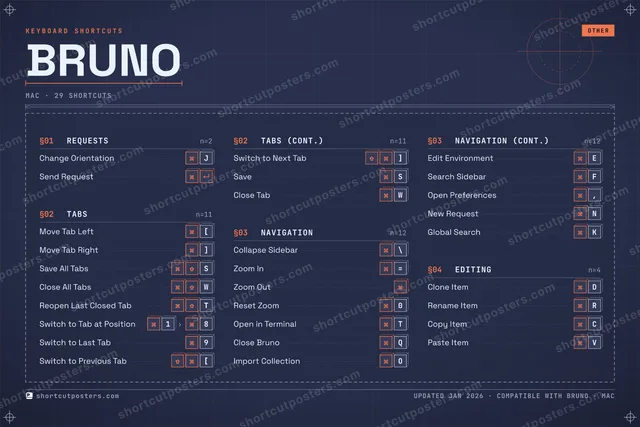
BRUNOKEYBOARD SHORTCUTS · MAC · 291Switch t…23456789Switch t…0Reset Zo…QClose Br…W⌘ ⇧Close Al…EEdit Env…RRename I…TOpen in …YUIOImport C…PAS⌘ ⇧Save All…DClone It…FSearch S…GHJChange O…KGlobal S…LZXCCopy ItemVPaste It…BNNew Requ…MMORE SHORTCUTSMove Tab Left[Move Tab Right]Collapse Sidebar\Zoom In=Zoom OutReopen Last Close…TSwitch to Previou…[Switch to Next Tab]Open Preferences,Send RequestSaveSClose TabWshortcutposters.comUPDATED JAN 2026 · COMPATIBLE WITH BRUNO · MAC

Hover to locate · click on the poster to disable · drag to reorder categories & shortcuts · to rename a category

Free PNG $0
  • Web resolution (1600 px)
  • Light watermark
  • Instant download
Made to order
Custom print-ready PDF $2.99
  • 300 DPI, framed-quality — no watermark
  • Every standard print size
  • Built to order from the poster above — checkout link emailed to you

Trouble ordering? Email business@shortcutposters.com.

How it works

  1. 1

    Choose a style

    Pick from four layouts: isometric keys, a typewriter list, a labelled keyboard map, or a bold editorial print.

  2. 2

    Make it yours

    Set the accent colour and palette, rename categories, and reorder anything.

  3. 3

    Pick the shortcuts

    Toggle exactly which shortcuts appear — or add your own custom ones.

  4. 4

    Download or print

    Export a free high-resolution PNG instantly, or order a print-ready PDF.

Four styles to choose from

BRUNOKEYBOARD SHORTCUTS · MAC · 20 ESSENTIAL1Switch t…23456789Switch t…0Reset Zo…QClose Br…W⌘ ⇧Close Al…EEdit Env…RRename I…TOpen in …YUIOImport C…PAS⌘ ⇧Save All…DClone It…FGHJChange O…KLZXCVBNMMORE SHORTCUTSMove Tab Left[Move Tab Right]Collapse Sidebar\Zoom In=Zoom OutReopen Last Close…TSwitch to Previou…[Switch to Next Tab]shortcutposters.comUPDATED JAN 2026 · COMPATIBLE WITH BRUNO · MAC
Keyboard map Every binding labelled on a realistic QWERTY or AZERTY keyboard.
TABSMove Tab Left[Move Tab Right]Save All TabsSClose All TabsWReopen Last Closed TabTSwitch to Tab at Position18Switch to Last Tab9Switch to Previous Tab[Switch to Next Tab]EDITINGClone ItemDRename ItemRREQUESTSChange OrientationJNAVIGATIONCollapse Sidebar\Zoom In=Zoom OutReset Zoom0Open in TerminalTClose BrunoQImport CollectionOEdit EnvironmentEBrunoKEYBOARD SHORTCUTS · MAC · 20 ESSENTIALBOTH LAYOUTSQWERTYQWERTYAZERTYAZERTYshortcutposters.comUPDATED JAN 2026 · COMPATIBLE WITH BRUNO · MAC
Isometric Shortcuts on a 3D isometric keyboard — bold and poster-like.
TABS09Move Tab Left[Move Tab Right]Save All TabsSClose All TabsWReopen Last Closed TabTSwitch to Tab at Position18Switch to Last Tab9Switch to Previous Tab[Switch to Next Tab]EDITING02Clone ItemDRename ItemRREQUESTS01Change OrientationJNAVIGATION08Collapse Sidebar\Zoom In=Zoom OutReset Zoom0Open in TerminalTClose BrunoQImport CollectionOEdit EnvironmentEBrunoKEYBOARD SHORTCUTS · MAC · 20 ESSENTIALBOTH LAYOUTSQWERTYQWERTYAZERTYAZERTYshortcutposters.comUPDATED JAN 2026 · COMPATIBLE WITH BRUNO · MAC
Typewriter A clean printed list, grouped by category — dense and legible.
BRUNO · KEYBOARD SHORTCUTSMac · 4 SETS · No.01BRUNOTOTAL20SHORTCUTSFOR MAC · SHIPPED COMBOSSETSREQUESTS01TABS09NAVIGATION08EDITING02REF. EDITION · JAN 2026shortcutposters.comChange OrientationJMove Tab Left[Move Tab Right]Save All TabsSClose All TabsWReopen Last Closed TabTSwitch to Tab at Position18Switch to Last Tab9Switch to Previous Tab[Switch to Next Tab]Collapse Sidebar\Zoom In=Zoom OutReset Zoom0Open in TerminalTClose BrunoQImport CollectionOEdit EnvironmentEClone ItemDRename ItemR
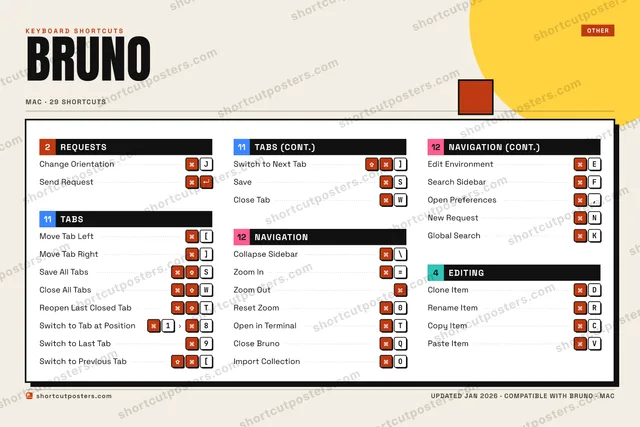
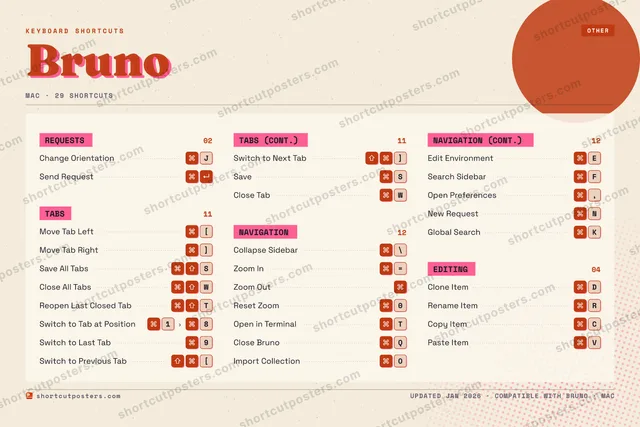
Editorial A bold Swiss-style print: giant wordmark, dense keycap columns, and a totals rail.

Frequently asked questions

Is the Bruno poster maker free?

Yes — you can design and download a high-resolution PNG of your Bruno shortcuts poster for free. A print-ready PDF is an optional paid upgrade.

Can I choose which Bruno shortcuts appear?

Yes. Toggle any shortcut on or off, reorder them, rename categories, and even add your own custom shortcuts.

Can I change the colours and style?

Yes. Pick an accent colour, choose a palette, and switch between the isometric, typewriter, and keyboard-map styles.

Which keyboard layout and operating system are supported?

Choose QWERTY or AZERTY, and switch the edition between the operating systems Bruno supports (macOS, Windows, Linux).

How do I get a printed poster?

Download the free PNG to print yourself, or order the print-ready, framed-quality PDF directly from the maker.