ShortcutPosters
iPhone appNew

Make your Adobe Firefly shortcuts poster
Pick the shortcuts that matter, add your own, tune the colours and style — then download a free personalized PNG, or order the print-ready PDF.

Making a poster for:
Style
Accent
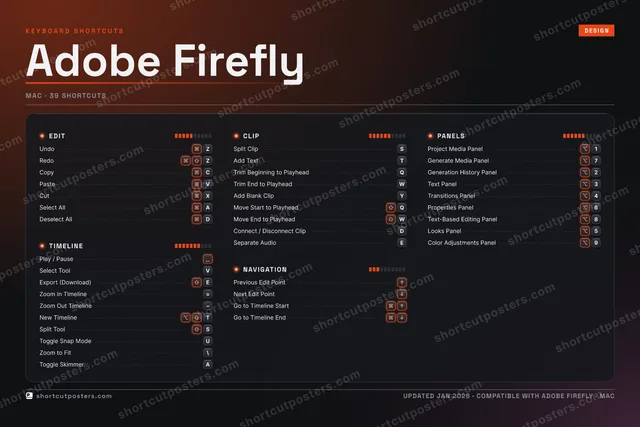
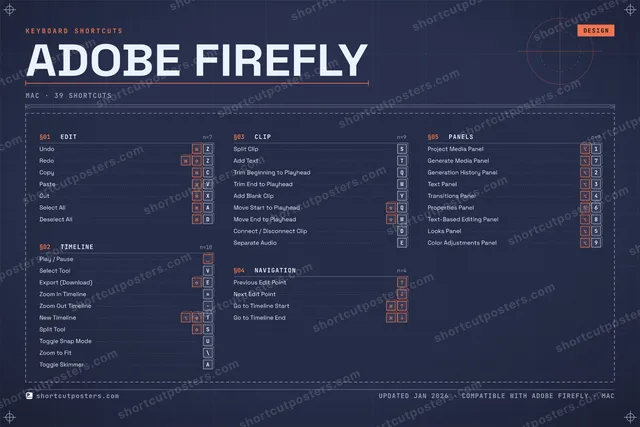
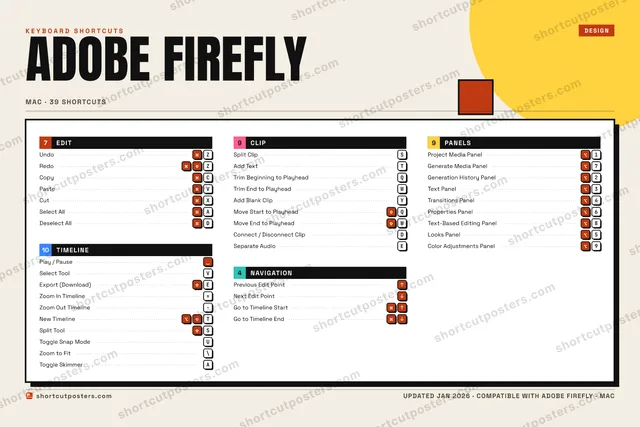
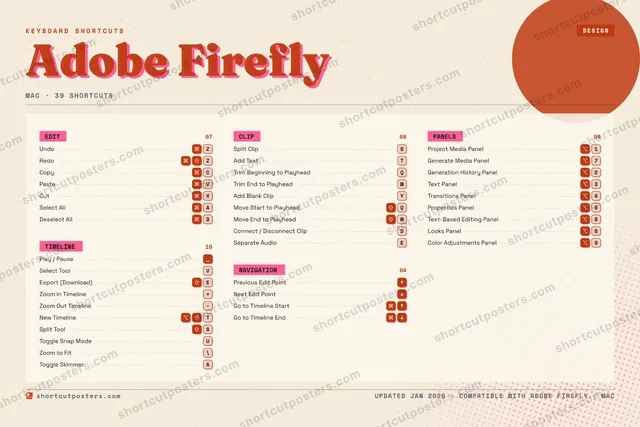
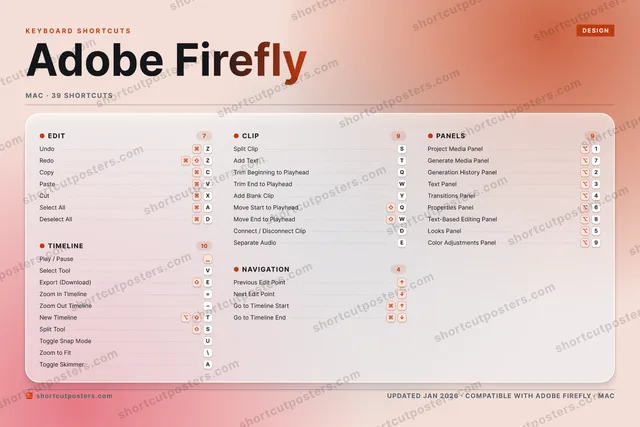
EDIT7Undo⌘ZRedo⌘⇧ZCopy⌘CPaste⌘VCut⌘XSelect All⌘ADeselect All⌘DTIMELINE10Play / Pause␣Select ToolVExport (Download)⇧EZoom In Timeline=Zoom Out Timeline−New Timeline⌥⇧TSplit Tool⇧SToggle Snap ModeUZoom to Fit\Toggle SkimmerACLIP9Split ClipSAdd TextTTrim Beginning to PlayheadQTrim End to PlayheadWAdd Blank ClipYMove Start to Playhead⇧QMove End to Playhead⇧WConnect / Disconnect ClipDSeparate AudioENAVIGATION4Previous Edit Point↑Next Edit Point↓Go to Timeline Start⌘↑Go to Timeline End⌘↓PANELS9Project Media Panel⌥1Generate Media Panel⌥7Generation History Panel⌥2Text Panel⌥3Transitions Panel⌥4Properties Panel⌥6Text-Based Editing Panel⌥8Looks Panel⌥5Color Adjustments Panel⌥9KEYBOARD SHORTCUTSDESIGNAdobe FireflyMAC · 39 SHORTCUTSshortcutposters.comUPDATED JAN 2026 · COMPATIBLE WITH ADOBE FIREFLY · MACshortcutposters.comshortcutposters.comshortcutposters.comshortcutposters.comshortcutposters.comshortcutposters.comshortcutposters.comshortcutposters.comshortcutposters.comshortcutposters.comshortcutposters.comshortcutposters.comshortcutposters.comshortcutposters.comshortcutposters.comshortcutposters.comshortcutposters.comshortcutposters.comshortcutposters.comshortcutposters.comshortcutposters.comshortcutposters.comshortcutposters.comshortcutposters.comshortcutposters.comshortcutposters.comshortcutposters.comshortcutposters.comshortcutposters.comshortcutposters.comshortcutposters.comshortcutposters.comshortcutposters.comshortcutposters.comshortcutposters.comshortcutposters.comshortcutposters.comshortcutposters.comshortcutposters.comshortcutposters.comshortcutposters.comshortcutposters.comshortcutposters.comshortcutposters.comshortcutposters.comshortcutposters.comshortcutposters.comshortcutposters.comshortcutposters.comshortcutposters.comshortcutposters.comshortcutposters.comshortcutposters.comshortcutposters.comshortcutposters.comshortcutposters.comshortcutposters.comshortcutposters.comshortcutposters.comshortcutposters.comshortcutposters.comshortcutposters.comshortcutposters.comshortcutposters.comshortcutposters.comshortcutposters.comshortcutposters.comshortcutposters.comshortcutposters.comshortcutposters.comshortcutposters.comshortcutposters.comshortcutposters.comshortcutposters.comshortcutposters.comshortcutposters.comshortcutposters.comshortcutposters.comshortcutposters.comshortcutposters.comshortcutposters.comshortcutposters.comshortcutposters.comshortcutposters.comshortcutposters.comshortcutposters.comshortcutposters.comshortcutposters.comshortcutposters.comshortcutposters.comshortcutposters.comshortcutposters.comshortcutposters.comshortcutposters.comshortcutposters.comshortcutposters.comshortcutposters.comshortcutposters.comshortcutposters.comshortcutposters.comshortcutposters.comshortcutposters.comshortcutposters.comshortcutposters.comshortcutposters.comshortcutposters.comshortcutposters.comshortcutposters.comshortcutposters.comshortcutposters.comshortcutposters.com

Hover to locate · click on the poster to disable · drag to reorder categories & shortcuts · ✎ to rename a category

Free PNG $0
  • Web resolution (1600 px)
  • Light watermark
  • Instant download
Made to order
Custom print-ready PDF $2.99
  • 300 DPI, framed-quality — no watermark
  • Every standard print size
  • Built to order from the poster above — checkout link emailed to you

Trouble ordering? Email business@shortcutposters.com.

How it works

  1. 1

    Choose a style

    Pick one of five styles — Studio, Blueprint, Aurora, Block or Riso — each in the app's own colours. Games start from generative Arcade art.

  2. 2

    Make it yours

    Set the accent colour, rename categories, and reorder anything.

  3. 3

    Pick the shortcuts

    Toggle exactly which shortcuts appear — or add your own custom ones.

  4. 4

    Download or print

    Export a free high-resolution PNG instantly, or order a print-ready PDF.

Five styles to choose from
Adobe Firefly aurora shortcuts poster preview
Aurora Frosted glass on soft halos of the app's colour, white keycaps — light and premium.
Adobe Firefly studio shortcuts poster preview
Studio A dark console with 3D keys, the modifiers lit and a level meter on each group.
Adobe Firefly blueprint shortcuts poster preview
Blueprint A technical drawing: grid, dimension lines, numbered sections and wireframe keys.
Adobe Firefly block shortcuts poster preview
Block Neo-brutal Swiss: a giant condensed title, black section bars and hard shadows.
Adobe Firefly riso shortcuts poster preview
Riso Two inks, grain and an off-register title, like a risograph print.

Frequently asked questions

Is the Adobe Firefly poster maker free?

Yes — you can design and download a high-resolution PNG of your Adobe Firefly shortcuts poster for free. A print-ready PDF is an optional paid upgrade.

Can I choose which Adobe Firefly shortcuts appear?

Yes. Toggle any shortcut on or off, reorder them, rename categories, and even add your own custom shortcuts.

Can I change the colours and style?

Yes. Pick an accent colour and switch between the Studio, Blueprint, Aurora, Block and Riso styles.

Which operating systems are supported?

Switch the edition between the operating systems Adobe Firefly supports (macOS, Windows, Linux): every key is shown as it is on that system.

How do I get a printed poster?

Download the free PNG to print yourself, or order the print-ready, framed-quality PDF directly from the maker.