
ShortcutPosters

4 art directions — pick one below, click to zoom & compare.
Layout
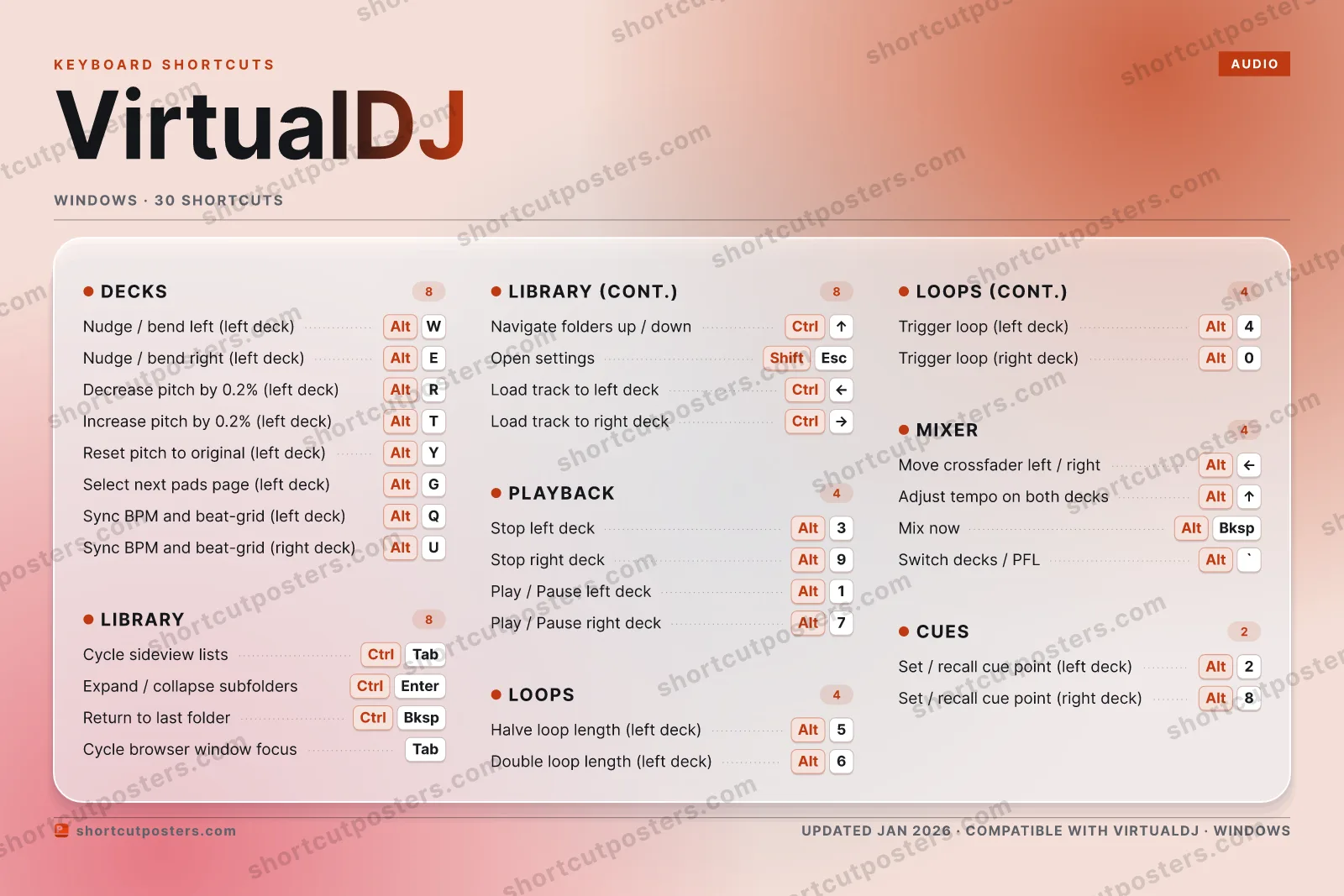
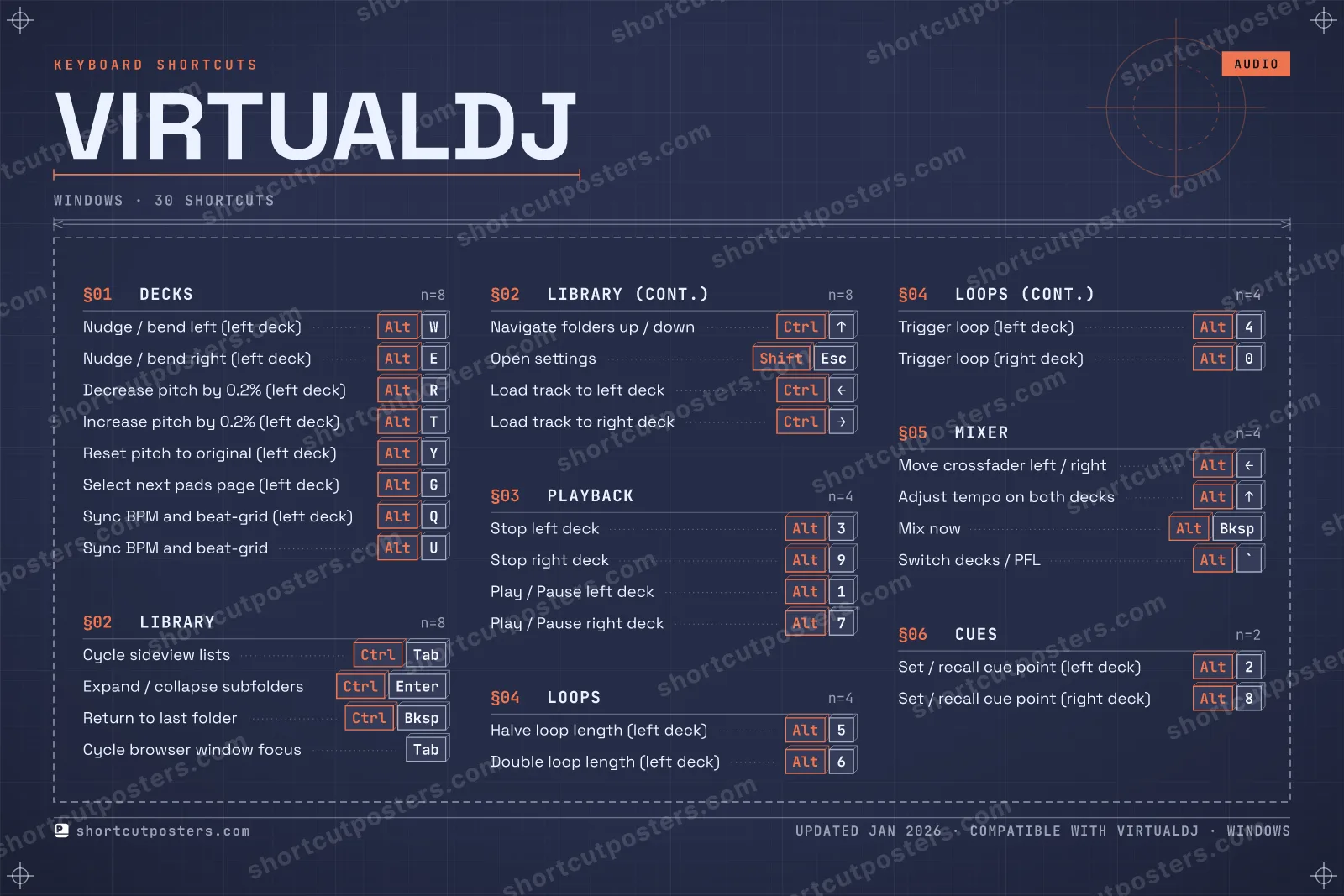
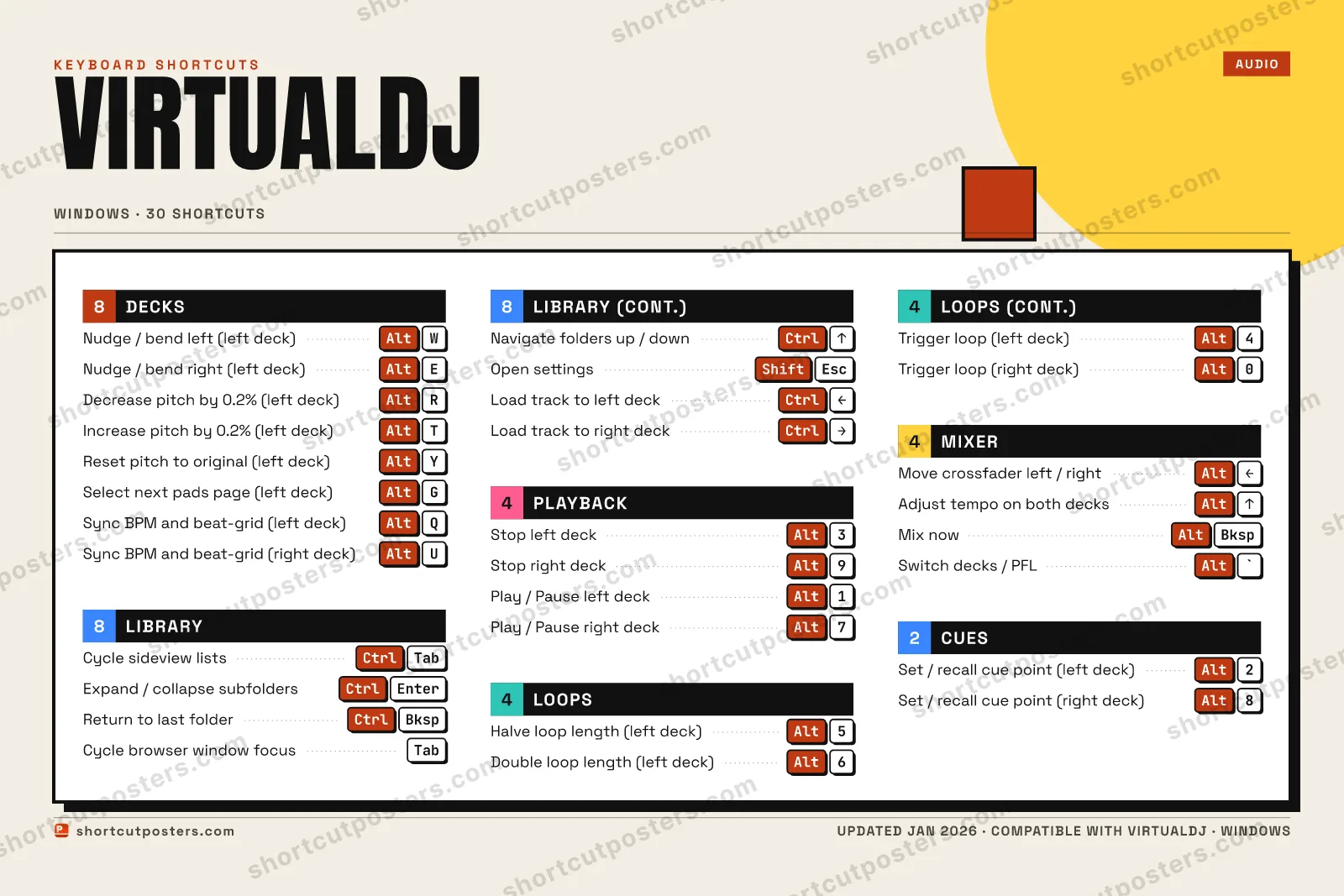
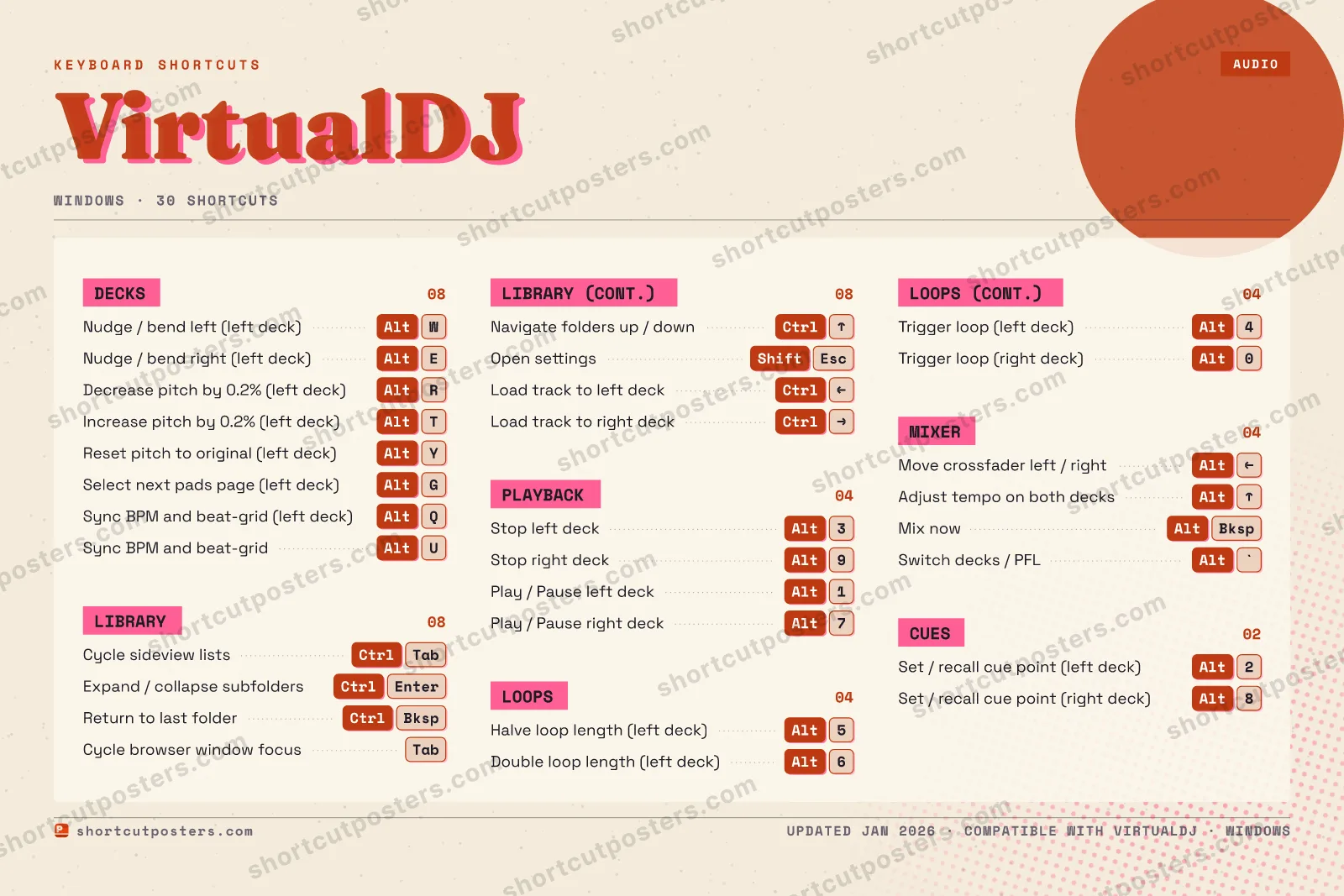
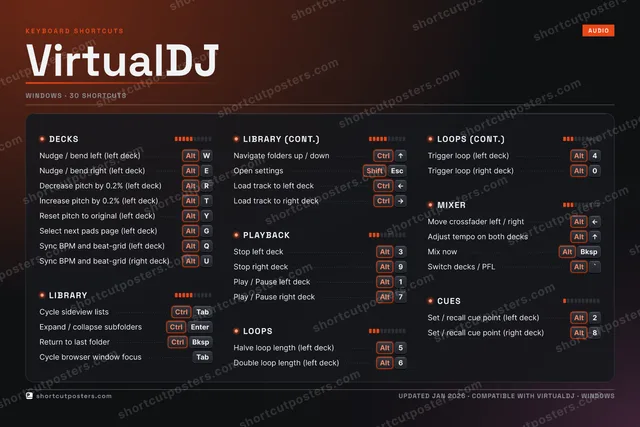
VIRTUALDJKEYBOARD SHORTCUTS · WINDOWS · 301AltPlay / P…2AltSet / re…3AltStop lef…4AltTrigger …5AltHalve lo…6AltDouble l…7AltPlay / P…8AltSet / re…9AltStop rig…0AltTrigger …QAltSync BPM…WAltNudge / …EAltNudge / …RAltDecrease…TAltIncrease…YAltReset pi…UAltSync BPM…IOPASDFGAltSelect n…HJKLZXCVBNMMORE SHORTCUTSCycle sideview li…CtrlTabExpand / collapse…CtrlEnterReturn to last fo…CtrlBkspMove crossfader l…AltLEFTAdjust tempo on b…AltUPMix now (crossfad…AltBkspSwitch decks / PFLAlt`Cycle browser win…TabNavigate folders …CtrlUPOpen settingsShiftEscLoad track to lef…CtrlLEFTLoad track to rig…CtrlRIGHTshortcutposters.comUPDATED JAN 2026 · COMPATIBLE WITH VIRTUALDJ · WINDOWS
DECKSNudge / bend left (l…AltWNudge / bend right (…AltEDecrease pitch by 0.…AltRIncrease pitch by 0.…AltTReset pitch to origi…AltYSelect next pads pag…AltGSync BPM and beat-gr…AltQSync BPM and beat-gr…AltUCUESSet / recall cue poi…Alt2Set / recall cue poi…Alt8PLAYBACKStop left deckAlt3Stop right deckAlt9Play / Pause left de…Alt1Play / Pause right d…Alt7LOOPSHalve loop length (l…Alt5Double loop length (…Alt6Trigger loop (left d…Alt4Trigger loop (right …Alt0LIBRARYCycle sideview listsCtrlTabExpand / collapse su…CtrlEnterReturn to last folderCtrlBkspCycle browser window…TabNavigate folders up …CtrlUPOpen settingsShiftEscLoad track to left d…CtrlLEFTLoad track to right …CtrlRIGHTMIXERMove crossfader left…AltLEFTAdjust tempo on both…AltUPMix now (crossfade w…AltBkspSwitch decks / PFLAlt`VirtualDJKEYBOARD SHORTCUTS · WINDOWS · 30BOTH LAYOUTSQWERTYQWERTYAZERTYAZERTYshortcutposters.comUPDATED JAN 2026 · COMPATIBLE WITH VIRTUALDJ · WINDOWS
LIBRARY08Cycle sideview listsCtrlTabExpand / collapse subfoldersCtrlEnterReturn to last folderCtrlBkspCycle browser window focusTabNavigate folders up / downCtrlUPOpen settingsShiftEscLoad track to left deckCtrlLEFTLoad track to right deckCtrlRIGHTPLAYBACK04Stop left deckAlt3Stop right deckAlt9Play / Pause left deckAlt1Play / Pause right deckAlt7CUES02Set / recall cue point (left deck)Alt2Set / recall cue point (right deck)Alt8DECKS08Nudge / bend left (left deck)AltWNudge / bend right (left deck)AltEDecrease pitch by 0.2% (left deck)AltRIncrease pitch by 0.2% (left deck)AltTReset pitch to original (left deck)AltYSelect next pads page (left deck)AltGSync BPM and beat-grid (left deck)AltQSync BPM and beat-grid (right deck)AltULOOPS04Halve loop length (left deck)Alt5Double loop length (left deck)Alt6Trigger loop (left deck)Alt4Trigger loop (right deck)Alt0MIXER04Move crossfader left / rightAltLEFTAdjust tempo on both decksAltUPMix now (crossfade with beat matching)AltBkspSwitch decks / PFLAlt`VirtualDJKEYBOARD SHORTCUTS · WINDOWS · 30BOTH LAYOUTSQWERTYQWERTYAZERTYAZERTYshortcutposters.comUPDATED JAN 2026 · COMPATIBLE WITH VIRTUALDJ · WINDOWS
VIRTUALDJ · KEYBOARD SHORTCUTSWindows · 6 SETS · No.01VIRTUALDJTOTAL30SHORTCUTSFOR WINDOWS · SHIPPED COMBOSSETSDECKS08LIBRARY08PLAYBACK04LOOPS04MIXER04CUES02REF. EDITION · JAN 2026shortcutposters.comNudge / bend left (left deck)AltWNudge / bend right (left deck)AltEDecrease pitch by 0.2% (left deck)AltRIncrease pitch by 0.2% (left deck)AltTReset pitch to original (left deck)AltYSelect next pads page (left deck)AltGSync BPM and beat-grid (left deck)AltQSync BPM and beat-grid (right deck)AltUCycle sideview listsCtrlTabExpand / collapse subfoldersCtrlEnterReturn to last folderCtrlBkspCycle browser window focusTabNavigate folders up / downCtrlUPOpen settingsShiftEscLoad track to left deckCtrlLEFTLoad track to right deckCtrlRIGHTStop left deckAlt3Stop right deckAlt9Play / Pause left deckAlt1Play / Pause right deckAlt7Halve loop length (left deck)Alt5Double loop length (left deck)Alt6Trigger loop (left deck)Alt4Trigger loop (right deck)Alt0Move crossfader left / rightAltLEFTAdjust tempo on both decksAltUPMix now (crossfade with beat matching)AltBkspSwitch decks / PFLAlt`Set / recall cue point (left deck)Alt2Set / recall cue point (right deck)Alt8

Windows edition · 30 shortcuts

VirtualDJ Keyboard Shortcuts Poster

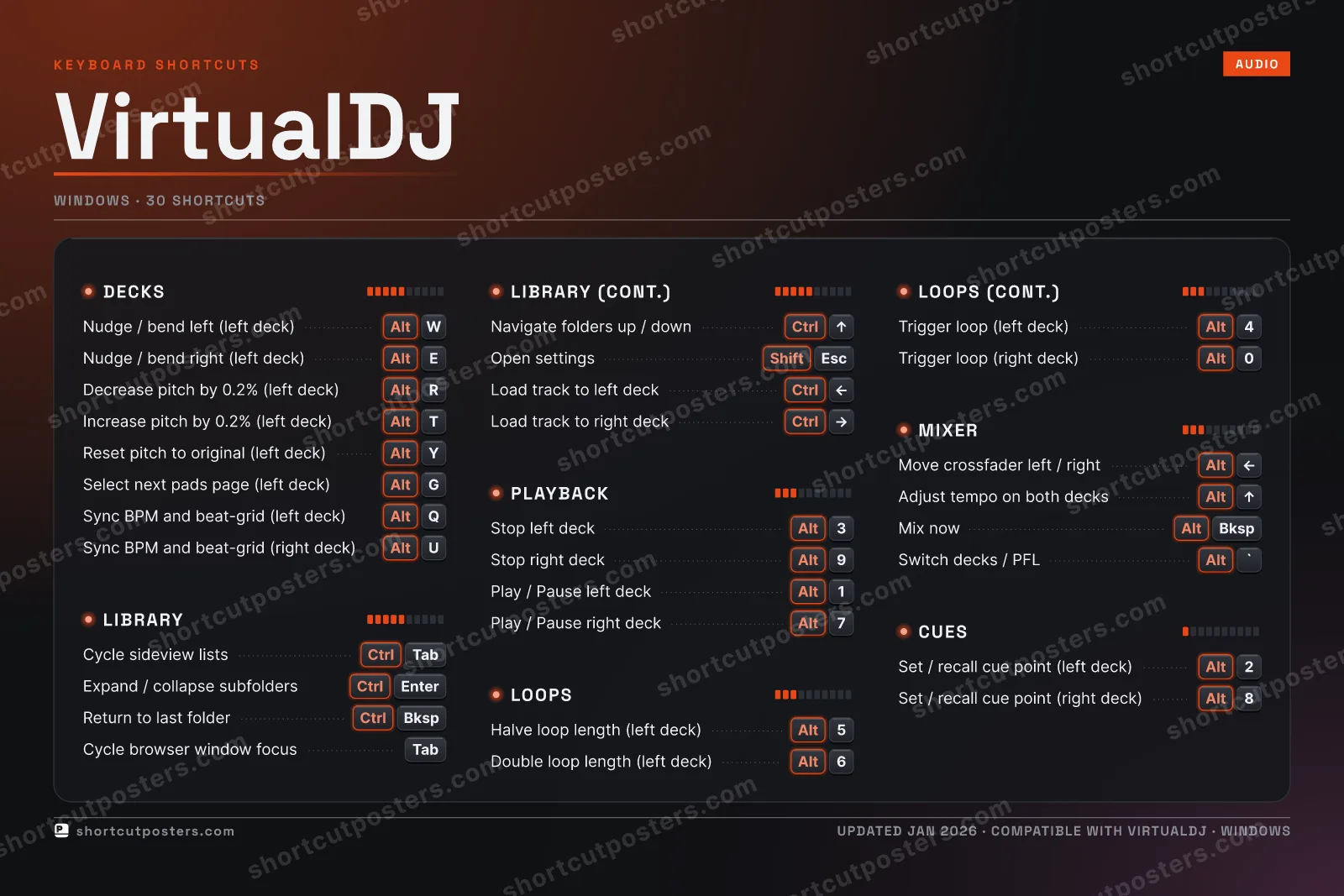
A printable, framed-quality poster of the essential VirtualDJ shortcuts for Windows — the keys worth keeping in view, designed to stay readable on a wall.

Edition
Apple Mac Windows Windows

Free PNG is web-resolution & lightly watermarked.

Customise this poster Pick the shortcuts, restyle the colours — download free. Get the framed-quality print Full 300 DPI, print-ready — at home or shipped to your door.

VirtualDJ by Atomix Productions is a DJ mixing application for performing and recording sets. Its default keyboard mapping leans on ALT combinations for deck actions (play, cue, sync, loops, pitch) and CTRL combinations for browsing and loading tracks, letting you control both decks without ever leaving the keyboard.

All VirtualDJ keyboard shortcuts (Windows)

Layout
Esc
F1
F2
F3
F4
F5
F6
F7
F8
F9
F10
F11
F12
`
1
2
3
4
5
6
7
8
9
0
-
=
⌫ Back
Tab
Q
W
E
R
T
Y
U
I
O
P
[
]
\
Caps
A
S
D
F
G
H
J
K
L
;
'
Enter ⏎
Shift
Z
X
C
V
B
N
M
,
.
/
Shift
Ctrl
Win
Alt
Space
Alt
Win
Menu
Ctrl

Decks 8

Action Shortcut
Nudge / bend left (left deck) AltW
Nudge / bend right (left deck) AltE
Decrease pitch by 0.2% (left deck) AltR
Increase pitch by 0.2% (left deck) AltT
Reset pitch to original (left deck) AltY
Select next pads page (left deck) AltG
Sync BPM and beat-grid (left deck) AltQ
Sync BPM and beat-grid (right deck) AltU

Library 8

Action Shortcut
Cycle sideview lists CtrlTab
Expand / collapse subfolders CtrlEnter
Return to last folder CtrlBksp
Cycle browser window focus Tab
Navigate folders up / down CtrlUP
Open settings ShiftEsc
Load track to left deck CtrlLEFT
Load track to right deck CtrlRIGHT

Playback 4

Action Shortcut
Stop left deck Alt3
Stop right deck Alt9
Play / Pause left deck Alt1
Play / Pause right deck Alt7

Loops 4

Action Shortcut
Halve loop length (left deck) Alt5
Double loop length (left deck) Alt6
Trigger loop (left deck) Alt4
Trigger loop (right deck) Alt0

Mixer 4

Action Shortcut
Move crossfader left / right AltLEFT
Adjust tempo on both decks AltUP
Mix now (crossfade with beat matching) AltBksp
Switch decks / PFL Alt`

Cues 2

Action Shortcut
Set / recall cue point (left deck) Alt2
Set / recall cue point (right deck) Alt8

Sourced from virtualdj.com , virtualdj.com Last verified

Unofficial reference. ShortcutPosters is not affiliated with, endorsed by, or sponsored by VirtualDJ. All product names, logos, and trademarks are property of their respective owners. See our licensing & trademark notice.

Frequently asked questions

Does the poster include every VirtualDJ shortcut?
VirtualDJ has 30 keyboard shortcuts in total — the complete list is free to read on this page. The poster features the most essential ones, curated to stay readable on a wall.
Can I print it at home?
Yes. The digital download is a high-resolution 300 DPI file you can print at home or at any print shop, in standard frame sizes.
Does it cover both Mac and Windows?
We sell separate Mac and Windows editions so every key matches your keyboard exactly. This page is the Windows edition.
Is this an official VirtualDJ product?
No. This is an unofficial reference poster and is not affiliated with or endorsed by VirtualDJ. All trademarks belong to their respective owners.
For app makers

Promote your app

Built an app with great keyboard shortcuts? Get it into the database — a free, searchable reference page, and an optional printable poster your power users will pin to the wall.

  • Free shortcut reference page
  • Indexed & searchable
  • Optional framed poster